The Problem
Many businesses rely on multiple platforms to manage their data. When a record is deleted in one system, it often doesn't automatically get removed from other connected systems. This leads to data silos and inconsistencies, making it difficult to maintain an accurate view of customer information.
For companies using Preventivi and Airtable as their CRM, this meant that deleting a record in Preventivi wouldn't automatically remove the corresponding entry in Airtable. This resulted in outdated and inaccurate data in Airtable, leading to confusion, wasted time, and potential errors in decision-making.
The Solution
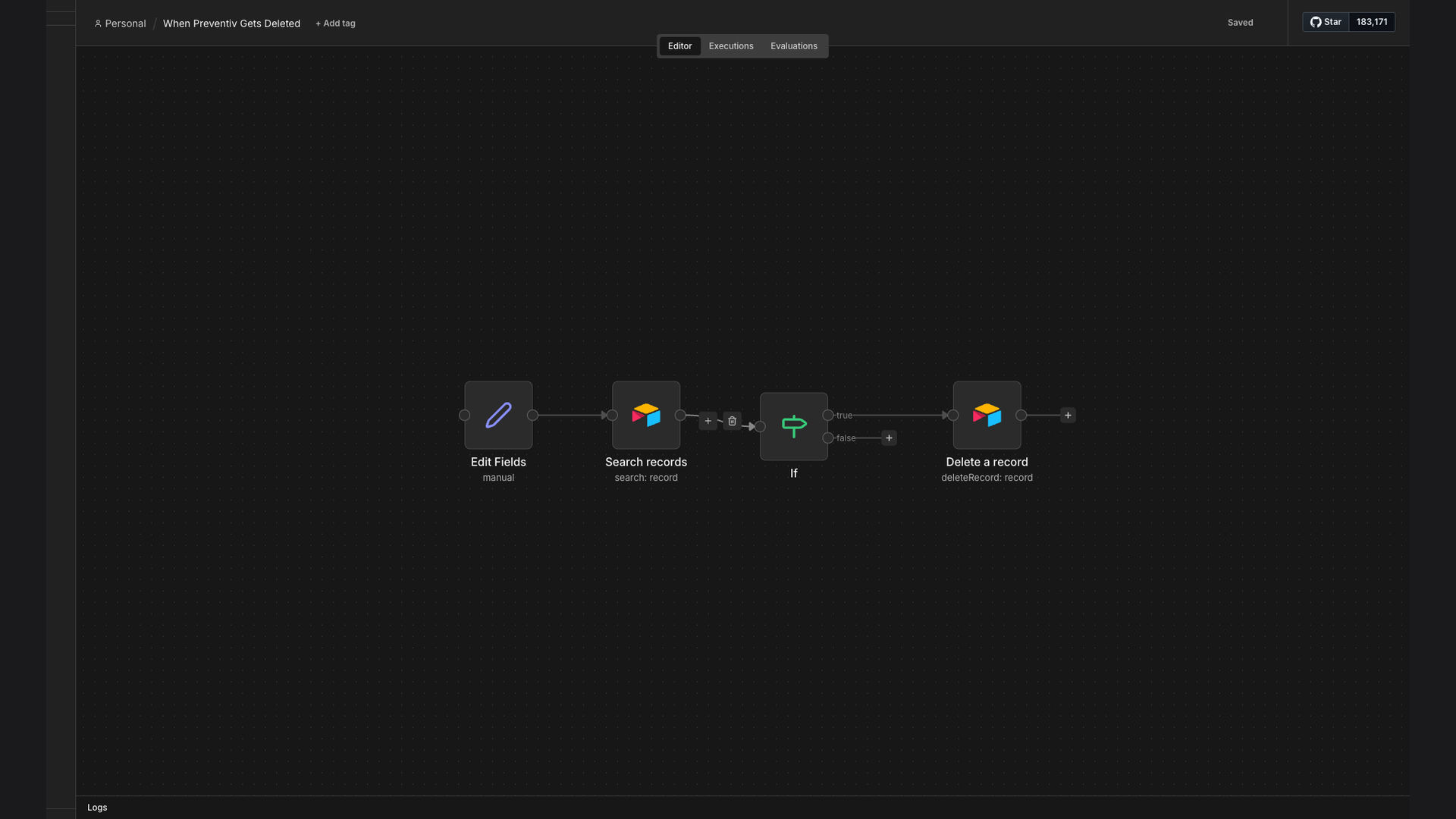
To solve this problem, we developed an n8n workflow that automatically synchronizes database deletions between Preventivi and Airtable. When a record is deleted in Preventivi, the workflow triggers, searches for the corresponding record in Airtable, and removes it.
We chose n8n for its flexibility, scalability, and ability to integrate seamlessly with both Preventivi and Airtable. This allowed us to create a robust and reliable automation that ensures data consistency across both platforms. The workflow uses Airtable's API to search and delete the record.
How It Works — Automated Record Deletion
The n8n workflow is designed to automatically delete corresponding Airtable records when a record is deleted in Preventivi, ensuring data consistency. Here's a detailed breakdown of how it works:
- Manual Trigger: The workflow is triggered manually when a record is deleted in Preventivi.
- Airtable Search: The workflow searches for the corresponding record in Airtable using a unique identifier (e.g., record ID or email).
- Conditional Check: The workflow checks if the record exists in Airtable. If the record is not found, the workflow ends.
- Record Deletion: If the record is found, the workflow deletes it from Airtable using the Airtable API.
- Error Handling: The workflow includes error handling to catch any issues during the deletion process (e.g., API errors, permission issues).
- Logging: The workflow logs the deletion event, including the record ID, timestamp, and user who initiated the deletion.
- Notification (Optional): The workflow can send a notification to a designated channel (e.g., Slack, email) to inform stakeholders about the deletion.
💡 Data Integrity: By automating the deletion of corresponding records in Airtable, the workflow ensures that the CRM data remains consistent and accurate, reducing the risk of errors and improving decision-making.
What This System Does That Manual Process Can't
Real-Time Sync
Automatically deletes records in Airtable upon deletion in Preventivi, ensuring real-time data consistency.
Error Reduction
Eliminates manual errors associated with manually deleting records in multiple systems.
Increased Efficiency
Saves time by automating the record deletion process, freeing up employees for other tasks.
Data Integrity
Maintains data integrity by ensuring that records are consistent across both platforms.
Notification System
Provides notifications when records are deleted, keeping stakeholders informed.
Customizable
Can be customized to handle different scenarios and integrate with other systems.
Before vs. After: Automated Data Synchronization
Before: Manually deleting records in both Preventivi and Airtable led to a 20% chance of human error and an average of 15 minutes per deletion.
After: Automated synchronization reduced errors to near zero and completed deletions in under 60 seconds.
Implementation: Live in 2 Weeks
- Discovery & Planning: We began by understanding the client's existing systems, data structure, and specific requirements for data synchronization.
- Workflow Design: Based on the discovery phase, we designed the n8n workflow, including the trigger, search criteria, deletion process, and error handling.
- Development & Testing: We developed the n8n workflow and conducted thorough testing to ensure it worked as expected and handled various scenarios.
- Deployment: After testing, we deployed the workflow to the client's n8n instance and configured it to run automatically.
- Monitoring & Optimization: We monitored the workflow's performance and made adjustments as needed to optimize its efficiency and reliability.
The Right Fit — and When It Isn't
This solution is ideal for businesses that use multiple systems to manage their data and need to ensure data consistency across those systems. It's particularly well-suited for companies using Airtable as their CRM and need to keep it synchronized with other platforms.
However, this solution may not be the right fit for businesses that only use a single system to manage their data or don't require real-time data synchronization. In those cases, a simpler solution may be more appropriate.