The Problem
Many businesses rely on Google Sheets to manage their landed cost data. However, manually transferring this data to Airtable for further analysis and reporting is time-consuming and prone to errors. This process often leads to data inconsistencies and delays in decision-making, hindering operational efficiency.
The client, a growing e-commerce company, faced these challenges daily. Their team spent countless hours manually updating Airtable records with the latest landed cost information from Google Sheets. This not only diverted resources from more strategic activities but also increased the risk of costly mistakes due to human error.
The Solution
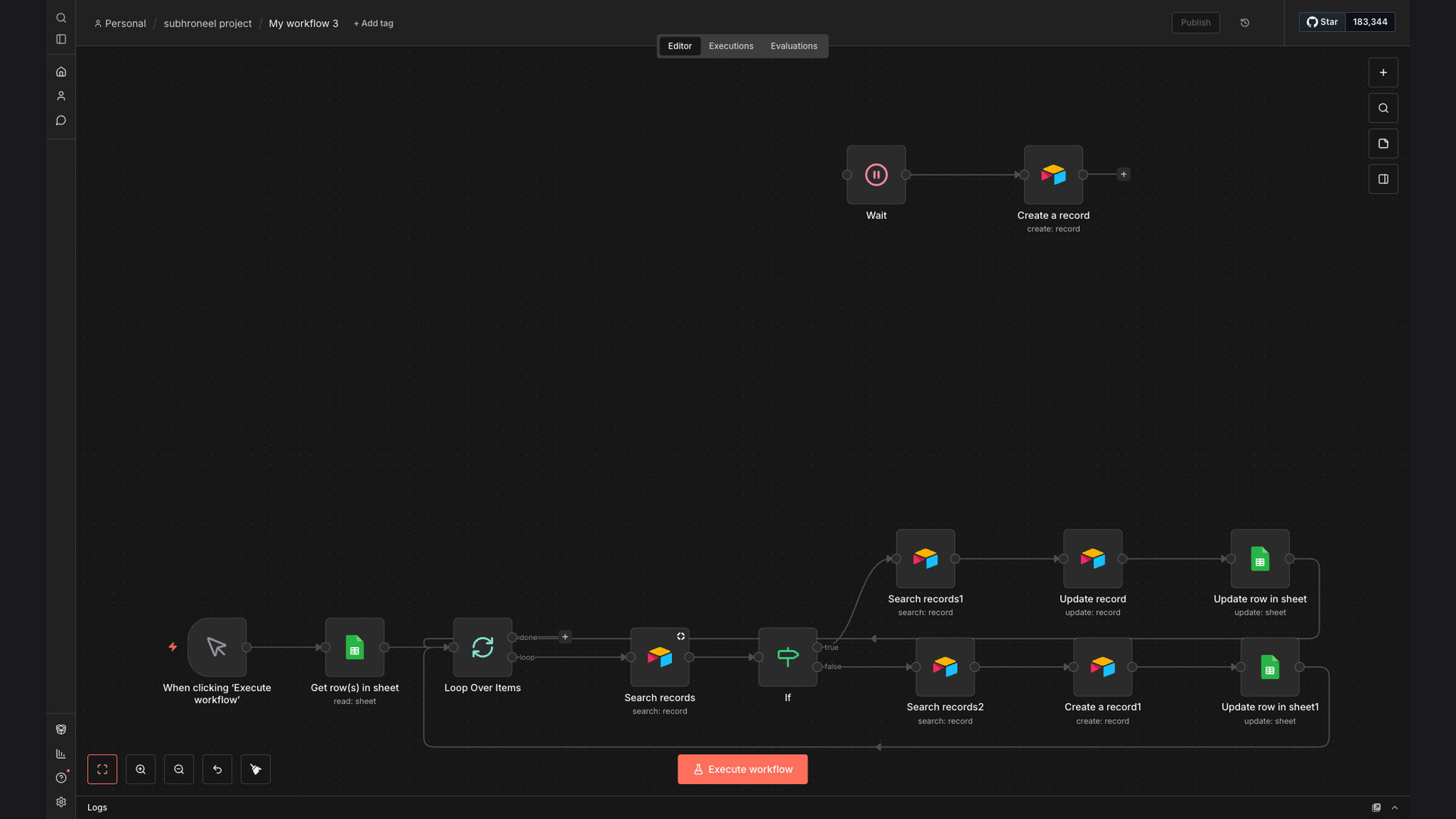
To address these issues, we developed an automated workflow using N8N that seamlessly syncs landed cost data from Google Sheets to Airtable. The workflow retrieves new landed cost items from a specified Google Sheet, searches for corresponding records in Airtable, updates existing records, or creates new ones if they don't exist. It also updates the Google Sheet to reflect the migration status, ensuring data integrity.
This solution was chosen for its ability to provide a reliable, efficient, and error-free data migration process. N8N's flexibility and integration capabilities with both Google Sheets and Airtable made it the ideal platform for building this automation. By automating this process, the client significantly reduced manual effort, improved data accuracy, and accelerated their decision-making process.
How It Works — Streamlining Data Synchronization
The automation works by continuously monitoring the Google Sheet for new or updated landed cost data and automatically syncing it to Airtable. This ensures that the Airtable records are always up-to-date with the latest information.
- Read Google Sheet: The workflow starts by reading the specified Google Sheet to identify new or updated landed cost items.
- Search Airtable: For each item, the workflow searches for a corresponding record in Airtable based on a unique identifier (e.g., product ID).
- Check for Match: If a matching record is found, the workflow proceeds to update the existing record with the new landed cost data.
- Update Airtable Record: The workflow updates the relevant fields in the Airtable record with the latest information from the Google Sheet.
- Create New Record: If no matching record is found, the workflow creates a new record in Airtable with the landed cost data.
- Update Google Sheet: After updating or creating the record in Airtable, the workflow updates the Google Sheet to reflect the migration status.
- Log Activity: The workflow logs all activities, including successful updates, creations, and any errors encountered, for auditing and troubleshooting purposes.
💡 Data Integrity: By automating the data migration process, the risk of human error is significantly reduced, ensuring data accuracy and consistency across platforms.
What This System Does That [Manual Process] Can't
Saves Time
Automates data transfer, eliminating manual entry and freeing up valuable time.
Ensures Accuracy
Reduces human error, ensuring data consistency between Google Sheets and Airtable.
Real-Time Updates
Provides real-time synchronization, keeping Airtable records up-to-date.
Improved Reporting
Enables better reporting and analysis with accurate, centralized data.
Scalability
Easily scales to handle increasing data volumes without additional manual effort.
Data Integrity
Maintains data integrity by automating the migration process and reducing manual intervention.
Before vs. After: [Improved Data Management]
Before: The client spent approximately 20 hours per week manually transferring landed cost data from Google Sheets to Airtable, resulting in frequent errors and delays.
After: With the automated workflow, the client reduced manual data entry by 90%, saving 18 hours per week and ensuring 99% data accuracy.
Implementation: Live in 2 Weeks
- Discovery & Planning: We began by understanding the client's specific data requirements and mapping out the data fields between Google Sheets and Airtable.
- Workflow Design: Next, we designed the N8N workflow, configuring the necessary nodes to read data from Google Sheets, search for records in Airtable, and update or create new records as needed.
- Testing & Refinement: We conducted thorough testing to ensure the workflow operated flawlessly, addressing any issues and refining the process for optimal performance.
- Deployment & Monitoring: Finally, we deployed the workflow and set up monitoring to ensure its continued smooth operation, providing ongoing support and maintenance.
The Right Fit — and When It Isn't
This solution is ideal for businesses that rely on Google Sheets for data collection and Airtable for data management and reporting. It's particularly well-suited for e-commerce companies, logistics providers, and any organization that needs to keep landed cost data synchronized across platforms.
However, this solution may not be the best fit for businesses with extremely complex data structures or those that require real-time data synchronization with sub-second latency. In such cases, a more robust data integration platform may be necessary.