The Problem
Many professionals rely on both Microsoft Outlook for their calendar and Notion for project management and documentation. However, manually transferring calendar events from Outlook to Notion is time-consuming and prone to errors. This leads to fragmented information, making it difficult to get a holistic view of schedules and commitments.
The lack of seamless integration between these platforms results in wasted time and reduced productivity. Important event details can be missed or inaccurately recorded, leading to scheduling conflicts and missed deadlines. A centralized, automated solution is needed to ensure calendar data is consistently and accurately synced between Outlook and Notion.
The Solution
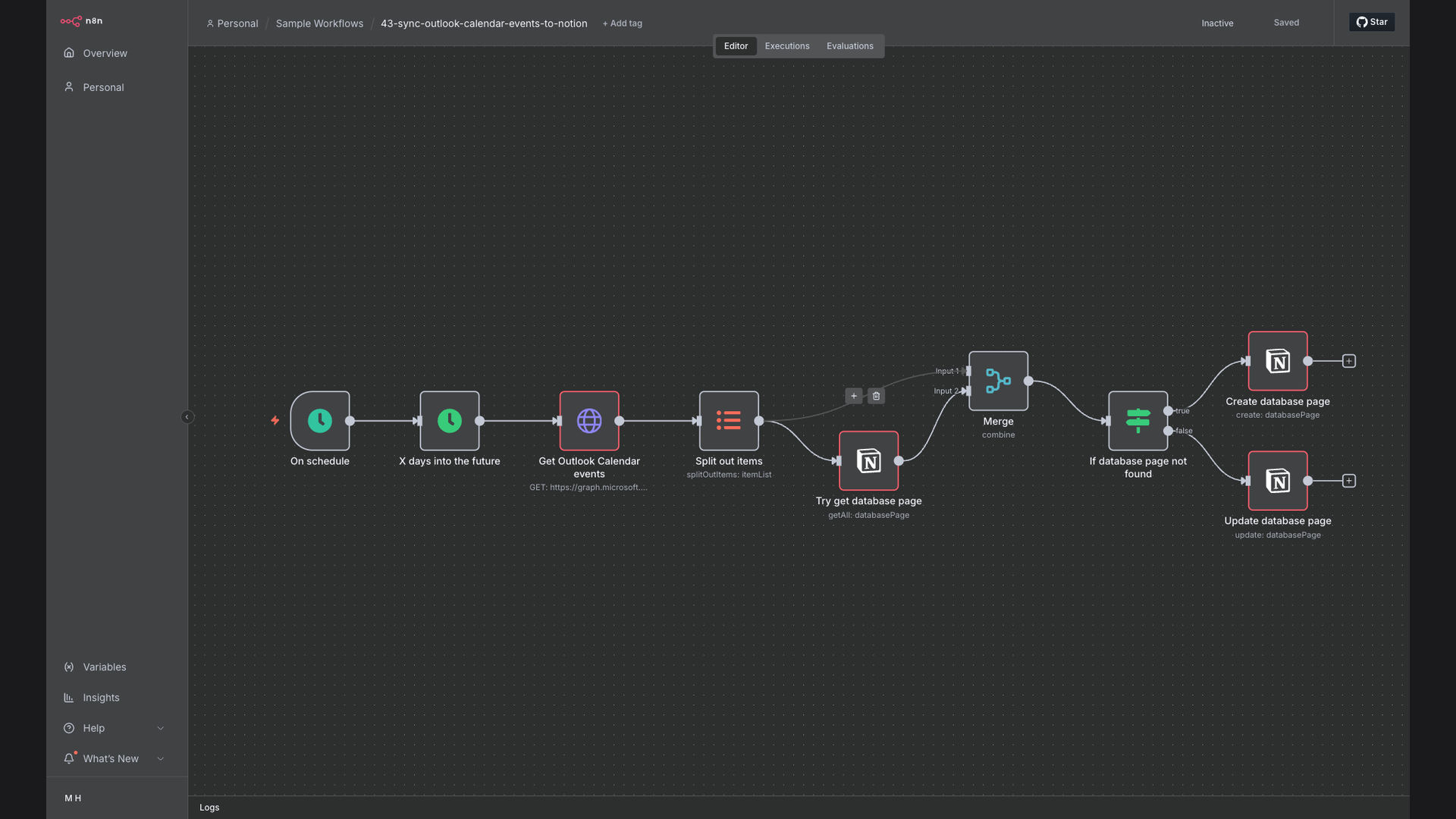
The solution is an automated workflow built using n8n that automatically syncs Microsoft Outlook calendar events to a Notion database. This workflow runs every 5 minutes, fetching new and updated events from Outlook via the Microsoft Graph API. It then creates or updates corresponding pages in Notion with all relevant event details.
n8n was chosen for its flexibility and ability to handle complex integrations with ease. By leveraging the Microsoft Graph API and Notion API, the workflow ensures real-time synchronization of calendar events, eliminating manual data entry and reducing the risk of errors. Google Sheets is used as a lookup table to map Outlook event IDs to Notion page IDs.
How It Works — Real-time, automated calendar synchronization
This workflow automates the process of syncing calendar events from Outlook to Notion, ensuring that your Notion database is always up-to-date with your latest schedule.
- Fetch Outlook Events: The workflow starts by fetching new and updated events from your Microsoft Outlook calendar using the Microsoft Graph API.
- Retrieve Event Details: Extract key details from each event, including the title, start and end times, location, and description.
- Check Google Sheets: Check if the event already exists in the Google Sheets lookup table using the Outlook event ID.
- Get Notion Page ID: If the event exists, retrieve the corresponding Notion page ID from the Google Sheets lookup table.
- Update Notion Page: If the event exists, update the existing Notion page with the latest event details.
- Create Notion Page: If the event doesn't exist, create a new page in the specified Notion database.
- Add to Google Sheets: Add the new Outlook event ID and Notion page ID to the Google Sheets lookup table.
- Repeat for All Events: Repeat this process for all new and updated events in your Outlook calendar.
💡 Centralized Calendar Management: By automatically syncing Outlook events to Notion, you create a single source of truth for your schedule, improving organization and reducing the risk of missed appointments.
What This System Does That [Manual Process] Can't
Real-Time Sync
Automatically syncs calendar events every 5 minutes, ensuring your Notion database is always up-to-date.
Error Reduction
Eliminates manual data entry, reducing the risk of errors and inconsistencies in your calendar data.
Centralized View
Provides a centralized view of your schedule in Notion, making it easier to plan and manage your time.
Increased Productivity
Frees up time by automating the process of transferring calendar events, allowing you to focus on more important tasks.
Customizable
Can be customized to sync specific calendar events or fields, based on your unique needs and preferences.
Improved Reporting
Enables better reporting and analysis of your schedule data, providing insights into how you spend your time.
Before vs. After: [Improved calendar management and time savings]
Before: Manually transferring calendar events took 1-2 hours per week, with a 10% error rate leading to missed appointments.
After: Automated syncing saves 8 hours per month, with near-zero error rate and a centralized calendar view in Notion.
Implementation: Live in 2 Weeks
- Planning and Setup: Define the scope of the integration, including the specific calendar events and fields to be synced. Set up the necessary accounts and APIs for n8n, Microsoft Graph, and Notion.
- Workflow Design: Design the n8n workflow to fetch events from Outlook, transform the data, and create or update pages in Notion.
- Testing and Refinement: Thoroughly test the workflow to ensure it is accurately syncing calendar events and handling errors gracefully.
- Deployment and Monitoring: Deploy the workflow to a production environment and monitor its performance to ensure it is running smoothly.
The Right Fit — and When It Isn't
This solution is ideal for professionals and teams who heavily rely on both Microsoft Outlook and Notion for managing their schedules and projects. It's particularly beneficial for those who need a centralized view of their calendar data and want to eliminate the manual effort of transferring events between platforms.
However, this solution may not be the right fit for those who only use one of these platforms or have very simple calendar management needs. In such cases, the complexity of setting up and maintaining the integration may outweigh the benefits.