The Problem
Many businesses struggle with manually transferring data between their payment processing platform (Stripe) and their CRM (Airtable). This process is not only time-consuming but also prone to errors, leading to inaccurate customer information and inefficient data management. The lack of real-time synchronization between these systems results in delayed updates and missed opportunities.
Without an automated solution, companies face challenges in maintaining consistent and reliable data across platforms. This can lead to poor customer service, inaccurate reporting, and increased operational costs. The need for a seamless, automated data flow between Stripe and Airtable is crucial for businesses looking to optimize their CRM processes and improve overall efficiency.
The Solution
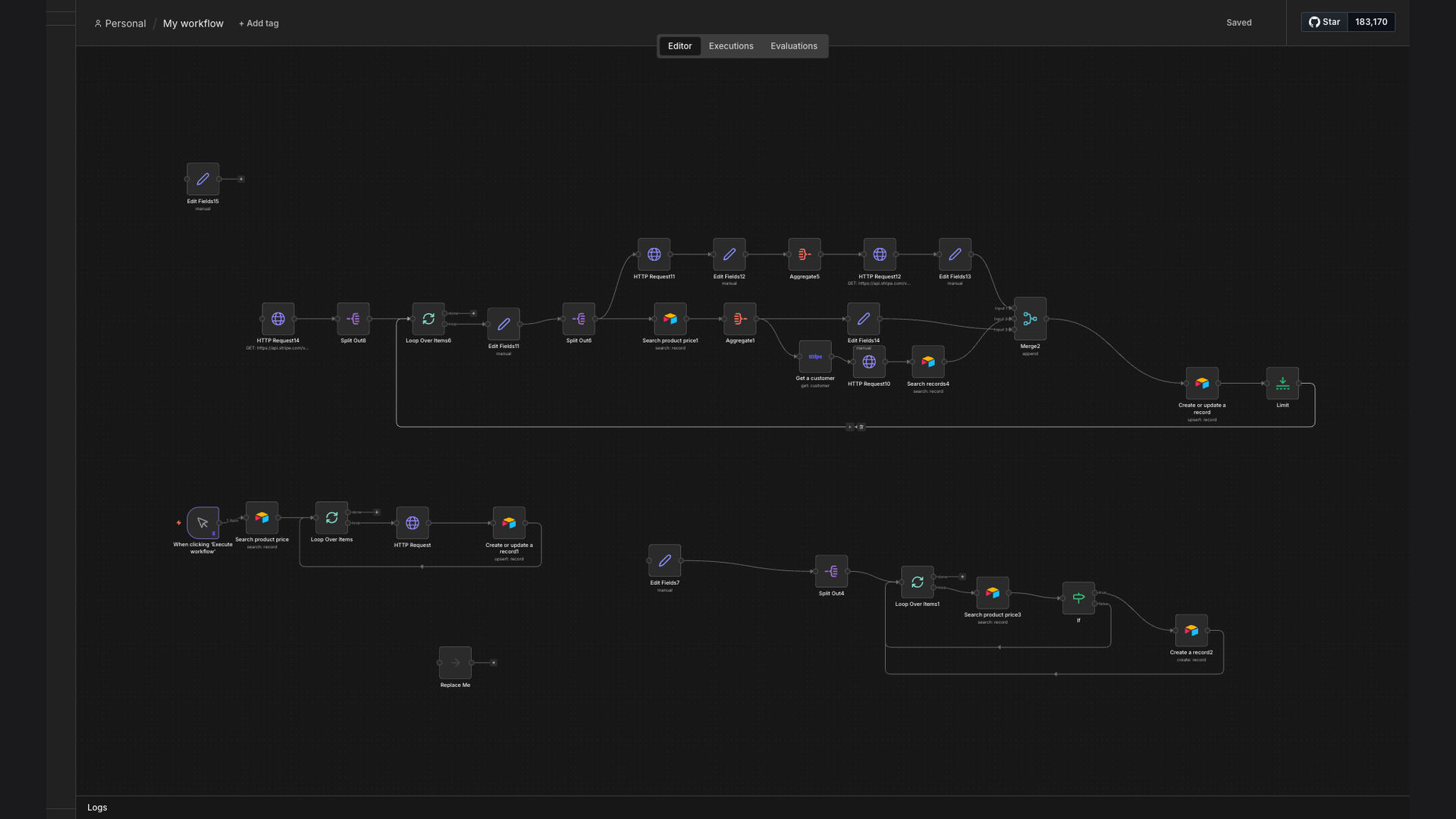
We developed an n8n workflow that automates the synchronization of Stripe subscription data and customer information into an Airtable CRM database. This workflow fetches new and updated subscriptions from Stripe, retrieves associated customer details, and updates the corresponding records in Airtable. It ensures that all customer data, including domain metadata and pricing information, is accurately and consistently reflected in the CRM.
n8n was chosen for its flexibility, open-source nature, and ability to handle complex data transformations. Its robust integration capabilities with both Stripe and Airtable made it the ideal platform for building a seamless data synchronization solution. By automating this process, businesses can eliminate manual data entry, reduce errors, and improve the efficiency of their CRM operations.
How It Works — Real-Time Data Synchronization
The n8n workflow automates the process of syncing customer and subscription data from Stripe to Airtable, ensuring your CRM is always up-to-date.
- Fetch New Subscriptions: The workflow starts by fetching new or updated subscriptions from Stripe using the Stripe API.
- Retrieve Customer Details: For each subscription, the workflow retrieves detailed customer information from Stripe, including email, name, and billing address.
- Extract Tax IDs: The workflow extracts any available tax IDs associated with the customer for compliance purposes.
- Search for Existing Client: The workflow searches the Airtable CRM for an existing client record matching the customer's email address.
- Update Airtable Record: If a matching record is found, the workflow updates it with the latest subscription and customer data.
- Create New Record (If Needed): If no matching record is found, the workflow creates a new client record in Airtable with the retrieved data.
- Add Domain Metadata: The workflow enriches the Airtable record with domain metadata, such as the customer's website URL.
- Sync Pricing Information: The workflow synchronizes pricing information, including subscription amounts and billing cycles, to the Airtable record.
💡 Data Enrichment: By adding domain metadata and other relevant information, the workflow enhances the value of the CRM data, providing a more complete view of each customer.
What This System Does That [Manual Process] Can't
Real-Time Updates
Automatically syncs data between Stripe and Airtable in real-time, ensuring your CRM is always up-to-date.
Data Accuracy
Eliminates manual data entry errors, ensuring accurate and consistent customer information across platforms.
Increased Efficiency
Automates the data synchronization process, freeing up time for more strategic tasks.
Improved Reporting
Centralizes customer and subscription data in Airtable for comprehensive reporting and analysis.
Secure Data Transfer
Uses secure connections and encryption to protect sensitive data during transfer between Stripe and Airtable.
Customizable Workflow
Allows for customization to fit specific business needs, including filtering and data transformations.
Before vs. After: Streamlined Data Management
Before: Manual data entry led to 20 hours per week spent updating customer information, with a 10% error rate.
After: Automated synchronization reduced manual effort by 90%, improved data accuracy by 5x, and provided real-time updates.
Implementation: Live in 3 Weeks
- Discovery and Planning: We began by understanding the client's specific needs and mapping out the data flow between Stripe and Airtable.
- Workflow Design: Our team designed the n8n workflow, including the necessary nodes for fetching data, transforming it, and updating Airtable records.
- Testing and Refinement: We conducted thorough testing to ensure the workflow functioned correctly and made adjustments based on client feedback.
- Deployment: The workflow was deployed to a secure n8n instance, and data synchronization was initiated.
The Right Fit — and When It Isn't
This solution is ideal for businesses that rely on Stripe for payment processing and Airtable for CRM or data management. It's particularly beneficial for subscription-based businesses, e-commerce companies, and service-based businesses looking to streamline their data management processes.
However, this solution may not be the right fit for businesses with very simple data needs or those that do not use Stripe and Airtable. In such cases, a simpler integration or manual data entry may suffice.