The Problem
Content creators and designers often face the challenge of removing unwanted objects or modifying specific areas within images. Manual editing processes are time-consuming, requiring specialized skills and software. This can lead to bottlenecks in content production, especially when dealing with high volumes of images or tight deadlines.
Existing AI-powered solutions often lack the flexibility and control needed for precise edits. Many require extensive coding knowledge or are not easily integrated into existing workflows, leading to inefficiencies and increased costs. A streamlined, user-friendly solution that can be integrated into a web-based environment is highly desirable.
The Solution
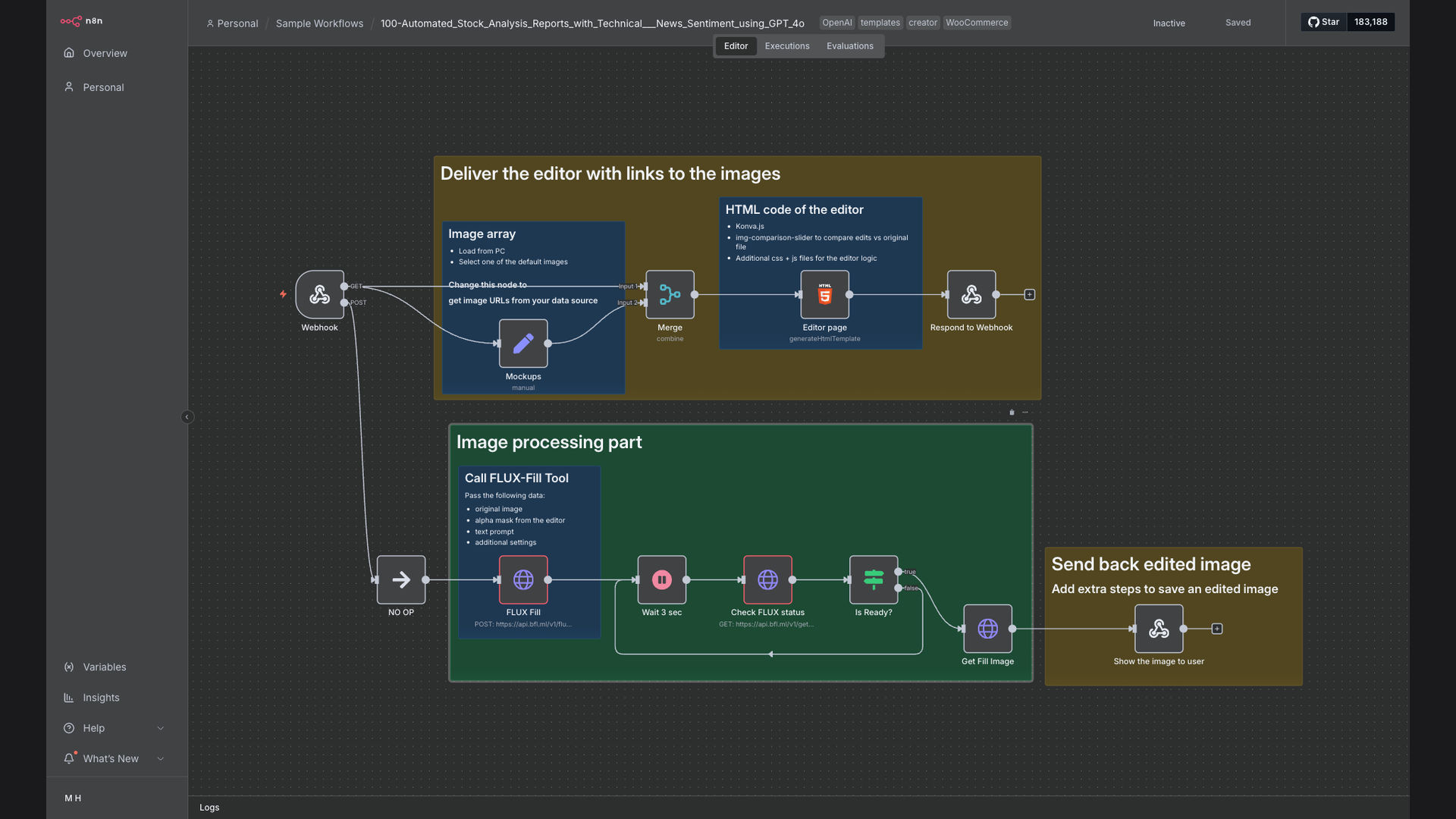
We developed a web-based AI image inpainting editor using n8n to orchestrate the workflow, Flux AI for image processing, and Konva.js for the interactive web interface. This system allows users to upload images, define masks to specify areas for editing, and send prompts to an external API to generate the edited images.
n8n was chosen for its ability to seamlessly integrate with various APIs and webhooks, providing a flexible and scalable platform for managing the image processing pipeline. Flux AI offers powerful AI algorithms for image inpainting, while Konva.js enables a smooth and intuitive user experience within the web browser.
How It Works — Streamlining Image Editing with AI
This system provides a user-friendly interface for AI-powered image inpainting, allowing users to easily remove objects or modify images directly within their web browser. Here's how it works:
- Image Upload: Users upload the image they want to edit through the web interface.
- Mask Definition: Using Konva.js, users paint a mask over the area they want to modify or remove.
- Prompt Submission: Users can optionally enter a text prompt to guide the AI in generating the desired content for the masked area.
- API Request: The system sends the image, mask, and prompt to the Flux AI API via a webhook.
- AI Processing: Flux AI processes the image based on the mask and prompt, generating the edited image.
- Image Streaming: The edited image is streamed back to the user's browser in real-time.
- Review and Refinement: Users can review the edited image and refine the mask or prompt if necessary.
- Download: Once satisfied, users can download the final edited image.
💡 Real-Time Feedback: The system provides real-time feedback during the editing process, allowing users to quickly iterate and refine their edits.
What This System Does That Manual Process Can't
Speed and Efficiency
AI-powered inpainting significantly reduces the time required for image editing, enabling faster content production.
Scalability
The system can handle a large volume of images, making it suitable for businesses with high content demands.
Precision and Control
Users have precise control over the editing process through mask definition and prompt submission.
Web-Based Interface
The web-based interface eliminates the need for specialized software, making it accessible to a wider range of users.
Seamless Integration
n8n facilitates seamless integration with various APIs and webhooks, enabling a flexible and customizable workflow.
Cost-Effective
Automation reduces the need for manual labor, resulting in significant cost savings.
Before vs. After: Streamlined Image Editing
Before: Manual image editing required 2-3 hours per image, leading to bottlenecks and delays in content production.
After: AI-powered inpainting reduces editing time to just minutes per image, increasing output volume by 5x and improving overall efficiency.
Implementation: Live in 4 Weeks
- Planning and Design: Defining project scope, user requirements, and system architecture.
- n8n Workflow Development: Building the n8n workflow to orchestrate the image processing pipeline and API integrations.
- Web Interface Development: Creating the user interface with Konva.js for image upload, mask definition, and prompt submission.
- API Integration: Integrating the Flux AI API for image inpainting and configuring webhooks for real-time communication.
- Testing and Deployment: Thoroughly testing the system and deploying it to a production environment.
The Right Fit — and When It Isn't
This solution is ideal for businesses and content creators who need to efficiently remove objects or modify images programmatically. It's particularly well-suited for those dealing with high volumes of images or tight deadlines. The web-based interface makes it accessible to users with varying levels of technical expertise.
However, this system may not be the best fit for highly complex or specialized image editing tasks that require manual intervention. In such cases, a combination of AI-powered automation and manual editing may be necessary.