
The Client and the Problem: The Overhead of Manual Cleaner Coordination
The client operates a farm venue hosting weddings, retreats, and guests. Bookings arrive through Google Calendar, and every single booking needs a professional clean before the next guest arrives. They have a team of cleaners who must be coordinated for every clean — and managing that manually through text messages, every week, had become a real operational problem.
Someone had to personally reach out to each cleaner, wait for replies, follow up on non-responses, and find last-minute replacements when someone dropped out. What they needed was a system that handled all of it automatically, so their team could focus on running the venue instead of chasing cleaners.
The First Build: Make.com Backend Scenario
The original system was built on Make.com. Every time a guest booking landed in the venue's Google Calendar, Make.com detected it, created a cleaning shift, and began messaging cleaners to offer the shift — escalating through priority tiers and handling their responses automatically. Bookings were pulled from Google Calendar into Airtable, and a message went to the operations manager to confirm the booking and the shifts to be created. Multiple use cases ran out of Make.com.
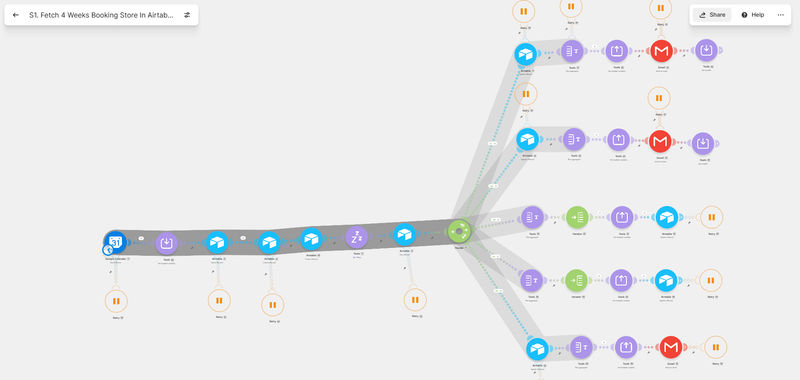


The no-code backend worked, resolving the basic scheduling logic and automating messaging chains. However, as bookings scaled and operational workflows matured, the friction points of running a critical team schedule on a developer-facing canvas became apparent.
Why the No-Code Backend Was the Wrong Interface
The system was not user-centric. The client could not visualize how things were working on the backend — and it was never their job to. Interacting with a no-code backend meant dealing with technicalities they were not comfortable with and a system structure they could not easily reason about.
If they wanted to adjust the messages being sent out, it was difficult. If something broke, or if a step was missed, or if something got changed that should not have been, the client was left exposed. Expecting a client to maintain a no-code backend is not an ideal solution to propose.
The Rebuild: A Fully Custom Web Application
GrowwStacks rebuilt the entire system from scratch as a fully custom web application using vibe coding. Same logic, same automations — but now the client has a proper dashboard their whole team actually uses.

The dashboard surfaces pending confirmations, urgent confirmations, staffing status, and which bookings are fully staffed. All alerts appear in one place. Every booking is visible, and the client can confirm it directly. Shifts can be assigned manually. Live staffing progress is visible at a glance — for example, three of six cleaners accepted, three still needed.
Shifts can be created for a whole venue or an individual building, with the client setting the number of hours and the number of cleaners required, then assigning cleaners and creating the shift.
Cleaner Database and Reliability Tiers
The system holds a full cleaner database organised into three priority tiers. Tier 1 cleaners are offered shifts first, then the system escalates to Tier 2 and Tier 3.
Reliability is tracked, so the client can assess which cleaners are most dependable. If a Tier 3 cleaner proves more reliable based on their acceptance rate and shifts accepted, the client can promote them to Tier 1 directly from the interface. Team leads can update their own availability from their own login.
Client-Controlled Scheduling
Everything that was previously locked inside the Make.com backend is now a setting the client controls: when bookings are synced from Google Calendar, when confirmation requests are sent, when confirmation reminders go to the operations manager, and when Tier 1 cleaners are offered a shift.
All of it is dynamically adjustable with simple toggles. This flexibility did not exist in the Make.com build, where changing an escalation timeframe meant editing a router delay value directly in a backend canvas.
System Logs, Health Checks, and Zero Dependency
The application includes system logs capturing every adjustment, alert, and notification. Email delivery is tracked. Health checks surface warnings when a WhatsApp connection drops or Gmail credentials expire.
Critically, the client can reconnect services themselves — click reconnect, authenticate in the popup, and the platform is restored. They no longer depend on GrowwStacks for routine maintenance. User management is also self-service. The client can add team members, define their roles, deactivate people who have left, and mark users as away when on holiday. If the business scales, they add people themselves.
Automatic Alerts So Nothing Gets Missed
Urgent situations surface automatically in the alerts panel — understaffed shifts, booking cancellations, coverage gaps. The team sees every upcoming shift, confirms with one click, and checks who has been offered a shift, who has accepted, and where escalation currently stands, all in one place.
💡 Operations Control: Instantly surfacing understaffed shifts on the dashboard homepage guarantees that scheduling exceptions are flagged and handled hours before the shift is scheduled to begin.
The Part That Makes It Better: Zero Running Cost
The rebuilt system runs at zero ongoing cost. No Make.com subscription. No Airtable licensing fees.
The application is deployed on Vercel's free tier. The database and backend run on Supabase, also free at this scale. The automations that previously ran inside Make.com now run as edge functions inside Supabase — scheduled jobs, WhatsApp messages, tier escalation, and reminders. All of it built in code and completely owned by the client.
The Outcome: Same Automation Logic, Better User Control
The client went from navigating a no-code backend they did not understand to having a purpose-built tool their whole team uses every day. Same outcome, better experience, zero ongoing costs.
The Right Fit — and When It Isn't
This migration path suits businesses already running proven automation logic on no-code platforms who have outgrown the interface — where the client needs daily operational visibility, where recurring platform fees have become significant, or where non-technical staff need to adjust settings without touching a backend.
It is less suited to businesses still validating their process, where the logic changes weekly and the speed of no-code iteration outweighs the cost and interface limitations. Rebuild once the workflow is stable.