
The Problem: The Admin Burden of Multi-Location Brand Reputation
For brands operating multiple physical showrooms, maintaining a strong local reputation is key. However, managing multiple Google Business Profile locations introduces major administrative friction. Operations teams must manually check each store location, read new positive and negative reviews, write appropriate responses, and post them one by one.
A mattress retail chain with multiple showrooms across Mumbai (such as Saki Vihar Road) faced exactly this operational challenge. Due to the manual overhead, replies were inconsistent, reviews sat unanswered for several days, and negative feedback was occasionally missed entirely. Without a centralized audit trail, the executive team had no visibility into ratings and customer feedback trends across their different Mumbai store locations.
The Solution: Centralized local SEO and Review Automation
GrowwStacks engineered an automated reputation pipeline on Make.com that connects Google Business Profiles directly with Google Sheets. The system scans for new reviews across all Mumbai store profiles every few hours, instantly identifies the sentiment and rating, applies pre-approved responses, publishes replies back to Google Business Profiles in real-time, and maintains a centralized log in Google Sheets.
This automated flow keeps brand responses fast and consistent. High-star ratings get prompt gratitude, while low-star feedback is immediately acknowledged with apologies and contact information for swift resolution. All actions are logged, creating a complete audit trail without requiring a single minute of manual work from the showroom staff.
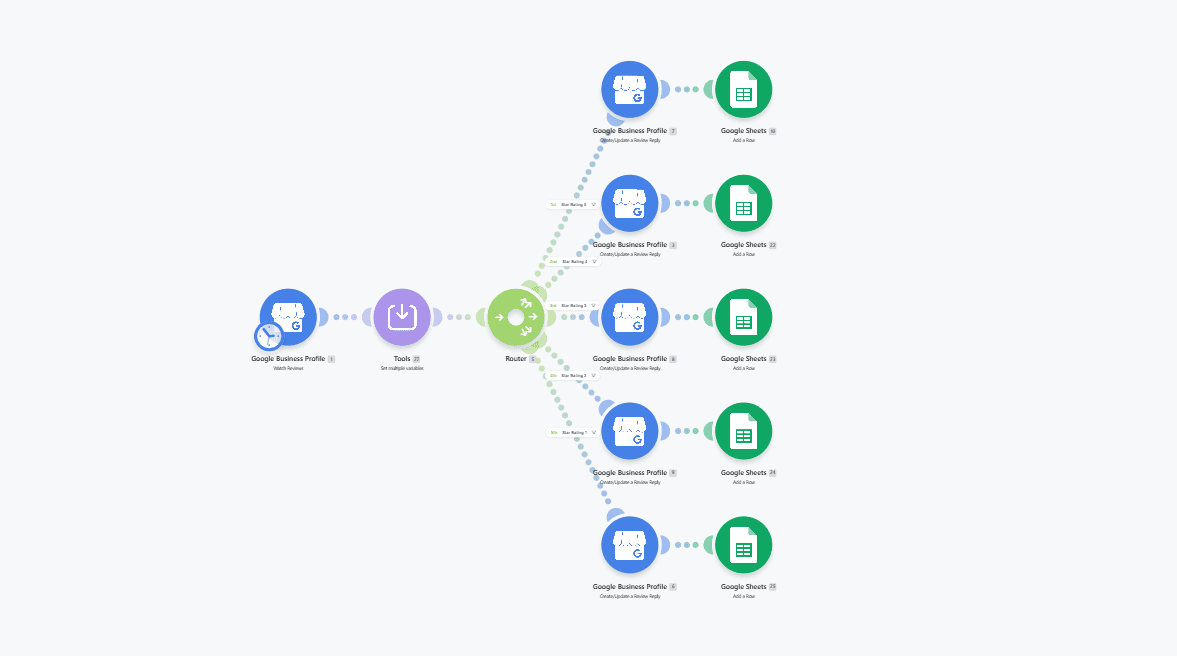
How It Works — The Automated Reputation Pipeline
The automation operates as a continuous background engine to handle the entire reputation loop without human intervention. Here is the step-by-step breakdown:
- Scheduled Scan: The Make.com scenario runs on a schedule (typically every few hours) and queries all registered Google Business Profiles for new reviews.
- Review Ingestion: The scenario retrieves metadata for each new review, including the reviewer's name, star rating, text comment, post date, and the specific store location.
- Sentiment Evaluation: The system identifies the rating level. 4-star and 5-star reviews (e.g., Manish Makija's 4-star review or Vikas Singh's 5-star review) are routed to positive templates. 1-star, 2-star, or 3-star reviews are routed to negative templates.
- Template Matching: The scenario selects the matching template response:
- Positive Response: "Thanks for the shout out. Thrilled to hear that you enjoyed your experience with us!"
- Negative Response: Acknowledges the feedback, apologizes for the experience, and directs the customer to reach out to the manager to resolve the issue.
- Auto-Publish Response: The pipeline posts the template response back to the customer's review on Google Business Profile in real-time.
- Centralized Database Update: The review details, rating, reply sent, sentiment classification, date/time, and store location (e.g., Saki Vihar Road) are logged to a central Google Sheet.
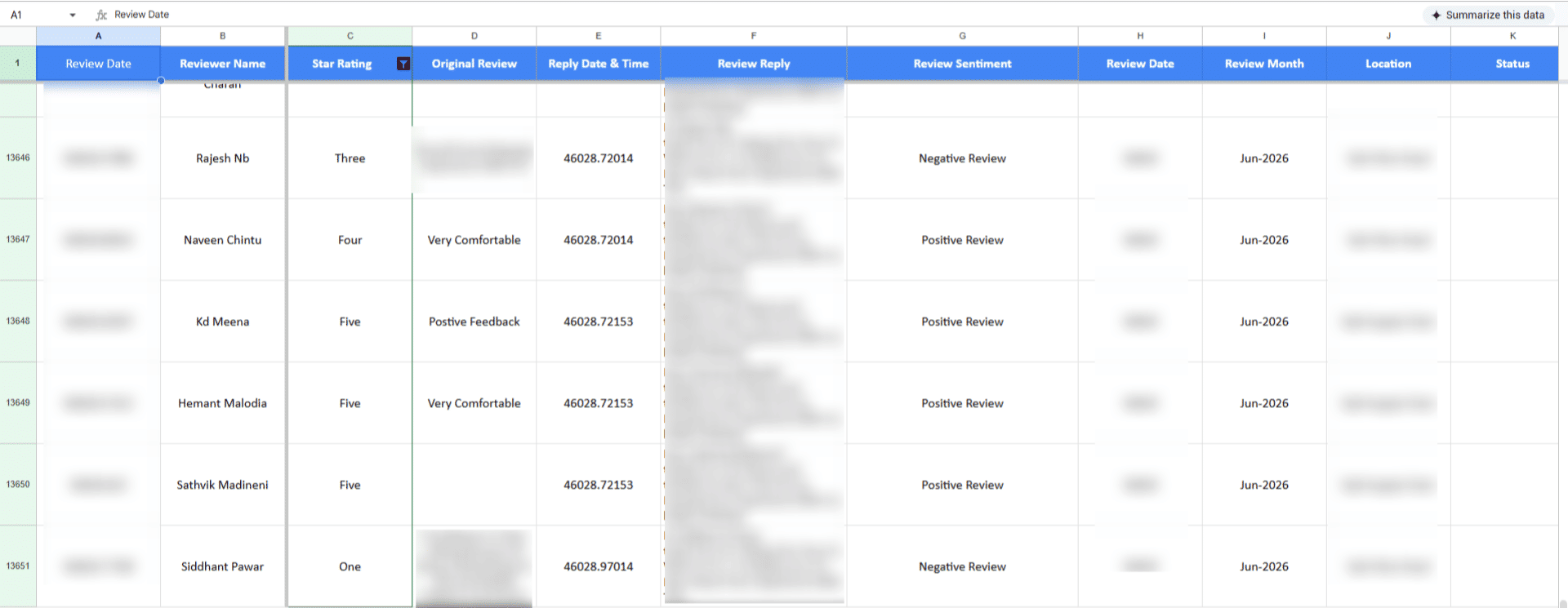
💡 Operational Audit Trail: Logging all location reviews in a single Google Sheet provides the executive team a complete audit trail and makes it easy to track trends and showroom service quality across all locations in Mumbai.
What This System Does That Manual Process Can't
Multi-Location Sync
Monitors and manages multiple Google Business Profiles in a single automated scenario, eliminating the need to log into multiple dashboards.
Sentiment Classification
Automatically filters reviews by rating and comment sentiment, dispatching tailored answers for praise or complaints.
Immediate Action
Responds to customers within hours instead of leaving reviews unanswered for days, improving local SEO rankings.
Audit Trail Database
Maintains a complete historical log in Google Sheets, allowing management to analyze service quality across different showrooms.
No Missed Feedback
Ensures every single review receives a response, preserving a 100% reply rate on Google Business Profiles.
Consistent Brand Voice
Applies pre-approved professional response templates, avoiding spelling errors and erratic responses.
Before vs. After: Multi-Store Reputation Control
Before: The mattress retail chain had to manually check every review across Mumbai locations. Responses were inconsistent, reviews sat unanswered for days, and some were missed, leading to poor customer engagement.
After: The Make.com automation automatically checks reviews, answers positive and negative feedback consistently using approved templates, and logs every review with location tags in a central Google Sheet — saving 2+ hours daily.
Implementation: Live in 2 Weeks
- Account Integration: Integrated access tokens for Google Business Profiles and Google Sheets in the Make.com environment.
- Template Formulation: Formulated approved response templates for positive (4-5 stars) and negative (1-3 stars) review scenarios.
- Workflow Construction: Built the Make.com scenario to pull reviews, evaluate star ratings, route to matching response templates, and publish replies.
- Audit Logging Design: Configured the Google Sheet logging node to write reviewer metadata, ratings, comments, reply text, and store location tags.
- Testing and Launch: Conducted dry runs on historical reviews to test routing logic and published the live scenario on a 4-hour cron schedule.
The Right Fit — and When It Isn't
This solution is perfect for multi-location retail chains, franchise systems, hospitality brands, and service businesses operating several physical locations with individual Google Business Profiles. It centralized control while maintaining local visibility.
However, it may not be necessary for single-location businesses receiving fewer than 5 reviews a month, as manual management is easily handled. Additionally, businesses that require highly customized, bespoke replies to complex service issues should use a manual review workflow instead of template replies.