
In the dynamic world of customer support, every interaction presents a unique challenge. Troubleshooting diverse issues efficiently and effectively demands a blend of creativity and problem-solving skills from support agents. The sheer variety of customer queries means that no two days are ever the same, requiring constant adaptation and quick thinking.
Fortunately, platforms like Make offer robust and flexible automation capabilities that can handle even the most intricate customer support scenarios. By leveraging automation, businesses can streamline repetitive tasks, reduce the burden on their support teams, and ensure a consistent, high-quality customer experience.
This article explores six powerful automation templates designed to enhance your customer support operations. These solutions offer both comprehensive and detailed approaches to common support challenges, and they can be implemented immediately to start transforming your helpdesk. By integrating these automated workflows, you can significantly reduce the time support agents spend on administrative tasks, boost their overall productivity, and empower them to deliver exceptional service.
6 Make Scenarios to Take Your Customer Support to the Next Level
Customer support is a critical function for any business, directly impacting customer satisfaction and retention. While the nature of support often involves complex, human-centric interactions, many underlying processes can be significantly improved through automation. By automating routine tasks, data collection, and communication, support teams can free up valuable time to focus on more challenging customer issues, ultimately leading to a more efficient and effective helpdesk operation.
The following six Make scenarios provide practical, actionable ways to integrate and automate various aspects of your customer support workflow. These integrations leverage popular tools like Zendesk, Databox, RingCentral, Dropbox, Canny, Help Scout, MonkeyLearn, Zoho Desk, Airtable, Freshdesk, and Microsoft 365 Calendar to create seamless, intelligent processes. Implementing these solutions can help your team manage inquiries more effectively, gain deeper insights into performance, and proactively address customer needs.
1. Reporting Customer Support Analytics
One of the most effective ways to enhance your customer support team's performance is through rigorous measurement and analysis. Understanding key metrics allows you to identify strengths, pinpoint weaknesses, and make data-driven decisions to improve service quality. However, manually tracking and reporting these analytics can be a time-consuming and error-prone process.
By integrating your helpdesk system, such as Zendesk, with a data visualization platform like Databox, and using Make as the automation bridge, you can create dynamic dashboards that automatically track and display your team's performance. This setup provides real-time insights into crucial metrics, from the sheer volume of incoming tickets to the average time it takes to resolve them. Below are three specific scenarios you can implement to gain a comprehensive understanding of your team's service delivery.
These automated dashboards not only save countless hours typically spent on manual reporting but also empower your team with immediate feedback. This allows for agile adjustments to strategies and resource allocation, ensuring that your customer support remains responsive and continuously improves.
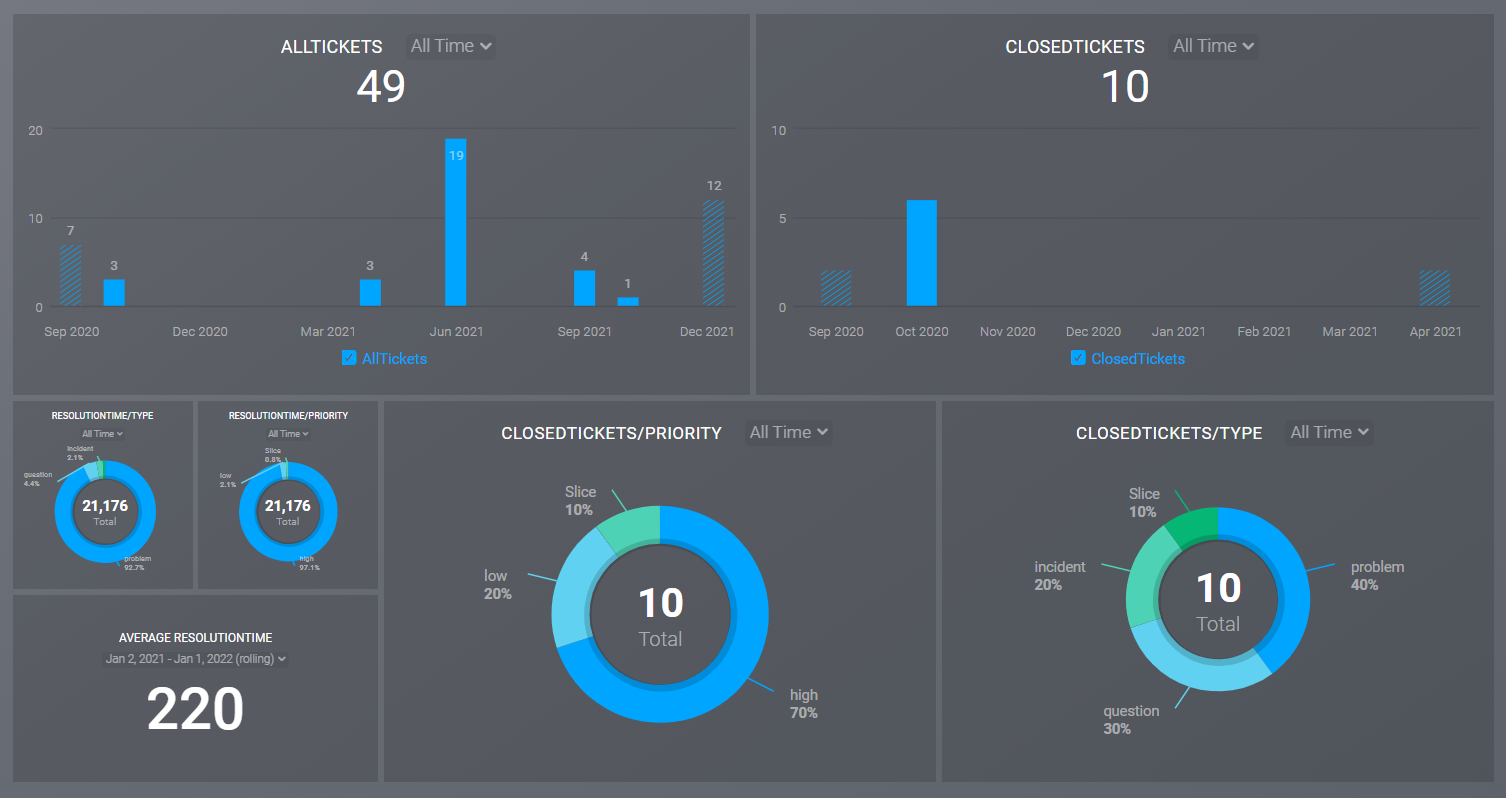
Add a ticket metric in Databox with the total number of Zendesk tickets created
Tracking overall ticket volume is a foundational metric in customer support, providing a clear indication of demand and workload. This metric is essential for resource planning, helping you determine if you have adequate staffing to maintain excellent service levels. A sudden spike or consistent increase in ticket volume might signal a need for additional support agents or a deeper issue within your product or service.
This Make scenario automates the process of counting all tickets ever created in your Zendesk account. It then seamlessly transfers this cumulative count to Databox, where it is displayed as a dedicated metric. This automation ensures that your dashboard always reflects the total historical ticket volume, offering a long-term perspective on customer engagement and support demand without any manual data aggregation.
Update the ticket metric in Databox with the number of tickets created in Zendesk on the previous day
While total ticket volume provides a historical overview, daily ticket creation offers a more immediate pulse on your operations. This scenario refines the previous one by focusing on daily fluctuations, allowing you to track the number of tickets generated specifically on the preceding day. This granular view is invaluable for identifying short-term trends and reacting quickly to changes in customer demand.
We highly recommend keeping this daily scenario active and running consistently. It acts as an early warning system, helping you monitor the health of both your support team and your product. For instance, a sustained high volume of daily tickets could indicate an overwhelmed team or, more critically, a significant bug or issue within your product that requires urgent attention. Proactive monitoring through this automation enables timely interventions, preventing minor issues from escalating into major problems.
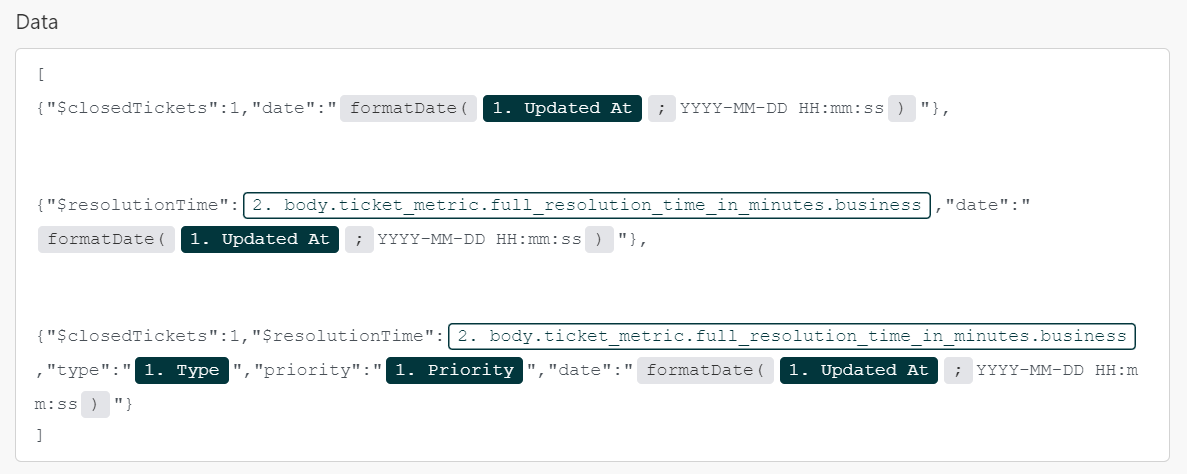
Track the metrics “number of closed tickets” and “resolution time” for the dimensions “type of ticket” and “ticket priority” in Databox
To move beyond basic metrics, this advanced scenario allows for a more nuanced analysis of your support operations. It tracks the exact number of issues resolved and the average resolution time, broken down by specific ticket types and priority levels. This level of detail provides deep insights into how effectively your team handles different categories of problems and how well they prioritize urgent requests.
This comprehensive dashboard not only highlights your team's productivity and efficiency but also reveals their strategic capabilities in managing critical issues and their overall problem-solving prowess. While customizing these metrics for an even richer understanding might involve some familiarity with JSON structures, the core setup offers a powerful foundation for evaluating and optimizing your support strategy. It helps identify which types of tickets consume the most resources and whether high-priority issues are being addressed with appropriate speed.
2. Backing Up Your Customer Support Calls
Just as sales teams benefit from reviewing call recordings to refine their techniques, customer service teams can gain immense value from backing up their support calls. Analyzing these interactions allows agents and managers to identify successful communication strategies, pinpoint areas for improvement, and continuously enhance customer service skills. It provides a tangible record of how issues were handled, offering valuable learning opportunities for the entire team.
Beyond training and performance analysis, automatically backing up call recordings offers crucial peace of mind. It ensures that no critical customer interaction is ever lost, providing a reliable archive for future reference. This can be invaluable for resolving disputes, reviewing complex cases, or meeting compliance requirements, ensuring that you always have access to the full context of past conversations.
This Make scenario automates the entire backup process: it uploads your RingCentral call recordings directly to Dropbox, creating a dedicated subfolder for each customer. Within these folders, recordings are meticulously organized with date and time stamps. This systematic approach ensures that all customer support calls are stored in an easily searchable and tidy manner, allowing your team to quickly locate specific interactions whenever needed, saving significant time and effort.
3. Collecting Customer Feedback
Customer feedback is the lifeblood of product development and service improvement. Without a clear understanding of your customers' experiences, feelings, and thoughts about your product, it's impossible to make informed decisions that drive growth and satisfaction. Since customers are the ultimate arbiters of your product's value, actively seeking and incorporating their advice is paramount for building and iterating successful offerings.
To streamline the crucial process of gathering customer insights, we've developed a Make scenario that integrates the customer feedback management tool Canny with the customer support software Help Scout. This powerful combination ensures that valuable feedback is not only captured but also immediately routed to the appropriate channels for action.
In this specific scenario, Make automatically creates a support conversation or ticket in Help Scout whenever a new post related to a particular topic appears on your Canny profile. Alternatively, you can configure the automation to create a support conversation for any new post on Canny, ensuring no feedback goes unnoticed. This direct integration transforms passive feedback into actionable support tasks, allowing your team to respond promptly and address customer suggestions or concerns.
Another highly effective scenario for collecting customer feedback taps into the prevalent tendency for individuals to express their opinions about brands on social media. This Make automation continuously scans Twitter for mentions of your brand. When a tweet is identified, it's sent to MonkeyLearn, an AI-powered sentiment analysis tool, which determines the sentiment of the post. If MonkeyLearn classifies the tweet as negative, Make automatically creates a new ticket in Zoho Desk.
This social listening scenario is incredibly valuable, arguably even more so than direct feedback platforms like Canny, due to the sheer volume and often unfiltered nature of social media commentary. Twitter provides a real-time, candid stream of public opinion, allowing you to capture genuine customer sentiment that might not be expressed through formal channels. By automating the identification and ticketing of negative social media mentions, your team can proactively address public concerns, manage your brand's reputation, and demonstrate responsiveness to customer issues, often before they escalate.
4. Flagging Undelivered Customer Support Emails
In the fast-paced world of customer support, time is always of the essence. Customers expect prompt responses and efficient service, which often means support representatives are constantly striving to meet high demands. There's nothing more frustrating for an agent than sending a timely email to a customer, only to discover days later that the message was never received, leaving the customer feeling ignored despite the agent's efforts.
A common issue arises when your Gmail or Microsoft 365 Email inbox is connected to Zendesk: you typically won't receive direct notifications if an email fails to deliver to a ticket requester. This can happen for various reasons, such as a customer accidentally typing an incorrect email address when submitting a ticket. Such delivery failures can lead to significant delays in resolving issues and can severely impact customer satisfaction.
Fortunately, Make offers an elegant solution to this problem. It can be configured to automatically scan your email inbox for automated replies from "mailer-daemon" or other "undelivered" notifications. Upon detecting such a message, Make immediately identifies the relevant support agent and notifies them by tagging or commenting on the most recent Zendesk ticket associated with the customer whose email address was unreachable.
These automated scenarios eliminate the need for your team to constantly switch between Zendesk and their email inboxes just to verify email delivery. By proactively flagging undelivered messages, agents can quickly rectify contact information or find alternative communication channels, ensuring that critical support messages always reach the customer. This not only saves valuable time but also significantly improves the reliability and responsiveness of your customer support operations.
Pro tip: These scenarios are particularly useful when your support emails are sent from your brand's domain rather than a generic helpdesk address like "@zendesk.com." This helps maintain consistent branding and prevents customer confusion about the origin of their support communications.
5. Creating Recurring Tickets
Many helpdesk operations involve tasks that need to be performed regularly, such as system maintenance, routine check-ups, scheduled follow-ups, or customer-specific recurring services. Manually creating these tickets each time can be incredibly time-consuming and prone to human error. It's easy to forget to create a ticket, or to create it past its due date, leading to missed deadlines and potential service disruptions.
Automating the creation of recurring tickets can significantly alleviate these burdens, ensuring that no important task is ever overlooked. By setting up a system that automatically generates these tickets, your team can focus on more complex, ad-hoc issues, knowing that routine tasks are being managed reliably in the background. This not only boosts efficiency but also enhances the consistency and quality of your service delivery.
With the Make scenario provided, all you need to do is input a few key data points into a designated Airtable base. This base acts as your central hub for scheduling recurring tasks. Make will then automatically create corresponding tickets in Zoho Desk, set to recur daily, weekly, or monthly, based on your specified schedule. This seamless integration ensures that all your recurring operational and customer-specific tasks are consistently tracked and managed without any manual intervention, freeing up your team to be more productive.
6. Adding Deadlines to Microsoft 365 Calendar
Deadlines serve as powerful motivators, not just for completing tasks but also for maintaining a structured and accountable workflow. In customer support, managing deadlines effectively is crucial for meeting service level agreements (SLAs) and ensuring customer satisfaction. However, manually transferring due dates from a helpdesk system to individual calendars can be a tedious and error-prone process, leading to missed deadlines and increased stress for agents.
To address this, we've developed a robust integration that links Freshdesk, a popular helpdesk platform, directly with Microsoft 365 Calendar. This integration ensures that support agents are always aware of their upcoming commitments, helping them prioritize tasks and manage their time more effectively. It creates a seamless flow of information, reducing the administrative burden and improving overall organizational efficiency.
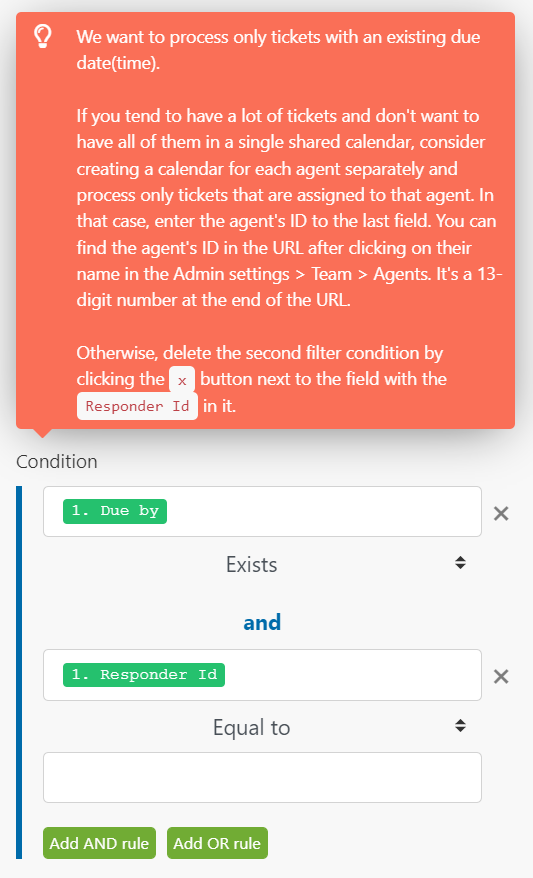
In this Make scenario, an event is automatically created in an individual support agent's Microsoft 365 Calendar whenever a due date is added to one of their Freshdesk tickets. Furthermore, the integration is intelligent enough to update the calendar event automatically if the due date changes in Freshdesk. This real-time synchronization ensures that agents' calendars are always up-to-date, providing them with accurate reminders and helping them stay on top of their workload without manual adjustments. This proactive approach to deadline management significantly reduces the risk of missed commitments and enhances agent productivity.
Automating the Busy Work Out of Customer Support
Customer support is undeniably the backbone of any successful company. It's the direct line to your customers, providing crucial feedback and ensuring their satisfaction. However, the nature of support work—dealing with a vast array of varied and often time-sensitive issues—demands a unique blend of resourcefulness and problem-solving skills that are not always easy to find. Indeed, it's one of the most challenging roles within any organization.
At GrowwStacks, our mission is to simplify this complex landscape for you. The automation scenarios outlined in this guide offer practical, real-world solutions designed to tackle even the most intricate customer support cases. By offloading repetitive and administrative tasks to automated workflows, your team can redirect their energy and expertise towards resolving critical customer issues that truly require human intervention.
Implementing these integrations will not only make your team's job easier but also empower them to deliver the highest standard of support in your industry. By streamlining operations and reducing manual effort, you create an environment where agents can thrive, customers feel valued, and your business can flourish. If you're looking to extend the power of automation to other areas of your business, explore our comprehensive guide on 25 simple workplace automation ideas covering operations, HR, project management, sales, and marketing.