Managing invoices can often feel like a significant burden for businesses of all sizes. The process is frequently time-consuming, leading to a backlog of tasks and potential errors. It can also be quite expensive, considering the human hours dedicated solely to handling these documents, and draining, as it diverts energy from more critical business functions.
Fortunately, automation offers a powerful solution to these common challenges. By implementing automated systems, companies can transform their invoice processing from a manual, error-prone chore into a streamlined, efficient operation. This guide will explore seven practical ways to automate your invoicing, helping you save countless hours and improve your financial management.
Why Should You Automate Your Invoicing Process?
Automating your invoicing process brings a multitude of benefits that extend beyond mere convenience. Consider the financial implications: an average accounting employee can process only about five manual invoices per hour, with each invoice taking approximately 12 minutes to handle. This includes tasks like data entry, proofreading, corrections, and final processing.
When you factor in the average salary of an Accounts Payable Clerk, which is around $39,950 per year or $19.21 per hour, each manual invoice costs nearly $4 to process. In contrast, an automated system, even with the combined monthly subscription costs for invoicing software and an automation platform, can process dozens of invoices for the equivalent of just one hour of an employee's time. This stark difference highlights the immense cost savings potential.
Beyond the financial savings, invoice automation offers several other compelling advantages. It significantly reduces the likelihood of human error, which can be costly in financial operations, and accelerates the entire fulfillment process. Automation also enhances employee productivity by freeing up staff from repetitive tasks, allowing them to focus on more strategic work. Furthermore, it improves transparency across the workflow, providing clearer insights into financial data and facilitating better analytics and auditing.
What Are the Two Main Invoice Types?
Understanding the two primary types of invoices is crucial for effective automation, as each serves a distinct purpose and requires a tailored approach. Depending on your business model, you will typically issue invoices either before or after receiving payment from your clients.
The distinction between these invoice types is important because it dictates the focus and objectives of your automation efforts. Whether you're requesting payment or confirming a transaction, automation can be configured to optimize each specific scenario, ensuring accuracy and efficiency throughout your financial operations.
Before Payment
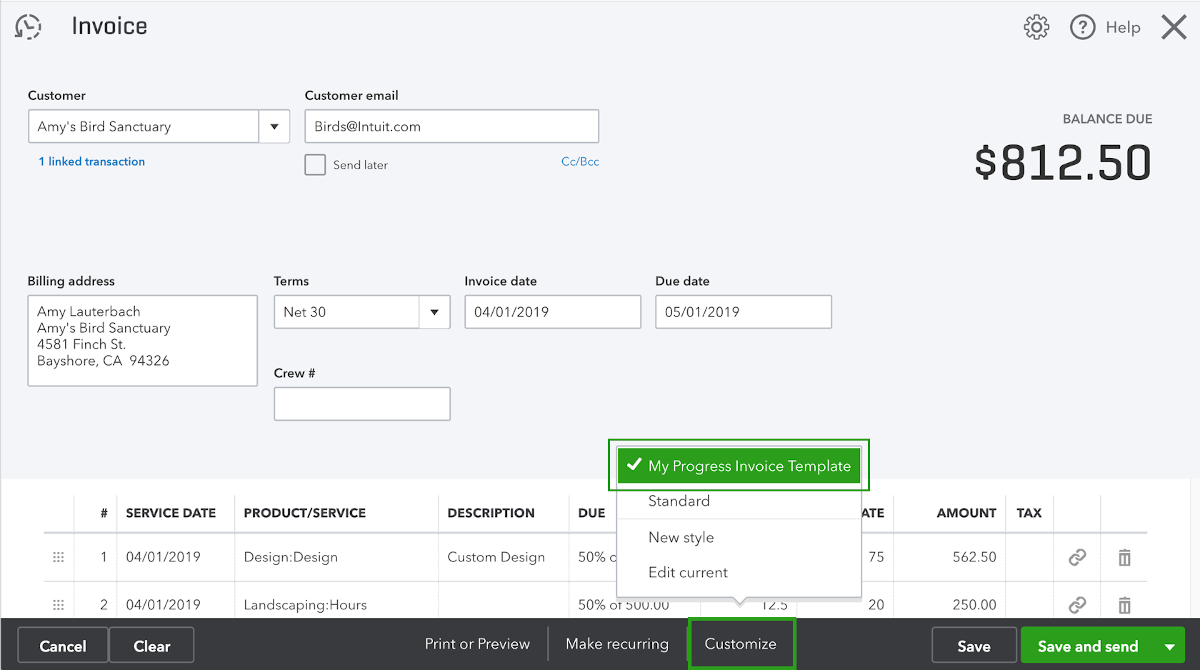
Invoices issued before payment are common in business-to-business (B2B) professional services. These invoices function as formal payment requests, detailing the products or services provided and specifying the amount due. Often referred to as "accounts receivable" for the issuing company and "accounts payable" for the client, these documents typically include a payment deadline, such as 15 or 30 days from the issue date.
For this type of invoice, automation can significantly accelerate the payment cycle and improve financial oversight. Key automation opportunities include automatically generating and sending invoices to clients, registering these invoices directly into your accounting software to maintain a clear view of your accounts receivable pipeline, and setting up automated reminders to ensure timely payments are received.
After Payment
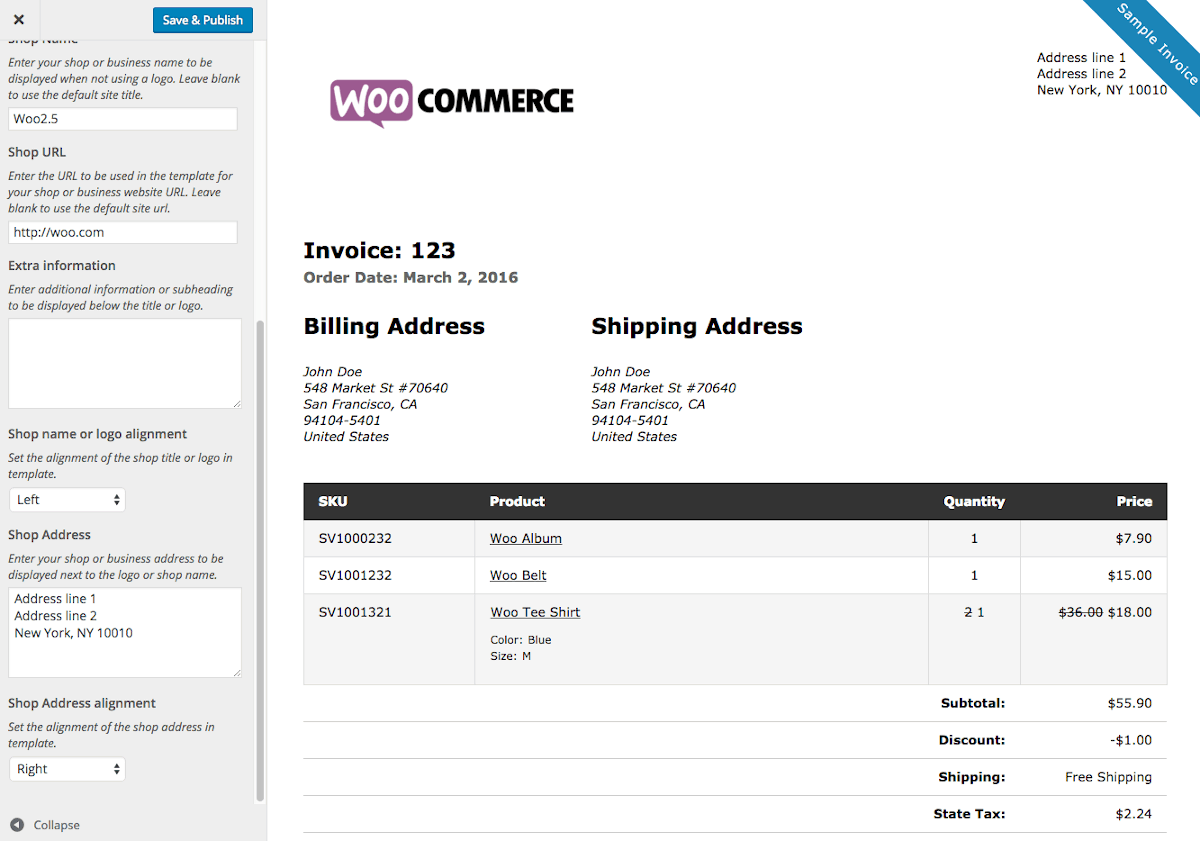
When invoices are issued after payment, they primarily serve as receipts for the customer, confirming that a transaction has been completed and providing proof for their record-keeping. This model is prevalent in e-commerce, where customers typically receive an invoice via email immediately after making a purchase.
In this scenario, automation plays a vital role in enhancing customer experience and streamlining internal bookkeeping. Automation can ensure that a copy of the invoice is promptly sent to customers as a receipt, automatically copies these invoices into your accounting software to simplify bookkeeping, and facilitates the automatic creation of invoices directly from payment data, thereby accelerating the overall sales process.
Now that we've clarified the fundamental differences between these invoice types, let's delve into seven specific ways you can automate invoice processing to benefit your business.
7 Invoice Processing Tasks You Can Automate
Automating your invoice processes can be approached in two main ways: by leveraging native integrations and features within your existing applications (like Stripe or QuickBooks) or by utilizing a dedicated automation tool such as Make. The best approach often depends on your business's specific needs and the complexity of your current workflows.
This section will explore seven practical methods for automating invoice processing. Some of these solutions are built into popular software, while others can be easily implemented using a flexible automation platform like Make. By adopting these strategies, you can significantly reduce manual effort, minimize errors, and free up valuable time for your team.
1. Generate a Receipt for Every Order in Your Online Store
Manually creating an invoice or receipt for every single order that comes through your e-commerce store is an incredibly repetitive and time-consuming task. This manual effort not only consumes valuable staff hours but also introduces a high risk of data entry errors and inconsistencies, which can lead to financial discrepancies and customer dissatisfaction.
Automation provides a robust solution by ensuring that an invoice is generated accurately and consistently for every order, without human intervention. Many e-commerce platforms offer plugins or built-in features for this purpose. For instance, WooCommerce users can utilize Webtoffee’s PDF invoice generator, while Shopify users might opt for Order Printer Pro. Alternatively, a custom automation solution built with Make can automatically create invoices in your accounting system whenever an order is completed on your platform, regardless of its native capabilities.
Pro tip: Use this template to create an invoice in QuickBooks every time an order is completed on Shopify, ensuring no sale goes unbilled.
2. Use Forms to Automate Invoice Creation
For businesses that issue invoices before payment, integrating forms into your workflow is an excellent way to implement a "hands-off" invoicing process. By having customers directly fill out a form with all the necessary details, you can significantly reduce the manual effort required from your team. This method ensures that all relevant information is captured accurately and consistently from the source.
Forms offer several advantages: they enforce consistency by defining specific fields for information, making data mapping straightforward. They are also user-friendly, as most people are familiar with filling out online forms, requiring minimal explanation. Furthermore, non-technical tools like Typeform, JotForm, or Paperform make it easy to design, edit, and manage these forms without needing extensive technical expertise. Once submitted, the data from these forms can be automatically used to generate invoices in your accounting software, streamlining the entire creation process.
Pro tip: Leverage this template to create an invoice in Freshbooks automatically when a form is submitted in Typeform, populating invoice fields with the provided answers.
3. Automatically Invoice Your Customers
While it might seem obvious to send an invoice when payment is due, human error can easily lead to missed or delayed invoices. The manual process of copying, pasting, and entering data often results in details falling through the cracks, which can impact cash flow and customer relationships.
Automating the dispatch of invoices ensures that every single invoice generated in your system is promptly sent to the correct customer. Solutions like Zoho and QuickBooks offer features for managing recurring invoices, ensuring that clients billed on a regular schedule receive their documents without fail. For one-off payments or irregular billing, an automation tool like Make can detect when a new invoice is created and automatically send it to the appropriate contact, effectively eliminating this tedious administrative task from your to-do list.
4. For Freelancers: Automatically Generate an Invoice Including Your Rate at End of Every Month
Freelancers often find themselves deeply involved in invoicing, as they typically need to issue invoices regularly to multiple clients to get paid for their services. This often involves calculating hours worked, applying specific hourly rates, creating the invoice document, and then sending it out. As their client base and projects grow, this process can quickly become a significant administrative burden.
Errors or delays in invoicing can directly impact a freelancer's bottom line. Automating invoice creation ensures that bills are generated accurately and on time, every time. Time-tracking solutions such as Harvest and Toggl allow freelancers to precisely log their work, and when integrated with invoicing software via a platform like Make, they can automatically generate detailed invoices. This integration ensures that all billable hours are accounted for and correctly priced, allowing freelancers to focus more on their core work rather than administrative tasks.
5. Receive a Reminder When an Invoice is Due
Invoices issued before payment inherently come with a deadline, typically 15 or 30 days from the issue date. However, clients can sometimes overlook these deadlines, leading to delayed payments. Missing an invoice deadline, whether as the issuer or the payer, can have negative consequences, including delayed payments, potential late fees, and a strained business relationship.
To proactively prevent these uncomfortable situations, setting up automated reminders is highly beneficial. Most modern invoicing tools, such as QuickBooks and Invoice Ninja, include features that send email alerts when an invoice is due. For more customized notifications, you can use an automation platform like Make to integrate your invoicing software with your preferred communication tool, such as Slack. This way, you receive instant notifications when an invoice is created or approaching its due date, ensuring you or your clients never miss a payment.
6. Store a Copy of Every Invoice Created in Your Accounting Software for Easy Reference
Maintaining a comprehensive and accurate paper trail of all financial operations is a cornerstone of sound invoicing and financial management. This practice is essential for several critical reasons: it ensures transparency, allowing both your accounting department and customers to easily track and verify invoice statuses; it facilitates auditing processes by providing readily accessible records of every financial transaction; and it is paramount for effective accounts receivable management, ensuring all records are up-to-date for timely payment collection.
Relying solely on manual tracking or individual team members to keep tabs on invoices is inefficient and prone to error. Your accounting software should serve as the central, real-time repository for all relevant invoice information. Platforms like Zoho Suite and QuickBooks offer integrated solutions that consolidate financial data. Many accounting tools also provide integrations with complementary services like Harvest and Xero. For ultimate flexibility, Make allows you to automatically forward invoice data from various sources directly into your accounting software, ensuring proper storage and accessibility regardless of the origin of the invoice.
7. Keep a Copy of Invoices in a Safe Place
While integrating invoices into your primary accounting software is crucial, it's equally important to maintain redundant copies in a separate, secure location. This practice safeguards your financial records against potential issues such as system failures or data loss within your main accounting platform. Furthermore, it provides a convenient way to share invoice access with collaborators without granting them full, potentially sensitive, access to your core accounting system.
Implementing this backup strategy doesn't require significant manual effort. You can easily automate this process by setting up a workflow that automatically copies every newly created invoice to a secure cloud storage solution like Google Drive. This ensures that your records are always protected and accessible, enhancing both data security and operational flexibility.
Bonus: Automate Your Whole Invoicing Workflow for Complete Autonomy
The most advanced and impactful approach to invoice automation involves integrating all your accounting and invoicing software and processes into one comprehensive automation workflow. By selectively applying the tips and tricks discussed in this article, you can design a custom scenario that seamlessly connects every stage of your invoicing and fulfillment process.
For example, a single, end-to-end automation could encompass several steps: automatically copying customer details into your invoicing software, creating an invoice upon receipt of payment or an order, securely storing the new invoice in both your primary accounting system and a backup location, sending the invoice to the customer, and setting up reminders for upcoming payment due dates. While establishing such a complete automated process requires an initial investment of time, the long-term benefits are substantial. Companies like Accenture have reported dramatic improvements, with invoicing speeds increasing from an average of three days to under ten minutes, alongside a 0% reduction in spreadsheet data entry errors. This level of automation saves significant time, resources, and money, allowing your business to operate with unparalleled efficiency and accuracy.