
In today's remote-first world, companies are increasingly hiring talent from across the globe, bringing unprecedented opportunities but also new challenges. One of the most significant hurdles for remote organizations is effective onboarding. While the shift from a local to a global talent pool is exciting, it also means traditional onboarding methods often fall short.
This article will explore the intricacies of remote onboarding and demonstrate how automation can transform this critical process. By streamlining tasks and enhancing the new hire experience, automation not only addresses common remote work challenges but also unlocks greater efficiency and satisfaction for both employers and employees.
Regular onboarding vs remote onboarding: What’s the difference?
Consider the typical first day at a new job in a traditional office setting. It often involves a physical office tour, face-to-face introductions to the team, getting set up at a designated desk, and receiving initial tasks directly from a manager. These activities are designed to immerse a new employee into the company culture and workflow.
For remote workers, these fundamental onboarding elements still apply, but they manifest differently. Office tours become virtual walkthroughs, team introductions happen via video conferencing, and task assignments are managed through digital productivity tools. However, remote environments introduce additional complexities that require careful consideration.
These environmental shifts can create friction, leading to a new set of challenges for both companies and new hires. These include:
- Disparate time zones
- Unexpected interruptions
- More nuanced cultural differences
- Bigger potential for misunderstandings and miscommunication
- Lack of “organic” communication between colleagues and teams
- Difficulties in transmitting certain company culture aspects
- Higher reliance on technology
- Heightened need for soft skills and proactive communication
- Need for more thorough documentation and other digital assets
Consequently, traditional onboarding workflows need to be adapted and optimized for the remote context. This is precisely where automation becomes invaluable, offering solutions to mitigate these challenges and create a more seamless experience.
Benefits of automating the remote onboarding process
Automating the remote onboarding process offers substantial advantages for both businesses and their new hires. The primary objective is to enhance every facet of the experience, making it more efficient, engaging, and personalized for all involved parties. For companies, this translates into tangible operational improvements and cost savings.
Automated onboarding facilitates smoother operations for asynchronous teams spread across different time zones, significantly reduces errors in data collection and paperwork, and ultimately saves valuable time and money. For new employees, the benefits are equally impactful, providing a less stressful adjustment period, shorter onboarding times, and a personalized journey that ensures no time or resources are wasted. To illustrate the power of automation in this context, let's explore some specific examples of how it can be applied.
9 remote onboarding steps you can automate
An organized and clearly defined onboarding workflow is paramount for successfully integrating new employees, especially in a remote setting. While such standardization is often associated with larger corporations, there's no reason why any company, regardless of size, shouldn't adopt it.
Breaking down the onboarding process into actionable, repeatable steps ensures efficiency, transparency, and accountability. This structured approach minimizes confusion and provides a consistent experience for every new hire. With this in mind, we will now delve into a 9-step onboarding process and demonstrate how each stage can be effectively automated.
From preparing essential paperwork to assigning initial tasks, the following automated steps are designed to add significant value to your remote onboarding process, making it more robust and user-friendly. Let's explore how to implement these automations.
1. Get the paperwork out of the way
The initial phase of any onboarding process inevitably involves a substantial amount of paperwork. From employment contracts and tax forms to health insurance documents, the sheer volume can be overwhelming for both the new hire and the HR department. This administrative burden is often a source of delays and potential errors.
Fortunately, this is an ideal area for automation. By digitizing these processes, companies can significantly reduce manual effort and minimize the risk of mistakes. Automation ensures that all necessary documents are presented, signed, and filed correctly and promptly.
Using a platform like Make.com, you can integrate e-signature solutions to manage document signing. This setup allows HR managers to track the completion status of all documents in real-time within a spreadsheet, providing an immediate overview of what's completed and what's still pending. This not only speeds up the process but also enhances accuracy and compliance.
2. Accelerate the collection of a new hire’s personal information
Manual data collection is notoriously prone to inconsistencies and errors, making it a bottleneck in the onboarding process. Implementing automated data entry solutions can significantly smooth out this critical step, ensuring accuracy and efficiency from the outset.
To automate the collection of personal information, HR departments can leverage online form-building tools. These tools allow for the creation of comprehensive personal information surveys that new employees can easily complete during their onboarding journey. Popular options include JotForm, Cognito Forms, and Survey Anyplace, which offer user-friendly interfaces and robust data collection capabilities.
Once the new hire submits their information, Make.com can be configured to automatically transfer these form answers into a designated spreadsheet, a document, or directly into a productivity tool. This seamless integration ensures that all necessary data is captured accurately and made available for subsequent evaluation and record-keeping without any manual intervention.
3. Keep your team up to date about new hires automatically
Keeping every team member informed about new hires can be particularly challenging for companies experiencing rapid growth, those with high employee turnover rates (like large retail or e-commerce giants), or both. In a remote environment, the risk of a new employee feeling overlooked or forgotten on their first day is even higher, which can negatively impact their initial experience and long-term engagement.
An automated scenario can effectively address this challenge by ensuring that relevant team members and managers are promptly notified whenever someone new joins the company. This proactive communication fosters a welcoming atmosphere and prepares the team for the new arrival.
By setting up an automation that triggers a notification in your preferred communication platform (e.g., Slack, Microsoft Teams) upon a new hire's official start, you can include essential details like their name, role, and a brief introduction. This simple step helps integrate new employees smoothly and ensures they feel acknowledged and supported from day one.
4. Give access to the tech stack
Providing new employees with access to the necessary software, platforms, and tools (the "tech stack") can quickly become a time-consuming and error-prone manual process. Manually sharing usernames and passwords for multiple applications, or worse, storing them in insecure spreadsheets, poses significant security risks and administrative overhead.
Automating this step is crucial for efficiency and security. Make.com can be instrumental in automatically creating user profiles and accounts across various systems as soon as a new hire's contract is finalized. This means that by the time their first day arrives, their access is already provisioned, eliminating delays and manual effort.
By integrating your HR system with identity management tools through Make.com, you can ensure that new employees gain immediate and secure access to all required applications without any manual intervention. This not only saves HR and IT teams considerable time but also provides a seamless and professional experience for the new hire.
5. Create lines of communication
In a physical office, spontaneous conversations and casual interactions naturally build camaraderie and facilitate information exchange. However, replicating this organic communication in a remote setting is challenging, requiring intentional strategies and the effective use of digital tools.
In the remote work era, communication primarily occurs through platforms like Slack, Microsoft Teams, Zoom, and Google Meet. These tools, while powerful, need to be leveraged strategically to foster connection and ensure new hires feel integrated into the team.
HR can utilize the bot and automation capabilities within these communication tools. For example, setting up an automated welcome message to introduce new employees to their team members and key stakeholders is highly effective. This message can include repetitive but crucial information, saving HR from typing the same details repeatedly.
A simple Make.com template, such as a greet bot managed from Airtable, can automate these welcome messages. This ensures every new hire receives a consistent and warm introduction, making them feel part of the team from the moment they join.
6. Send out reading materials
Providing new employees with essential reading materials is a fundamental part of onboarding. However, simply "dumping" a large handbook on their virtual desk can be overwhelming and ineffective, potentially leading to information overload and wasted time. A more strategic approach is needed to ensure information is absorbed efficiently.
A robust knowledge base tool becomes an invaluable asset here. It allows companies to distribute information in a user-friendly, organized, and easily searchable manner. This not only aids new employees in finding answers independently but also reduces the number of repetitive questions directed to HR or managers.
Automation tools like atSpoke can further enhance this experience by integrating with communication platforms. New employees can ask questions directly in Slack, and the system can automatically pull relevant answers from the knowledge base. This creates a self-service model for information retrieval, empowering new hires and freeing up valuable time for support staff.
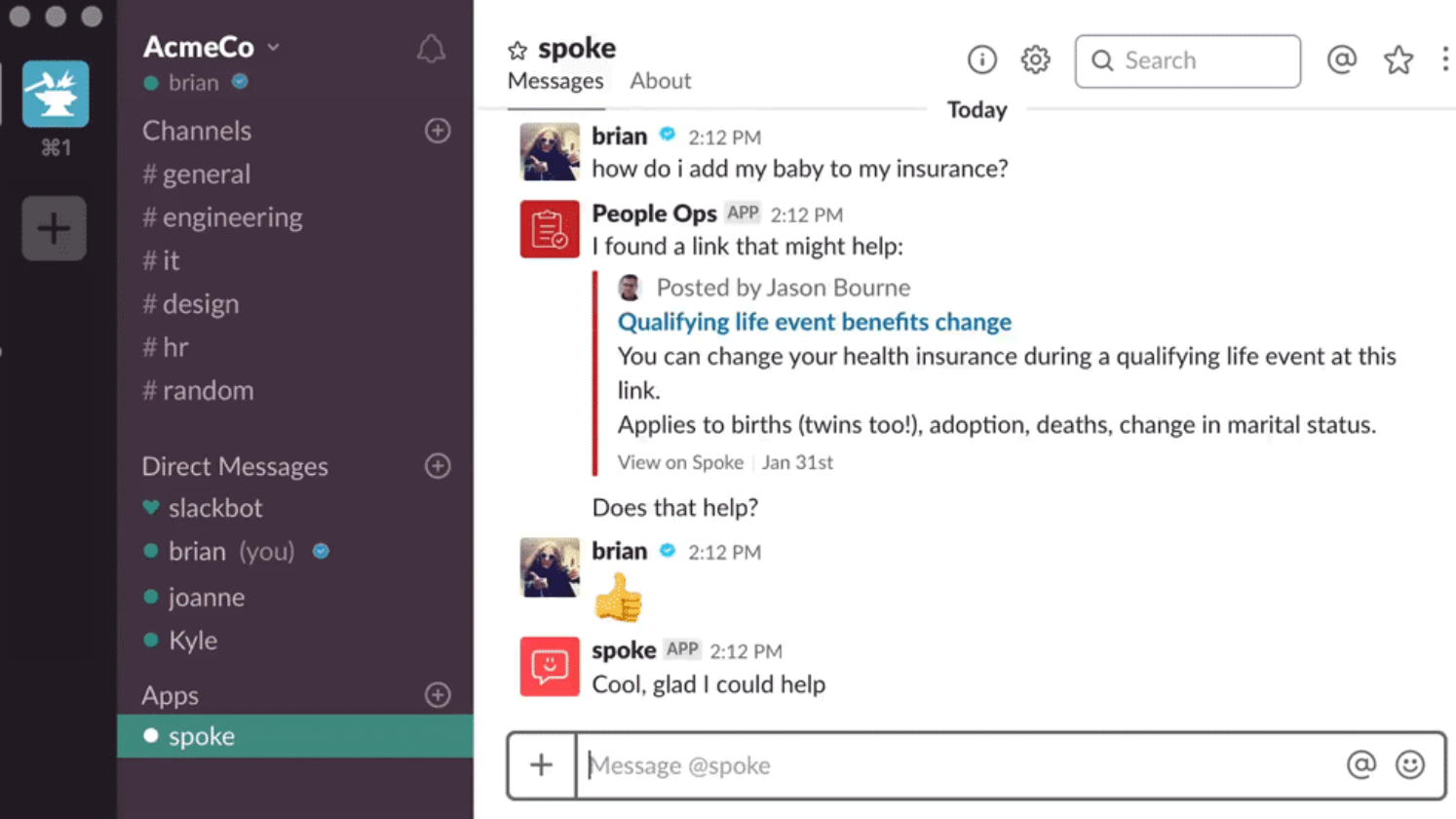
Pro tip: Regularly update your knowledge base with frequently asked questions and new company policies to ensure new hires always have access to the most current information. This proactive approach minimizes confusion and boosts productivity.
7. Meeting time: Introduce stakeholders
While remote settings may preclude traditional "first lunch" gatherings, it remains crucial for new hires to virtually meet and connect with key stakeholders and team members. These introductions are vital for building relationships, understanding team dynamics, and grasping the organizational structure.
Video conferencing tools make these virtual meetings possible, but the administrative tasks associated with organizing them can be cumbersome. Setting agendas, scheduling meetings across different time zones, sending invitations, and issuing reminders often consume significant time and effort for HR or managers.
Tools like Calendly can simplify the scheduling process by syncing calendars and automating reminders. However, even with these tools, people can still forget. Adding an extra layer of automated notifications ensures that all participants are reminded of upcoming meetings, minimizing no-shows and ensuring a smooth introduction process. This proactive approach helps new hires feel valued and connected.
8. Start on the right foot with clear goals
The employee onboarding experience profoundly influences a new hire's future performance, well-being, and job satisfaction. A well-structured onboarding process that includes clear goal setting is essential for their long-term success and integration into the company.
Regardless of the performance tracking methodology used (e.g., OKRs, KPIs), establishing clear objectives from the outset helps new employees understand expectations and contributes to their early achievements. While the actual setting of objectives requires direct communication and is an ongoing dialogue, automation can play a significant role in keeping these goals prominent and actionable.
By integrating Make.com with tools like Databox or Mixpanel, companies can automate the feeding of performance data into dashboards. This provides real-time visibility into progress and allows for the setup of timely reminders for both new hires and their stakeholders. This ensures that goals remain front and center, facilitating continuous monitoring and support.
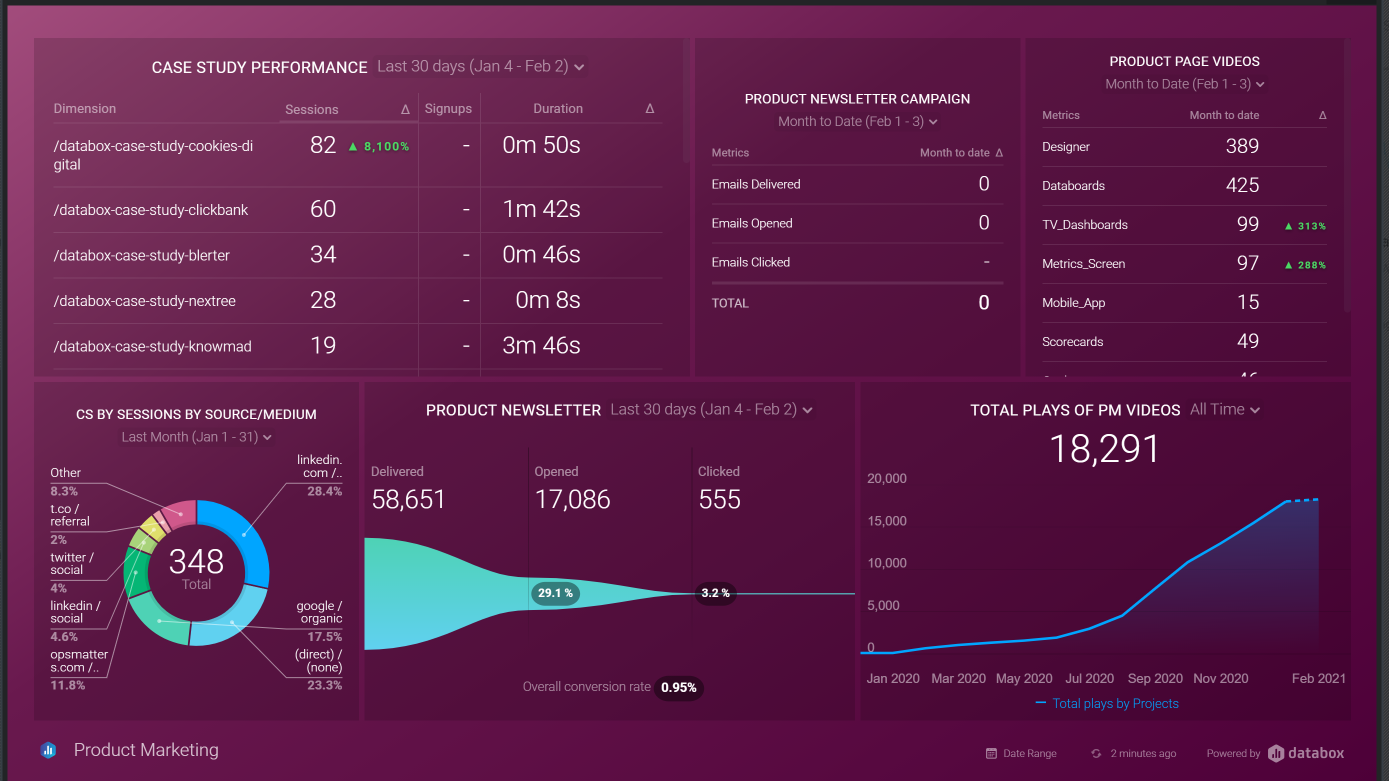
Pro tip: Configure automated alerts in your dashboard tools to notify managers when a new hire's progress deviates from their initial goals. This allows for timely intervention and support, ensuring they stay on track.
9. Encourage feedback (and stay on top of it)
Remote employee onboarding is an evolving process, and HR and recruiting teams often face a learning curve as they adapt to new challenges. It's likely that initial remote hires might experience some bumps along the way, making continuous improvement essential for providing a better experience over time.
The most effective way to refine and enhance the onboarding process is through consistent feedback collection and actively applying the lessons learned. This iterative approach ensures that the process becomes more robust and user-friendly with each new hire.
To stay on top of feedback, it's beneficial to centralize all incoming responses in one accessible location. Furthermore, setting up automated notifications for new feedback submissions ensures that no valuable input is missed. A simple automated scenario can be configured to send alerts to your preferred communication platform (e.g., Slack, email) whenever a new feedback form is completed.
This automation ensures that HR teams are immediately aware of new feedback, allowing them to review, analyze, and implement changes promptly. This makes the feedback loop efficient and convenient, leading to a continuously improving remote onboarding experience.