
Understanding Shopify Cart Abandonment
Running an online store comes with many operational challenges, but few are as frustrating - or costly - as shopping cart abandonment. Industry research shows the average abandonment rate across ecommerce sits at nearly 70%, meaning seven out of ten shoppers who add items to their cart ultimately leave without completing their purchase.
This phenomenon represents significant lost revenue potential. Customers abandon carts for various reasons including unexpected shipping costs, complicated checkout processes, or simply getting distracted. The key insight is that most abandonment happens after purchase intent has been established - these are warm leads who were genuinely interested in your products.
Pro tip: The first hour after abandonment is the most critical window for recovery attempts. Customers are 3x more likely to complete their purchase if contacted within this timeframe.
Make-Autopilot Integration Overview
Autopilot is a powerful marketing automation platform that specializes in customer journey mapping across email, web, SMS and direct mail channels. While it integrates with hundreds of apps, Shopify isn't natively supported - which is where Make comes in.
This integration creates a seamless workflow where:
- Make monitors your Shopify store for newly abandoned carts
- Customer and cart data is captured and formatted
- This information is passed to Autopilot
- Autopilot triggers personalized email sequences
- Customers receive timely reminders with direct links back to their abandoned carts
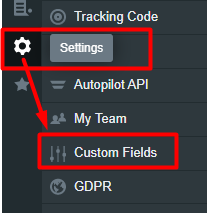
Setting Up Custom Fields in Autopilot
Before building your automation, you need to configure Autopilot to properly track Shopify cart data. This requires creating two custom fields:
Shopify URL abandoned cart
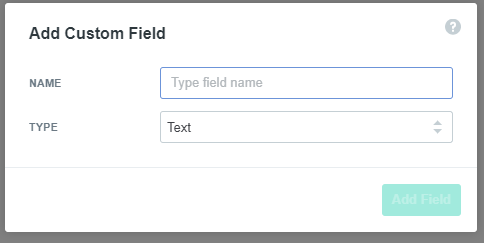
This text field will store the direct link to the customer's abandoned cart. When creating this field in Autopilot's settings, select "Text" as the field type. This allows you to include the full URL that will take customers back to their exact cart contents.
Shopify ID abandoned cart
Also a text field, this stores the unique cart identifier. Using text format (rather than number) ensures proper handling even if the ID starts with a zero. This field is particularly important for tracking replies and matching them to the correct abandoned cart record.
Configuring the Autopilot Journey
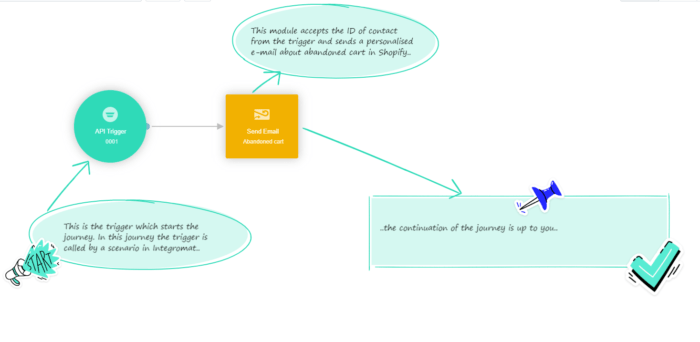
With your custom fields created, you can now build the recovery journey in Autopilot. This process uses two key modules:
API Trigger
This module receives the cart data from Make and initiates the customer journey. Configure it to accept the Shopify cart URL and ID you created earlier. Ensure you enable the option to allow contacts to enter the journey multiple times, as customers may abandon multiple carts.
Send Email
This module delivers your recovery emails. When setting it up, be sure to enable reply tracking so you can monitor customer responses. The email content should include the personalized cart link using the custom field you created earlier.
Pro tip: Structure your journey to send multiple follow-ups if the first email goes unanswered. Typical sequences include an initial email within 1 hour, a reminder at 24 hours, and a final offer at 72 hours.
Creating Effective Recovery Email Templates
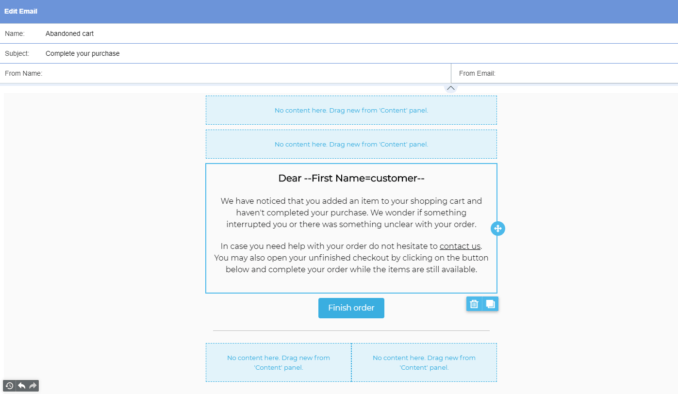
Your recovery emails need to strike the right balance between urgency and value. Here are key elements to include:
Personalized Cart Contents
Reference specific products the customer left behind using Shopify's cart data. This reminds them what they were interested in and makes the email feel tailored.
Clear Call-to-Action
Use your custom URL field to create a prominent button linking directly back to their cart. Make the next step as frictionless as possible.
Incentive (Optional)
Consider offering a small discount or free shipping to overcome any hesitation. Even 5-10% can significantly boost recovery rates.
Building the Make Automation Scenario
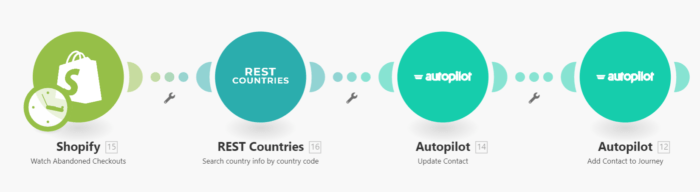
The Make scenario acts as the bridge between Shopify and Autopilot. It consists of four key modules:
Watch abandoned checkouts on Shopify
This trigger module monitors your Shopify store for new abandoned carts. Configure the polling interval based on your store's volume - every 15-30 minutes is typical.
Search country info by country code (Optional)
This REST Countries module enriches customer data with location information, helpful for international stores.
Update contact in Autopilot
This module creates or updates the customer record in Autopilot, including the custom cart URL and ID fields you created.
Add contact to Autopilot journey
The final module triggers the recovery journey in Autopilot, starting the email sequence.
Cart Recovery Best Practices
To maximize your recovery rates:
Timing is Critical
Send your first email within 60 minutes of abandonment when purchase intent is highest. Follow up within 24 and 72 hours for maximum effectiveness.
Test Different Approaches
Experiment with various subject lines, email content, and incentives to see what resonates best with your audience.
Monitor and Optimize
Regularly review your recovery rates and tweak your approach. Even small improvements can significantly impact your bottom line.