
Social Media Automation Instagram Telegram Pinterest

Auto Post from Instagram to Telegram, Pinterest and Other Social Media Platforms

Learn how to automatically post from Instagram to Telegram, Pinterest and other platforms with this step-by-step automation guide.

Automated social media posting workflow diagram

Configuring the Scenario

This automation scenario watches for your new posts on Instagram, downloads the files, and posts them to Telegram and Pinterest. The implementation requires intermediate skills and takes approximately 20 minutes to set up.

Before starting, ensure you have a Telegram account with a configured bot, Instagram and Pinterest accounts with all connections added, and basic understanding of how to use routers, filters, and array aggregators in your automation platform.

Pro tip: The Instagram module can only watch for your own new posts on your account, not other users' content.

The scenario consists of several key modules that work together to automate your social media posting:

  • Instagram → Watch my account
  • Router
  • Instagram → Download a media file
  • Array Aggregator
  • Instagram → Get media album
  • Telegram Bot → Send a document/image
  • Pinterest → Create a pin
  • Telegram Bot → Send a video
  • Telegram Bot → Send an album (media group)
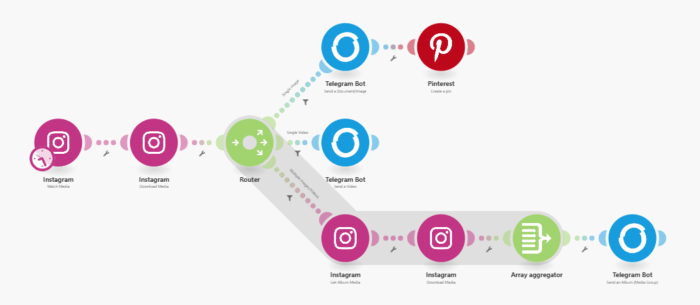
Full automation scenario overview
Complete workflow diagram showing all modules and connections

Adding Router, Telegram and Pinterest Modules (Top Route)

The first route in our automation handles single image posts from Instagram. After the initial Instagram watch module, we add a router that splits the scenario into three routes, each with specific filters.

The top route filter only allows single image files to pass through to subsequent modules. You'll set this up by mapping the Media type element to the filter field, selecting "Contains (case insensitive)" as the operator, and typing "IMAGE" in the comparison field.
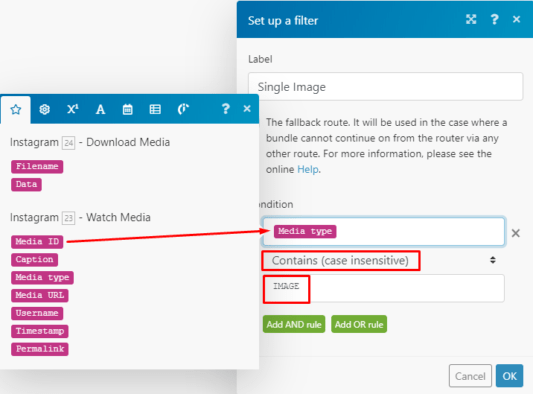
Filter configuration for image posts
Filter setup to process only single image posts

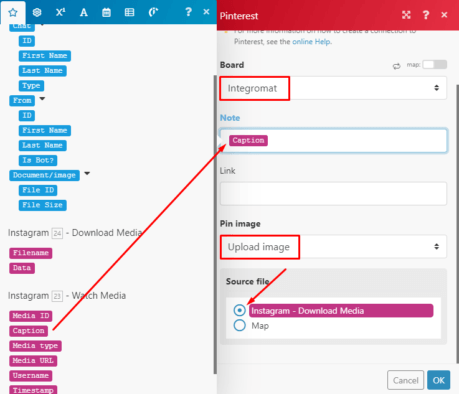
After the filter, configure the Telegram Bot module to send the image to your channel. You'll need your Chat ID (available through Telegram bot commands) and to map the caption from Instagram. Select "Data" in the Send by field and choose the downloaded media file as the source.

Adding Telegram Module (Middle Route)

The middle route processes single video posts from Instagram. The filter setup is similar to the image route but uses "VIDEO" as the comparison value instead.

Configuration of the Telegram video module mirrors the image module setup - using the same Chat ID and caption mapping. The key difference is that this route doesn't include Pinterest posting, as Pinterest's API handles videos differently than images.

Pro tip: For platforms that don't support direct video posting, consider uploading to YouTube first and then sharing the link.

Adding Instagram and Telegram Modules (Bottom Route)

The bottom route handles Instagram carousel albums (posts with multiple images/videos). The filter uses "CAROUSEL_ALBUM" as the comparison value to identify these posts.

This route requires additional modules to process multiple media files. The Instagram Get Album Media module retrieves all files from the post, which are then downloaded and aggregated into a single array before being sent to Telegram as a media group.
Array aggregator configuration
Array aggregator setup for processing multiple media files

Frequently Asked Questions

Common questions about automating Instagram posts to other platforms

The automation watches for new posts on your Instagram account, downloads the media files, and automatically posts them to your Telegram channel or group. It handles different media types including single images, videos, and carousel albums.

The system uses Instagram's API to detect new posts, then processes each media type through specific routes in the workflow before delivering to Telegram with the original captions and formatting intact.

The system supports three types of Instagram posts: single image posts, single video posts, and carousel albums containing multiple images/videos. Each type is processed through different routes in the automation workflow.

Reels and Stories currently require different approaches as they use separate APIs. The basic workflow can be extended to support these formats with additional configuration.

Basic understanding of automation tools is helpful but not required. The guide provides step-by-step instructions. You'll need to configure your Telegram bot and obtain channel IDs, which are clearly explained.

Key technical requirements include:

  • Creating a Telegram bot via BotFather
  • Adding your Instagram account to the automation platform
  • Understanding basic filter logic for routing different post types

Absolutely. The workflow is designed to be extensible. You can add modules for Twitter, Facebook, Tumblr or any other platform that has an API or integration available in your automation tool.

Each additional platform may require slight modifications to handle its specific media requirements, but the core Instagram processing remains the same. The router makes it easy to add new destinations.

When properly configured, the automation is highly reliable. It includes error handling for different media types and uses filters to ensure each post type is processed correctly through the appropriate route.

Monitoring is recommended to catch any API changes or temporary service interruptions. Most automation platforms provide logging to help troubleshoot any issues that may arise.

API changes would require updating the integration. We recommend monitoring the automation and subscribing to updates from your automation platform about any Instagram API changes that might affect functionality.

Major platforms typically provide advance notice of API deprecations and update their connectors accordingly. Having a notification system for failed executions helps identify issues quickly.

Yes! Our team can build fully customized automation solutions tailored to your specific social media workflows and platform requirements. We handle everything from simple cross-posting to complex multi-platform distribution strategies.

Custom solutions can include additional features like content moderation, scheduling, analytics integration, and platform-specific optimizations to maximize engagement across all your channels.

Need Custom Automation Help?

This guide is a starting point. Our team builds fully tailored automation systems for your specific workflow needs.