
Make.com SFTP SoundCloud Podcast Automation

Auto Upload Podcast Audio from SFTP to SoundCloud

Are you a podcaster, producer, or musician? This guide will show you how to overcome a cumbersome part of your job: uploading files to SoundCloud.

Podcast recording studio setup with microphones and audio equipment

The Problem

Many podcasters and audio producers face a tedious workflow when publishing episodes. After completing production, there are typically two manual steps required: downloading the audio file from a remote SFTP directory and uploading it to SoundCloud with the proper title and description.

This process often takes about 15 minutes per episode, with most of that time spent waiting for files to transfer. The delays come from SFTP download speeds and SoundCloud's upload limitations. For podcast teams releasing multiple episodes per week, this quickly adds up to significant lost productivity.

The Solution

We've developed an "Automation Sandwich" approach that combines automated processes with essential human input. This method starts with automation, inserts human decision-making where needed, then completes with more automation.

The key innovation is recognizing that while file transfers can be automated, podcast metadata (titles, descriptions) requires human creativity. Our solution handles the transfers automatically while providing an intuitive interface for the human elements.

Pro tip: This workflow can be adapted for other audio platforms beyond SoundCloud by simply changing the final upload module.

Step 1: File Retrieval and Preparation

The first part of our automation watches a designated SFTP folder for new podcast files. When a new audio file appears, the system automatically retrieves it and performs several formatting operations:

  • Applies regex patterns to clean filenames
  • Encodes special characters for URL safety
  • Converts to lowercase for consistency

After processing, the system saves the audio file to a temporary Dropbox location and sends a Slack notification to the production team. Error handling is built in to alert the team if any issues occur during SFTP transfer.
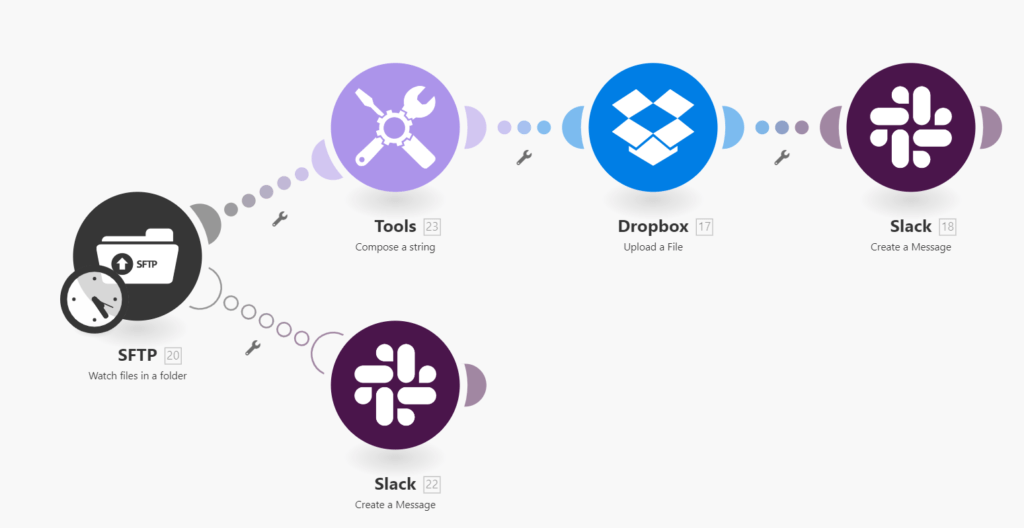
SFTP to Dropbox automation workflow diagram
Visualization of the automated file transfer process from SFTP to Dropbox

Step 2: Metadata Collection

The Slack notification sent to the team includes a link to a secure, pre-filled form where they can enter the podcast details. This form serves as the "filling" in our automation sandwich - the crucial human input point.

The form includes several fields to ensure complete episode information:

  • Guest name (if applicable)
  • Episode topic/description
  • Final filename (editable)
  • SFTP file path (auto-filled)

When submitted, this form triggers a webhook that passes all collected information to the final automation stage.
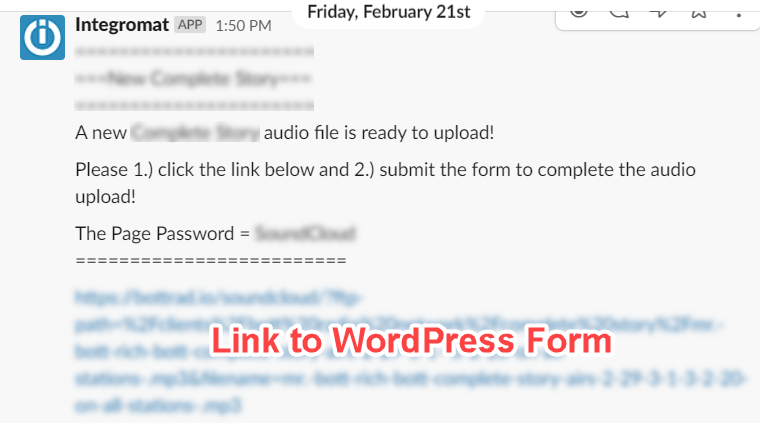
Slack notification interface for podcast metadata collection
Example Slack message prompting for podcast metadata input

Step 3: SoundCloud Upload

The final automation retrieves the audio file from Dropbox and uploads it to SoundCloud along with all the metadata provided through the form. This process includes:

  • Retrieving the formatted audio file
  • Applying the title and description
  • Handling SoundCloud's API requirements
  • Sending completion confirmation to the team

Upon successful upload, the system sends another Slack message confirming the new episode is live, completing the workflow. What previously took 15+ minutes now happens in just 2-3 minutes with minimal human intervention.
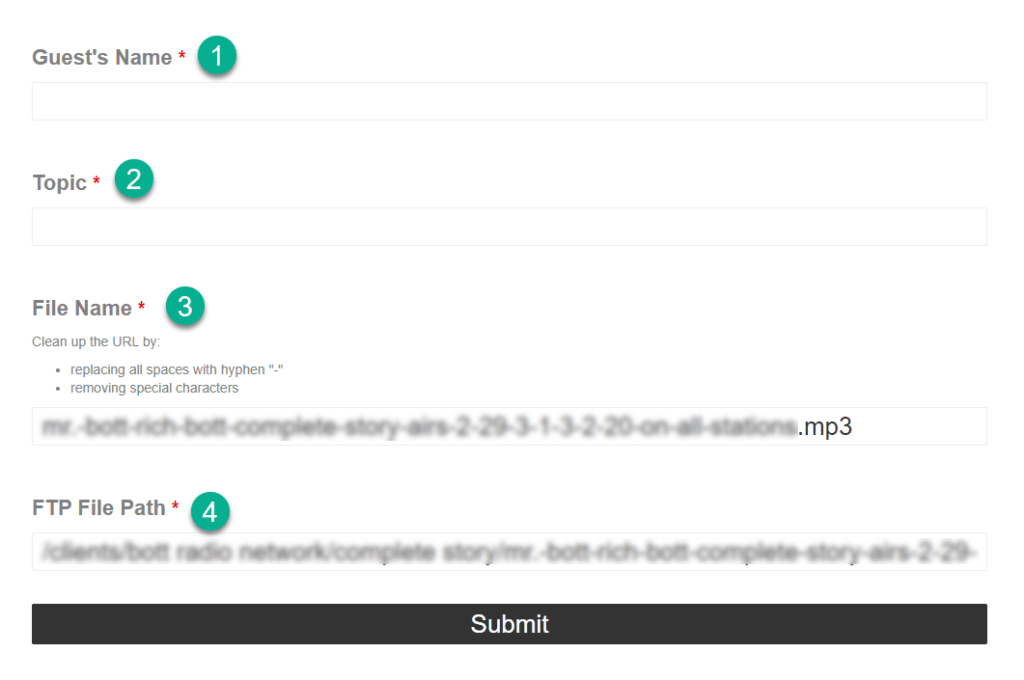
SoundCloud upload automation interface
Metadata form interface for podcast episode details

Frequently Asked Questions

Common questions about automating podcast uploads

The automation sandwich combines automated processes with human input. First, files are automatically retrieved from SFTP and stored in Dropbox. Then a human provides metadata via a form, which triggers the final automated upload to SoundCloud.

This approach recognizes that while file transfers can be fully automated, creative decisions like episode titles and descriptions benefit from human judgment. The sandwich model optimizes both aspects.

This workflow specifically handles MP3 audio files, which is the most common format for podcast distribution. The system watches for new MP3 files in the designated SFTP directory.

The workflow can be modified to support other formats like WAV or FLAC if needed, though MP3 is recommended for its balance of quality and file size.

Manual uploads typically take 15+ minutes per episode due to slow SFTP transfers and SoundCloud's upload process. This automation reduces that to just 2-3 minutes by handling the transfers in the background.

For podcast teams releasing weekly episodes, this saves nearly 11 hours per year - time better spent on content creation rather than file management.

Yes, the Slack notification system allows any authorized team member to provide the podcast metadata through the secure form interface, making it collaborative.

The system tracks who submitted each episode's details and can include this information in the final confirmation message for accountability.

The system includes error handling that sends specific Slack alerts to the team if any issues occur during file retrieval from SFTP, allowing for quick troubleshooting.

Common issues like connection timeouts or permission errors are automatically retried before alerting the team, reducing false alarms.

Yes, the form that collects human input can be customized to include any additional fields your podcast production workflow requires beyond the standard title and description.

Common additions include episode numbers, show notes, sponsor information, or custom tags for your content management system.

Our team at GrowwStacks specializes in building tailored automation solutions. We can adapt this workflow to your specific podcast production needs or create entirely new automations.

Whether you need to integrate with different platforms, add quality control steps, or scale for high-volume publishing, we can design a system that fits your exact requirements.

  • Custom platform integrations
  • Multi-show management systems
  • Advanced error handling

Need Custom Automation Help?

This guide is a starting point. Our team builds fully tailored automation systems for your specific workflow needs.