
What Make's AI can do for HR
360-degree feedback is a gold mine of HR insights, yet its value often goes untapped. Processing and analyzing all that data is slow and prone to bias, especially when it comes to open-ended comments. Traditional manual methods can take days to complete for each employee.
This is where Make and AI-driven HR analytics step in. By combining automated workflows with AI analysis, you can turn raw performance evaluations into structured reports in minutes, eliminating days of manual work while providing more consistent, data-driven insights.
Pro tip: AI analysis removes the recency bias common in manual reviews, where managers disproportionately weigh recent events over consistent performance patterns.
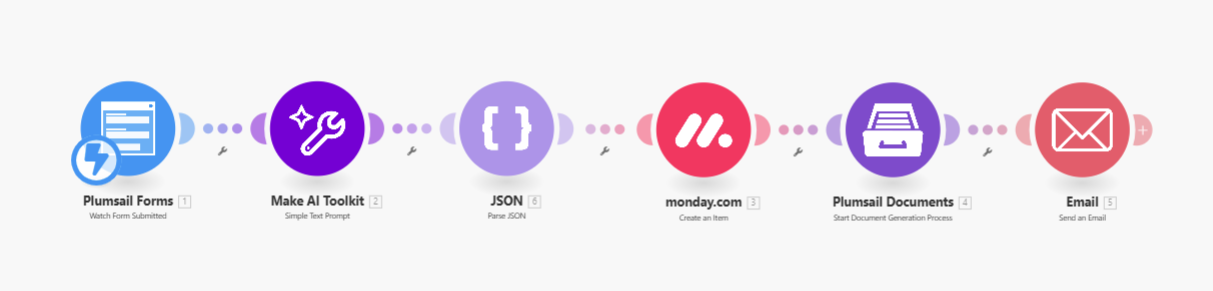
The Make scenario we'll build will:
- Trigger automatically when feedback questionnaires are submitted
- Send responses to AI for comprehensive analysis
- Extract employees' strengths, development areas, and recommendations
- Save original responses and AI analysis to your database
- Generate ready-to-use performance documents (PDF, PPTX, or images)
- Instantly report to relevant managers and HR personnel
Step-by-step: Build 360-degree feedback automation in Make
Here's how to construct your own HR automation in Make that transforms feedback collection into actionable insights.
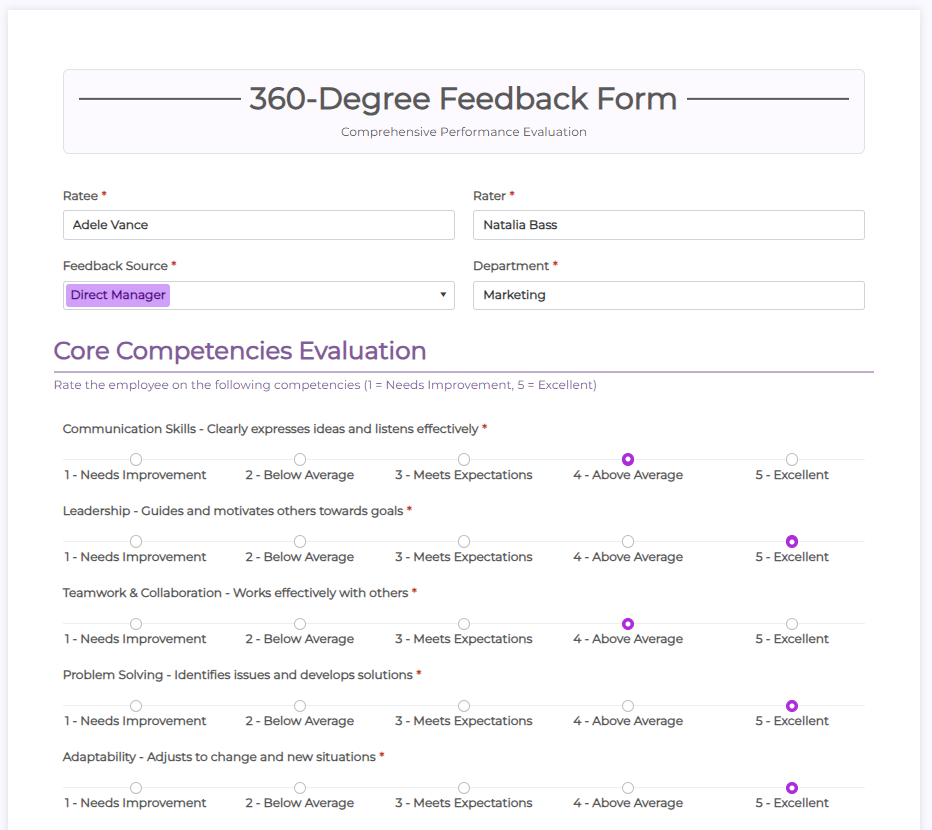
Step 1: Watch for form submissions
The scenario begins when new feedback is received through your chosen form platform. Popular options include:
- Plumsail Forms (used in this example)
- Google Forms
- Typeform
- Microsoft Forms
Configure the trigger module to monitor your form's submission endpoint. For high-volume organizations, consider adding a delay filter to process submissions in batches rather than individually.
Step 2: Analyze feedback with AI
Add the Make AI Toolkit module to process the feedback. The key to effective analysis lies in crafting detailed prompts that clearly define your desired output. A well-structured prompt should:
- Define the AI's role (e.g., "industrial-organizational psychologist")
- Specify the input data format
- List all required output elements
- Provide evaluation criteria
- Set the tone for responses
For example:
Sample Prompt: "Act as an expert industrial-organizational psychologist analyzing 360-degree feedback. Identify 3 key strengths, 2 development areas, and 3 actionable recommendations based on the numerical ratings and qualitative comments provided. Format the output as JSON with these fields: employee_strengths[], development_areas[], recommendations[], confidence_score (1-5)."
Step 3: Parse JSON output
The AI will return structured data in JSON format. Use Make's JSON parser to:
- Validate the response structure
- Extract individual data points
- Convert strings to appropriate data types
- Handle potential errors or missing values
This creates clean, typed fields that are easier to log, filter, and map into reports. Consider adding error handling that flags unusual responses for HR review.
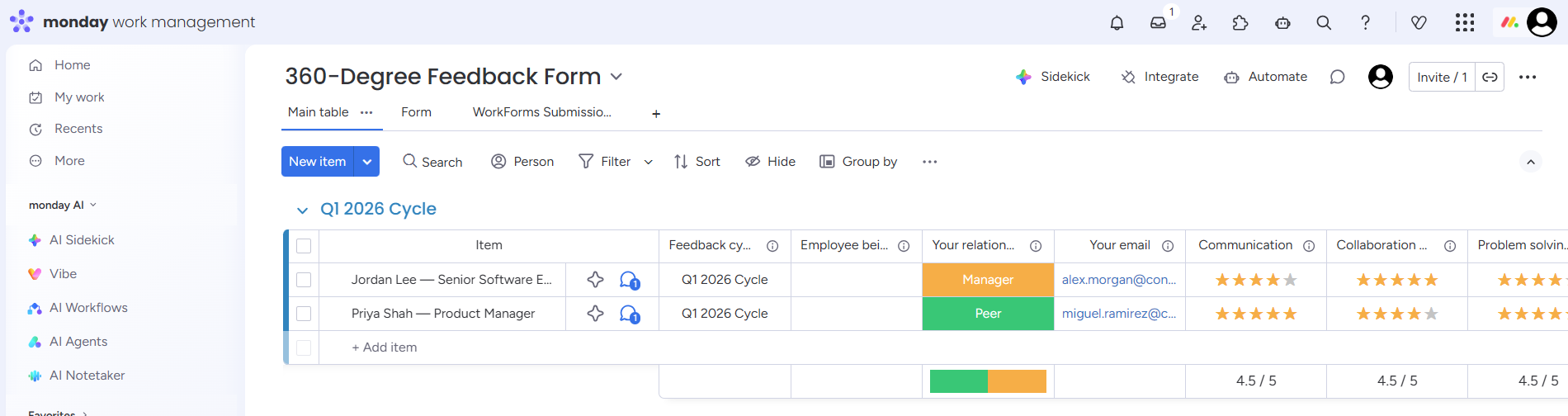
Step 4: Log feedback to a database
Store both the original responses and AI analysis in your preferred database system. Common options include:
- Monday.com (shown in example)
- Airtable
- Notion
- SQL databases
- HRIS systems via API
This creates a searchable archive for trend analysis and future reference. Consider adding timestamp metadata and version control for audit purposes.
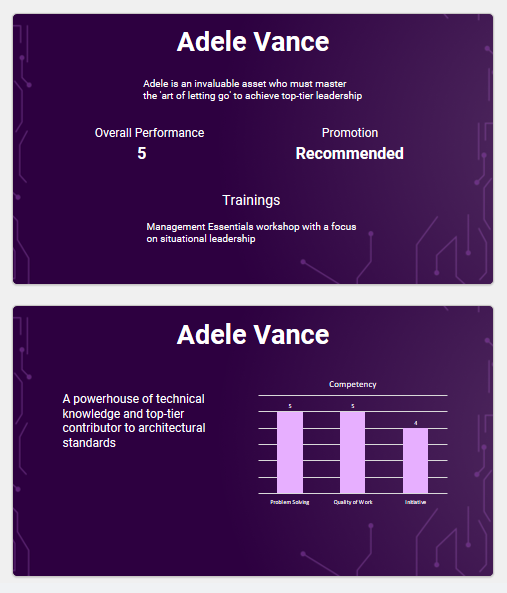
Step 5: Create a report file
Use document generation tools to produce polished reports. Key elements to include:
- Employee and reviewer metadata
- Visualized rating distributions
- Thematic analysis of qualitative comments
- AI-generated strengths and development areas
- Personalized development recommendations
- Comparative data (optional)
Popular document generators include Plumsail Documents, PDF.co, or native PDF creation modules.
Step 6: Send the report
Distribute reports through your organization's preferred channels:
- Direct email to managers
- Slack/Teams notifications
- HR system integrations
- Secure cloud storage links
Consider adding access controls so reports are only visible to authorized personnel. For sensitive feedback, implement expiration dates for shared links.
Make it a consolidated report
For comprehensive analysis across all reviewers (self, manager, peers), modify the workflow to:
- Trigger when all reviews are submitted or the review period closes
- Group all feedback for each employee
- Send consolidated data to AI for cross-review analysis
- Generate unified reports showing patterns across rater groups
This approach reveals valuable insights like:
- Consensus strengths/weaknesses
- Perception gaps (e.g., self vs. peer ratings)
- Department-specific patterns
- Trends across review periods
Getting Started
With Make and AI connected to your 360-degree review process, you can fundamentally transform how performance analysis happens in your organization. The automated workflow:
- Reduces administrative burden by 80-90%
- Provides more consistent, data-driven insights
- Enables real-time feedback processing
- Creates searchable performance archives
To implement this solution:
- Map your current feedback collection process
- Identify integration points with existing HR systems
- Customize the AI analysis prompts for your evaluation criteria
- Design report templates matching your branding
- Test with a pilot group before full rollout