
In the fast-paced world of e-commerce, every new product launch triggers a flurry of marketing activities. Teams rush to create social media posts, email campaigns, and paid advertisements. However, a significant bottleneck often arises during this process: manual link tagging. This seemingly small task can quickly become a major drain on resources and a source of costly errors.
Manually generating UTM (Urchin Tracking Module) parameters for each link, copying them into a shortener, and then meticulously recording them in a spreadsheet is not only time-consuming but also highly prone to human error. Inconsistent tagging across different campaigns, channels, or even team members can lead to flawed attribution data, causing businesses to make poor decisions about where to allocate their marketing budget.
This comprehensive guide will walk you through building a "zero-touch" attribution system using Make.com and Linkly. By the end of this tutorial, your Shopify store will automatically generate branded, trackable short links with perfectly configured UTM parameters the moment a new product is created. These links will then be instantly shared to your chosen social media platforms, all without any manual intervention, ensuring flawless data and maximum efficiency.
Why Automated Tracking is Your E-commerce Superpower
In the competitive landscape of e-commerce, accurate data is paramount for informed decision-making. When marketing teams rely on manual processes for link tagging and attribution, the risk of errors like misspelled UTMs, forgotten parameters, or broken tracking links increases significantly. These inconsistencies can lead to a distorted view of campaign performance, making it difficult to identify which channels and strategies are truly driving sales and revenue.
Automating this critical workflow with Make.com offers several distinct advantages that can transform your e-commerce marketing efforts. It eliminates the potential for human error, ensures rapid deployment of marketing assets, and strengthens your brand's online presence through consistent, professional-looking links.
- Flawless Consistency: Every single link generated through this automated system will adhere to a predefined tagging structure. This eliminates human error, ensuring that all your attribution data is uniform and reliable, providing a clear picture of your marketing effectiveness.
- Maximum Speed: With automation, trackable links are ready and published on social media almost instantaneously after a product is created. This gives your marketing team a significant competitive edge, allowing them to capitalize on new product launches without delay.
- Professional Branding: Instead of generic, messy URLs, this system utilizes branded short links. This not only enhances the professionalism of your marketing materials but also reinforces your brand identity across all digital touchpoints, leading to higher click-through rates and improved customer trust.
The Prerequisites: What You'll Need
Before you begin setting up this powerful automation, ensure you have access to and accounts for the following platforms. Each plays a crucial role in the seamless operation of your zero-touch attribution system.
Having these accounts ready and configured will streamline the setup process and allow you to integrate them effectively within your Make.com scenario.
- Make.com Account: This will serve as the central hub for your automation, connecting all the different applications and orchestrating the workflow.
- Shopify Store: You'll need an active Shopify store with staff permissions that allow access to product data and the ability to set up webhooks for real-time updates.
- Linkly Account: Linkly is the short-link generator that will apply your custom UTM parameters and branded domains to your product URLs.
- Facebook Account: An active Facebook account with an associated Business Page is required for the automated social media posting component of this workflow.
The 4-step Zero-Touch Automation Workflow
This automation is designed to be a "set it and forget it" system, ensuring that every new product launch is accompanied by perfectly tracked, branded links and immediate social media promotion. Follow these four steps to build your zero-touch attribution workflow.
Each step leverages a specific module within Make.com to achieve a part of the overall automation, from detecting new products to publishing them on social media.
Step 1: Watch for new products in Shopify (the trigger)
The first and most crucial step in our automation is to detect when a new product is added to your Shopify store. This event will act as the trigger that initiates the entire workflow.
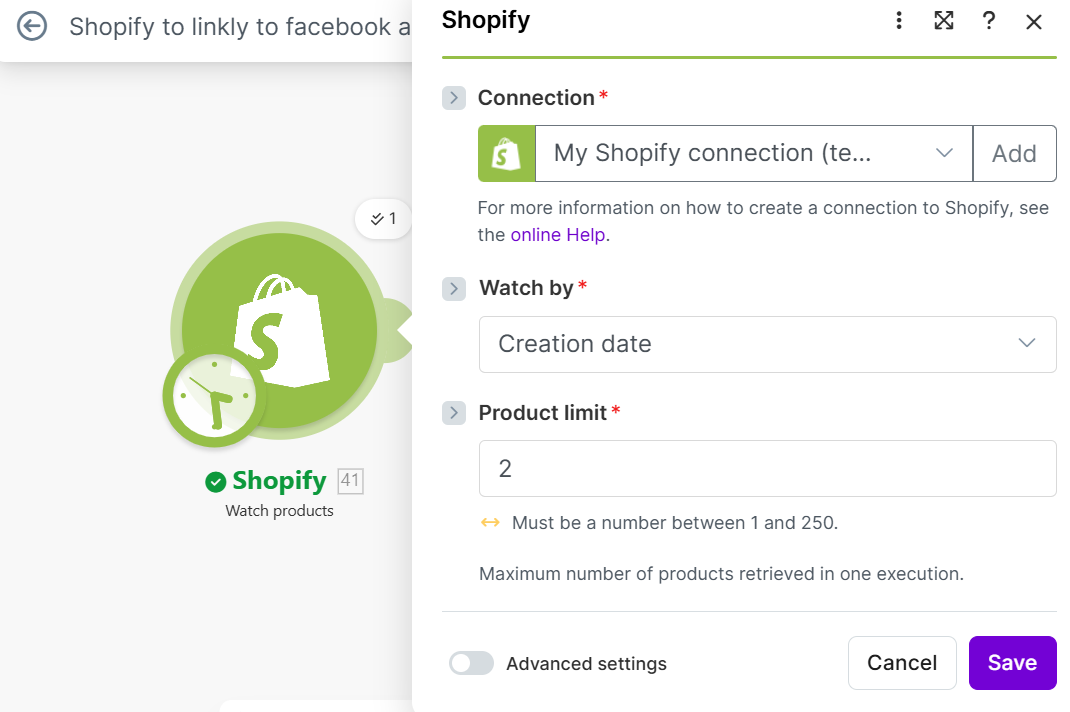
In Make.com, you will use the Shopify module configured to "Watch Products." This module constantly monitors your Shopify store for any new product entries, ensuring that your automation is always responsive to your latest inventory updates.
- Role: This module functions as the "ears" of your automation, continuously monitoring your Shopify product catalog for new additions.
- Setup Tip: For initial testing, set the "Limit" parameter to 1. This ensures that only the most recently created product is processed, making it easier to debug and verify the scenario's functionality without processing your entire product catalog.
Step 2: Construct the full product URL (the foundation)
Shopify's API typically provides a unique "product handle" (e.g., blue-suede-shoes) rather than the complete, live URL of the product page. To create a functional and trackable link, we need to construct the full destination URL.
This step ensures that Linkly receives a valid and complete URL to shorten and apply attribution parameters to, pointing directly to the correct product page on your store.
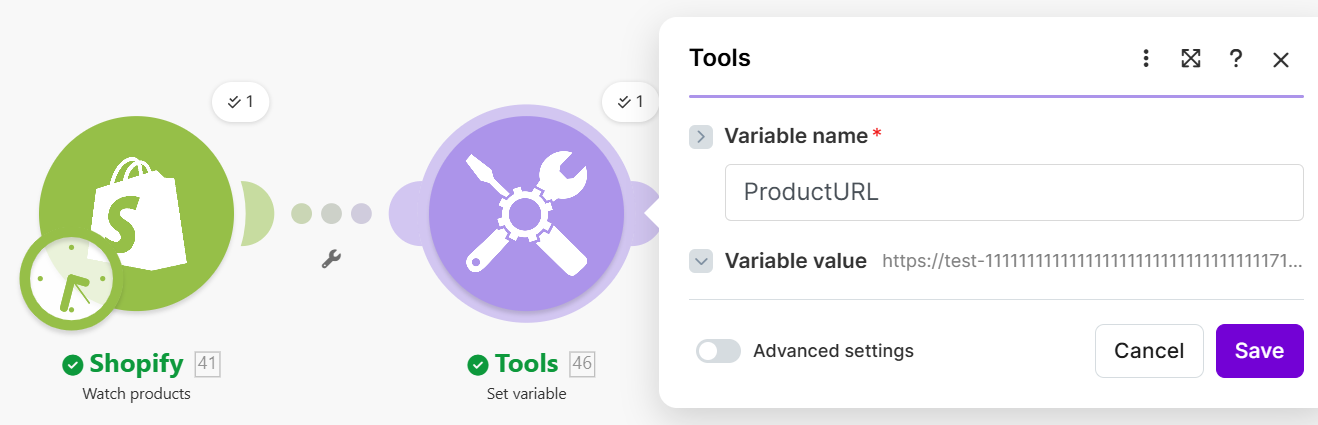
- Module: Utilize the "Tools > Set Variable" module in Make.com.
- Action: Create a new variable, which we can name
ProductURL. This variable will be formed by appending the product's handle (dynamically pulled from the Shopify trigger) to your store's standard product base URL (e.g.,https://yourstorename.com/products/+[Product Handle]). This concatenation guarantees that Linkly always receives the accurate, live product page URL.
Step 3: Create the trackable link with Linkly (the heavy lifting)
This is the core of your attribution system, where the full product URL is transformed into a branded, trackable short link with all necessary UTM parameters embedded. This ensures that every click can be accurately attributed to its source.
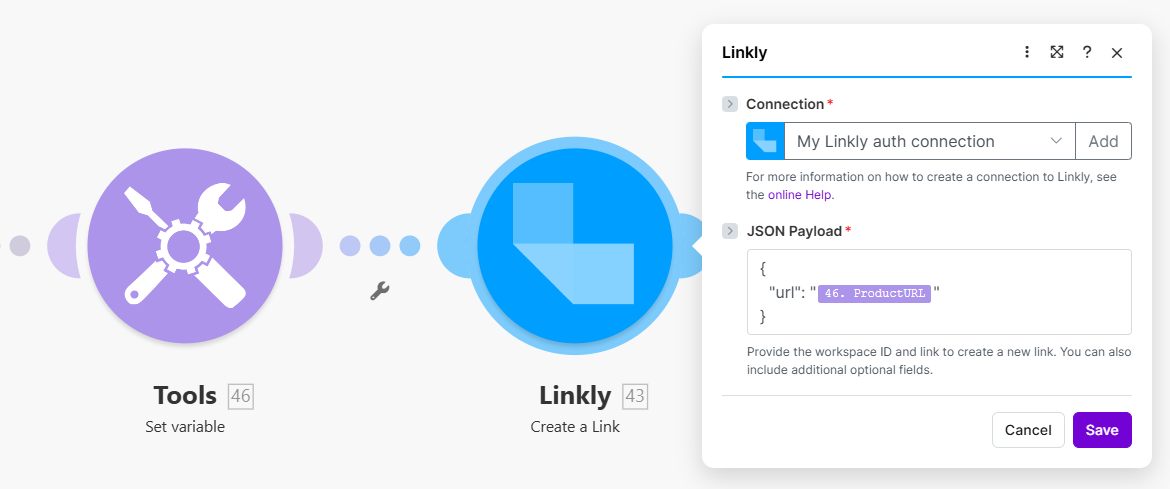
You will add the Linkly module to your Make.com scenario and configure it to create a new link, dynamically pulling the URL and applying your desired tracking information.
- Destination URL: Map the
ProductURLvariable that you created in the previous step directly into this field. This tells Linkly which long URL to shorten and track. - Crucial: Adding UTM Parameters: Leverage Linkly’s robust settings to dynamically map your desired UTM parameters. For a Facebook post, a best-practice structure might include:
- UTM Source: Facebook
- UTM Medium: social_post
- UTM Campaign: Dynamically map the product title from Shopify (e.g.,
[Product Title]). - Branded Domain: Select your custom branded domain (e.g.,
brand.link) for maximum click-through rates and brand consistency.
Pro tip: Always use a consistent naming convention for your UTM parameters across all campaigns. This makes data analysis much easier and more reliable in the long run. Consider creating a standardized template for your UTMs to ensure uniformity.
Step 4: Share to social media (the final touch)
The final step in this zero-touch workflow is the immediate distribution of your newly created, branded, and tracked short link to your social media channels. This ensures that your new product gets instant visibility and that your marketing efforts are launched without delay.
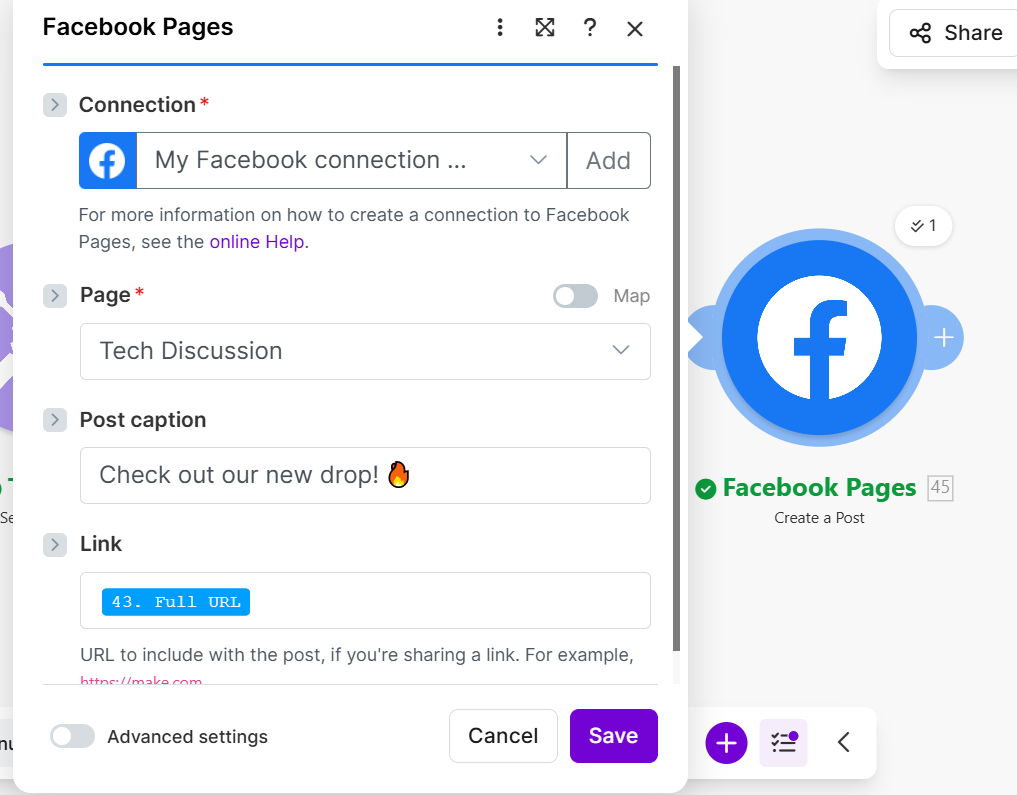
In Make.com, you will integrate the Facebook Pages module to automatically create a post, leveraging the output from the Linkly module.
- Action: Map the "Full URL" output from the Linkly module directly into the post message field of the Facebook Pages module. You can also dynamically map the Shopify Product Title and a short description to create a rich, informative, and engaging social media post.
With this step configured, the moment you click "Save" on a new product in Shopify, your fully tracked, branded short link will be live, and your social media post will be automatically published. This completes the zero-touch attribution system, allowing you to focus on other strategic tasks.
The ROI of Zero-Touch Attribution
While manual link tagging might seem like a minor task, its cumulative impact across numerous campaigns and channels can lead to a significant operational drain. The time spent on repetitive manual work could be better utilized for strategic planning, content creation, or customer engagement.
However, the true cost of manual attribution extends beyond just time and effort; it lies in missed opportunities. Automated tracking provides instant, accurate visibility into which traffic sources are performing best, allowing for real-time optimization. This leads to improved reporting consistency and provides marketing and sales teams with cleaner data for better budgeting, performance analysis, and overall strategic decision-making.
Automation, particularly for critical marketing functions like attribution, lays a robust foundation for predictable and scalable growth. By seamlessly connecting Shopify, Linkly, and Facebook via Make.com, businesses can ensure they have clean, accurate data and an always-on marketing presence. This empowers them to focus solely on innovating and expanding their brand, confident that their attribution is precise and efficient.