
Make.com ClickUp Productivity Automation

Automate Your Productivity in One Place with ClickUp and Make

Learn how to connect ClickUp with Make to automate your workflows and boost productivity with powerful integrations.

Woman using laptop to automate ClickUp tasks with Make

How to Get Started Using Make with ClickUp

Productivity automation prepares your company for the next decade by eliminating repetitive manual work. By connecting ClickUp with Make, you can create seamless workflows that save hours of effort while ensuring nothing falls through the cracks.

Make scenarios (workflows) are built by setting up triggers in one app that initiate actions in another. This structure provides flexible options for integrating ClickUp into your processes. For example, when a teammate changes a task's status to "Review" in ClickUp, Make can automatically send you an email reminder to take action.

Pro tip: Start with simple automations like status change notifications before building more complex workflows. This helps you learn the platform while delivering quick wins.

The reverse workflow is equally powerful - you can trigger ClickUp task creation from events in other apps. When someone posts in a Slack channel or submits a Google Form, Make can instantly convert these into properly formatted ClickUp tasks with all relevant details included.
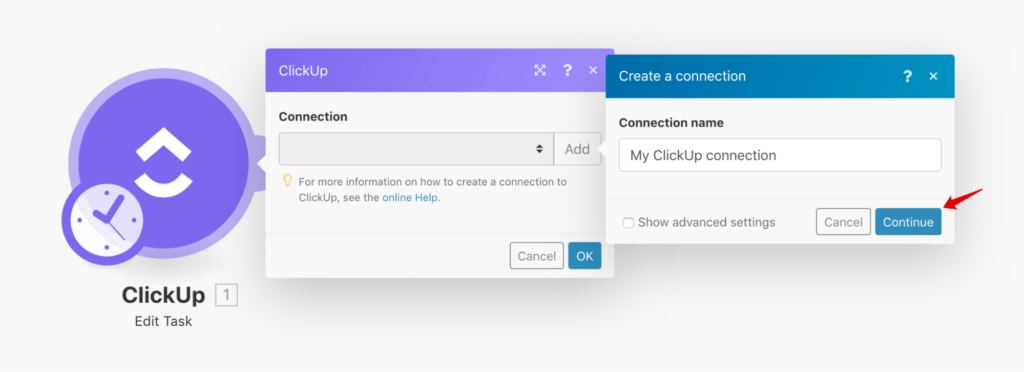
ClickUp task editing interface
The ClickUp interface showing task editing options that can be automated

How to Use Powerful Templates to Create Actions

Make offers numerous pre-built templates that simplify creating ClickUp automations. These templates handle common use cases while providing customization options to match your specific workflow needs.

Add new Google Calendar events to ClickUp as tasks

This automation eliminates the manual step of creating tasks for calendar events. Whenever you schedule a meeting or deadline in Google Calendar, Make instantly creates a corresponding task in your chosen ClickUp list. The task includes all event details like title, description, date/time, and attendees.
Google Calendar to ClickUp integration workflow
Visual representation of Google Calendar to ClickUp task automation

Create ClickUp tasks from new JIRA issues

For development teams using JIRA, this integration automatically converts new issues into ClickUp tasks. The automation preserves all relevant details including priority, assignee, due date, and description. This creates visibility across teams while maintaining each tool's specialized functionality.
JIRA to ClickUp integration workflow
JIRA issue automatically converted to ClickUp task through Make

Create ClickUp tasks from new Google Sheets spreadsheet rows

This powerful integration turns spreadsheet data into actionable tasks. When you add a new row to your Google Sheet - whether it's a project plan, content calendar, or bug tracker - Make instantly creates a corresponding ClickUp task. You can map spreadsheet columns to specific ClickUp fields for perfectly formatted tasks every time.
Google Sheets to ClickUp integration workflow
Spreadsheet rows transforming into ClickUp tasks through automation

Pro tip: Combine multiple templates to create end-to-end workflows. For example, automatically create ClickUp tasks from form submissions, then notify Slack when tasks are completed.

What's Next?

These examples just scratch the surface of what's possible when connecting ClickUp with Make. The platform supports thousands of apps, allowing you to automate virtually any workflow that involves task management.

To explore more templates and begin automating your productivity, visit Make's template library. The platform offers a free tier so you can test integrations before committing to a paid plan.

Frequently Asked Questions

Common questions about ClickUp and Make automation

Connecting ClickUp with Make allows you to automate repetitive tasks between ClickUp and other apps, saving time and reducing manual work. You can create workflows that automatically create tasks, update statuses, or send notifications based on triggers from other applications.

This integration eliminates the need to constantly switch between apps and manually duplicate information. Teams report saving 5-10 hours per week by automating these routine data transfers while reducing errors from manual entry.

Yes, Make enables you to automatically create ClickUp tasks from various triggers like Google Calendar events, JIRA issues, Google Sheets rows, emails, and many other applications. This eliminates manual data entry and ensures tasks are created consistently.

The platform supports over 1,000 apps, so you can connect virtually any business tool to ClickUp. Common examples include converting support tickets to tasks, turning meeting notes into action items, and transforming survey responses into follow-up tasks.

Common automations include syncing calendar events to tasks, converting support tickets to actionable items, turning spreadsheet rows into tasks, and automating status updates. These workflows help teams stay organized without manual coordination.

Other popular use cases include automatically assigning tasks based on rules, moving tasks between lists when statuses change, and generating reports from completed tasks. The possibilities are nearly endless depending on your workflow needs.

No coding skills are required. Make provides a visual interface where you can connect apps and define workflows using pre-built templates. The platform handles all the technical complexity behind the scenes.

The drag-and-drop builder lets anyone create powerful automations by connecting "if this then that" logic blocks. You can start with simple templates and gradually build more complex workflows as you become comfortable with the platform.

Make automations are highly reliable, running 24/7 in the cloud. The platform monitors all workflows and provides error handling options. You'll receive notifications if any issues occur with your integrations.

The service includes automatic retries for failed actions and detailed logs to troubleshoot any problems. Most workflows run successfully on the first attempt, with enterprise-grade uptime ensuring your automations work when you need them.

Yes, you can map any available ClickUp task fields in your automations, including assignees, due dates, priorities, custom fields, and more. This allows you to create fully customized tasks that match your workflow requirements.

Make's field mapping interface shows all available ClickUp fields, letting you precisely control how data flows into each task property. You can even apply formulas to transform data before it reaches ClickUp.

Yes, GrowwStacks specializes in building tailored ClickUp automation solutions. Our team can design custom workflows that perfectly match your business processes and integrate ClickUp with all the tools your team uses daily.

We handle everything from initial consultation to implementation and ongoing support. Whether you need simple time-savers or complex enterprise automation, our experts can create the perfect ClickUp integration for your needs.

  • Custom workflow design
  • Multi-app integration
  • Ongoing maintenance and support

Need Custom Automation Help?

This guide is a starting point. Our team builds fully tailored automation systems for your specific workflow needs.