
Why Automate Xero with Make
Xero is powerful cloud accounting software, but manual data entry still consumes valuable time for small business owners and accounting teams. Make bridges this gap by connecting Xero to your other business apps and automating repetitive accounting workflows.
With Make's visual automation builder, you can create workflows that handle tasks like invoice generation, expense tracking, purchase order creation, and contact management automatically. This eliminates tedious manual work while reducing the risk of human error in your financial records.
Pro tip: Start by automating your most repetitive Xero tasks - these typically offer the highest time savings with the lowest implementation complexity.
Available Xero Modules
Make's Xero integration includes multiple trigger and action modules that cover core accounting functions. Triggers watch for specific events in Xero, while actions perform operations in your Xero account.
Trigger Modules
Triggers initiate workflows when specific events occur in Xero. The available triggers include monitoring for new or updated receipts, credit notes, bank transfers, purchase orders, and invoices. Each trigger can start a customized workflow tailored to your accounting processes.
Action Modules
Action modules perform operations in Xero. You can create receipts, invoices, contacts, and purchase orders. Additional actions let you update existing records, retrieve specific documents, delete contact groups, and upload files to attach to Xero records.
Connecting Xero to Make
Setting up the Xero-Make connection is straightforward. When you add your first Xero module to a scenario, Make guides you through authorizing access to your Xero account. This secure connection uses Xero's official API and follows their authentication protocols.
The authorization process redirects you to Xero's website where you can review and approve the permissions Make requests. After granting access, you're returned to your scenario where you can begin building automation workflows between Xero and your other connected apps.
Practical Automation Examples
To demonstrate Make's capabilities with Xero, let's examine two common accounting automation scenarios that solve real business challenges.
E-commerce Order Processing
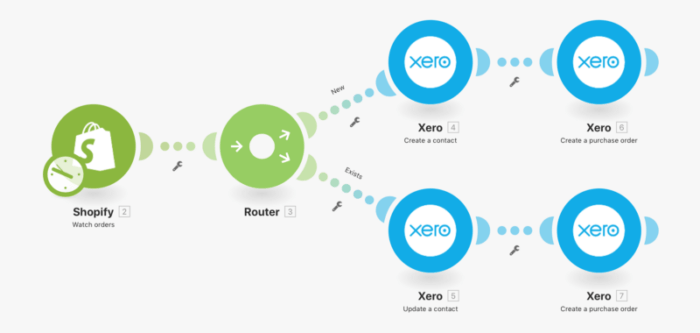
This scenario connects Shopify to Xero, automatically creating customer records and purchase orders for new online orders. The workflow checks whether the customer exists in Xero, creates a new contact if needed, then generates the purchase order - all without manual data entry.
Automated Invoice Workflow
Building on the first scenario, this workflow watches for new purchase orders in Xero, generates corresponding invoices, and emails them to customers. The automation pulls customer email addresses from Shopify and invoice details from Xero to create and send professional invoices automatically.
