
Keeping contact lists current is a fundamental requirement for sales and marketing teams. While essential, the task of manually updating these lists can be incredibly tedious and time-consuming. It often involves the monotonous process of copying and pasting information, a chore that frequently falls to an unsuspecting team member.
Many businesses wish for a more efficient solution to this problem, seeking to automate the process and free up valuable human resources. Fortunately, a powerful tool exists that can transform this dreaded task into a seamless, automated workflow.
This is where SigParser comes into play, offering a revolutionary approach to contact management. By leveraging automation platforms like Make, businesses can ensure their contact databases are always up-to-date without the need for constant manual intervention.
Say Goodbye to Copy and Paste
SigParser excels at automatically extracting valuable contact data directly from email signatures, a rich source of professional information. This innovative tool can identify and capture details such as job titles, phone numbers, and social media profile URLs from incoming emails.
Beyond mere data extraction, SigParser's true power lies in its ability to integrate with other applications through automation platforms. Make, a highly capable integration platform, serves as the perfect bridge to connect SigParser with virtually any online application. This connectivity allows the parsed information to be sent precisely where it needs to go, ensuring your contact lists are consistently updated.
Make simplifies complex, multi-step actions, making it effortless to direct SigParser's extracted data to its final destination. This means your sales and marketing teams can maintain accurate and comprehensive contact databases with minimal effort, significantly boosting efficiency and reducing the burden of manual data management.
Pro tip: Regularly review your automation scenarios in Make to ensure they are running optimally. Small adjustments to filters or data mapping can significantly improve the accuracy and efficiency of your contact list updates.
Parse Email Signatures and Add/Update Contacts in Salesforce
For businesses utilizing Salesforce as their Customer Relationship Management (CRM) system, a dedicated template demonstrates how to seamlessly integrate SigParser with Make to automate contact updates. This setup ensures that your Salesforce records are always current with the latest information from email signatures.
The process begins whenever a new email arrives in a designated Gmail account. Make initiates a scenario where SigParser analyzes the sender's email signature, extracting key data points such as phone numbers, addresses, and job titles. This parsed information is then directed to Salesforce.
Upon receiving the data, the system intelligently checks if a contact with matching details already exists in Salesforce. If an existing contact is found, their record is updated with the new information. If no match is present, a new contact entry is automatically created, ensuring no valuable lead or client information is missed.
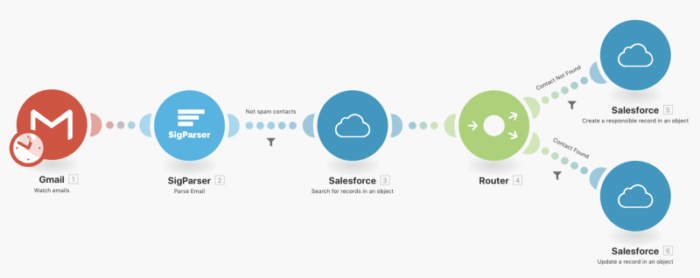
To implement this powerful automation, you can follow the instructions provided in a comprehensive video tutorial. This tutorial, featuring Paul from SigParser, also covers advanced considerations like setting up filters to exclude spam emails, further refining the quality of your contact data.
Parse Email Signatures and Add/Update Contacts in a Google Sheet
Another highly versatile template is available for those who prefer to consolidate parsed data into a Google Sheet. This scenario is ideal for general data collection, providing a centralized repository for all extracted contact information that can then be connected to other applications as needed.
Similar to the Salesforce integration, this automation is triggered by the arrival of a new email in a specified Gmail account. Make initiates a scenario where SigParser extracts relevant contact details from the email signature. The parsed data is then routed to a Google Sheet.
The system is configured to intelligently manage the data within the Google Sheet. It first checks if a contact already exists based on the extracted information. If a match is found, the corresponding row in the Google Sheet is updated. If the contact is new, a fresh row is added, ensuring your spreadsheet remains accurate and comprehensive.
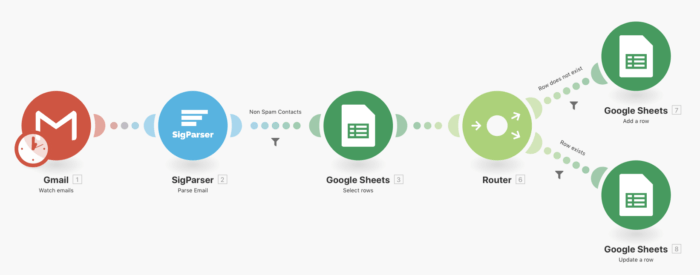
This automated solution eliminates the need for manual data entry, saving countless hours for you and your team. By leveraging SigParser and Make, you can maintain perfectly organized and up-to-date contact lists, allowing you to focus on more strategic tasks rather than repetitive administrative work.
Exploring SigParser's capabilities on Make can unlock significant efficiencies for your business. Don't let manual processes hinder your productivity; embrace automation to streamline your operations and empower your team.