The Problem: Manual Data Classification
Business onboarding processes often involve handling numerous documents that require classification and data extraction. Traditional manual methods are time-consuming, error-prone, and inefficient. Tasks like verifying W-9 tax forms or assigning NAICS classification codes typically require trained staff to review each document individually.
Manual classification presents several challenges. First, it's slow - each document might take 15-30 minutes to process properly. Second, accuracy suffers due to human fatigue and the complexity of classification systems. Third, scaling manual processes requires hiring more staff rather than improving efficiency.
The financial impact is significant. A medium-sized business processing 100 documents monthly could spend 50+ hours just on classification tasks. This doesn't include the costs of errors, which might lead to compliance issues or missed opportunities.
Pro tip: Before automating, analyze your most common document types and classification needs. This helps design targeted solutions rather than generic automation.
Required Tools
This automation solution requires three core components: a CRM platform, AI capabilities, and Make for workflow automation. The specific tools used in our example are Monday.com as the CRM, OpenAI's ChatGPT for AI processing, and Make to connect everything together.
Monday.com serves as the document intake system and record keeper. It stores the original documents and maintains the classified data. OpenAI provides the intelligence to analyze documents and extract relevant information. Make acts as the automation engine that moves data between systems and applies business logic.
While we use these specific tools, the approach works with alternatives. Any modern CRM can replace Monday.com. Various AI services can substitute for OpenAI. The key is having these three functional components working together.
Implementation Setup
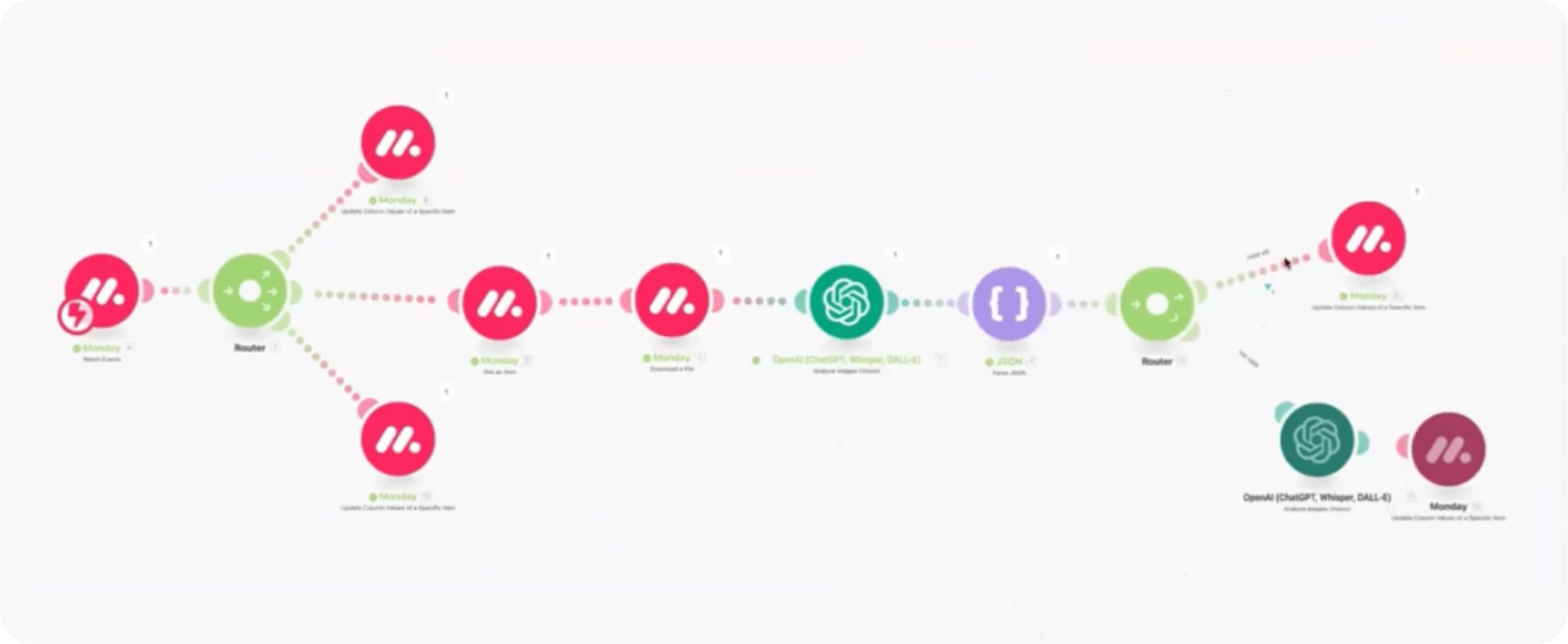
The technical setup involves creating connections between these three systems. First, establish API connections between Make and your CRM. Second, configure Make to access your AI service. Third, set up document storage either within your CRM or a connected cloud storage service.
Document flow follows a clear path: 1) Documents get uploaded to the CRM, 2) Make detects new uploads and sends them to AI, 3) AI processes and returns structured data, 4) Make updates CRM records with extracted information, and 5) The system flags any documents needing human review.
Configuration typically takes 2-4 hours for basic setups. More complex implementations with multiple document types or custom business rules might require 8-16 hours. The time investment pays off quickly through ongoing time savings.
Extracting W-9 Info with AI
W-9 tax form processing demonstrates the power of this approach. The system can verify whether a submitted document is a valid W-9 form, extract key fields like name and tax ID, and update CRM records automatically. This replaces manual review of each form.
The AI component uses image recognition to identify W-9 forms and optical character recognition (OCR) to read the information. It then extracts specific fields and returns them in a structured format. The system can even handle variations in form layouts.
Error handling is built into the workflow. If the AI can't confidently process a document, it routes it for human review. This hybrid approach ensures accuracy while still automating the majority of cases. The system learns from corrections to improve over time.
Classifying NAICS Codes
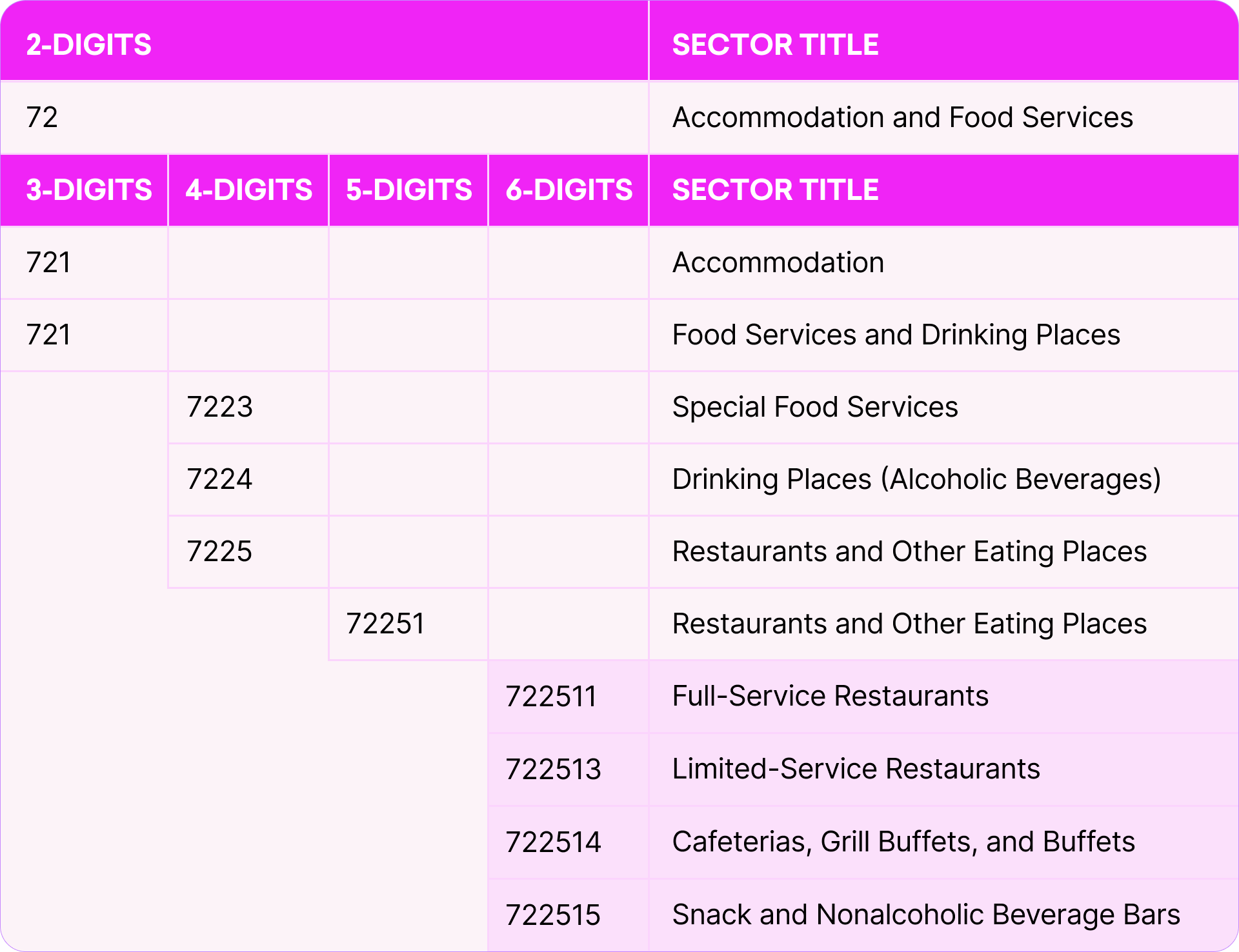
NAICS code assignment presents a more complex challenge. With hundreds of possible codes across multiple hierarchy levels, direct classification often produces inconsistent results. Our step-by-step method solves this by breaking the decision into smaller steps.
The system first determines the top-level NAICS category (like "Manufacturing" or "Services"). Then it progressively narrows down through subcategories until reaching the most specific code. This approach mimics how human experts classify businesses.
Each decision point uses AI to analyze available business information - website content, marketing materials, or descriptions provided during onboarding. The AI weighs this against NAICS code definitions to make its classification.
Time and Cost Savings
The efficiency gains from this automation are substantial. Where manual classification might take 30 minutes per document, the automated system processes documents in under a minute. This 30x speed improvement allows staff to focus on exceptions and higher-value work.
Accuracy also improves significantly. The AI system maintains consistent application of classification rules without fatigue. It can reference vast amounts of reference material instantly when making decisions. Human reviewers then handle only the ambiguous cases.
Scalability becomes effortless. The same system that processes 10 documents daily can handle 100 or 1,000 with minimal additional cost. This supports business growth without proportional increases in administrative staff.