
Supercharging Productivity with ClickUp and Make
In today's fast-paced work environment, productivity isn't just about working harder—it's about working smarter. The combination of ClickUp's flexible project management platform with Make's powerful automation capabilities creates a productivity powerhouse that can transform how you work.
ClickUp was born out of frustration with existing project management tools, offering customizable views (list, box, and board), flexible statuses beyond simple checklists, assignable comments, and personalized dashboards. When you connect this already powerful tool with Make's automation capabilities, you unlock new levels of efficiency.
Automate Your ClickUp Tasks
The average employee uses 36 different cloud services at work, meaning tasks come from everywhere: email, messaging apps, customer platforms, social media, accounting software, and more. Your task list is rarely determined solely by you—it's shaped by inputs from all these different sources.
By using Make to connect ClickUp with these various services, you can centralize all your to-dos in one place. This means less time spent switching between apps and more time focused on actually completing tasks. The automation handles the busywork while you focus on what matters.
Create ClickUp Tasks from Starred Emails in Gmail
One of the most powerful automations you can set up is creating ClickUp tasks from starred emails in Gmail. This workflow ensures important emails never fall through the cracks by automatically converting them into actionable tasks.
To set this up in Make, start with the "Watch emails" trigger module from the Gmail app. After connecting your Gmail account, configure it to monitor your "Starred" folder. You can specify whether to watch all emails or just unread ones, and set how many emails to process at once.
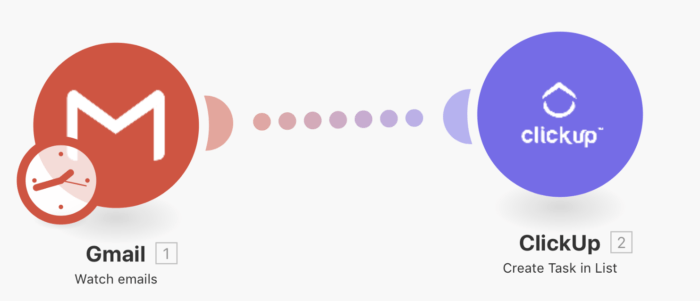
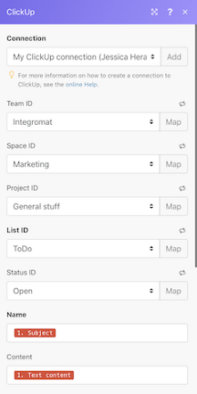
Next, add the "Create a task for a list" module from ClickUp. Connect your ClickUp account and specify where the new tasks should be created by defining the Team ID, Space ID, Project ID, List ID, and Status ID. Map the email subject to the task name and the email content to the task description.
With just these two modules connected, you've created a powerful automation that will save you countless hours of manual task creation. The scenario runs on your specified schedule, automatically converting starred emails into ClickUp tasks without any ongoing effort from you.
Pro tip: Use Make's error handling features to set up notifications if the automation fails, ensuring you never miss an important task creation.
Additional Integration Possibilities
While the Gmail integration is powerful, it's just the beginning of what you can automate between ClickUp and other apps using Make. Here are three more valuable integrations to consider:
1. Add New GitHub Issues to ClickUp as Tasks
Connect your development workflow by automatically creating ClickUp tasks for new GitHub issues. This keeps your entire team aligned, with developers working in GitHub and project managers tracking progress in ClickUp.
2. Add Slack Messages to ClickUp
Never let important discussions get lost in Slack. Set up an automation that creates ClickUp tasks from messages in specific Slack channels, ensuring action items are properly tracked.
3. Create ClickUp Tasks from Typeform Entries
Automatically convert form submissions into actionable tasks. This is perfect for customer support requests, employee onboarding, or any process that begins with form submission.
These examples barely scratch the surface of what's possible. With Make's visual workflow builder and ClickUp's flexible API, you can automate nearly any aspect of your task management workflow. The key is identifying repetitive processes that consume your time and designing automations to handle them for you.