
Make.com Marketing Automation Email Marketing CRM Integration

Connect ActiveTrail and Make to See What the Future of Marketing Looks Like

The world's friendliest email marketing automation software meets the power of Make to streamline your work and automate repetitive tasks.

ActiveTrail and Make integration diagram showing connected workflows

What can Make help ActiveTrail users with?

ActiveTrail is a powerful email marketing platform that combines newsletter software with marketing automation capabilities. It offers drag-and-drop templates, landing pages, surveys, and multi-channel delivery options. By connecting ActiveTrail to Make, you can automate repetitive tasks and create seamless workflows between ActiveTrail and hundreds of other applications.

Many marketers struggle with manual contact list updates, campaign coordination across channels, and keeping CRM data synchronized. These time-consuming tasks can be fully automated using Make's visual workflow builder. The platform allows you to connect ActiveTrail modules with thousands of other app modules without any coding required.

Pro tip: Start by identifying your most repetitive marketing tasks. These are prime candidates for automation and will deliver the quickest time savings when connected through Make.

1. Create ActiveTrail subscribers from new Google Forms responses

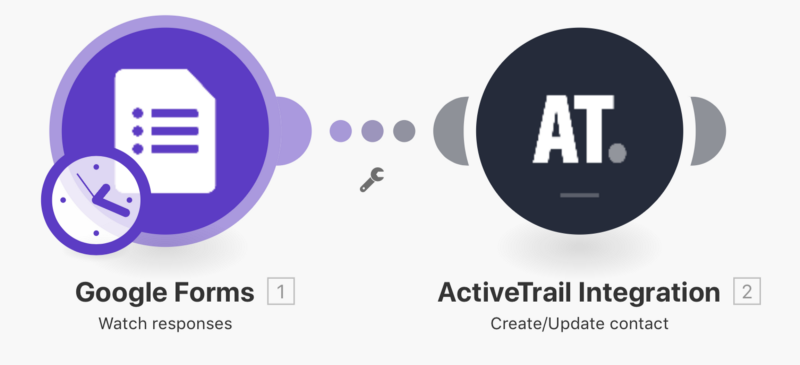
One of the most common automation needs is adding new contacts to your email lists automatically. With Make, you can set up a scenario where every new Google Forms response automatically creates a subscriber in ActiveTrail. This eliminates manual data entry and ensures no leads fall through the cracks.

The setup process begins with the Google Forms "Watch responses" trigger module. After connecting your Google account, you'll add the ActiveTrail "Create/Update contact" action module. The visual interface lets you map form fields to ActiveTrail contact fields through simple drag-and-drop.
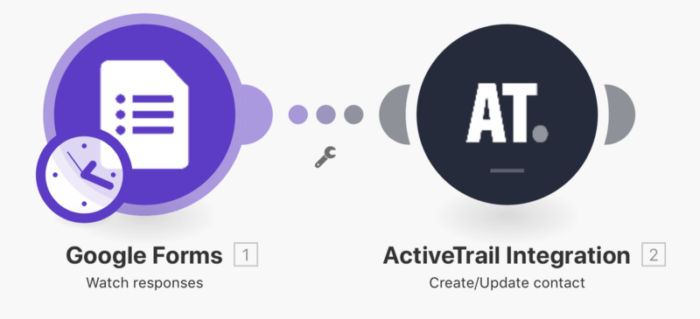
Google Forms to ActiveTrail integration diagram
Mapping Google Form fields to ActiveTrail contact properties in Make

2. Create ActiveTrail contacts from a Google Sheets spreadsheet

For marketers managing contact lists in spreadsheets, Make can automatically sync new entries to ActiveTrail. The "Watch a worksheet" trigger monitors your Google Sheet for new rows, while the ActiveTrail module processes each new entry as a contact.

This automation is particularly valuable for teams that collect leads at events or through offline channels before adding them to digital campaigns. The workflow can be enhanced with data validation and formatting steps to ensure clean data imports.
Google Sheets to ActiveTrail integration workflow
Automating contact creation from spreadsheet rows to ActiveTrail

3. Update contacts in HubSpot CRM based on subscription status in ActiveTrail

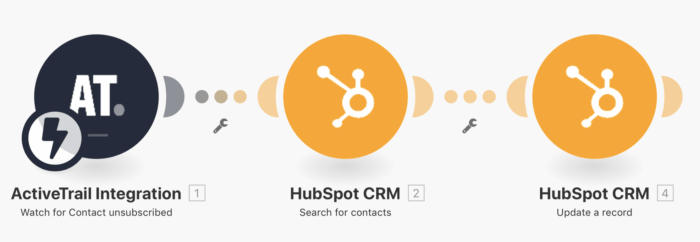
Keeping CRM records synchronized with email marketing preferences is crucial for compliance and customer experience. Make can monitor ActiveTrail for subscription changes and automatically update corresponding records in HubSpot CRM.

The workflow starts with ActiveTrail's "Watch for contact unsubscribed" trigger. Make then searches HubSpot for the matching contact and updates their subscription status. This two-way sync ensures your sales team always has accurate email preference data without manual updates.
ActiveTrail to HubSpot CRM integration flow
Syncing unsubscribe status between ActiveTrail and HubSpot CRM

Frequently Asked Questions

Common questions about ActiveTrail and Make integration

Connecting ActiveTrail with Make allows you to automate repetitive marketing tasks like contact list updates, campaign triggers, and CRM synchronization. This saves significant time while ensuring data accuracy across platforms.

Automations reduce human error in manual processes and enable real-time updates between systems. You'll see improved campaign performance from timely follow-ups and more personalized messaging based on integrated data.

Yes, Make supports integration with over 3,000 apps including Salesforce, Zoho CRM, Pipedrive and more. You can create similar automation workflows to keep contact data synchronized between ActiveTrail and any supported CRM.

The process involves using the appropriate CRM's API modules in Make to search for and update records. Field mappings may vary slightly between systems, but the core functionality remains consistent.

Make's visual interface makes it straightforward to connect apps without coding. For common workflows like contact syncing, you can use pre-built templates and simply customize the field mappings to match your data structure.

More complex automations may require additional steps for error handling or data transformation, but Make provides extensive documentation and community support to guide you through the process.

Make provides detailed error logs and notifications when automations fail. You can set up retry mechanisms or alternative paths in your scenarios to handle common failure cases gracefully.

For critical processes, you can configure email or Slack alerts to notify your team when intervention is needed. Make also offers history tracking to audit all automation executions.

Absolutely. Make's ActiveTrail integration supports SMS automation. You can trigger SMS messages based on customer actions, schedule campaigns, or personalize messages using data from other connected apps.

Common use cases include appointment reminders, order notifications, and two-factor authentication. The same visual builder used for email automations works for SMS workflows.

You can configure automations to run instantly when triggered (like a new form submission) or on scheduled intervals (hourly, daily, etc.). Make offers flexible scheduling to match your business needs.

For time-sensitive processes like lead follow-up, instant triggers ensure immediate action. Batch processes like nightly data syncs can run during off-peak hours.

Make provides a testing mode where you can run scenarios with sample data to verify everything works as expected before activating the automation with real data.

This sandbox environment lets you validate field mappings, data transformations, and error handling without affecting live systems. You can also limit initial runs to a small subset of records.

Yes, our team at GrowwStacks specializes in building tailored automation solutions. We can create custom ActiveTrail workflows that precisely match your marketing processes and integrate with your existing tech stack.

Our experts handle everything from initial consultation to implementation and ongoing optimization. We focus on creating automations that save you time while improving marketing results.

Need Custom Automation Help?

This guide is a starting point. Our team builds fully tailored automation systems for your specific workflow needs.