Make.com AI Content Creation Google Sheets

Create AI content library with CometAPI & Make automation

Build an AI-powered content inspiration library with CometAPI and Make. Automate social media content generation and organize ideas in Google Sheets seamlessly.

Get This Workflow → Make.com · · Free Template
AI-powered content library workflow setup in Make.com

What This Workflow Does

Content creators and social media managers constantly face the challenge of generating fresh, engaging ideas while managing multiple platforms. This automated workflow solves that problem by creating an AI-powered content inspiration library. It leverages CometAPI's advanced AI capabilities with Make's automation platform to continuously generate social media content ideas, automatically organize them in Google Sheets, and keep your content pipeline full without manual brainstorming or creative burnout.

This system transforms your content creation process from reactive to proactive, ensuring a consistent flow of diverse, platform-tailored content. By automating the ideation and organization phases, you can maintain an active social presence, adapt to real-time trends, and free up your team for more strategic tasks.
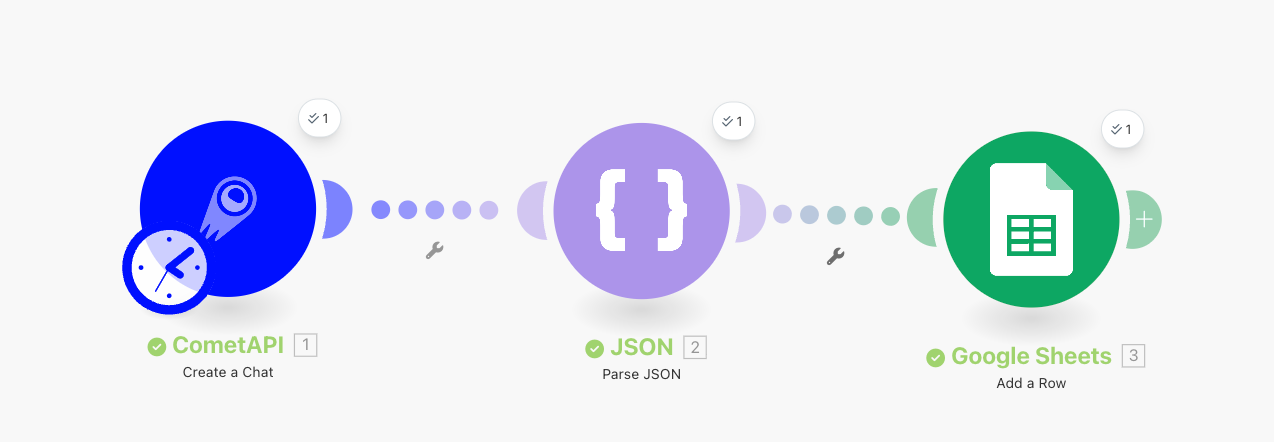
Make.com scenario showing CometAPI, Parse JSON, and Google Sheets modules
Overview of the Make.com scenario for AI content generation.

How It Works

This workflow operates in three main stages: AI content generation, data parsing, and spreadsheet organization. Each stage is handled by a dedicated module in Make.com, ensuring a smooth and efficient process.

Step 1: Set up the CometAPI + Make integration

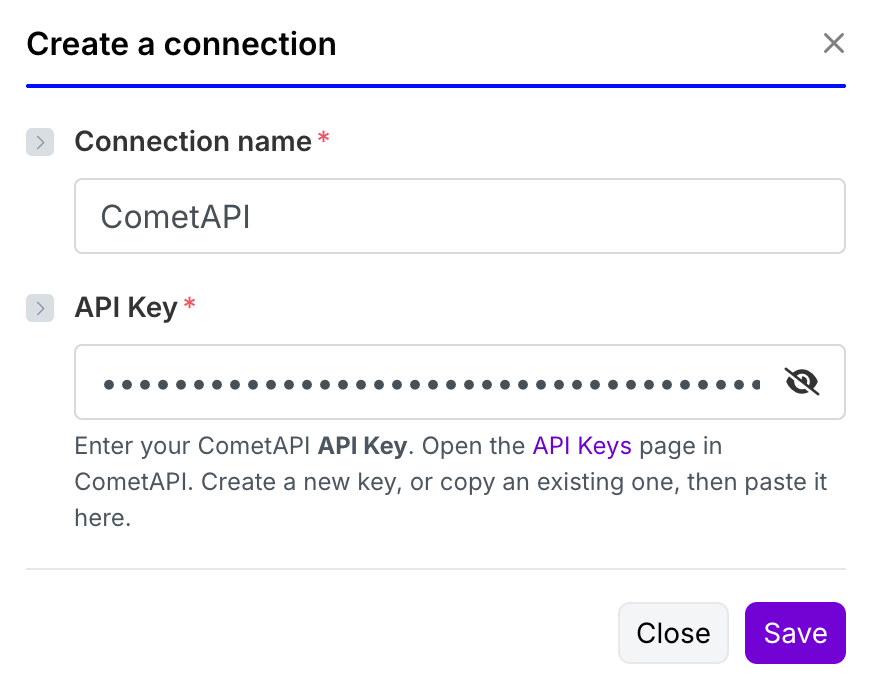
First, you'll connect CometAPI to your Make.com account. This involves obtaining your API key from the CometAPI console and adding it to a new Make scenario to establish a secure connection. This foundational step allows Make to send requests to CometAPI and receive AI-generated content.
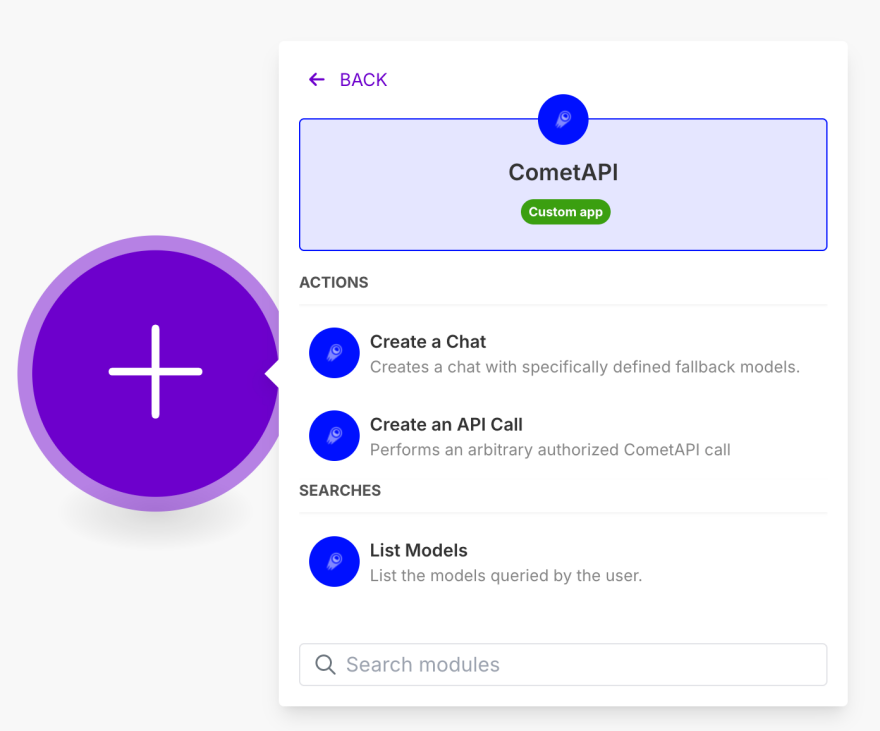
Make.com scenario creation interface
Creating a new scenario in Make.com.
CometAPI connection setup in Make.com
Adding the CometAPI key to establish the connection.

Step 2: Configure the content generation workflow

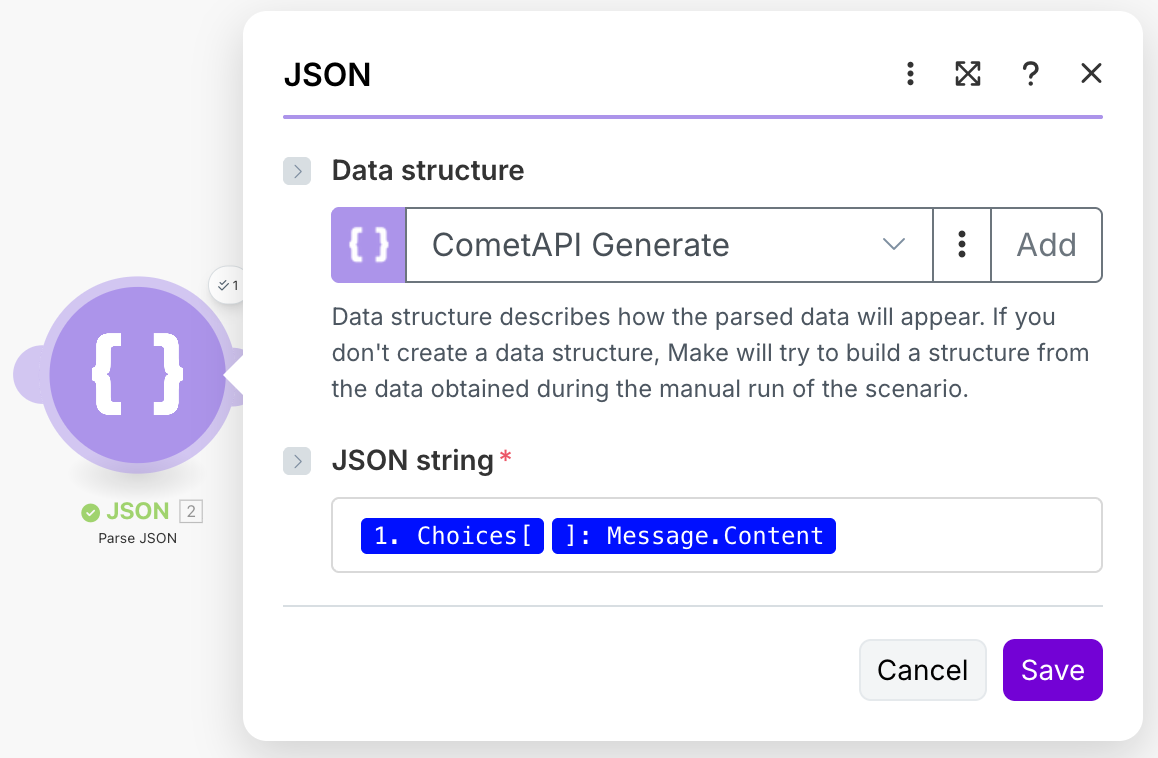
This is the core of the automation. A three-module workflow is built: a CometAPI module generates structured JSON content based on an optimized prompt, a "Parse JSON" module extracts specific data fields (Question, Answer, Tag), and a Google Sheets module maps these fields to a new row in your spreadsheet. This ensures that the AI's output is immediately usable and organized.
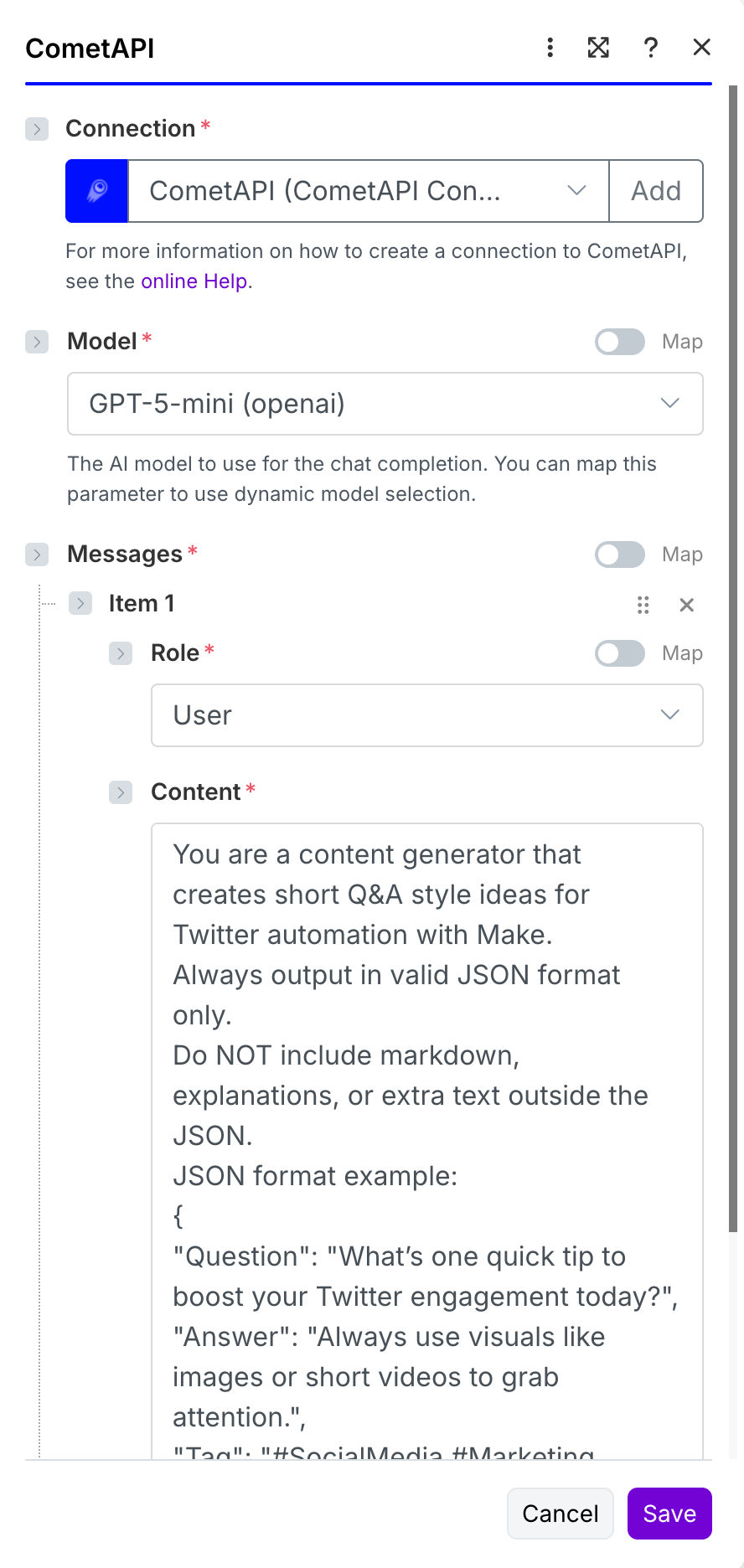
CometAPI module configuration with content generation prompt
Configuring the CometAPI module with an optimized prompt for social media content.
Parse JSON module setup in Make.com
Setting up the Parse JSON module to extract content fields.
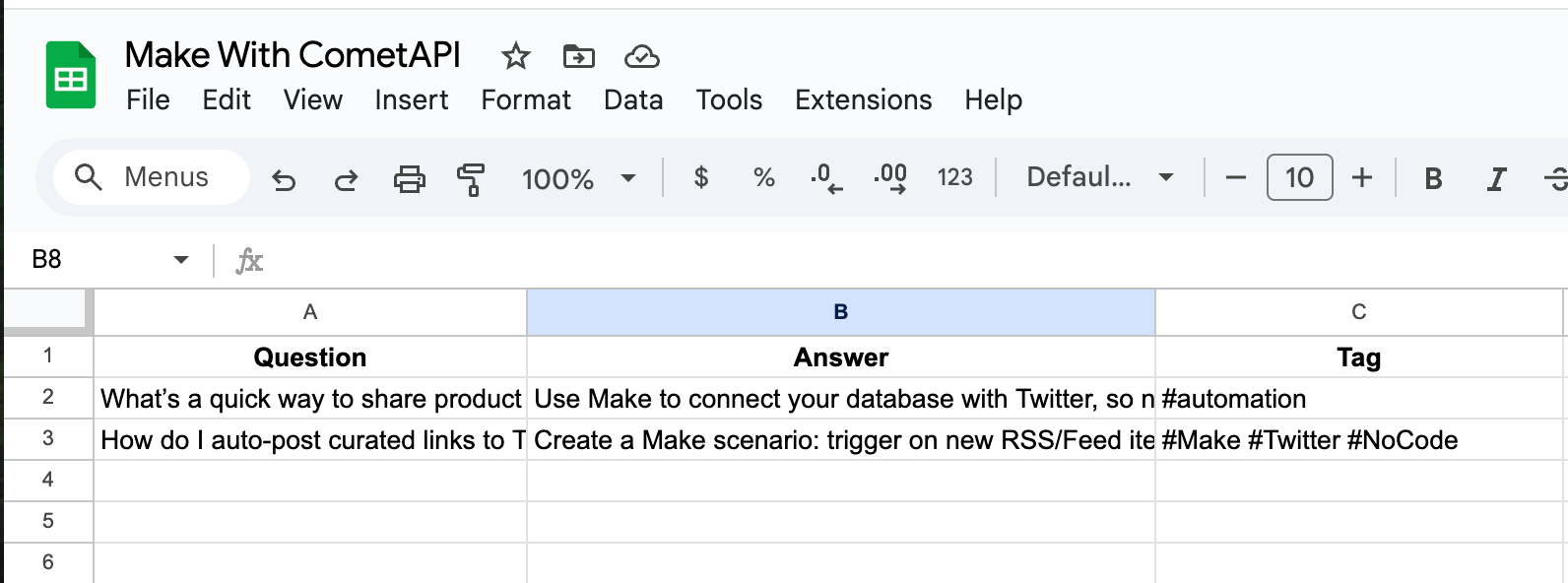
Google Sheet with columns for Question, Answer, and Tag
Example Google Sheet structure for organizing AI-generated content.
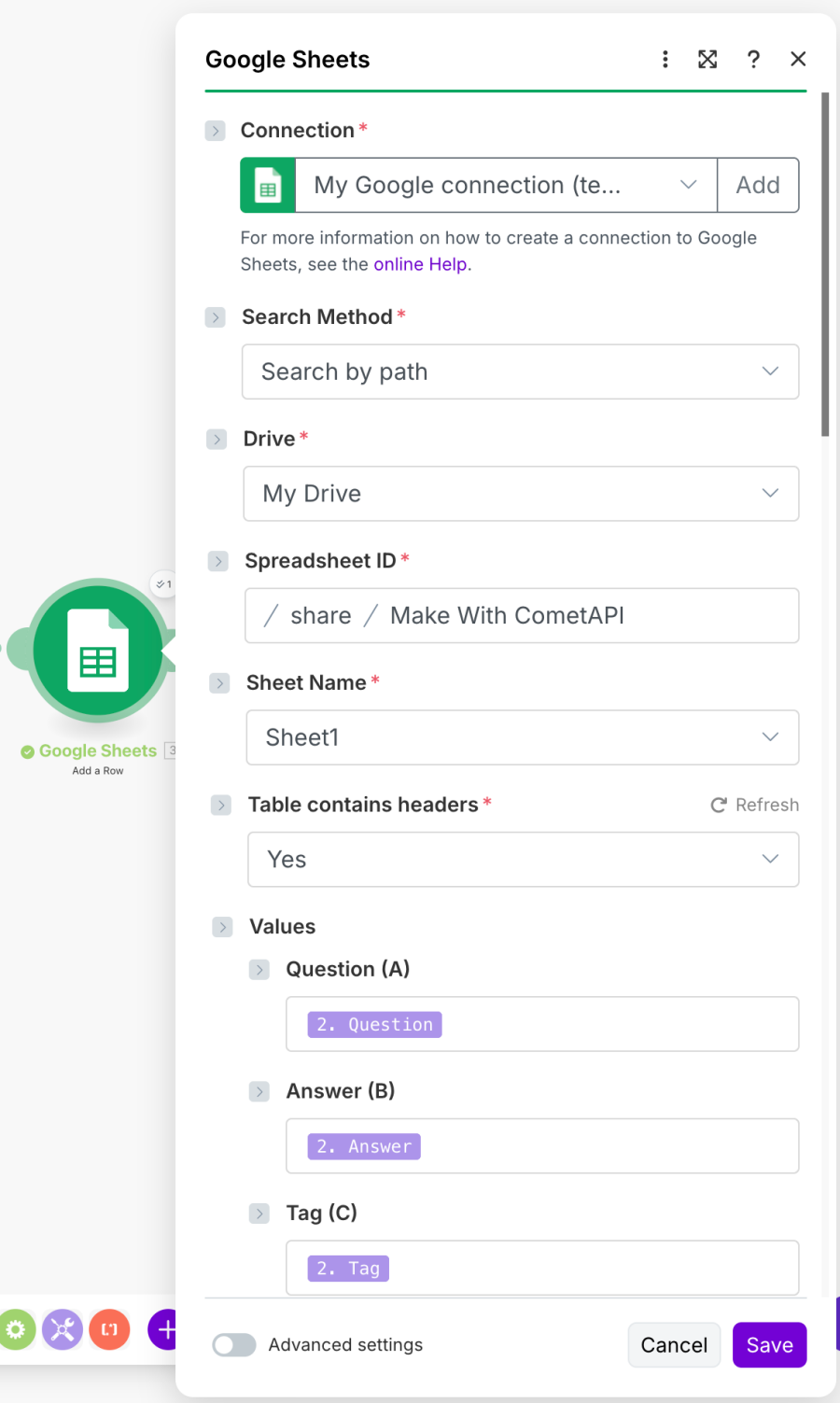
Google Sheets module field mapping in Make.com
Mapping parsed data to Google Sheets columns.

Step 3: Test and deploy the automation

After configuring the modules, you'll run the scenario once to verify that the entire workflow functions correctly. This involves checking your Google Sheet to confirm that a new row with the structured AI-generated content has been successfully added. Once confirmed, the automation can be scheduled to run regularly, providing a continuous stream of content ideas.
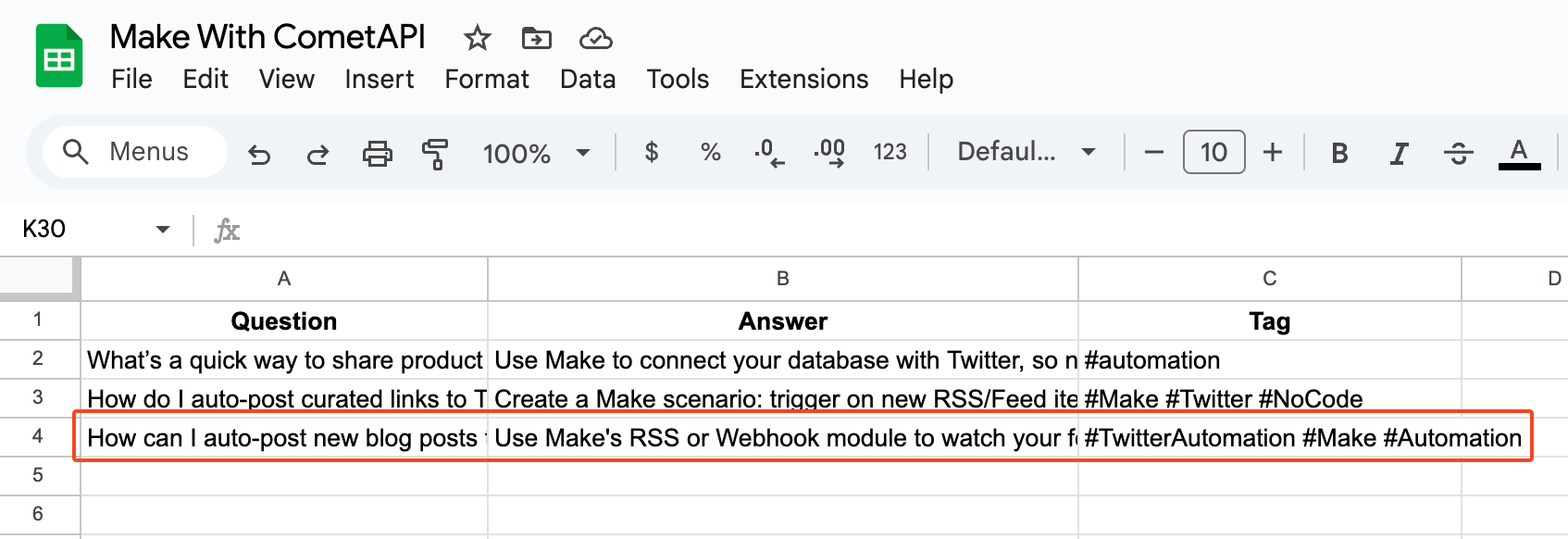
Google Sheet showing newly added AI-generated content
Verifying successful content insertion in Google Sheets after a test run.

Who This Is For

This workflow is ideal for:

  • Social Media Managers: Struggling to keep up with daily content demands and needing fresh ideas consistently.
  • Content Marketing Teams: Looking to scale content production and maintain a diverse content pipeline across various platforms.
  • Small Business Owners: Who want to establish a strong online presence without dedicating excessive time to content brainstorming.
  • Digital Agencies: Seeking to streamline content creation for multiple clients and improve efficiency.
  • Marketing Professionals: Aiming to leverage AI for ideation and automate repetitive tasks in their content strategy.

What You'll Need

  1. A Make.com account (free tier available)
  2. A CometAPI account and API key
  3. A Google account with access to Google Sheets
  4. A Google Sheet prepared with columns for "Question", "Answer", and "Tag"

Quick Setup Guide

  1. Sign up/Log in to CometAPI: Obtain your API key from the CometAPI console.
  2. Create a new Make.com scenario: Log in to your Make.com account and start a new scenario.
  3. Add CometAPI module: Search for CometAPI, select "Create a Chat" and add your API key to establish the connection.
  4. Configure CometAPI prompt: Use the provided optimized prompt to generate structured Q&A content.
  5. Add Parse JSON module: Connect it after the CometAPI module to extract "Question", "Answer", and "Tag" fields.
  6. Prepare Google Sheet: Create a new Google Sheet with "Question", "Answer", and "Tag" as column headers.
  7. Add Google Sheets module: Connect your Google account and map the parsed fields from the previous module to the corresponding columns in your spreadsheet.
  8. Test and activate: Run the scenario once to ensure it works, then schedule it to run at your desired intervals.

Key Benefits

  • Boost Content Output by 300%: Generate a continuous stream of fresh social media ideas, ensuring your content calendar is always full and diverse.
  • Save 10+ Hours Weekly on Brainstorming: Eliminate manual ideation sessions, allowing your team to focus on strategy, engagement, and other high-value tasks.
  • Maintain Consistent Online Presence: Ensure regular posting across platforms with AI-generated content tailored to platform-specific needs and trending topics.
  • Improve Content Organization: Automatically categorize and store all generated ideas in a structured Google Sheet, making content easily searchable and accessible for your team.
  • Reduce Creative Burnout: Alleviate the pressure of constant ideation, fostering a more creative and productive environment for your content team.

Frequently Asked Questions

Common questions about AI content library automation and integration

The primary benefit is maintaining a consistent and diverse content flow without manual effort or creative burnout. AI can continuously generate fresh ideas, ensuring your social media presence remains active and engaging, even when your team is focused on other tasks.

This frees up valuable human resources for strategic planning and higher-level creative work, allowing your team to focus on refining content and engaging with your audience rather than constantly brainstorming from scratch.

This workflow automates the generation of Q&A-style posts, engagement tips, and trending topic ideas, organizing them directly into Google Sheets. This creates a continuously updated content library, simplifying your content calendar management and ensuring you always have a pipeline of fresh ideas ready for various platforms.

By having a structured repository of ideas, you can easily pull content for different campaigns, adapt it as needed, and maintain a consistent posting schedule without the last-minute scramble for inspiration.

CometAPI provides the powerful AI engine that generates content based on your specified prompts. It acts as the creative brain of the operation, producing structured JSON outputs that can then be easily parsed and utilized by other tools in your workflow.

This integration allows for highly customizable and intelligent content creation, enabling you to fine-tune the AI's output to match your brand voice, target audience, and specific content goals. It's the core engine driving the ideation process.

Google Sheets offers a flexible and accessible platform for organizing content. Its spreadsheet format makes it easy to categorize, filter, and review AI-generated ideas. It also integrates seamlessly with Make, allowing for automated data entry and easy collaboration among team members, ensuring everyone has access to the latest content ideas.

This centralized system eliminates scattered notes and provides a single source of truth for your content library, making it simple to track, assign, and manage content pieces from ideation to publication.

Yes, absolutely. The workflow can be customized by modifying the AI prompt to generate content tailored for specific platforms like Twitter, LinkedIn, or Instagram. You can also add conditional logic within Make to format the content according to each platform's unique requirements, such as character limits or preferred media types.

This adaptability ensures that your AI-generated content is always optimized for maximum impact on each social channel, enhancing engagement and reach without requiring manual adjustments for every post.

Beyond basic content generation, this automation can be expanded for content personalization by integrating CRM data, multi-language support for global audiences, and visual content integration with AI image generation tools. It can also be used for performance optimization by connecting analytics APIs to refine future content strategies.

These advanced applications allow businesses to create highly targeted, visually rich, and data-driven content strategies, leading to deeper customer engagement and more effective marketing campaigns.

Yes, GrowwStacks specializes in building custom automation solutions tailored to your unique business needs. While this template provides a great starting point, we can design and implement a bespoke AI content generation and management system that integrates with your specific tools and workflows, ensuring maximum efficiency and impact for your content strategy.

Our experts can help you define your requirements, configure complex prompts, integrate with various platforms, and ensure the solution scales with your business growth, providing a truly personalized automation experience.

Need a Custom AI Content Library Automation?

This free template is a starting point. Our team builds fully tailored automation systems for your specific business needs.