
In today's rapidly evolving business landscape, transforming raw data into actionable insights is paramount for maintaining a competitive edge. Managing contacts, scheduling meetings, and tracking campaign or deal specifics can often consume as much time as the actual client interactions themselves.
This raises a crucial question: how can businesses minimize administrative tasks and maximize time spent engaging with people? HubSpot provides an answer. As a leading CRM software, HubSpot enables efficient organization and sharing of data, empowering teams to nurture new prospects and convert leads into deals with remarkable speed.
HubSpot's effectiveness stems from its ability to centralize data, log information instantly, and offer real-time sales overviews. These features allow sales and marketing teams to excel at their core function: managing and progressing leads. While having all your information in one place is beneficial, ensuring it remains synchronized with other essential applications you use is equally important.
This is where Make's custom integration capabilities become invaluable. Make.com can significantly enhance HubSpot's functionalities, ultimately boosting your team's overall performance and streamlining your operations.
HubSpot, Mailchimp, and Make
A prime illustration of this synergy is integrating Mailchimp modules with HubSpot. HubSpot serves as an excellent central repository for all your client data, providing a comprehensive view of each customer's journey. However, effective client communication and maintaining an up-to-date contact list often involve other specialized tools.
Mailchimp excels in email campaign management, offering robust features for engaging with your audience. By leveraging Make.com's modules for Mailchimp, you can seamlessly connect these two powerful platforms. This integration allows you to more effectively engage with your leads and ensure your contact information remains accurate and current across both systems.
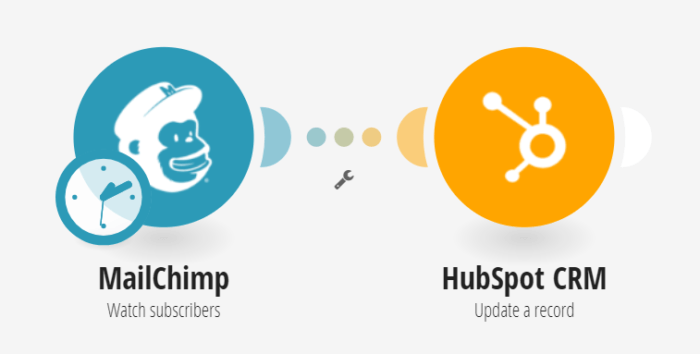
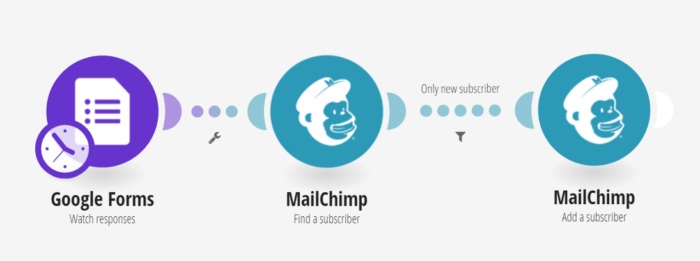
Consider a scenario where your company uses a web form to gather email addresses from users, which are then automatically added to Mailchimp for streamlined email campaign access. It's a common challenge that subscriber and user email addresses frequently change, making manual tracking both tedious and highly inefficient.
With Make.com, this process can be effortlessly automated. The initial setup involves a module that monitors incoming responses from a Google Form web form. Subsequently, a second module searches Mailchimp for the email address provided in the web form. Finally, a third module takes any new email addresses and creates corresponding subscriber records in HubSpot.
This automation eliminates the need for manual data transfers, reducing the risk of errors and freeing up valuable time. No more tedious dragging and dropping, or eye strain from staring at spreadsheets. This streamlined process ensures that your lead data is consistently updated across platforms, allowing your team to focus on more strategic tasks.
While the previous setup is excellent for onboarding new users, what about managing changes that occur over time, such as updates from a Mailchimp campaign or modifications to a web form? These dynamic changes also need to be accurately reflected in your CRM.
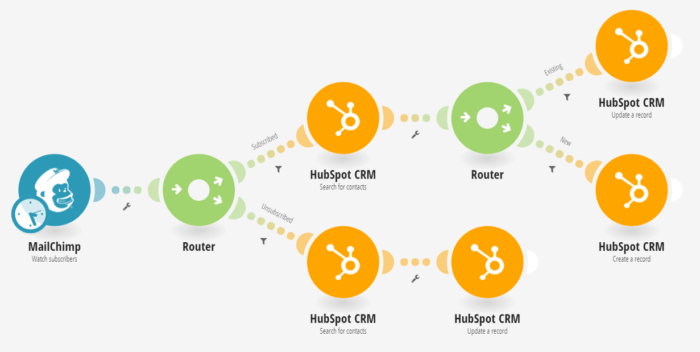
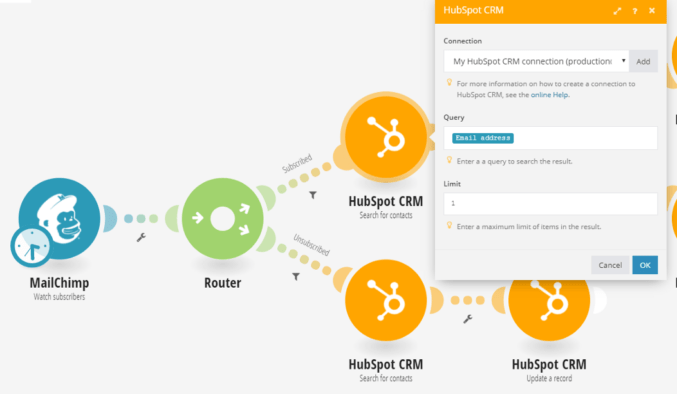
Any time a response is returned, the "Watch subscribers in Mailchimp" module is activated. This trigger identifies whether a subscriber's status has changed to either 'subscribed' or 'unsubscribed'. In both instances, it's critical that these status updates are accurately captured within HubSpot.
The following examples demonstrate how Make.com handles each scenario. Depending on the subscriber's status, the workflow proceeds through a series of predefined modules, ensuring your data is instantly cleaned and updated. This proactive approach maintains data integrity and keeps your CRM reliable.
Subscribed
If the incoming data indicates a subscription, the Make.com scenario directs the workflow along the upper route. Here, the system initiates a search within HubSpot for the contact using the email address provided by Mailchimp. This step is crucial for identifying whether the subscriber is new or an existing contact.
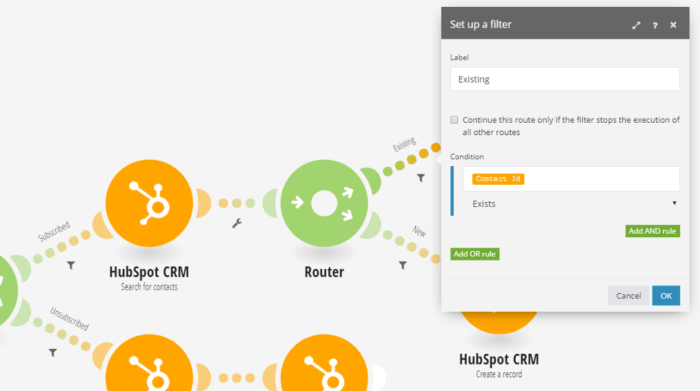
Following this search, a router module with a filter determines the next course of action. This filter intelligently distinguishes between a completely new contact and an individual who is already present in your HubSpot database. This ensures that the system either creates a new record or updates an existing one, preventing duplicate entries and maintaining data cleanliness.
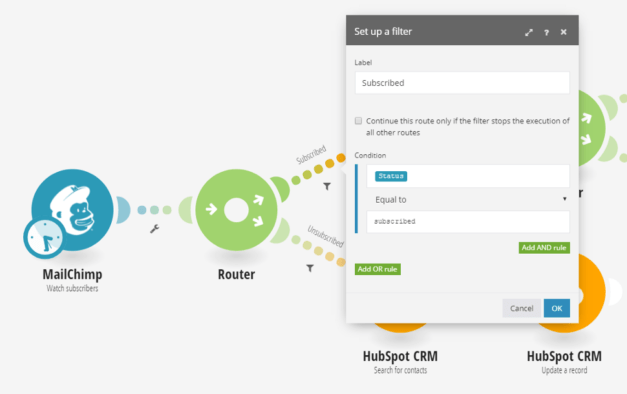
To ascertain if a contact is new or already exists, the system queries your current HubSpot contact list. This is performed by the "Search for a contact" module, which primarily utilizes the Contact-ID for efficient identification. This ensures that the system can quickly and accurately locate relevant records.
If the search confirms that it is a new contact, the scenario proceeds to create a fresh record in HubSpot, populating it with all the relevant values extracted from Mailchimp. Conversely, if the contact is already in your database, their existing record is updated with the latest information from Mailchimp. This dual approach guarantees that your HubSpot CRM is always accurate and free from redundant data.
Pro tip: Regularly audit your Make.com scenarios to ensure they are running efficiently and accurately. Small changes in API updates or data formats can sometimes break workflows, so periodic checks can prevent data discrepancies.
This seamless synchronization means that any new lead captured in Mailchimp is immediately reflected in HubSpot, ready for your sales and marketing teams to engage. The automation eliminates manual data entry, reduces errors, and ensures that your CRM is always a reliable source of truth for your customer information.
Unsubscribed
Conversely, it is equally important to manage instances where contacts choose to unsubscribe from your Mailchimp communications. This status change must also be accurately reflected within HubSpot to maintain data integrity and ensure compliance with communication preferences.
If a Mailchimp subscription is marked as 'unsubscribed', the Make.com scenario will follow a distinct path. Similar to the subscribed route, it will first search for the corresponding contact in HubSpot. Once identified, the system updates the contact's record with the information that the user has unsubscribed, effectively marking them as opted-out in your CRM.
A significant advantage of using Make.com is its capability to process historical data. This means that even if you're implementing this integration for the first time, you can configure the scenario to retroactively update contact statuses in HubSpot based on past Mailchimp subscription changes. This ensures that your entire contact list is accurate from the outset of your integrated operations.
Ultimately, whether it's a new subscriber, a returning user, or an unsubscriber, this automated scenario is vital for keeping your HubSpot leads consistently up-to-date. This efficiency allows your team to dedicate more time and energy to what truly matters: engaging with people. With this timesaving automation, you can manage your contacts painlessly and quickly, optimizing your overall workflow.
Pro tip: Consider adding an internal notification (e.g., Slack or email) to your Make.com scenario whenever a contact unsubscribes. This can alert your sales or customer success teams, allowing them to adjust their engagement strategy accordingly.
To further enhance your HubSpot CRM's capabilities and explore more integration possibilities, we encourage you to review the full range of available integrations. These tools can help you build an even more robust and responsive customer relationship management system.