
This article serves as a comprehensive introduction to Facebook integrations, exploring their significance for businesses leveraging the social media platform. With over 7 million active advertisers on Facebook, understanding and implementing integrations has become increasingly vital for streamlining operations and enhancing marketing efforts.
A Facebook integration fundamentally involves connecting one or more external applications with a Facebook product. The core purpose of this connection is to facilitate the seamless sharing of data, which in turn optimizes various workflows and campaigns. This guide will delve into the specifics of what these integrations entail, why they are beneficial, and the different methods available for creating them.
Facebook offers a wide array of products that support integrations, including Messenger, Pages, Groups, Lead Ads, Custom Audiences, Offline Conversions, Conversions, Workplace, and Ad Insights. A complete list of these products, along with their API documentation, can be found on the Facebook for Developers Documentation page. These products can be linked to hundreds of third-party applications, ranging from chatbots and email marketing tools to collaboration platforms and other social media networks.
Throughout this article, we will provide actionable insights into Facebook integrations. We will cover an expanded definition of what constitutes a Facebook integration, discuss the compelling reasons for their implementation, and detail the various methods available for their creation. By the end, you will have a solid understanding of how to leverage these powerful tools to advance your business objectives.
What is a Facebook Integration? An Expanded Definition
At its core, a Facebook integration is the process of merging one or more applications with a Facebook product. This essentially creates a bridge between two or more software applications, with at least one being a Facebook application. The primary function of such an integration is to enable the exchange of data between these connected systems, leading to optimized workflows and improved campaign performance.
There are several popular approaches to establishing these integrations. These include utilizing cloud-integration tools, leveraging native integrations offered by third-party applications, and directly interacting with Facebook's Application Programming Interfaces (APIs). While we will explore the nuances of each method in detail later, it's worth noting that the choice often boils down to convenience and the level of technical expertise required.
The first two methods—cloud-integration tools and native app integrations—are generally more user-friendly and do not typically require coding knowledge. They provide a streamlined way to connect systems without delving into complex programming. In contrast, working directly with Facebook's APIs demands a solid understanding of coding and often requires more time and resources for development and deployment. This direct approach offers the highest degree of customization but comes with a steeper learning curve.
It's also important to understand how to monitor and manage your existing Facebook integrations. Some integrations might be created almost automatically, for instance, when you use your Facebook account to log into a third-party application. In such cases, an app integration is often established in the background.
For individual Facebook accounts, you can review and manage your integrations by navigating to "Settings" and then "Business Integrations." This section, usually located on the bottom left of the page, provides an overview of all applications connected to your personal profile. Regularly checking this area ensures you have control over which apps have access to your Facebook data and can revoke permissions as needed.
For those managing business assets, such as through Facebook Business Manager or Facebook Ads Manager, the process is slightly different. You would typically click the "hamburger button" (three horizontal lines) in the top right corner of your screen and select "Business settings." Within this interface, you'll find a dedicated section on the left menu that allows you to view and manage all active integrations relevant to your business accounts, providing a centralized control panel for your professional Facebook ecosystem.
Reasons to Implement Facebook Integrations
Businesses, advertisers, and content creators leverage Facebook integrations for a multitude of strategic reasons, primarily centered around enhancing efficiency, optimizing performance, and gaining deeper insights. One of the most compelling drivers is the ability to automate processes and workflows. This includes automating routine tasks such as scheduling and posting content, monitoring social media activity, and managing customer interactions, freeing up valuable time and resources for more strategic initiatives.
Beyond automation, integrations play a crucial role in creating, expanding, and optimizing both new and existing campaigns. By connecting Facebook with other marketing tools, businesses can ensure a cohesive strategy across all channels, leading to more effective ad targeting, lead generation, and conversion tracking. This interconnectedness allows for a holistic view of campaign performance and facilitates rapid adjustments to maximize return on investment.
Furthermore, Facebook integrations are instrumental in improving customer support. By linking Facebook Messenger or Pages with CRM systems or dedicated support platforms, businesses can centralize customer inquiries, provide faster responses, and offer a more personalized support experience. This not only boosts customer satisfaction but also helps build stronger relationships with the audience.
These immediate operational benefits are often aligned with broader organizational objectives. Integrations enable businesses to extract the maximum value from their data, transforming raw information into actionable intelligence. They also contribute significantly to reducing operational costs by minimizing manual efforts and human error. Ultimately, by streamlining processes and centralizing data, Facebook integrations empower businesses to gain invaluable insights into their customers and prospects, driving informed decision-making and sustainable growth.
Methods to Create Facebook Integrations
When it comes to establishing connections between Facebook products and other applications, there are three primary methods available. Each approach offers distinct advantages and caters to different levels of technical expertise and customization needs. Understanding these methods is crucial for choosing the most suitable strategy for your specific integration requirements.
The three main approaches are: utilizing cloud-integration tools, leveraging native third-party app integrations, and directly interacting with Facebook's APIs. To help you evaluate these options, we'll also consider five key factors: convenience, flexibility, complexity, robustness, and pricing. This "scoreboard" will provide a quick comparative overview, guiding your decision-making process.
The choice among these methods often depends on the resources you have available, including time, budget, and technical talent. For instance, if you need quick, no-code solutions, cloud-integration tools might be ideal. If you require deep customization and have development resources, direct API access could be the best path. Let's delve into each method to understand their intricacies and how they can be applied to create effective Facebook integrations.
Cloud Integration Tools
Cloud integration tools provide a powerful and often user-friendly way to connect Facebook with a wide array of other applications. These platforms enable you to build automated workflows that transfer data and trigger actions between different services, significantly enhancing efficiency. Examples of applications that can be integrated include Customer Relationship Management (CRM) systems like Pipedrive, Zoho, and HubSpot, which help manage customer data and interactions.
For marketing efforts, these tools can link Facebook with email marketing platforms such as MailChimp, ActiveCampaign, and Brevo (formerly Sendinblue), allowing for automated lead nurturing and campaign management. Social media platforms like Twitter, Pinterest, and LinkedIn can also be integrated for cross-posting and audience engagement. E-commerce tools and platforms, including Shopify, WooCommerce, and PrestaShop, benefit from integrations for order processing, inventory management, and customer communication. Additionally, messaging tools like Slack, Discord, and ManyChat can be connected for internal communication and automated customer service.
Popular cloud integration tools include Make, PieSync, and Process Street. While they all aim to simplify integrations, their scope, capabilities, ease of use, and pricing models can vary significantly. What makes these tools particularly appealing is their ability to create a virtually endless number of custom integrations, not just for Facebook but across hundreds of different applications in your tech stack.
This flexibility proves invaluable in dynamic business environments. For example, if your company decides to switch CRM providers, a cloud integration platform can quickly facilitate the data flow from the new CRM to Facebook Custom Audiences, ensuring continuity in your marketing efforts with minimal disruption. Most importantly, these tools are designed to be accessible to non-developers, often requiring no coding knowledge. They typically offer comprehensive customer support, manage API maintenance, and provide training resources, making advanced automation achievable for businesses of all sizes.
Using cloud integration tools to develop Facebook integrations - Scoreboard
- Convenience: High
- Flexibility: High
- Complexity: Variable
- Robustness: High
- Pricing: Variable
Native Third-Party App Integrations
Many application developers recognize the importance of connecting with major platforms like Facebook and often build native integrations directly into their software. These built-in connections are typically developed in response to user demand, as businesses increasingly require seamless data flow between their various tools. The more users express a need to integrate a particular app with Facebook, the higher the likelihood that the app developers will offer such an option.
Within the category of native third-party app integrations, there's a special designation known as "Facebook partner integrations." These are applications whose parent companies have established an official partnership with Facebook, signifying a deeper level of collaboration and often more robust, officially supported connections. To access these partner integrations, users typically need to log into Facebook Business Manager, navigate to the "hamburger icon" in the top right corner, and select the "Events Manager" option. From there, the "Partner Integrations" button on the left column will display the available options.
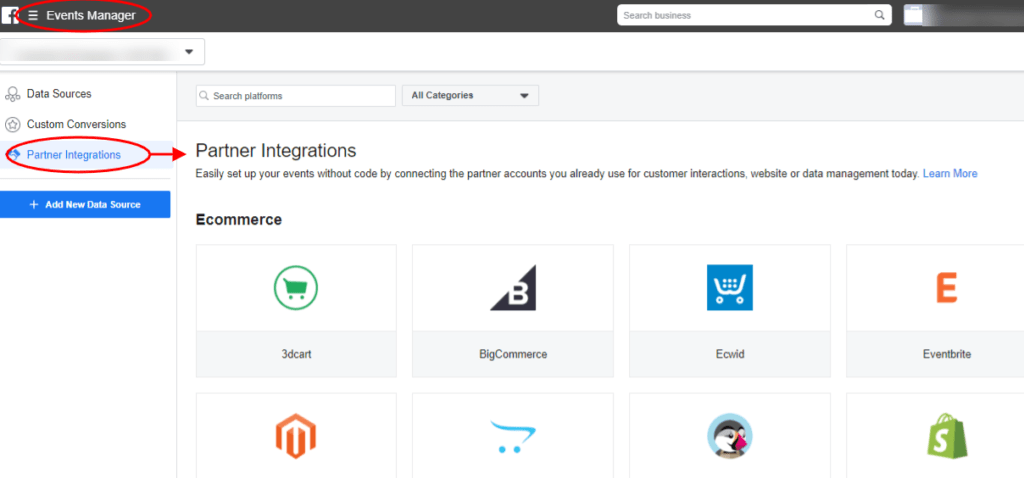
Popular examples of Facebook partner integrations include major platforms like Shopify, HubSpot, WooCommerce, Squarespace, and Salesforce. These integrations often provide streamlined setup and reliable performance due to the official endorsement and collaboration with Facebook. However, it's important to note that not every app offering a native integration with Facebook products is an official Facebook partner. While non-partner integrations can still be highly effective, the "partner" badge offers an extra layer of assurance regarding testing and approval by Facebook's teams.
Conversely, some prominent software providers, such as Pipedrive and Insightly CRM, have opted not to offer native integrations directly. In such cases, businesses would need to explore other methods, like cloud-integration tools or direct API access, to establish the desired connections. This highlights the varied landscape of integration options and the need to assess each app's capabilities individually.
Using native app third-party Facebook integrations - Scoreboard
- Convenience: Medium
- Flexibility: Low
- Complexity: Variable
- Robustness: Variable
- Pricing: Low
Facebook APIs
The third and most direct method for creating Facebook integrations involves working directly with Facebook's Application Programming Interfaces (APIs). This approach offers the highest level of customization and control, making it ideal for developers and businesses with specific, complex integration needs that cannot be met by off-the-shelf solutions or native app integrations. If you possess the necessary time, technical talent, and financial resources, leveraging Facebook APIs can unlock unparalleled flexibility in how your applications interact with Facebook products.
Before embarking on direct API integration, Facebook strongly recommends reviewing their extensive documentation. This includes guides for iOS, Android, JavaScript, PHP, and various third-party SDKs. Additionally, exploring the advanced topics documentation is crucial for understanding more intricate implementations and best practices. This preparatory step ensures that developers are equipped with the knowledge to build secure, efficient, and compliant integrations.
It's important to clarify that both cloud integration tools and native third-party app integrations ultimately rely on Facebook's underlying APIs. However, these tools act as a "middleware" layer, abstracting away much of the complexity and providing a more accessible interface for users. When you choose to work directly with APIs, you bypass this middleware, gaining direct access to Facebook's core functionalities. This direct access allows for fine-grained control over data exchange and the ability to implement highly specific logic, but it also means taking on the full responsibility for development, maintenance, and adherence to Facebook's platform policies.
Using Facebook APIs to develop integrations - Scoreboard
- Convenience: Low
- Flexibility: High
- Complexity: High
- Robustness: High
- Pricing: Low
Facebook Integrations Examples
Now that we've covered the theoretical aspects and methods of Facebook integrations, let's explore some practical examples. These integrations, built using platforms like Make, demonstrate how automation can streamline common business tasks. The best part is that many of these examples are available as templates, meaning you can implement them quickly if you have a Facebook account, a Make account, and the necessary app accounts for the included services.
These examples highlight the power of automation in saving time and ensuring consistency across your digital presence. Whether it's managing social media content or integrating CRM data, these templates provide a starting point for enhancing your Facebook operations. Let's dive into some specific use cases that can be deployed with minimal effort.
Share New Facebook Posts on Discord
Crossposting content across multiple social media platforms can be a time-consuming and repetitive task. Manually sharing every new Facebook post to other channels not only eats into valuable time but also increases the risk of inconsistencies or missed updates. This is where automation becomes incredibly valuable, transforming a cumbersome process into a seamless one.
This Make template offers a straightforward solution to this challenge. Its function is simple yet highly effective: every time you publish a new post on Facebook, Make automatically detects it and shares it on Discord. This ensures that your communities on both platforms receive timely updates without any manual intervention on your part.
The beauty of this integration lies in its ease of deployment. Assuming you already manage active Facebook and Discord accounts, you can set up this automation in just a few minutes. This allows you to maintain a consistent presence across your social channels, engage with your audience on their preferred platforms, and free up resources that can be reallocated to more strategic tasks, ultimately boosting your overall social media efficiency.
Post to Multiple Facebook Pages at Once
Many businesses, particularly those with a regional or localized presence, often manage several Facebook pages. This is a common scenario for industries such as insurance agencies, car dealerships, or gym chains, where each location or branch might have its own dedicated Facebook page. In such setups, it's a frequent practice for local pages to repost content from the main corporate Facebook page to maintain brand consistency and share central announcements.
However, manually reposting content across numerous pages can become an incredibly time-intensive task for both the main page administrators and those managing the local pages. This repetitive workflow is prone to delays and human error, making it a prime candidate for automation. An automated solution can ensure that all relevant pages are updated promptly and consistently.
This Facebook integration specifically automates the process of reposting content. It allows you to automatically share a post from one Facebook page to other Facebook pages that are controlled by the same individual or organization. This not only saves a significant amount of administrative time but also guarantees that all your localized pages are always up-to-date with the latest information, fostering a unified brand message across all your Facebook properties.
Bonus Integration: How to Integrate a CRM into Facebook?
Customer Relationship Management (CRM) data holds immense value for businesses, especially when it comes to refining advertising strategies on platforms like Facebook. This data is crucial for building highly targeted custom audiences and lookalike audiences, which can significantly improve the effectiveness of ad campaigns. However, many CRM tools traditionally focus their Facebook integrations primarily on Lead Ads, leaving other valuable Facebook products underserved.
This is where a versatile integration platform like Make shines. Make allows you to connect a wide range of CRM tools, including popular options such as HubSpot, Pipedrive, and Insightly, with up to eight different Facebook products. This comprehensive connectivity extends beyond just Lead Ads to include powerful features like Custom Audiences and Offline Conversions, providing a much broader scope for leveraging your CRM data.
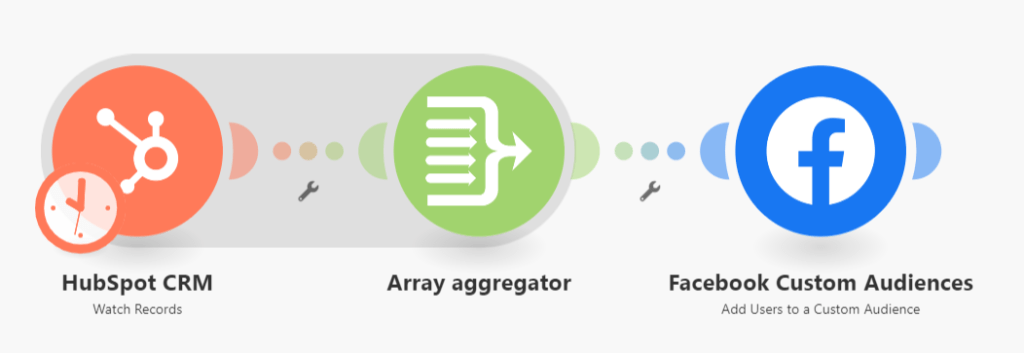
The process is designed for simplicity: you search for the relevant modules within Make, visually connect your CRM and desired Facebook app, and then run the automation scenarios. Make also offers pre-built templates that can be deployed instantly. For example, there's a template specifically designed to send new records from HubSpot directly to Facebook Custom Audiences. This automation eliminates the manual effort of exporting and uploading lead data, ensuring your Facebook ad targeting is always current and precise.