
Introduction to Event Automation
The holiday season, particularly December, brings with it a flurry of activities, including Christmas parties, client appreciation events, and charitable gatherings. These occasions are not just about personal celebrations but also offer invaluable opportunities for businesses to strengthen client relationships, generate new leads, and secure potential revenue for the upcoming year.
However, behind the festive facade, event planning often involves a significant amount of administrative work. This typically includes managing spreadsheets, analyzing data, coordinating follow-up communications, distributing surveys, and handling various other front-end and back-end tasks. This can quickly become overwhelming, detracting from the joy of the season and the core purpose of the events.
A highly effective strategy to mitigate this workload is to leverage event technology platforms and automation. By automating repetitive and time-consuming tasks, you can significantly streamline your event management processes. This approach transforms the often-stressful aspects of planning into a smooth and efficient operation, allowing you to concentrate on the more enjoyable and impactful parts of hosting successful holiday events.

Eventbrite and Make Modules
Eventbrite stands as the world's largest event technology platform, empowering individuals and organizations to effortlessly schedule events and sell tickets. Its robust features allow users to create professional ticketing and registration pages within minutes, manage and analyze event performance from any location, cultivate a loyal attendee base, and track sales data in real-time.
Make.com (formerly Integromat) has recently introduced a comprehensive suite of Eventbrite modules designed to automate various aspects of your holiday event planning. These modules provide powerful capabilities to streamline your workflows, ensuring that many tasks on your holiday to-do list can be handled automatically.
The available modules are categorized into Triggers, Actions, and Searches:
- Triggers: These modules initiate a Make scenario when a specific event occurs in Eventbrite. Examples include "Watch my events," "Watch attendees," "Watch orders," "Watch events," and an "instant trigger" for watching orders, ensuring real-time responses to new activities.
- Actions: These modules allow Make to perform specific operations within Eventbrite. Capabilities include "Unpublish an event," "Create an event," "Publish an event," and "Create a ticket class," giving you programmatic control over your events.
- Searches: These modules enable Make to retrieve specific data from Eventbrite. You can "Find events," "List orders," "List attendees," and "List ticket classes," allowing for dynamic data retrieval to support your automation needs.
By leveraging these modules, you can create sophisticated automation scenarios that connect Eventbrite with other applications, significantly enhancing your event management efficiency. Here are a few practical ways to maximize the utility of your Eventbrite account through Make.
Send Invites Automatically
Imagine a world where you can simply create an event and know that your invitations will be sent out instantly, without any further manual intervention. With Make, this is entirely possible. By connecting your Eventbrite account to an email campaign service like MailChimp, you can automate the entire invitation process.
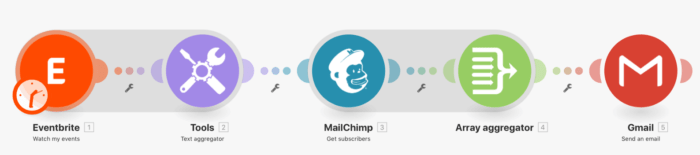
In this automation scenario, Make continuously monitors your Eventbrite account for any new events you create. As soon as a new event is detected, Make springs into action. It utilizes a "Text aggregator" tool to gather and consolidate all the essential event details, such as the event name, date, time, location, and registration link.
Following this, Make aggregates your subscriber list from MailChimp. Once both sets of data are prepared, it automatically dispatches personalized email invitations to all your subscribers. This eliminates the tedious and error-prone task of manually copying event details and managing invite lists, allowing you to focus on other critical aspects of event preparation.
Pro tip: Customize your email templates in MailChimp with dynamic fields that pull event details directly from Eventbrite via Make. This ensures every invitation is personalized and up-to-date without manual editing.
Build a Subscriber List
For businesses aiming to expand their contact list and generate leads, especially around key events, Make offers a powerful solution. You can set up an automation scenario that actively builds and maintains your subscriber list based on event attendance, ensuring your lead pipeline remains robust and current.
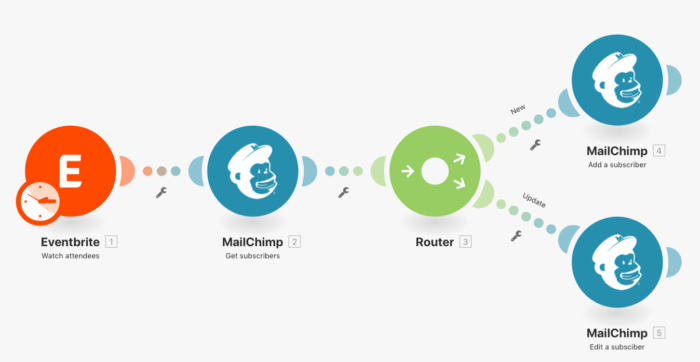
This scenario is designed to react instantaneously whenever a new attendee registers for one of your events on Eventbrite. Upon registration, Make automatically checks your existing subscriber list, typically within a connected email marketing platform like MailChimp, to determine if the new attendee is already present.
Based on this check, Make intelligently performs one of two actions: if the attendee is new, it creates a fresh subscriber entry in your contact list; if the attendee already exists, it updates their existing record with any new information or flags them as having attended a recent event. This ensures that your subscriber list is always accurate and comprehensive, providing valuable data for future marketing efforts and lead nurturing.
Update CRM System
After the successful conclusion of your holiday events, the valuable attendee data collected shouldn't just sit idle. It's crucial to integrate this information into your Customer Relationship Management (CRM) system, such as Pipedrive CRM, to ensure that your sales and marketing teams can promptly follow up and nurture these new connections. Automating this process saves significant time and ensures no lead falls through the cracks.
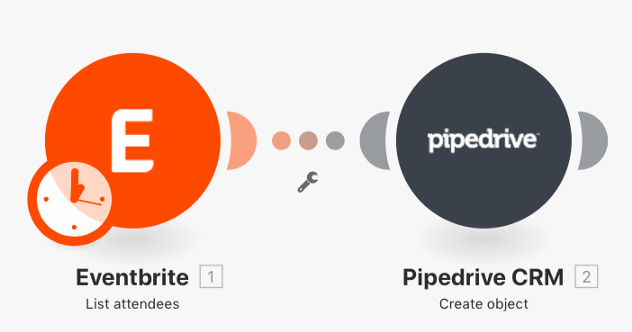
A dedicated Make scenario can be configured to seamlessly transfer attendee data from Eventbrite to your CRM. This automation will extract the complete list of attendees from your event and then automatically add them as new contacts or update existing records within your Pipedrive CRM system. This ensures that all relevant information, such as contact details and event attendance, is accurately recorded.
By automating this integration, your team can hit the ground running immediately after the holidays, equipped with a fresh, organized list of potential leads and engaged contacts. This proactive approach to data management maximizes the return on your event investments by facilitating timely and targeted engagement, ultimately driving business growth.
By investing a small amount of time to set up these or similar automation scenarios with Make, you can reclaim countless hours that would otherwise be spent on manual administrative tasks. This newfound efficiency allows you to truly enjoy the holiday season with friends and family, rather than being bogged down by event logistics.
While Make might not do your holiday shopping for you just yet, its capabilities for streamlining business operations are vast and continuously expanding. If these automation possibilities have sparked your interest, we encourage you to explore the Make.com platform and try it for free today to discover how it can transform your workflows.