
Automated Contract Creation Use Case
Contract management represents a significant operational burden for many organizations, with large companies processing thousands of agreements annually. Manual contract creation not only consumes valuable time but also introduces inconsistencies and errors that can lead to revenue leakage.
Our automation solution addresses these challenges by triggering contract generation whenever a deal reaches the "Won" stage in Pipedrive CRM. The system extracts relevant deal information and populates a pre-designed Google Docs template, creating a fully formatted contract in seconds.
Pro tip: Start with your most frequently used contract type (like NDAs or SLAs) to maximize the immediate impact of automation.
Basic CRM Configuration
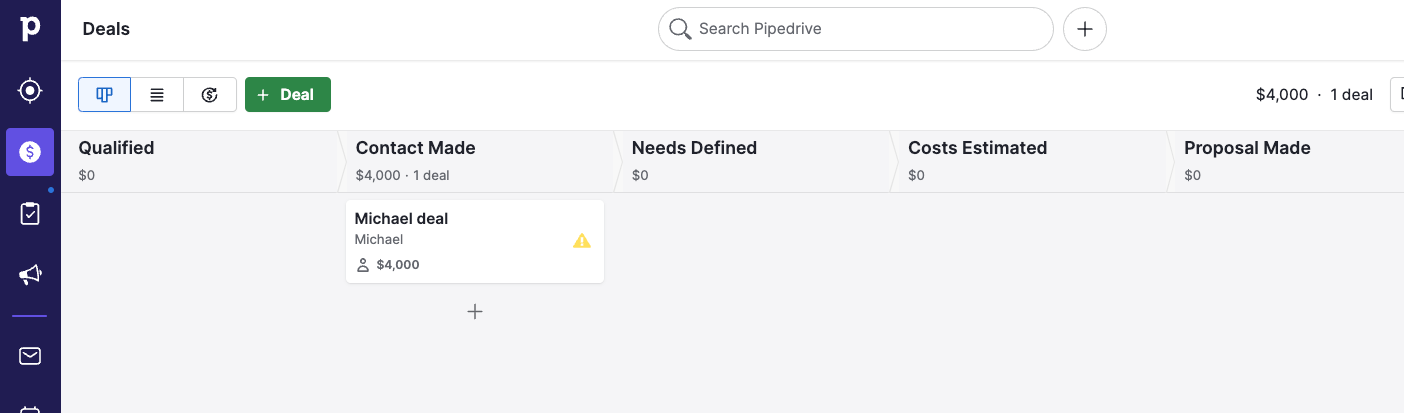
Proper CRM setup forms the foundation of our automated contract solution. Pipedrive's deal cards must contain all necessary fields to populate contract terms, including client details, service specifics, and financial terms.
We recommend creating custom fields for any contract-specific data not captured in standard CRM fields. These might include project timelines, service level commitments, or special terms and conditions that vary between agreements.
Essential CRM Fields
These fields should be present in your CRM to support automated contract generation:
- Client contact information (name, email, phone)
- Company details (legal name, address, tax ID)
- Service description and scope
- Pricing and payment terms
- Contract duration and renewal terms
Building the Make Scenario
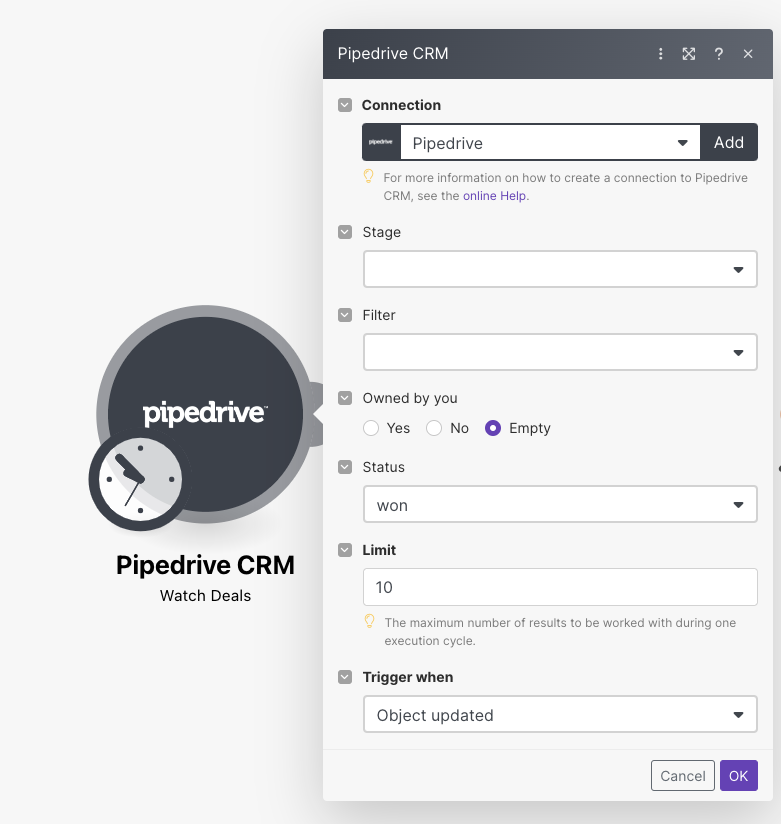
The automation begins with configuring Make's Pipedrive module to monitor for newly won deals. We set the trigger to activate when deal status changes to "Won," ensuring contracts generate at the optimal point in the sales process.
The scenario structure follows a simple but powerful sequence: CRM trigger → data processing → document generation → CRM update. This flow can be enhanced with additional steps like approval workflows or digital signature integration.
Module Configuration Details
The Pipedrive module requires specific settings to ensure reliable triggering:
- Trigger condition: Deal Status = Won
- Trigger event: Object Updated
- Filter: Only deals moving to Won status
- Output fields: Include all relevant deal information
Google Docs Template Design
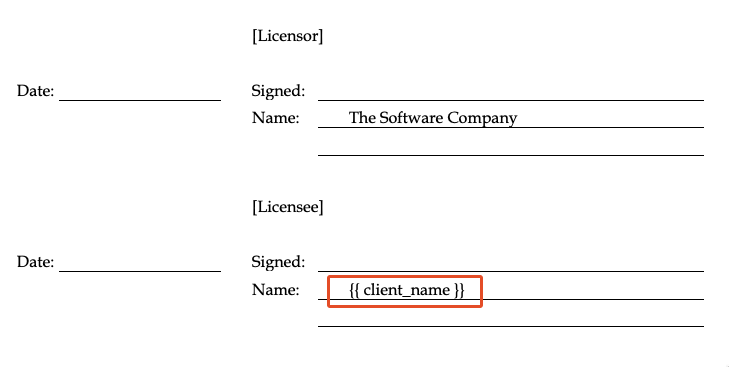
Effective template design is crucial for professional-looking automated contracts. We create a master document in Google Docs with placeholder tags for all variable content that will be populated from the CRM.
The template should maintain your organization's branding and standard legal language while incorporating dynamic fields for client-specific information. Common dynamic elements include names, dates, amounts, and service descriptions.
Template Structure Best Practices
Follow these guidelines when designing your contract template:
- Use clear naming conventions for placeholder tags
- Maintain proper document formatting and styling
- Include all standard legal clauses
- Test template with various data inputs
- Store templates in a dedicated Google Drive folder
Field Mapping Configuration
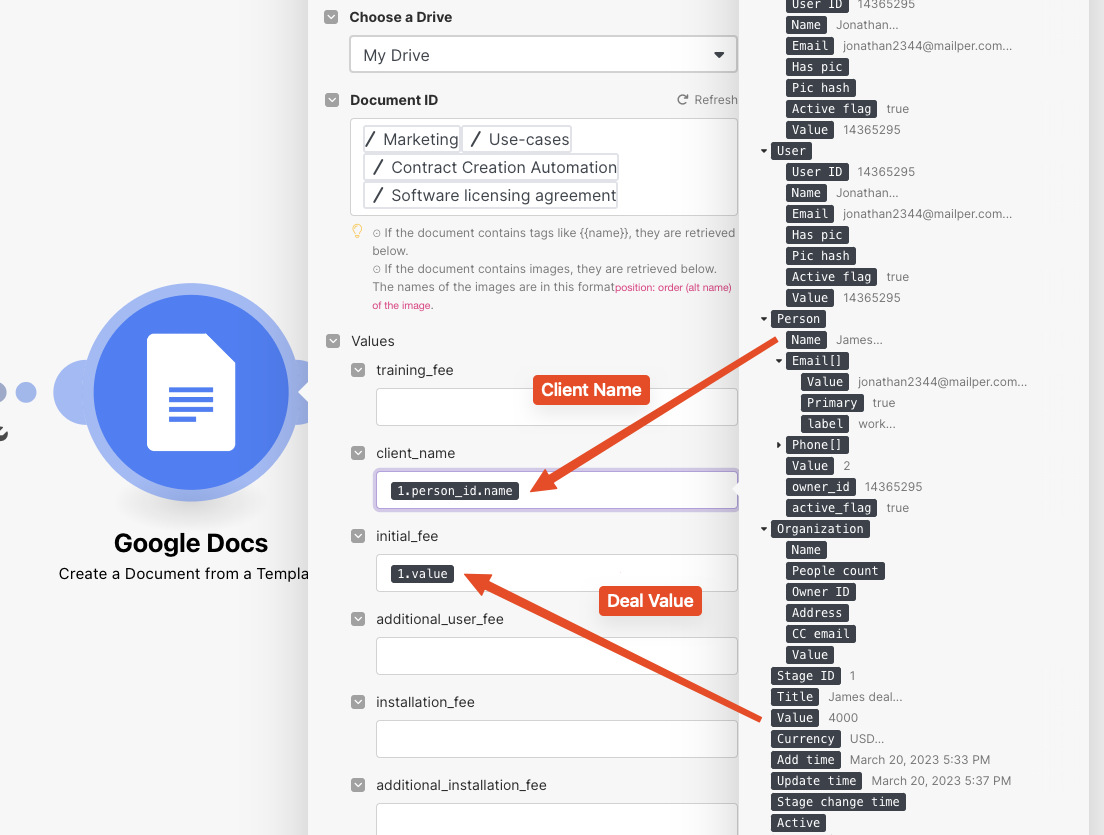
The Google Docs module in Make requires precise mapping between CRM fields and template placeholders. Each dynamic element in your contract template must be connected to the corresponding data point from Pipedrive.
This mapping process transforms raw CRM data into properly formatted contract content. You can apply formatting rules during this stage to ensure dates, numbers, and other values appear correctly in the final document.
Advanced Mapping Techniques
For more sophisticated contract automation:
- Use Make's text formatting functions for proper capitalization
- Implement conditional logic for optional contract clauses
- Add calculated fields for automatic totals and dates
- Include error handling for missing data