
Email list segmentation stands as a cornerstone of effective email marketing strategies. It empowers businesses to deliver highly pertinent and timely messages directly to individuals who are genuinely interested in receiving them. This targeted approach moves beyond generic mass emails, fostering a more personalized and engaging experience for subscribers.
However, the traditional method of creating segmented lists within most email marketing platforms often involves a significant amount of manual work. Marketers typically need to define and apply specific criteria to filter their existing lists, a process that can become incredibly time-consuming, especially when managing numerous lists or dealing with a large volume of new leads.
The old "spray and pray" method, where every email is sent to every contact in a database, has consistently proven ineffective. To truly succeed, businesses must focus on delivering relevant and timely content to an audience that actively wants to consume it. The challenge then becomes: how can this be achieved efficiently and at scale?
This is where automation platforms like Make.com (formerly Integromat) offer a powerful solution. By leveraging Make.com's ability to retrieve data from various no-code and custom forms, businesses can significantly enhance their data collection and segmentation processes. This guide, the second part in our series on automated data collection, delves into specific Make.com scenarios designed to automate email marketing segmentation.
If you find yourself dedicating countless hours to manually segmenting your email lists, this article is specifically for you. We will explore practical, step-by-step automation workflows that can transform your email marketing efforts, making them more efficient, personalized, and ultimately, more successful.
How to Automate Email Marketing Segmentation
Let's illustrate the power of automation with a practical example. Imagine an agency that uses a Typeform lead generation form to gather information from potential clients. On this form, prospects are asked to select the specific service they are interested in, such as "Website Development," "SEO Services," or "Content Marketing."
Once a prospect completes and submits this form, Make.com springs into action. The automation is designed to take the submitted information and automatically add the prospect to the corresponding, relevant email list within the agency's email marketing platform, like ActiveCampaign. This entire process unfolds seamlessly in the background, requiring absolutely no manual intervention from the agency's team.
The beauty of this automation lies in its efficiency. The segmented email list is built dynamically and is ready for use as soon as a new lead comes in. This ensures that prospects immediately begin receiving communications tailored to their expressed interests, significantly improving the chances of engagement and conversion.
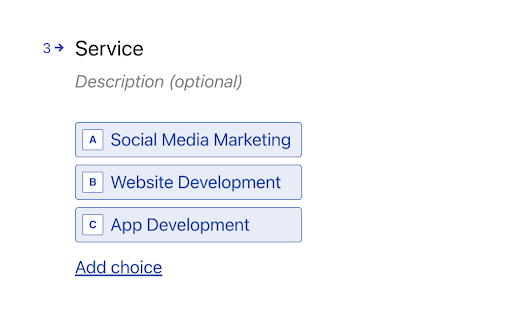
To construct this type of automation, you'll utilize Make.com's powerful filter feature in conjunction with a router module. The router is essential for creating multiple distinct paths within your scenario, each corresponding to a different service option selected by the prospect in the form.
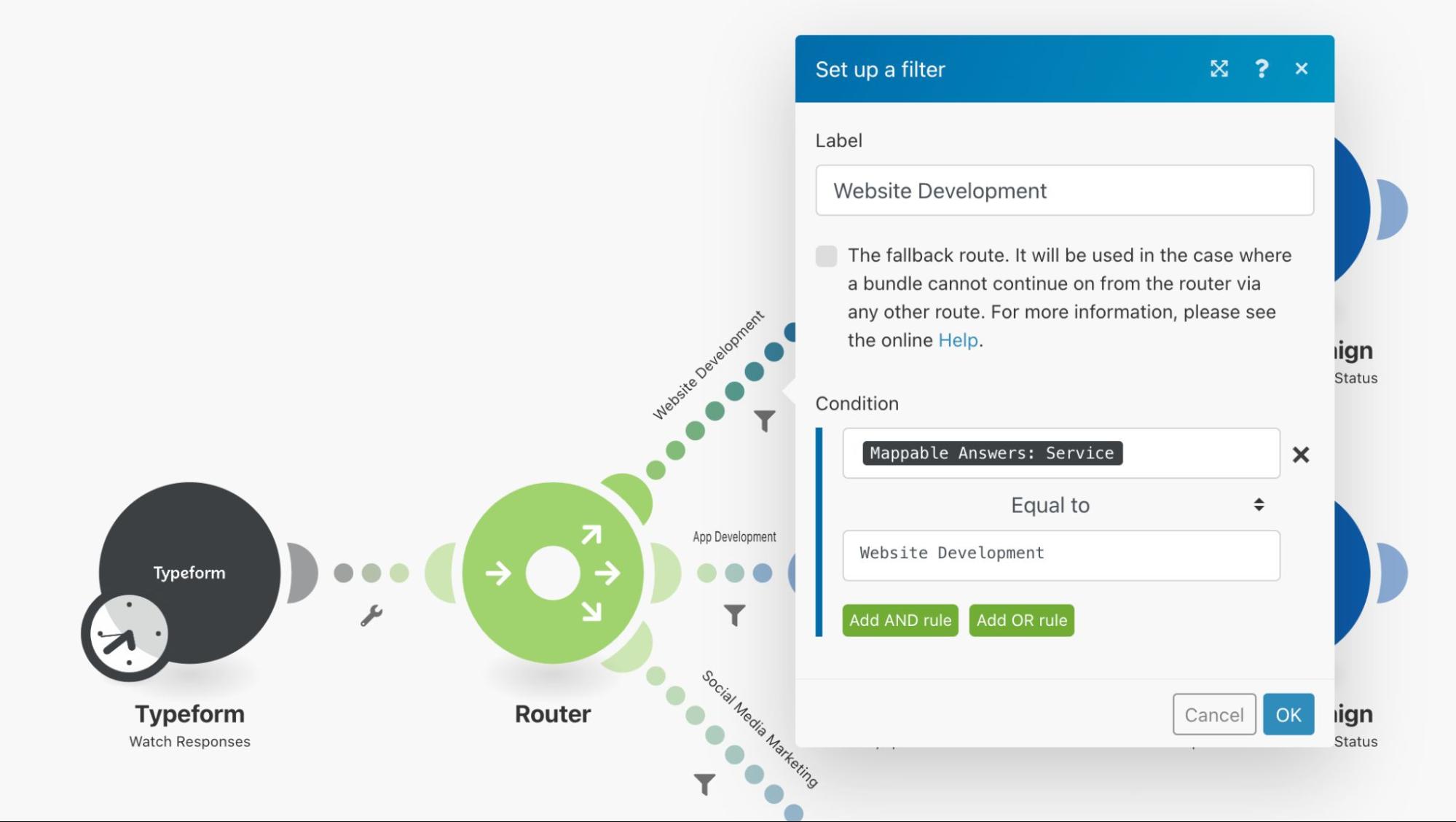
Since the "Service" field in our example form offers three different choices, the Make.com scenario will be configured with three separate paths. Each of these paths will have its own dedicated filter. These filters are crucial for directing the data down the correct path based on the prospect's selection, ensuring that the automation logic is precisely applied.
For instance, the filter on one of the paths will be set to check if the answer provided in the "Service" field of the form is exactly "Website Development." If this condition is met, the data for that particular prospect will then proceed along that specific path, triggering the subsequent actions defined for website development leads.
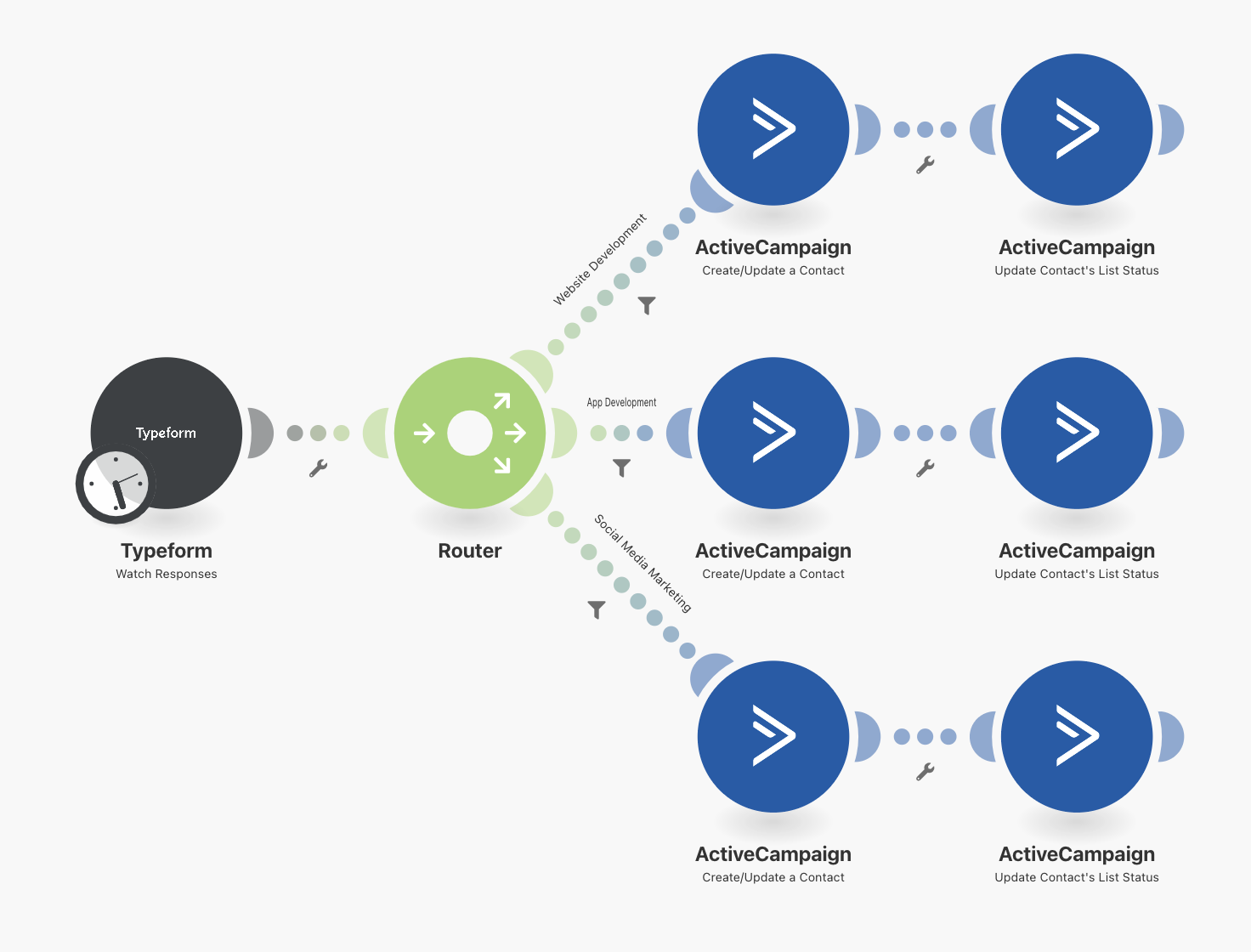
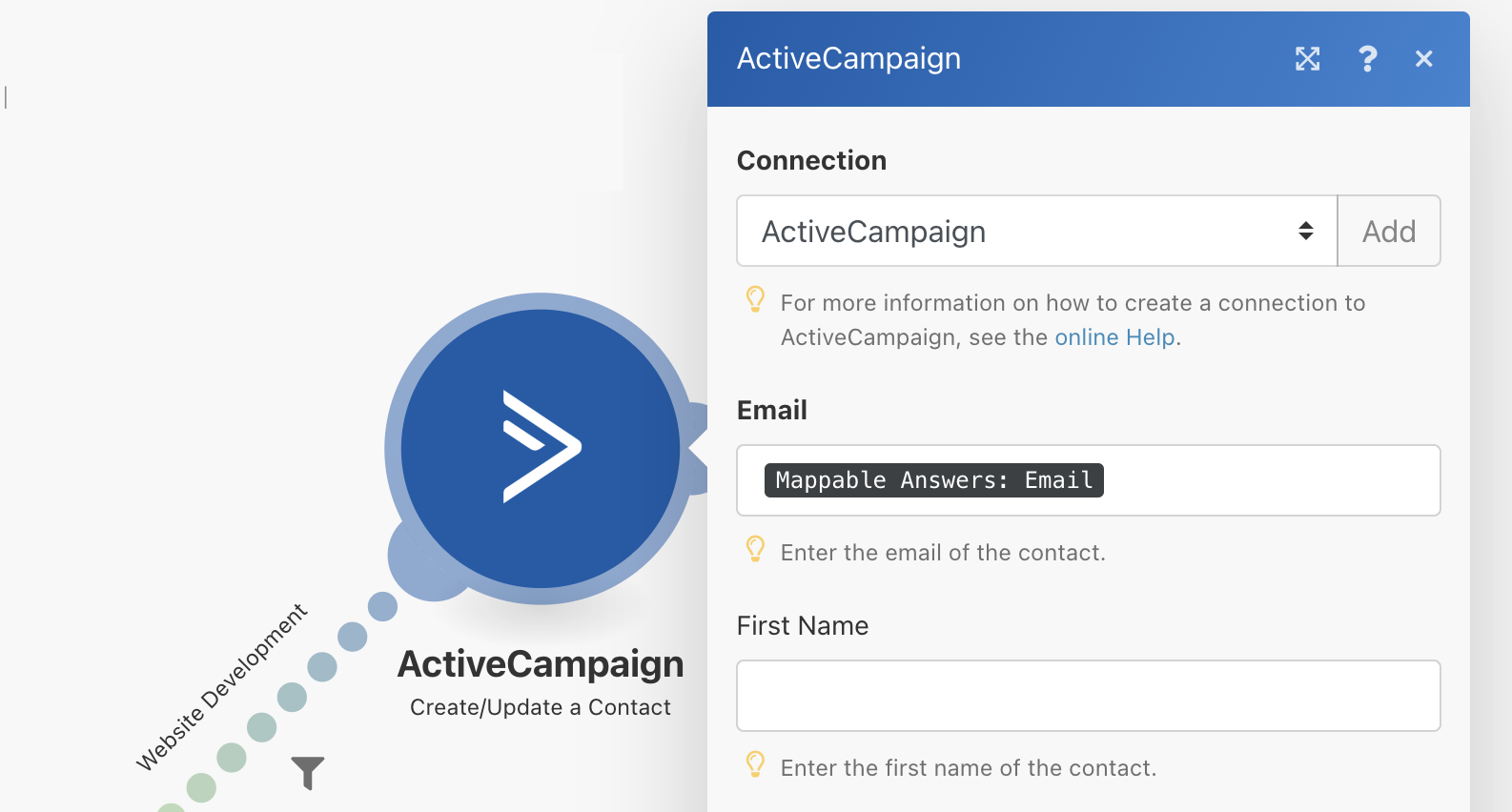
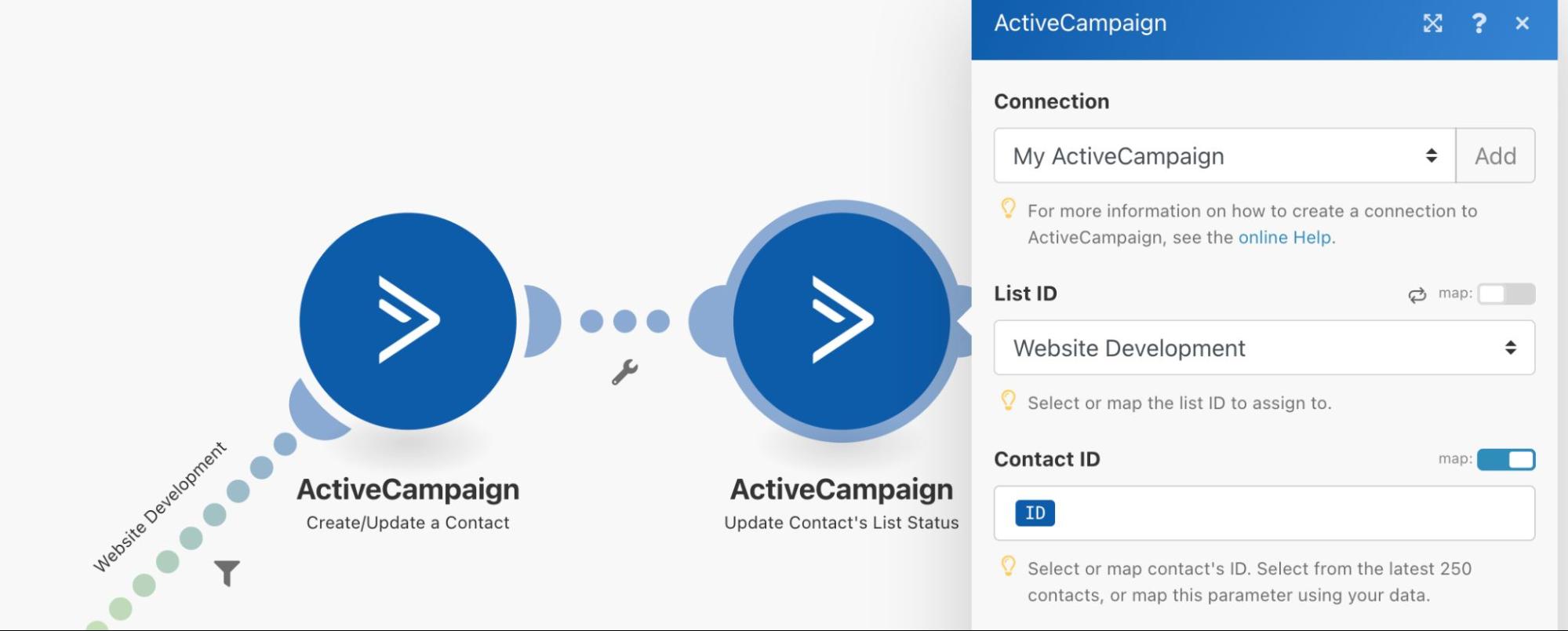
Let's delve deeper into the mechanics of this scenario. Once a prospect's data is routed down a specific path based on their service selection, Make.com performs two critical actions. First, it extracts the email address provided by the prospect in the form and uses it to create a new contact entry within ActiveCampaign.
Following the successful creation of the contact, ActiveCampaign generates a unique contact ID. Make.com then utilizes this newly generated contact ID to perform the second action: adding the prospect to a predefined ActiveCampaign list. In our example, this would be a list specifically named "Website Development" for prospects interested in that service.
This automated process ensures that the agency can send highly targeted email messages that directly address the prospect's specific needs and interests, as indicated by their form submission. For instance, a prospect on the "Website Development" list will receive content relevant to website design, development processes, and related services, rather than generic marketing emails.
The direct consequence of this personalized communication is a significantly higher probability of nurturing these leads effectively and ultimately converting them into paying customers. By delivering value that resonates with each individual, the agency builds trust and demonstrates a clear understanding of their potential clients' requirements.
Crucially, all these intricate steps occur without any human intervention. The cost savings associated with this automated segmentation are substantial, far outweighing the expense of having an employee manually sift through form responses and painstakingly create corresponding email lists. This efficiency allows the agency to scale its marketing efforts without proportionally increasing its operational overhead.
Pro tip: When setting up your filters in Make.com, ensure that the values you're checking against (e.g., "Website Development") exactly match the options provided in your form. Even a small typo can prevent the automation from functioning correctly, leading to miscategorized leads.
The integration of Make.com with your data collection and email marketing platforms streamlines a process that is often a bottleneck for businesses. It transforms a time-consuming, error-prone manual task into an efficient, automated workflow. This not only saves valuable resources but also enhances the quality and effectiveness of your email marketing campaigns.
By automating the creation of segmented lists, you ensure that your marketing messages are always relevant and timely. This level of personalization is key to fostering stronger customer relationships and driving better business outcomes in today's competitive digital landscape. The initial setup time for such a scenario is a small investment compared to the long-term benefits of continuous, accurate, and effortless segmentation.
This automated approach not only optimizes your current marketing efforts but also provides a scalable solution for future growth. As your business expands and your lead volume increases, the automated system will continue to handle segmentation efficiently, allowing your team to focus on strategic initiatives rather than repetitive tasks. It's a fundamental shift from reactive list management to proactive, intelligent audience targeting.
The ability to instantly categorize and engage with leads based on their expressed interests is a significant competitive advantage. It ensures that your first impression with a new prospect is a relevant one, setting the stage for a more productive and personalized communication journey. This precision in targeting can dramatically improve the return on investment for your email marketing campaigns.
Building Email Lists That Will Generate the Best Results Possible
As previously emphasized, the outdated "spray and pray" method of email marketing is fundamentally flawed and will never yield optimal results. To truly connect with your audience and drive conversions, your email strategy must prioritize sending relevant, timely, and personalized messages to individuals who genuinely want to receive them.
The traditional challenge in achieving this personalization lies in the manual effort required to create segmented lists. This often involves painstakingly sifting through data and applying filters to categorize contacts based on various criteria. Such a process is not only prone to human error but also consumes valuable time and resources that could be better allocated elsewhere.
This manual approach becomes particularly burdensome when dealing with a growing database and a multitude of different segmentation criteria. The sheer volume of data and the complexity of maintaining accurate, up-to-date segmented lists can quickly overwhelm marketing teams, leading to delays and missed opportunities for timely engagement.
Fortunately, Make.com offers a powerful and elegant solution to this persistent problem. By implementing automated scenarios, you can effortlessly filter your incoming leads into the most appropriate and relevant email lists. This means that as soon as a prospect expresses interest through a form, they are immediately placed into a segment that aligns with their preferences.
The immediate benefit of this automation is the ability to begin emailing leads with highly targeted content without delay. This proactive engagement, driven by precise segmentation, significantly boosts the likelihood of continued interaction with your brand. When recipients receive content that directly addresses their needs and interests, they are far more likely to open, read, and act upon your emails.
In essence, Make.com empowers you to move beyond the limitations of manual segmentation, transforming your email marketing into a dynamic, responsive, and highly effective channel. By ensuring that every message is delivered to the right person at the right time, you can cultivate stronger customer relationships, enhance brand loyalty, and ultimately achieve superior marketing outcomes.