
Chatbots have evolved far beyond simple customer service tools; they are now powerful lead generation machines capable of collecting email addresses and other critical data at scale. By engaging users in interactive conversations, chatbots can identify potential customers, gather their specific needs, and even deliver personalized content or sales quotes.
The true potential of chatbots for lead generation is unlocked through automation. Without automation, the process of extracting and utilizing the data collected by chatbots would be manual, time-consuming, and prone to errors. This guide, the fourth in our series on automating data collection, focuses on how to use Make.com (formerly Integromat) scenarios to streamline lead collection through chatbot marketing.
We will explore two primary methods for automating lead generation with chatbots: generating dynamic sales quotes for users and building an email list by offering valuable downloadable assets. These strategies empower businesses to capture leads efficiently, nurture prospects, and ultimately drive sales, all while minimizing manual effort.
How to Automatically Collect Leads with a Chatbot
Chatbots offer a unique and engaging way for customers to interact with your brand, and when integrated with a robust automation platform like Make.com, they transform into powerful sales and marketing tools. The key is to design chatbot flows that not only provide information but also strategically gather data that can be used for lead qualification and nurturing.
There are two primary ways to leverage chatbots for automated lead collection using Make.com, each designed to address different aspects of the sales and marketing funnel:
- Generating a sales quote for a chatbot user
- Adding chatbot users to an email list by offering them a downloadable asset, such as an eBook
These methods allow businesses to capture essential prospect information and deliver immediate value, enhancing the user experience while simultaneously building a strong lead pipeline. Let's delve into each of these strategies in detail.
1. Generate a Sales Quote for a Chatbot User
Chatbots can significantly streamline the sales process by automating the generation of personalized quotes. This not only provides immediate value to potential clients but also frees up your sales team to focus on more complex tasks. Imagine a chatbot that can understand a customer's needs and instantly provide an accurate estimate for your services.
Consider a web development company using a Facebook chatbot built on Chatfuel. This chatbot is designed to walk users through a series of questions to gather all the necessary information for a website development project quote. The process begins with the chatbot asking about the type of service the user is interested in, such as e-commerce development.
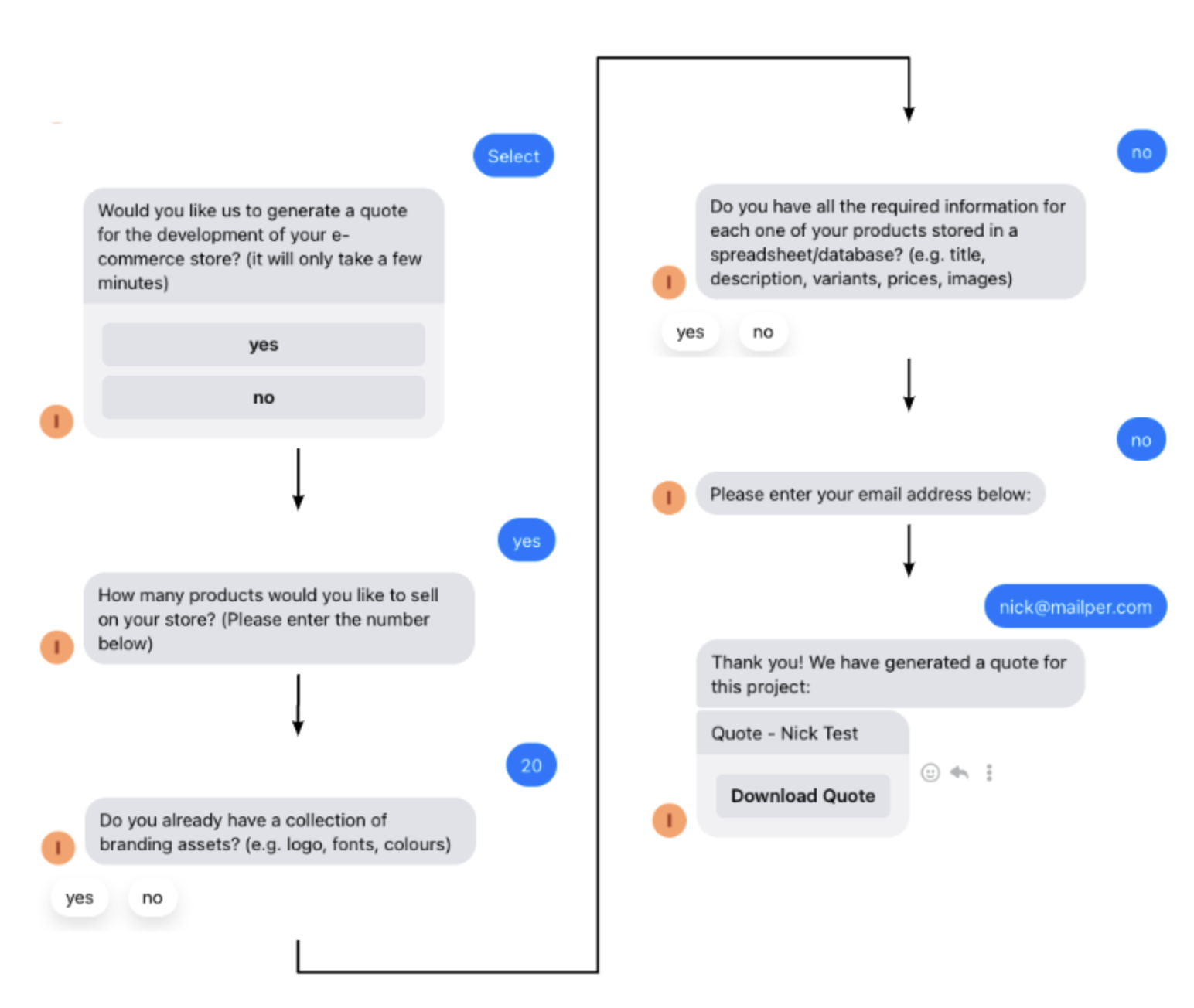
Once the user indicates their interest, for example, by selecting the e-commerce option, the chatbot proceeds to ask if they would like to generate a quote for that specific service. If the user agrees, the chatbot initiates a detailed requirements gathering phase, asking targeted questions to understand the project's scope, features, and specific functionalities required.
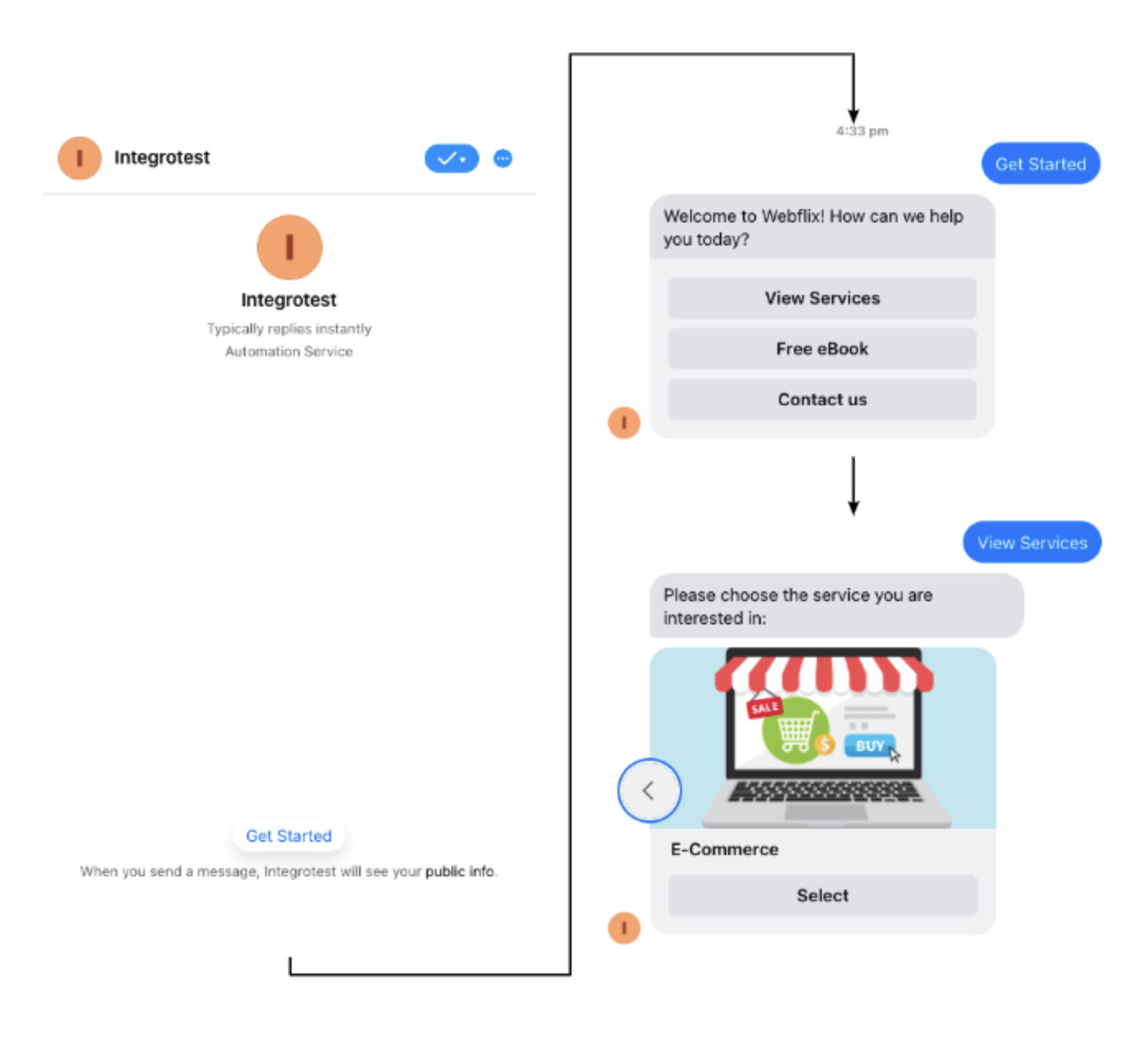
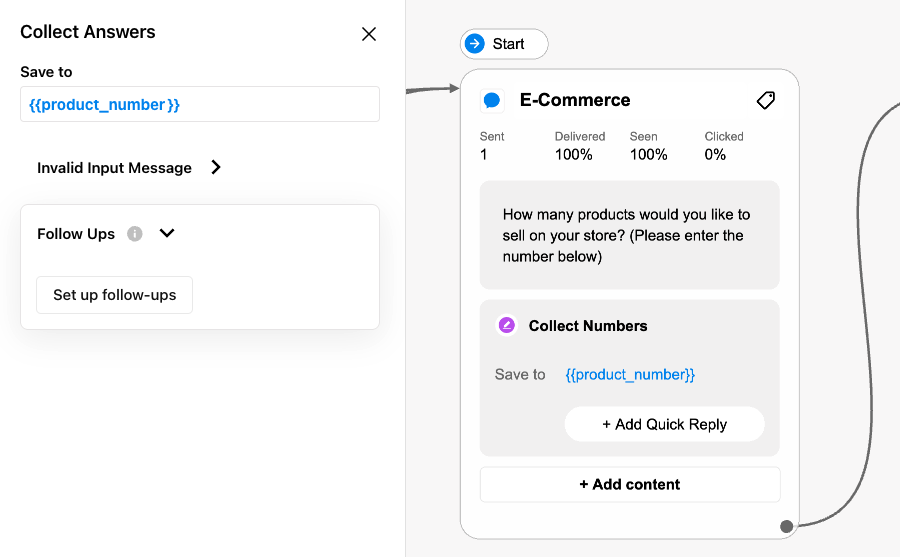
Throughout this interactive process, every piece of information the user provides is stored as a Chatfuel attribute. These attributes are crucial because they allow all the collected data to be seamlessly transferred to Make.com, where it will be used to construct the personalized sales quote. This structured data collection ensures that all relevant details are captured for accurate quoting.
In the final stage of the information gathering, the chatbot prompts the user to enter their email address. This step is vital for delivering the quote and for future communication. Once the email is provided, Chatfuel sends a webhook request containing all the collected data attributes to a pre-configured Make.com scenario. This request is typically in JSON format, making it easy for Make.com to parse and utilize the information.
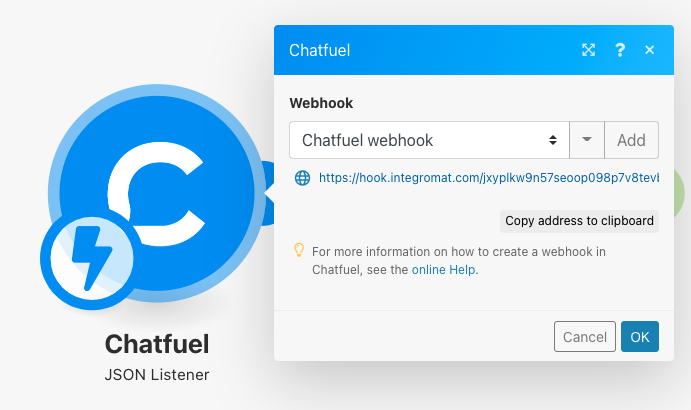
Within the Make.com scenario, a Chatfuel > JSON Listener module is set up to receive this incoming webhook. This module generates a unique webhook URL that Chatfuel uses to send the data. Once the JSON Listener receives the request, the attributes are then passed to a Chatfuel > JSON Request module. This setup is similar to how custom webhooks are used for lead data collection from paid advertisements, as discussed in the previous part of this series.
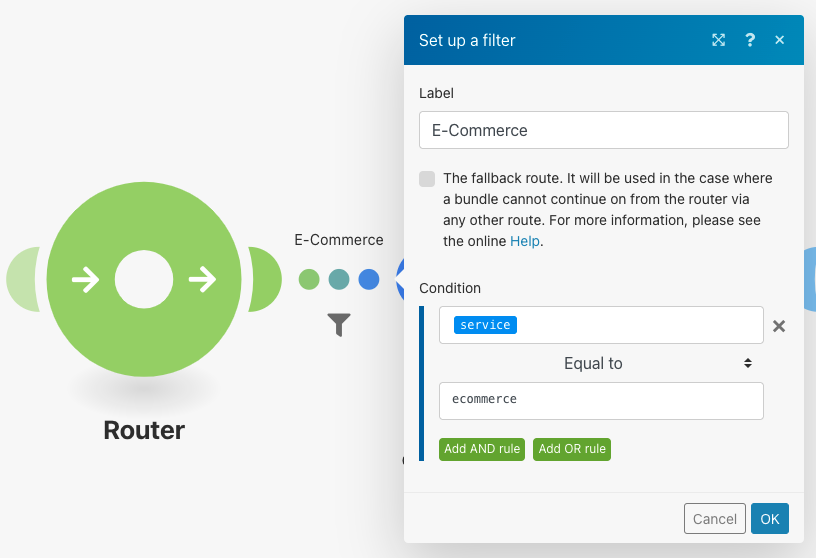
After the JSON Request module processes the user attributes, a filtered router in Make.com evaluates the "service" option value. For instance, it checks if the service selected is "ecommerce." This router is incredibly useful for directing the workflow based on different service types, as each service may require a unique set of conditions and calculations for quote generation.
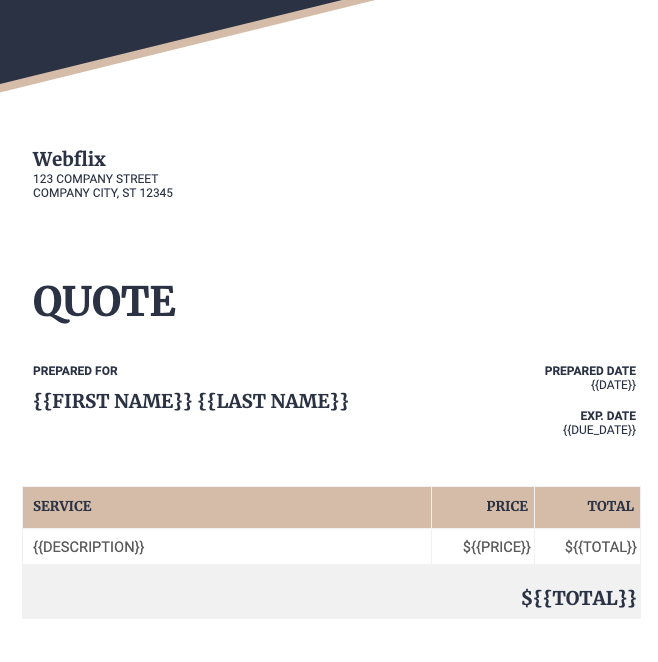
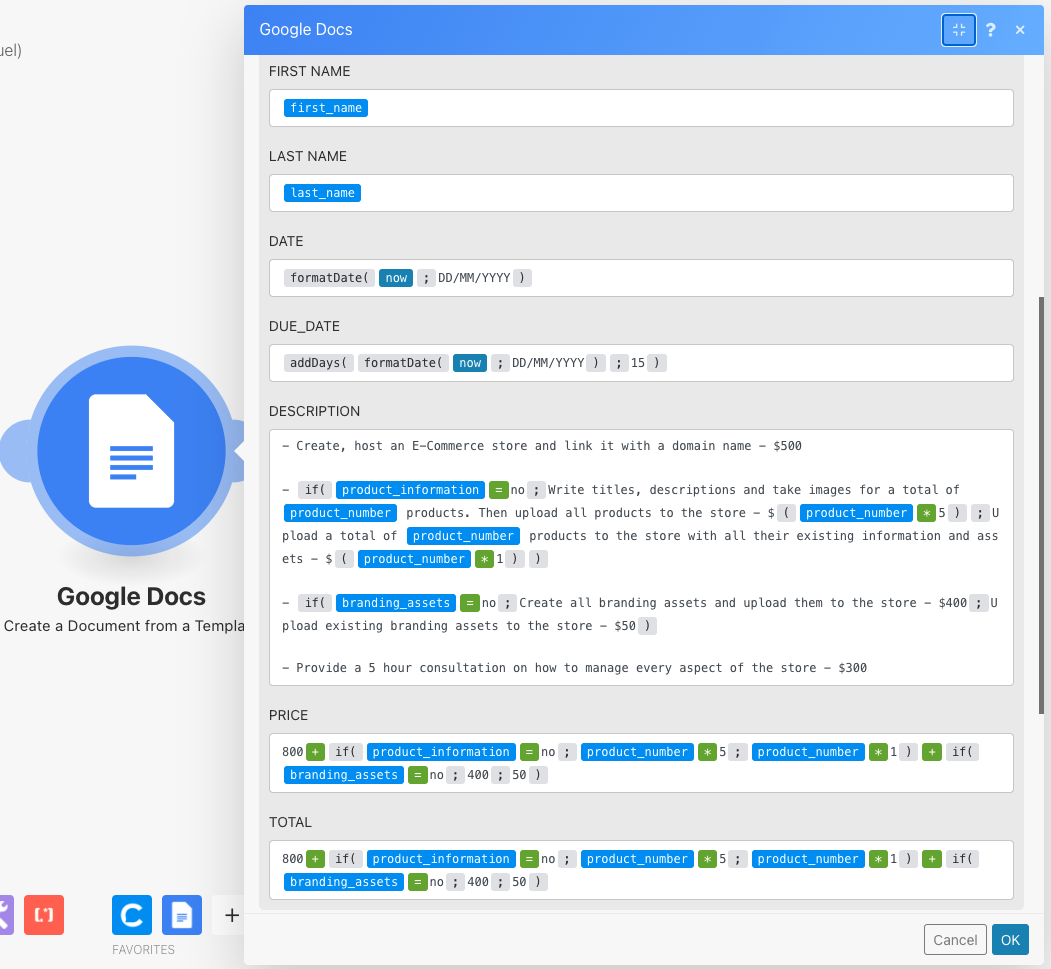
The core of this quote generation scenario lies within the Google Docs > Create a Document from a Template module in Make.com. This powerful module can generate comprehensive quotes for your potential customers using only a pre-designed Google Docs template. The first step is to create a Google Docs template with placeholders for all the dynamic information.
In this template, each field where you want to insert data from Make.com is enclosed in curly brackets, acting as a tag. For example, you might have tags like {client_name}, {service_description}, or {total_cost}. When this template is selected in the Google Docs module within Make.com, the platform automatically detects these tags and creates corresponding fields in the module's setup. This allows you to map the collected Chatfuel attributes directly to these tags, ensuring that the generated quote is fully customized with the user's specific information.
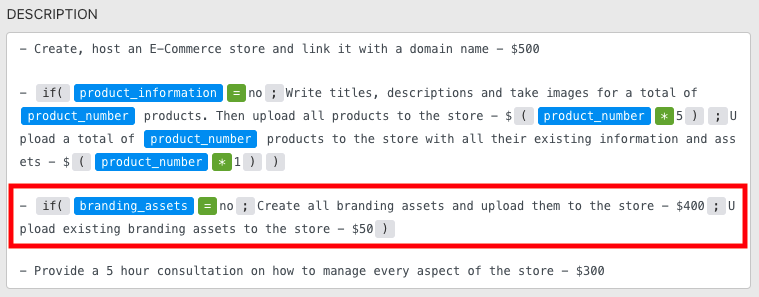
The true intelligence of this module comes from its ability to handle dynamic text changes based on user input. For instance, if a user indicates they do not have all the branding assets required for their e-commerce store, the module can automatically add a line to the quote description stating, "All branding assets will be created and uploaded to the store for an additional X dollars." Conversely, if the user confirms they have existing assets, the description might simply state that "existing branding assets will be uploaded to the store for $Y dollars."
These dynamic adjustments are made possible through Make.com's embedded functions, particularly the IF function combined with mathematical logic. This allows the scenario to evaluate conditions and insert different text or calculations accordingly, ensuring that the quote is not only personalized but also accurately reflects the services required. This level of customization significantly enhances the professionalism and accuracy of the automated quotes.
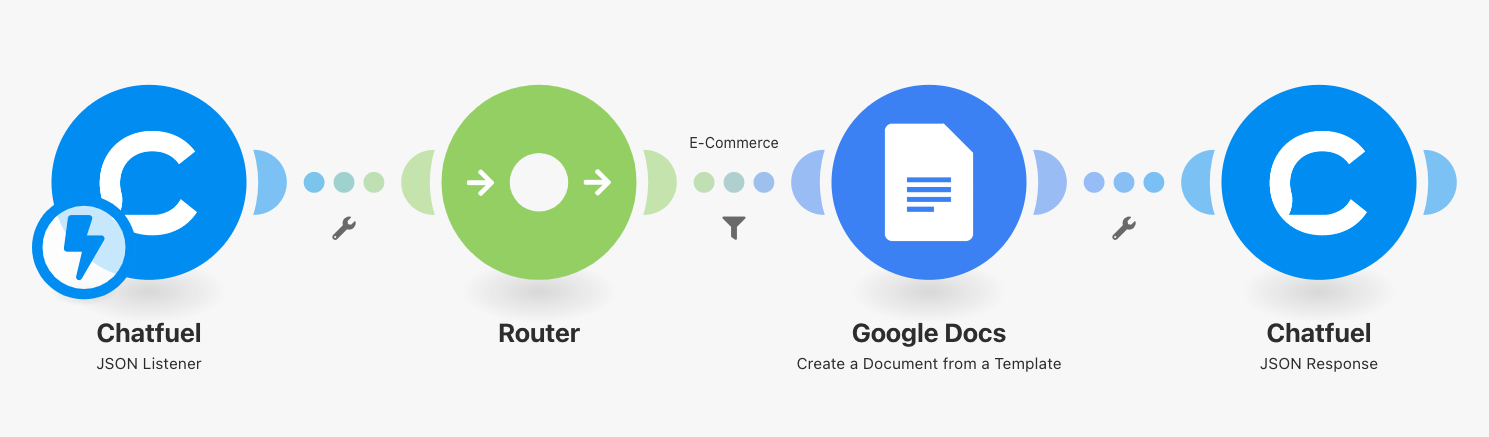
Once Make.com successfully generates the quote document, the next crucial step is to deliver it back to the chatbot user. This is achieved using the Chatfuel > JSON Response module. This module is designed to send a response back to the chatbot, which can include not only text but also various interactive elements, such as clickable buttons.
In this specific example, the JSON Response module is configured to include a button that, when clicked by the user, triggers the download of the auto-generated quote document to their computer. This seamless delivery mechanism ensures that the user receives their personalized quote instantly, completing the automated quote generation process efficiently and effectively.
Pro tip: When designing your Google Docs template for automated quotes, ensure that your tags are unique and descriptive. This prevents mapping errors in Make.com and makes it easier to manage complex templates with many dynamic fields. Clear tagging is key to a smooth automation process.
The entire process, from initial user interaction to final quote delivery, is fully automated, providing a fast and convenient experience for potential clients while significantly reducing the manual workload for your sales team. This allows businesses to scale their quoting process without increasing overhead, ensuring that every lead receives a professional and accurate estimate promptly.
2. Adding Chatbot Users to an Email List by Offering a Downloadable eBook
One of the challenges for businesses engaging with audiences on platforms like Facebook is the limited access to user email addresses. Facebook's privacy policies typically keep this information private, making it difficult for businesses to transition social media interactions into direct email marketing campaigns. However, chatbots provide an ingenious solution to this problem.
By offering a valuable incentive, such as a free e-book or a whitepaper, through your chatbot, you can encourage users to voluntarily provide their email addresses. This strategy not only helps you build a robust email list but also allows you to nurture these leads through targeted email campaigns, fostering a deeper connection with your audience.
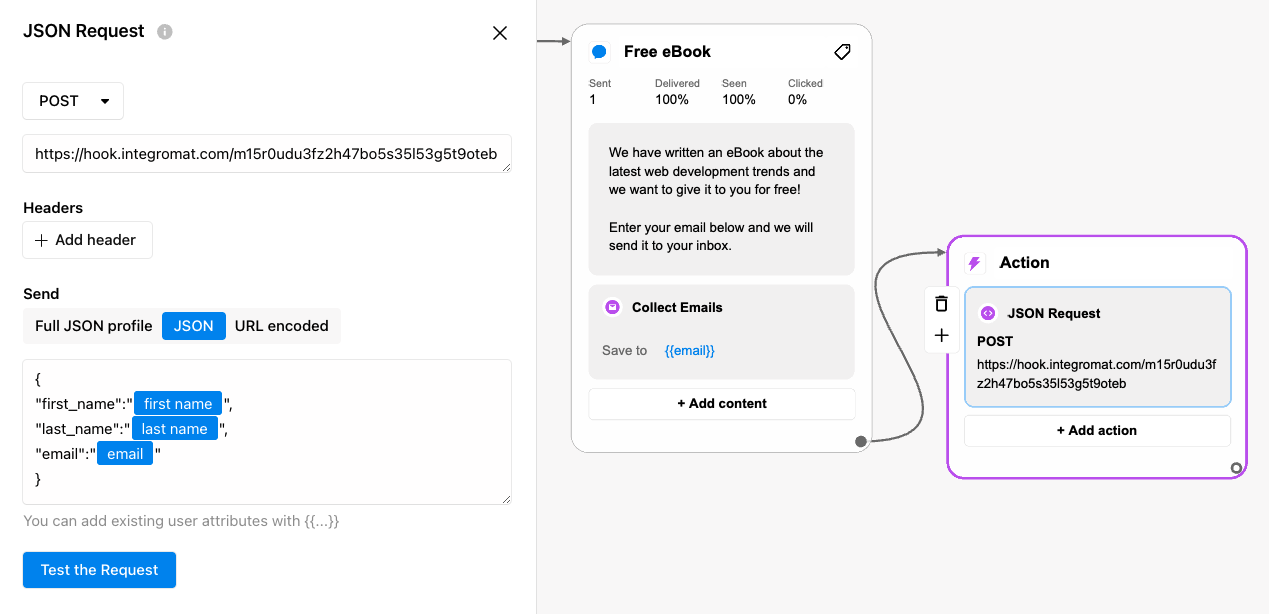
Let's revisit our web development company's chatbot. In a separate flow, the chatbot can introduce a free e-book relevant to its audience, perhaps on "The Ultimate Guide to Launching Your E-commerce Store." After a brief summary of the e-book's benefits, the chatbot prompts the user to enter their email address to receive the download. This exchange of value for contact information is a highly effective lead magnet.
Once the user provides their email address, a JSON Request action is triggered within the Chatfuel chatbot. This action sends the user's input, along with other readily available Facebook user data such as their first and last name, to a Make.com scenario. The data is packaged in a JSON payload, ensuring all relevant information is transferred efficiently.
Similar to the quote generation scenario, a Chatfuel > JSON Listener module in Make.com generates a unique webhook URL to receive this data. This scenario is specifically designed to process the lead data and add it to an email list. The data received by the Chatfuel module is then seamlessly transferred to a Mailchimp > Add/Update a Subscriber module.
As soon as the lead is successfully added to the Mailchimp list, Make.com triggers an automated email to be sent to the new subscriber. This email contains a direct link to the free e-book they requested. This immediate delivery ensures a positive user experience and reinforces the value exchange.
The benefit of this automation extends beyond just delivering the e-book. Since the lead is now part of your email list, your business can continue to engage with them through regular email campaigns, newsletters, and promotional content. This ongoing communication helps nurture the lead, keeping your brand top-of-mind and increasing the likelihood of conversion over time.
To finalize the interaction within the chatbot, a Chatfuel > JSON Response module is used to send a "Thank you" message back to the user. This simple text block confirms that their request has been processed and the e-book has been sent, providing a polite and professional closing to the chatbot conversation. This complete automation ensures that the lead generation process is efficient, effective, and provides a seamless experience for the user.
Pro tip: Always include a clear call to action and manage user expectations within your chatbot flow. Let users know exactly what they'll receive and when, to build trust and encourage them to provide their contact information. A well-communicated value proposition is crucial for successful lead magnet campaigns.
By implementing this automated e-book delivery system, businesses can overcome the challenge of collecting email addresses from social media users, effectively expanding their marketing reach and building a valuable database of engaged prospects for future campaigns.
Automatically Generating Quotes and Offering eBooks Through Your Chatbot
In today's fast-paced digital landscape, relying on manual processes for lead collection through chatbots is not only inefficient but also highly susceptible to human error. The scenarios outlined in this guide, leveraging the power of Make.com, transform your chatbot from a simple conversational interface into a dynamic lead generation powerhouse.
By automating the generation of personalized sales quotes and the delivery of valuable e-books, you can capture critical lead data, nurture prospects, and provide immediate value to your audience. This hands-off approach ensures consistency, accuracy, and scalability, allowing your business to convert more leads without increasing operational overhead.
Embracing these automation strategies means your chatbot can work tirelessly in the background, qualifying leads and delivering tailored content or quotes around the clock. This frees up your team to focus on high-value tasks, ultimately driving greater efficiency and accelerating your business growth. The future of lead generation is automated, and with Make.com, your chatbot can lead the way.