
Every individual lead represents a potential new customer for your business. The crucial next step after lead generation is to effectively score these leads, assessing their quality and likelihood of converting into paying customers. This process helps your sales and marketing teams focus their efforts where they will be most impactful.
Implementing automated cycles and funnels ensures that your lead data remains current and their quality scores are consistently accurate. At any given moment, you should be able to access a lead's profile in your CRM and immediately understand whether they are a valuable prospect worth pursuing further.
A fully integrated system is key to standardizing data across all your platforms, automatically updating relevant information in the right places, and maintaining consistent lead scoring. This guide will demonstrate how to optimize and automate your lead scoring process using Make.com.
Step 1: Define your funnel tracking plan
To kickstart the automation process, begin by meticulously outlining your customer journey. This involves mapping out every step a user takes, from their initial introduction to your brand all the way through to making a purchase. Understanding this journey is fundamental to identifying how best to support them at each stage.
The clearer your understanding of the customer journey, the better equipped you'll be to determine precisely what information is needed to assign a valuable and accurate score to each lead. This foundational step ensures that your scoring criteria are aligned with your actual sales process.
First, you need to map out your sales funnel. This typically mirrors the stages you already have defined within your CRM. Common stages include:
- Marketing Qualified Leads (MQL)
- Sales Qualified Leads (SQL)
- Demos booked/trial set up
- Closing
- Onboarding
- Referrals
Once your funnel stages are defined, the next critical step is to specify the actions and criteria that signify a lead's progression through each stage.
This is where you define what makes a lead move from one stage to the next. For example, how an MQL becomes a SQL.
For every stage of your sales funnel, from a new entry in your lead capture tool to the first payment, it's essential to add as much additional contact information and useful notes as possible within your CRM. This rich data provides context and helps in evaluating lead quality.
Consider the number of touchpoints a potential customer has experienced at each step. This could range from downloading an ebook to registering interest in an event. Tracking these interactions is vital for assessing a lead's overall score and determining the most effective approach at each stage of the funnel.
Step 2: Define your lead scoring criteria
Lead scoring criteria are developed by evaluating a lead's potential and intent, combined with how closely they align with your Ideal Customer Profile (ICP) and buyer persona. This holistic approach ensures a well-rounded assessment of each prospect.
Effective lead scoring goes beyond merely prioritizing leads; it also facilitates the delivery of a personalized experience. This personalization is a key factor in enhancing your B2B sales experience and building stronger customer relationships.
What is an Ideal Customer Profile (ICP) and how do you create one?
Unlike a buyer persona, which focuses on the characteristics of individuals within a company, an Ideal Customer Profile (ICP) identifies the types of companies that would most benefit from your service and outlines the best strategies to engage with them. This profile helps you target the right organizations.
Developing an ICP typically involves analyzing factors such as company size, annual revenue, industry, and geographical location. Once your ICP is clearly established, you can then proceed to score your leads based on two primary variables: lead potential and lead intent.
- Lead potential: This assesses how well a lead fits your ICP, the estimated time to close a sale, and the potential revenue that could be generated from that sale.
- Lead intent: This focuses on understanding the "when, how, and why" an ICP might make a purchase, indicating their readiness to buy.
The first variable helps you determine if a lead is worth pursuing at all, while the second helps you decide if they are worth pursuing right now. Both are critical for efficient sales operations.
Scoring the lead’s potential
With a well-defined Ideal Customer Profile (ICP), identifying the specific lead data points necessary to score a lead's potential becomes a straightforward process. This clarity allows for consistent and objective evaluation.
To measure your Return on Objectives (ROO), you can assign a value, typically between 1 and 10, for every action a lead takes. Additionally, establish a specific score threshold at which a lead officially qualifies as an ICP, indicating they are ready for further engagement.
Alternatively, you could develop criteria based on the type of company the lead represents and the technology stack they currently utilize. A deep understanding of your market is paramount when constructing your Ideal Customer Profile, as it informs these scoring decisions.
For instance, if your business sells Customer Data Platforms (CDPs), you would likely prioritize companies that are already using more advanced and sophisticated platforms like Salesforce or Adobe, as they are more likely to appreciate and integrate your solution.
Scoring the lead's intent
Measuring a lead's intent can be challenging. While a direct conversation with the lead is often the most effective way to gauge their intent, the primary goal of lead scoring is to avoid engaging with low-quality leads who are unlikely to convert. This saves valuable sales resources.
Before resorting to direct contact, several other factors can be used to estimate a lead's intent. For example, consider the source from which the lead originated. Different lead sources often indicate varying levels of intent.
By assigning a distinct score based on the value of the lead's origin, you can effectively assess their quality and determine their priority within your marketing efforts. A lead who actively browsed your website for two hours before signing up for a demo, for instance, would receive a higher quality score than someone who merely responded to a cold email campaign.
It's important to evaluate all your traffic sources and establish a specific score for each avenue through which a Marketing Qualified Lead (MQL) could have entered your system. This comprehensive approach ensures a more accurate and actionable intent score.
Step 3: Set up your event tracking
For each significant event in the customer journey, you will typically have either front-end or back-end tracking enabled. These tracking mechanisms capture crucial data about user interactions and behavior.
Such events can include a variety of actions, providing valuable insights into a lead's engagement and interest:
- Ebook download
- Newsletter sign-up
- Free trial sign-up
- Conference registration
- Demo booked
- User clicked "upgrade" call to action
- User hits the trial limit
- User creates first XYZ (e.g., a project, a document)
An effective way to leverage event tracking for lead scoring is by creating an instant trigger within Make.com. Each time an event is recorded, this trigger sends the relevant data to a Make webhook, initiating your automation scenario.
A simple example of the data sent to the webhook might include:
- Event name
- Account ID and/or Lead ID (a unique identifier that can be matched with your CRM entry)
- Contextual information such as data from a filled-in form, the plan the lead selected, or if a payment was made.
To maintain simplicity and ensure GDPR compliance, it's advisable to avoid including personal information directly at this stage. The Account ID serves as the link to connect this event data with the corresponding lead information in your CRM. Each time an event is triggered and sends information to the webhook, the lead’s score will automatically increase by a predefined number of points.
Example #1: Triggering a scoring scenario in Make from a marketing automation platform
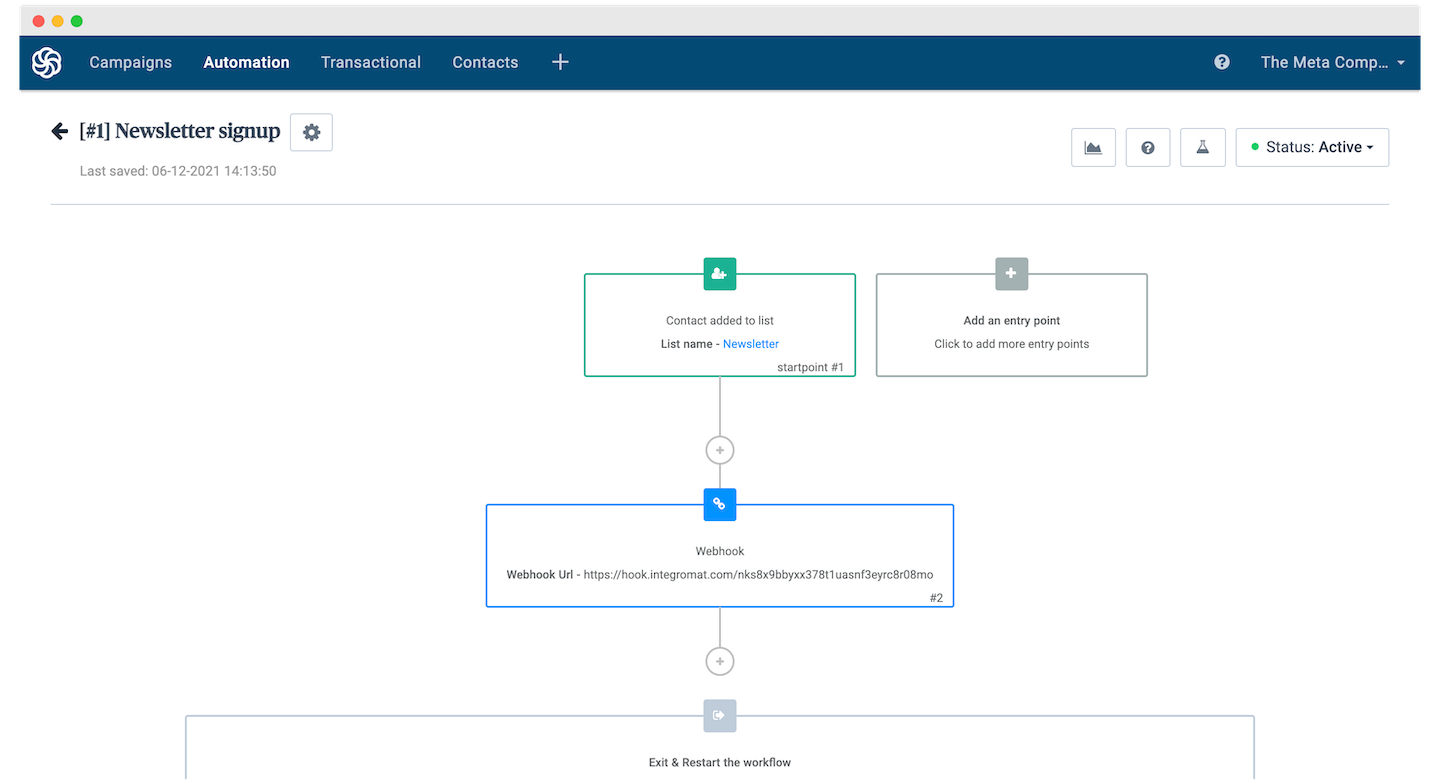
In this example, whenever a new contact is added to the 'Newsletter' mailing list within Brevo (formerly Sendinblue), it automatically triggers a webhook in Make.com. This webhook then initiates a process to update the contact's information or quality score in your connected systems.
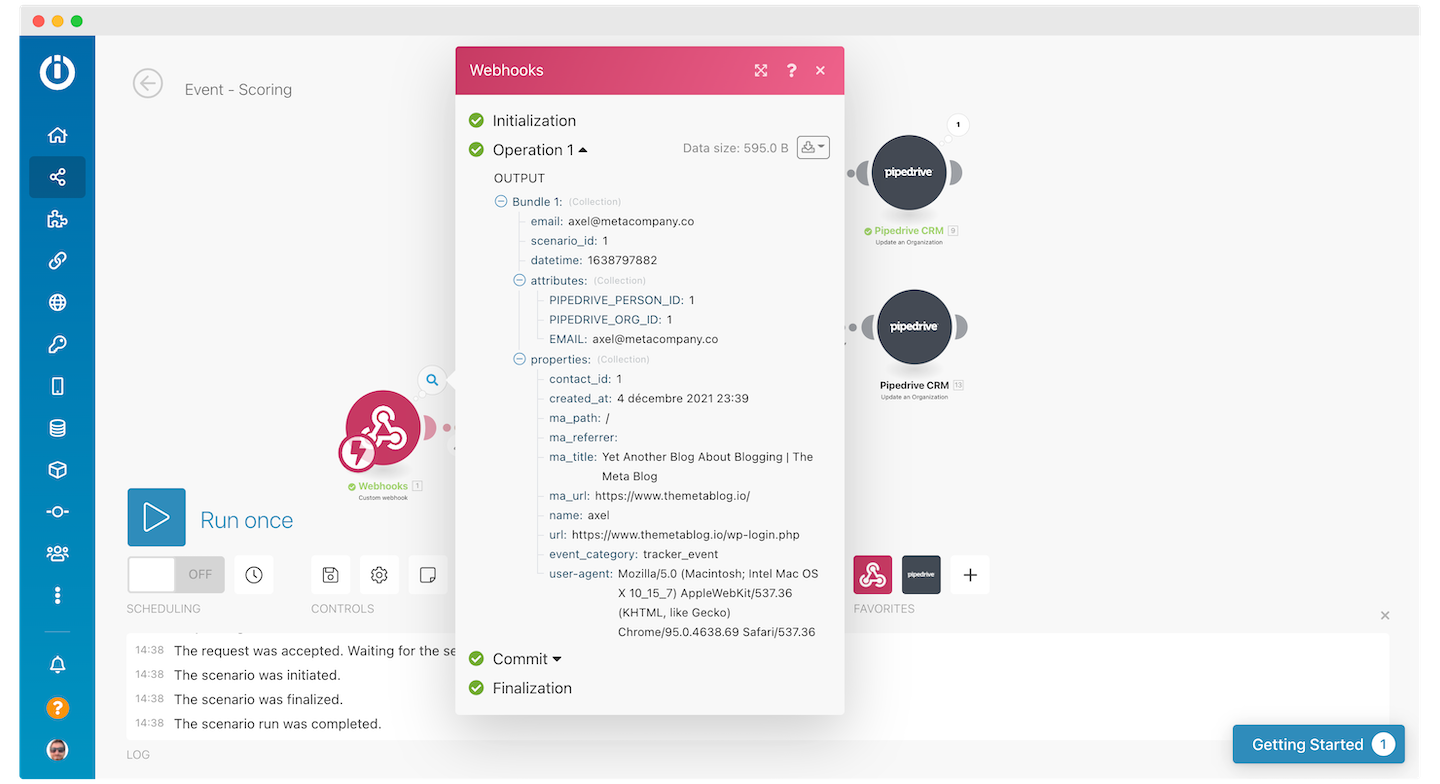
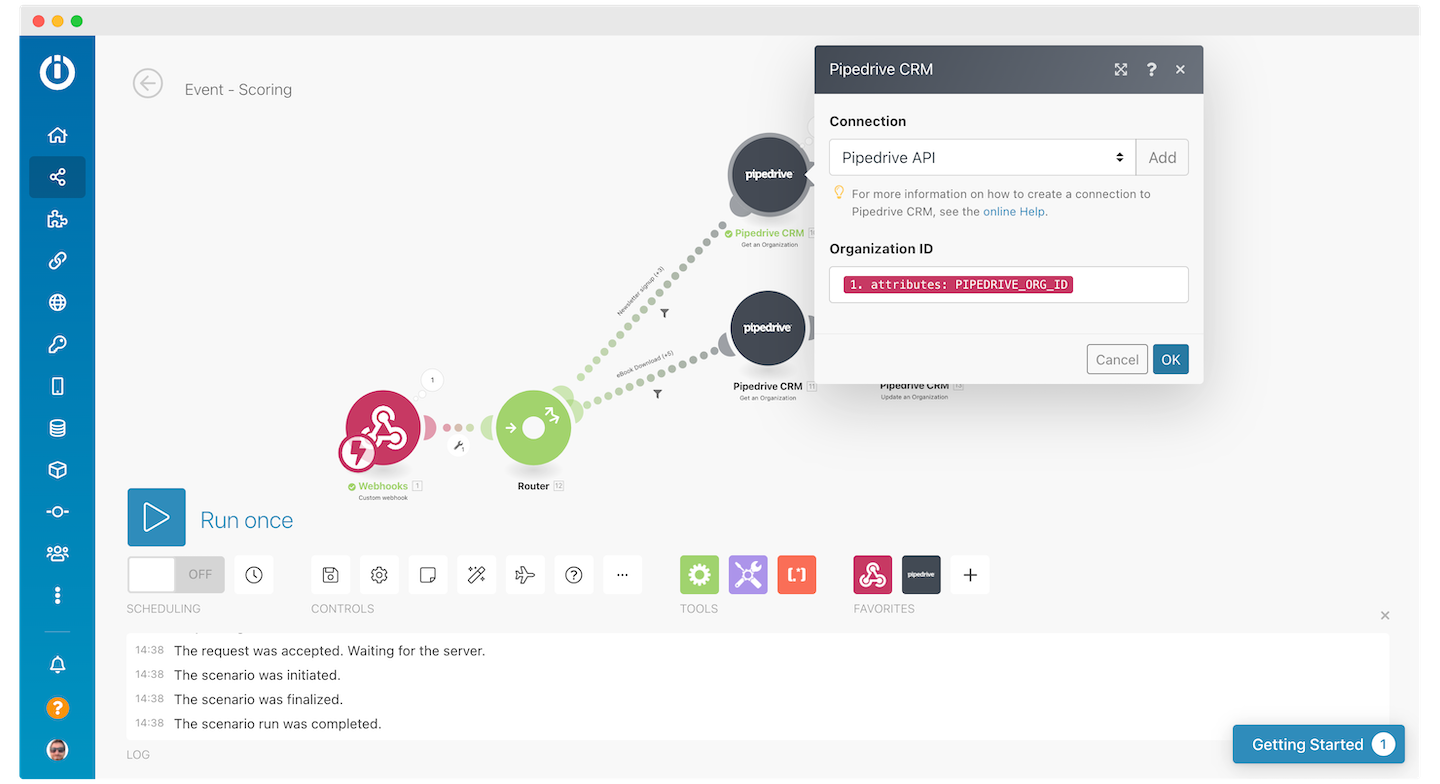
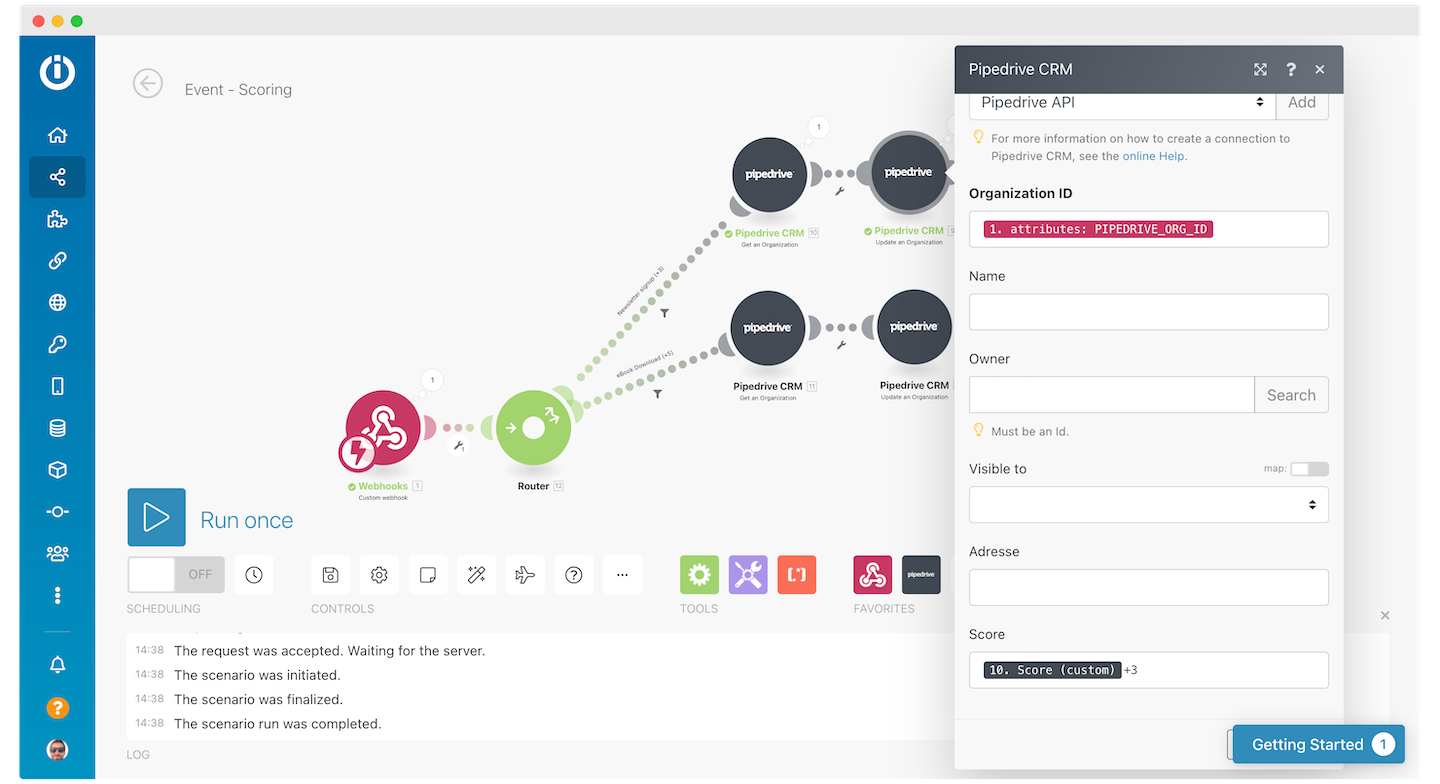
Following this, the webhook triggers a sequence of actions where Make.com fetches the lead's existing information from your CRM, updates it with the new data and the adjusted score, and then pushes this updated information back into the CRM. This ensures your lead data is always current.
Example #2: Triggering a scoring scenario in Make from your CRM
Most Customer Relationship Management (CRM) systems offer the functionality to set up webhooks that listen for any changes occurring within specific objects or across all objects. This capability is crucial for real-time data synchronization and automation.
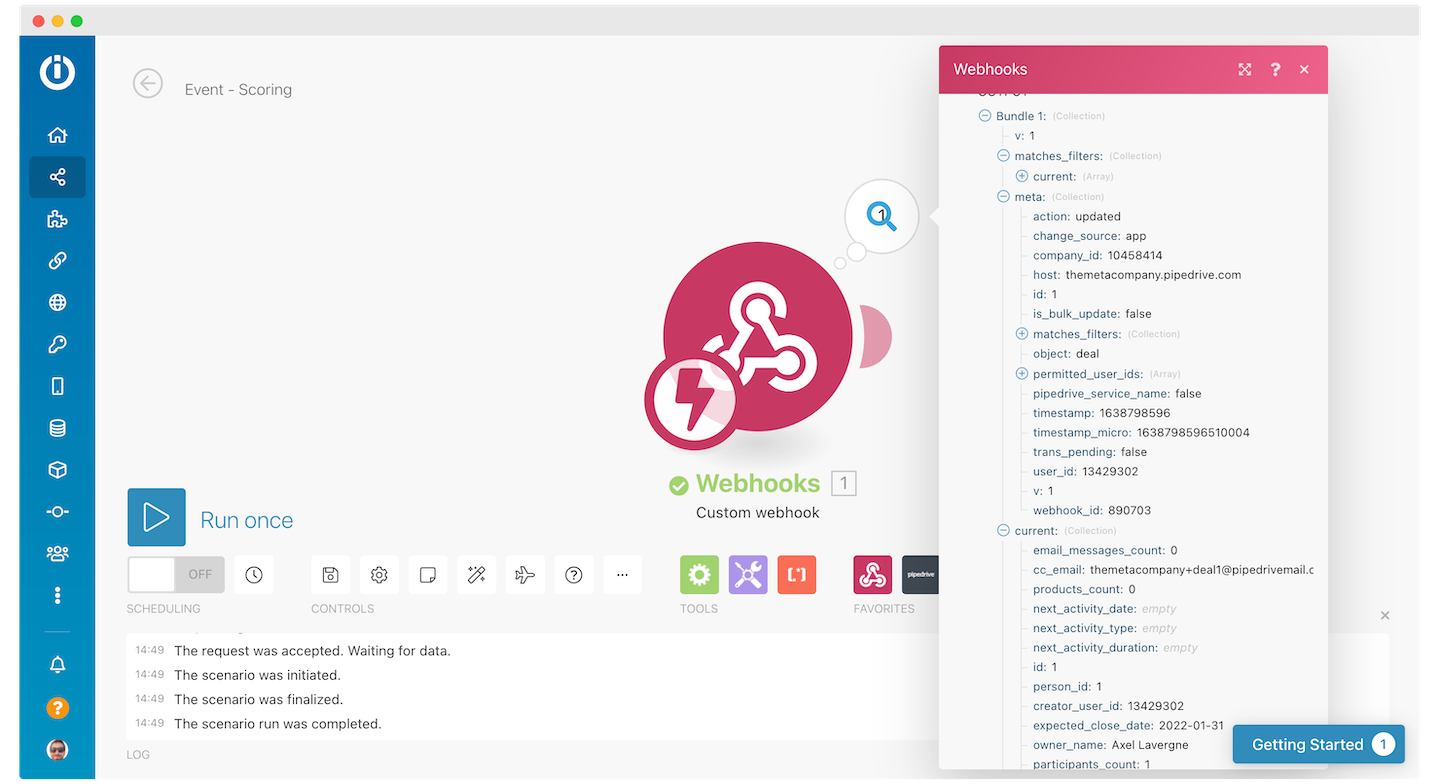
For instance, if you're using Pipedrive, its CRM integration allows you to configure a webhook to send notifications whenever a deal is created, updated, or deleted. This ensures that any significant changes in your sales pipeline are immediately communicated to your automation platform.
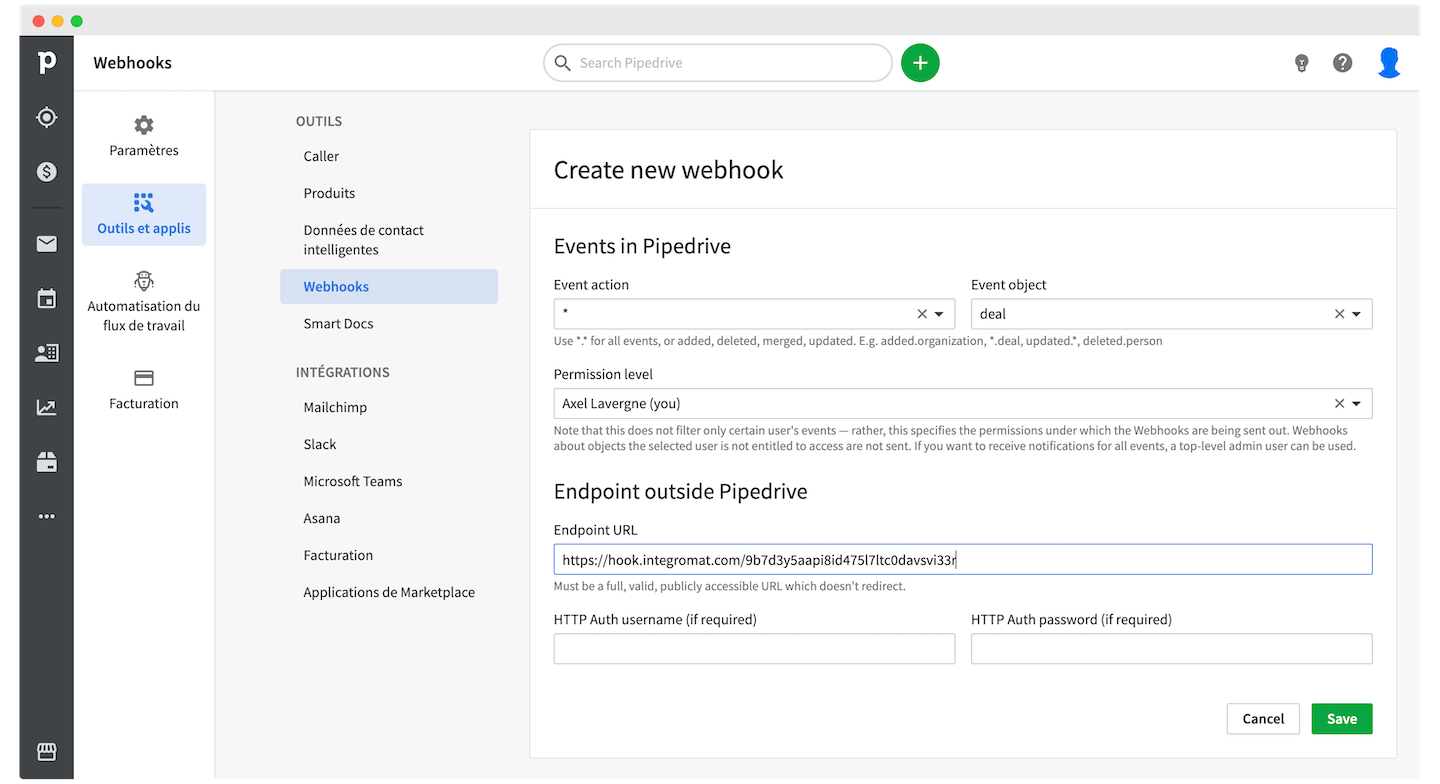
This means that any time a deal is moved, created, or deleted within Pipedrive, the webhook automatically triggers a corresponding scenario in Make.com. This real-time trigger ensures that your lead scoring and data updates are always in sync with your sales activities.
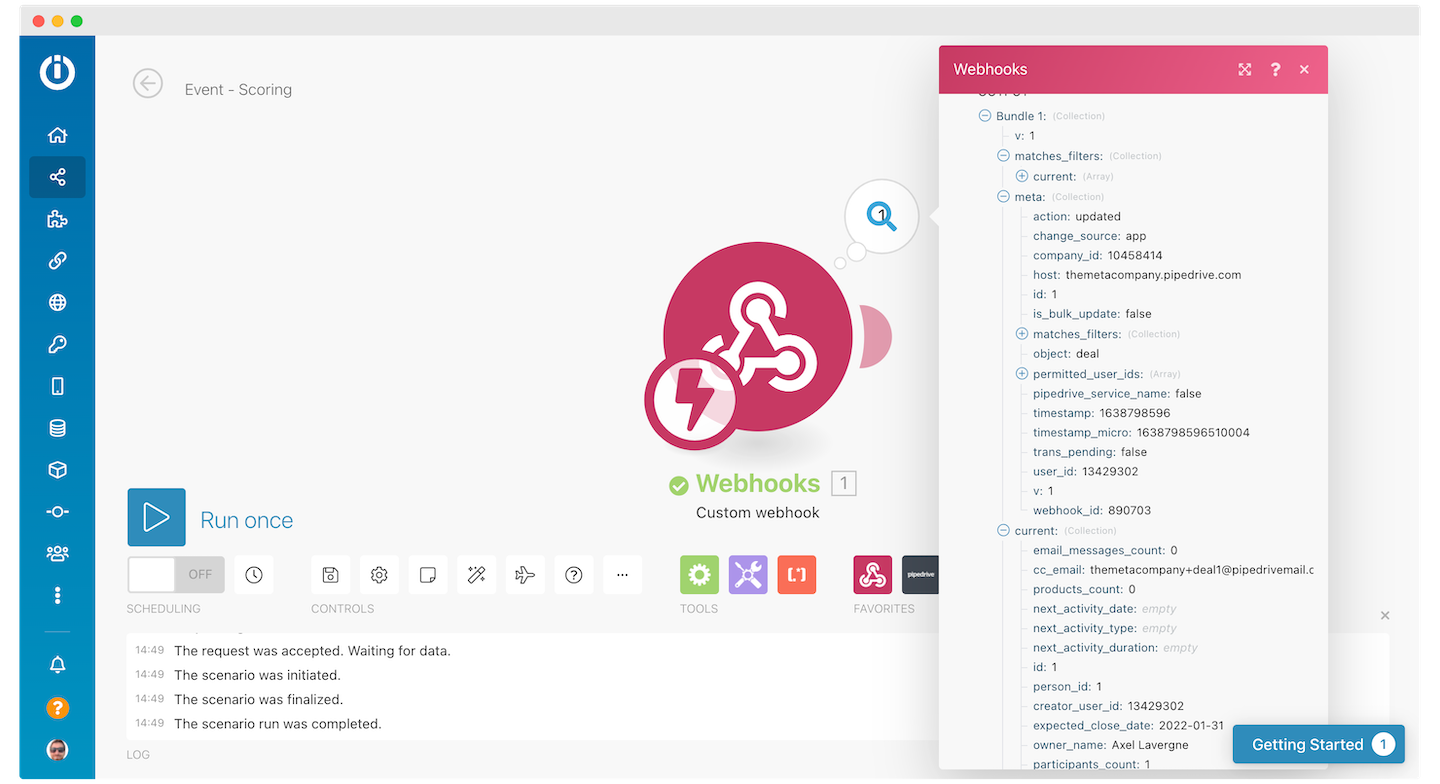
In this context, the two key objects of interest are the previous state and stage of the deal, and the current state and stage of the deal. By comparing these, you can determine if a positive progression has occurred.
If the webhook is triggered because the lead has advanced in the deal pipeline, this action can be configured to add additional points to the company's overall lead score. This reflects increased engagement and potential.
This scenario can unfold in various ways. For instance, the webhook might be triggered by a manual update in the CRM, such as a sales representative updating a lead's information after a call. Alternatively, a customer could take an identifiable step, like booking a demo through a synchronized calendar, which would automatically trigger the webhook and update the lead's score.
Step 4: Incrementing the score
Once you have clearly defined the conditions and reasons for a lead's score to increase, the next crucial step is to establish an efficient method for tracking these scoring increments and feeding that data back into your CRM system. This ensures that all lead profiles are consistently updated with the most accurate scores.
There are several effective approaches you can take to implement this scoring mechanism, each offering different levels of flexibility and complexity. Choosing the right method depends on the scale and specific needs of your lead scoring model.
Example: Hard-coding the increments directly in Make
A typical scoring pipeline within Make.com might look like this, where specific actions are directly linked to score increases.
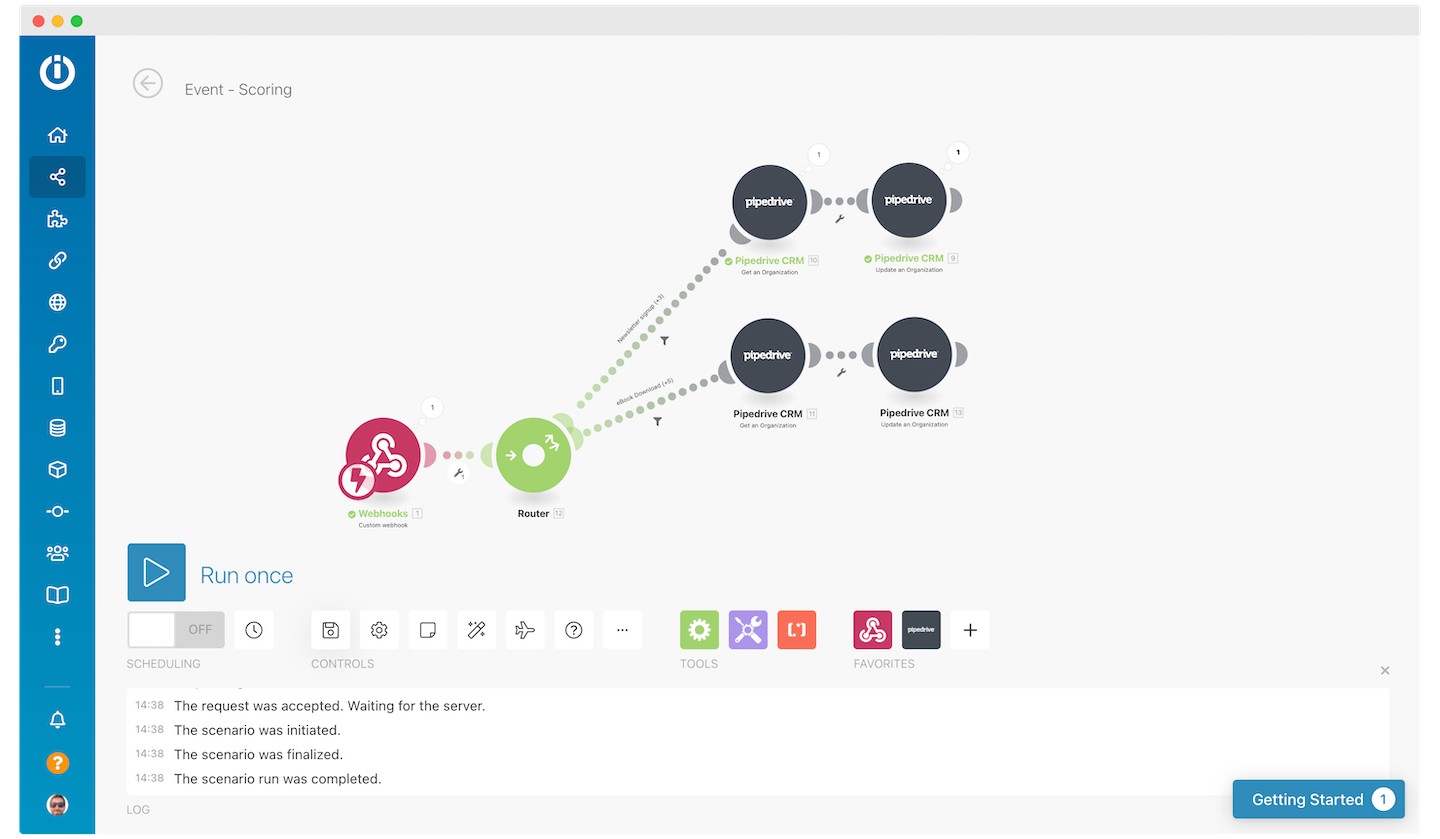
By utilizing filters in Make.com, you can directly associate any event trigger with a specific score and determine the exact increment amount based on that event. This method offers direct control over how each action impacts a lead's score.
However, managing this approach on a large scale can become cumbersome and unclear. It can be difficult to track and understand the precise impact of each individual event on the overall scoring, which is why a separate scorecard can significantly improve cohesion and manageability.
Setting up a scoring scorecard
You have several flexible options for setting up a dedicated scoring scorecard. The choice depends on your existing tools and preferences.
If you are already an active user of Make.com, you can conveniently leverage its built-in data stores to manage your scorecard. These data stores provide a robust and integrated solution for storing and retrieving scoring criteria.
Alternatively, a simple spreadsheet or even a dedicated table within your CRM system can function just as effectively. Essentially, any tool that allows for two columns—one for the event or criterion and another for its corresponding score—will suffice for this purpose.
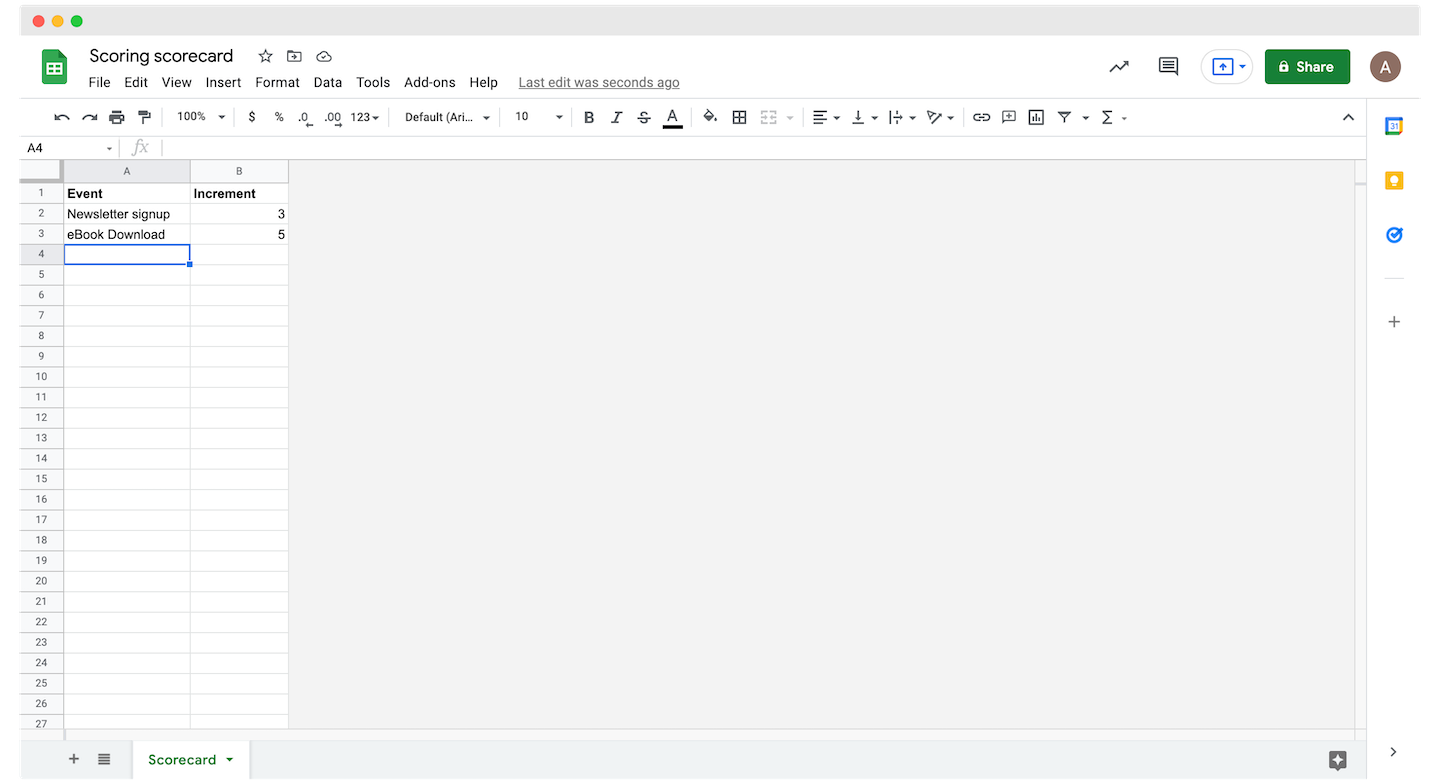
For each event you've defined, you can calculate the appropriate number of points directly within Make.com, which will then be fed back to your CRM. This ensures that scores are consistently applied based on your established criteria.
You can then seamlessly link your spreadsheet or data store within Make.com to automate the score calculation and update process.
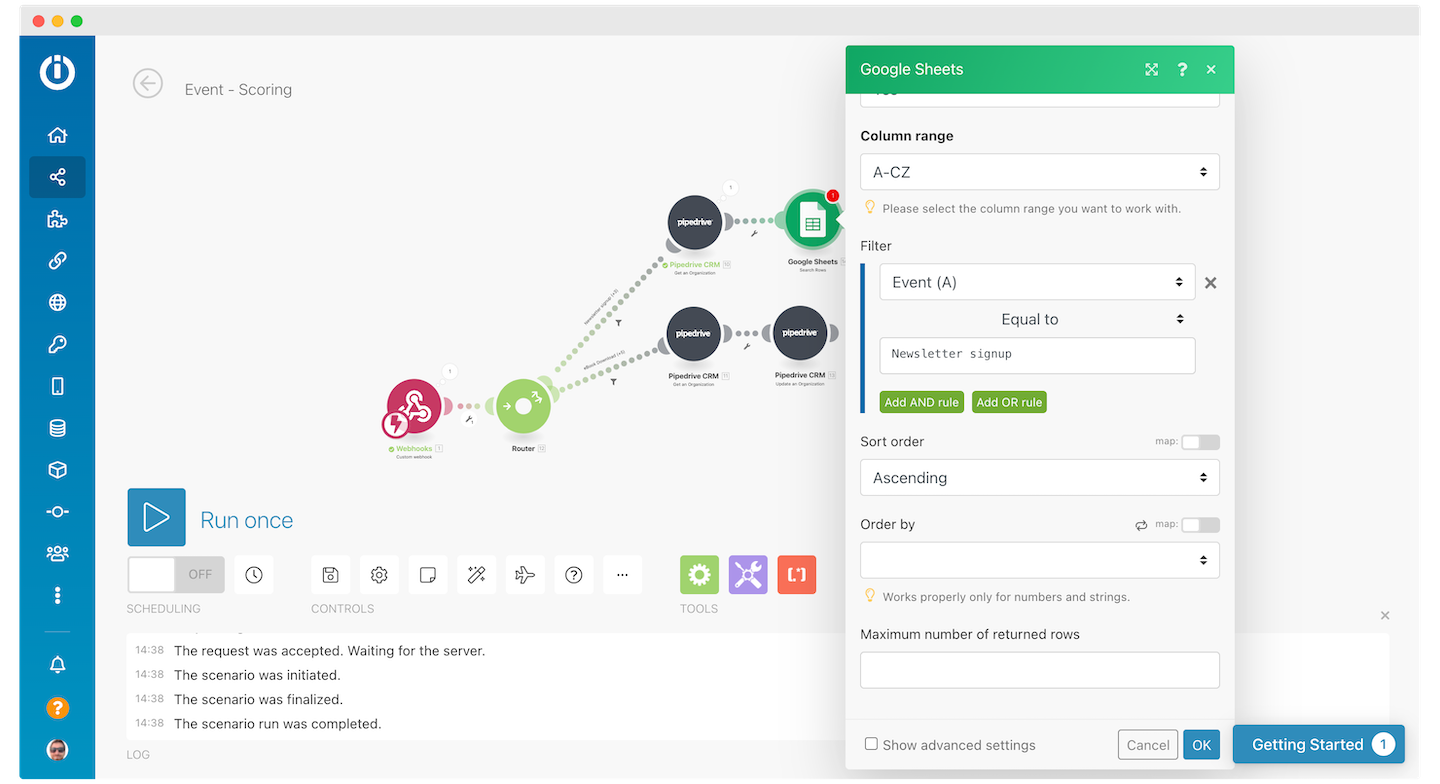
In certain scenarios, like the one illustrated, two distinct events might be hard-coded into Make.com to dictate the pipeline's flow. This is often necessary when the event type isn't inherently part of the original webhook schema, requiring a more direct configuration.
However, a cleaner and more efficient approach involves including the event name directly within the data sent to the Make.com webhook. This streamlines the process and reduces the need for hard-coding.
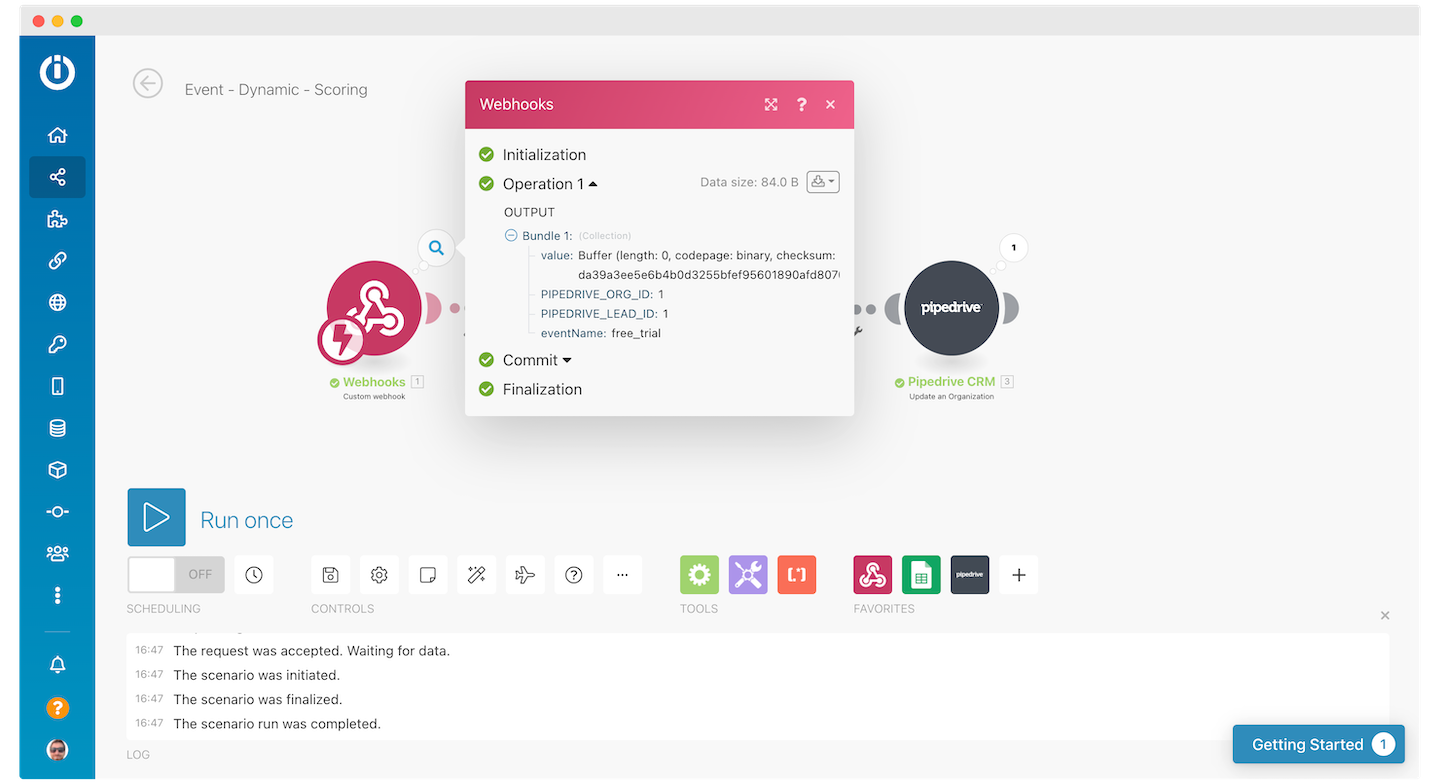
By including the event name in the webhook data, Make.com can dynamically fetch the correct number of score points based on the event type. This significantly enhances the automation and flexibility of your lead scoring system.
Integrating this information directly into the webhook further automates the Make.com scenario, eliminating the need for manual intervention in that specific step of the lead scoring process. This leads to greater efficiency and accuracy.
Step 5: Enriching your data
This is where the true power of automation shines. Every time an event is triggered, you can leverage additional data pulled through Make.com scenarios to further refine and enhance your lead scores. This continuous data enrichment provides a more complete picture of each lead.
For example, you might want to gather and incorporate the following types of information to build a more robust lead profile:
- Company's LinkedIn profile page: including details like the number of employees, location, and other relevant firmographic data.
- Company's CrunchBase profile: for insights into funding, acquisitions, and key personnel.
- The tools used by the company within their API: to understand their existing tech stack and potential integration points.
- Their website's traffic and authority: particularly useful if you operate in the Martech space, indicating market presence and potential.
- The number of offices: providing an indication of company size and geographical spread.
Beyond company-level data, you can also seek out specific contact information and contextual details about the individual lead:
- Lead's LinkedIn profile: to assess length of employment, job title, responsibilities, and career trajectory.
- Lead's contact information: including phone number and email, which can be obtained using tools like Kaspr or Lusha for verification and outreach.
Once you have successfully gathered this additional information, you can create a new Make.com scenario specifically designed to standardize this enriched data and push it back into your CRM. This ensures consistency and usability across your systems.
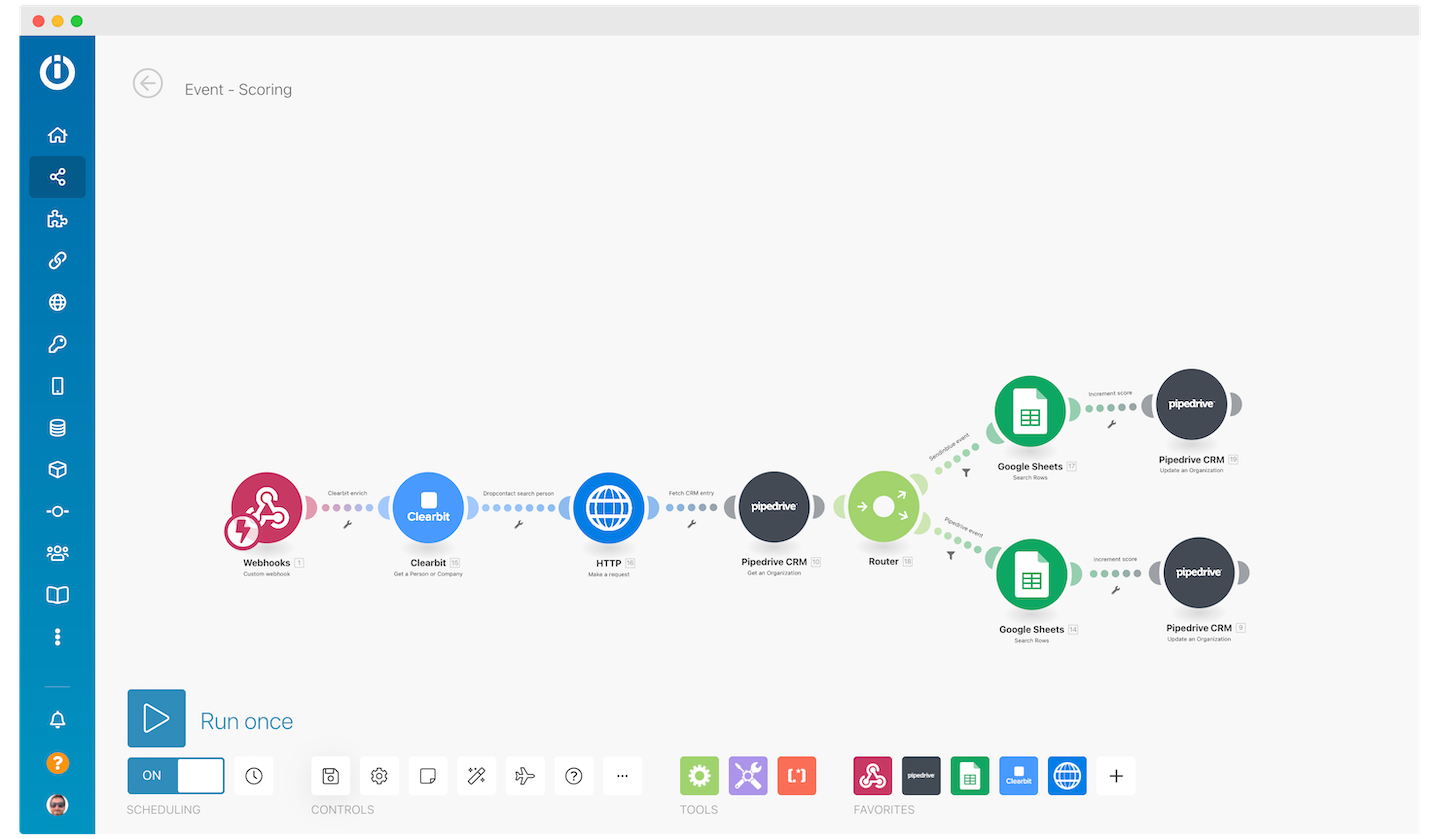
This new Make.com scenario can be executed immediately after the enrichment data is standardized, after any manual additions of information, or following a Quality Assurance check. This flexibility allows you to integrate the enrichment process seamlessly into your existing workflows.
Upon execution, the scenario will fetch the lead from your CRM, apply points to their score attribute based on your predefined scoring criteria, and then push this updated information back. Your system must already be configured with the scoring definitions and criteria, as established in Step 4, using a Notion table, spreadsheet, or Make.com data store.
If you're running this process asynchronously to your initial information input, you'll need a specific trigger to initiate the score update and push the data back to your CRM. Make.com offers various native triggers for this purpose.
For example, Make.com provides options to set up a trigger that runs daily at a specified time (e.g., 2 AM). This trigger would then review and update all relevant CRM entries and their quality scores. However, it's important to note that each trigger run incurs costs, and you may not need to process every entry daily, only those that require updating.
By diligently following these steps and leveraging Make.com to automate and standardize your workflows and information, you can consistently ensure that your lead scores are accurate and up-to-date. The ultimate result is that your sales representatives will have more time to focus on converting high-potential leads into loyal, long-term customers, driving significant business growth.