
Twitter Automation Make.com Social Media

How to Automatically Like Tweets on Twitter [Tutorial]

Learn how to build two different auto likers for Twitter: One for accounts, and another one for hashtags. It's easy with Make!

Twitter auto liker workflow visualization

If you're looking for the best auto liker for Twitter, you've come to the right place. In this tutorial, we'll show you how to build your own Twitter like generator with Make, step by step.

We'll actually go beyond basic liking and show you how to build two different auto like bots for Twitter:

  • One that likes the tweets of a specific account
  • Another that likes any tweet containing certain words, phrases, or hashtags

For both solutions, you'll just need a paid Make account (the Core Plan works perfectly) and a Twitter account. Let's dive right in.

Pro tip: Before automating Twitter actions, review Twitter's Developer Policy regarding automation to ensure your use case complies with their rules.

1. Automatically Like Tweets from a Specific Account

The first automation we'll build watches tweets from a specific Twitter account and automatically likes each new post. This is perfect for supporting influencers, brands, or accounts you want to engage with consistently.

After logging into your Make account, start by creating a new scenario from your dashboard. This will open the visual canvas where we'll construct our automation.
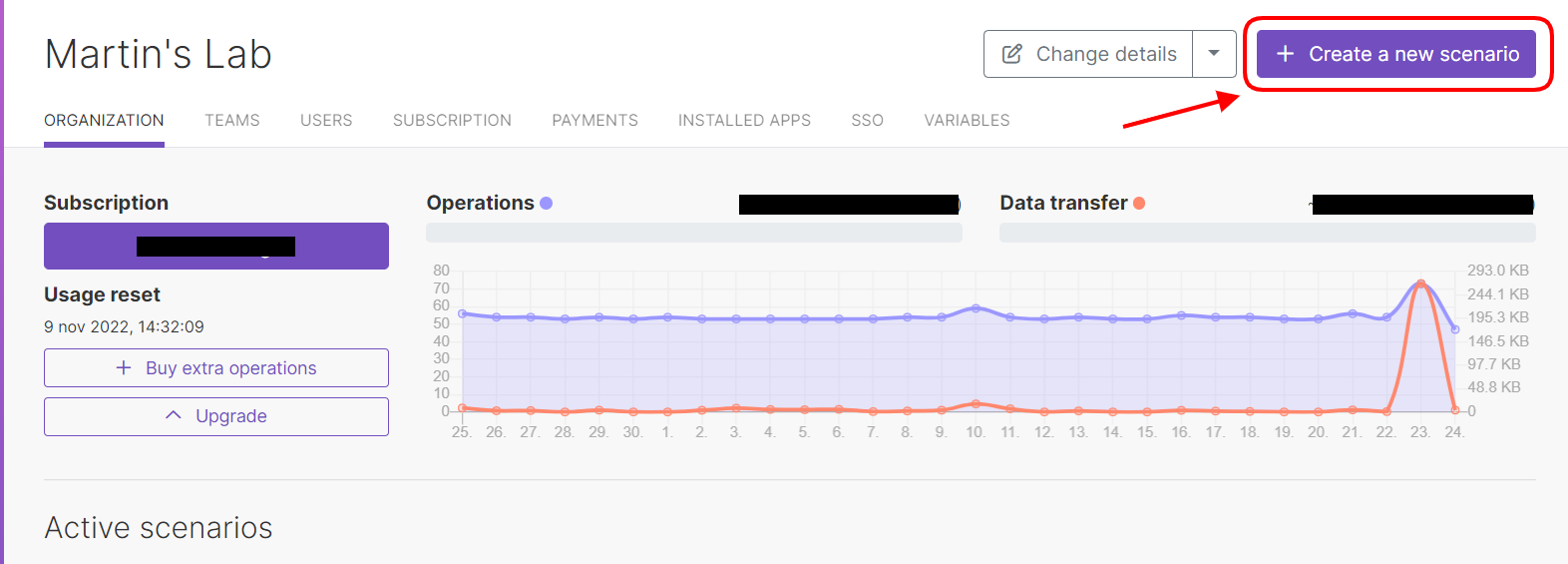
Create new scenario in Make dashboard
Creating a new scenario in Make's dashboard

Click the central button to add your first module, then search for and select the Twitter app. Choose the "Watch tweets" module - this will monitor tweets from any account you specify at regular intervals.

To configure this module:

  • Connect your Twitter account by clicking "Add"
  • Select "Watch someone else's tweets"
  • Enter the account's username without the @ symbol
  • Set "Return full text of tweets" to "Yes"
  • Specify how many tweets to watch each run (more active accounts need higher numbers)

After configuration, you'll set when to start watching tweets. For retroactive liking, choose "Since specific date." Otherwise, the automation will begin with new tweets after activation.

Adding the Like Action

Next, add the Twitter "Like/Unlike a Tweet" module by clicking the plus symbol. Configure it by:

  • Selecting "Like the tweet"
  • Mapping the "Tweet ID" from the first module

Finally, set your scenario's schedule by clicking the clock icon on the first module. You can set frequencies from once per minute to once per month based on how often the account tweets.

Pro tip: For accounts that tweet frequently, set a higher number of tweets to watch and more frequent checks to ensure you catch all new posts.

2. Automatically Like Tweets Containing Keywords/Hashtags

Our second automation likes tweets based on content rather than the posting account. This is ideal for engaging with topics, trends, or branded hashtags.

Create a new scenario and select Twitter's "Search Tweets" module instead of "Watch tweets." Configure it with:

  • Your Twitter connection
  • The keywords/phrases/hashtags to monitor
  • Number of tweets to check each run
  • "Return full text" and "Include entities" both set to "Yes"

Add the "Like/Unlike a Tweet" module as before, mapping the Tweet ID from the search results. Set your preferred schedule frequency before activating.

Example of keyword-based tweet liking setup
Configuring keyword filters for tweet liking

This automation will now like any public tweet containing your specified terms, helping you automatically engage with relevant conversations.

Frequently Asked Questions

Common questions about Twitter automation

You'll need a paid Make account (Core Plan or higher) and a Twitter account. The automation connects these two services to automatically like tweets based on your criteria.

The Make platform handles all the technical integration work, allowing you to visually build the automation without coding. Your Twitter account provides the API access needed to perform the liking actions.

Yes, you can create separate scenarios for each account you want to monitor and like tweets from. Each scenario watches one specific account's tweets.

For managing multiple accounts efficiently, consider cloning your initial scenario and just changing the target account username. This saves time recreating the entire workflow from scratch.

You control the frequency - from once per minute to once per month. More active accounts should be checked more frequently to catch all new tweets.

The optimal frequency depends on how often your target accounts post. For accounts tweeting multiple times per day, checking hourly or every few hours works well. Less active accounts might only need daily checks.

Yes, you can set up keyword or hashtag filters so only tweets containing specific content get liked automatically.

For account-based liking, you could add a filter module to check tweet content before liking. For search-based liking, your initial search query acts as the filter.

Twitter's API has rate limits, but Make handles this automatically by spacing out actions to stay within allowed limits.

The exact limits depend on your Twitter account type and API access level. Make's platform automatically queues actions if you approach any limits, ensuring compliance with Twitter's rules.

No, the automation can only interact with public tweets from accounts you have permission to view.

Twitter's API restrictions prevent accessing private account content programmatically. The account must be public, and you must have permission to view its tweets through normal Twitter usage.

Yes, GrowwStacks specializes in building tailored Twitter automation solutions for businesses needing more advanced functionality than this guide provides.

Our team can create custom Twitter automations that integrate with your CRM, analytics tools, or other business systems. We handle complex workflows, error handling, and scaling beyond basic liking functionality.

  • Custom filtering and routing logic
  • Integration with business systems
  • Advanced analytics and reporting

Need Custom Automation Help?

This guide is a starting point. Our team builds fully tailored automation systems for your specific workflow needs.