
Make.com Monday.com Workflow Automation

How to Connect Monday.com to Make

Learn how to integrate Monday.com with Make to automate workflows and enhance productivity with step-by-step instructions.

Monday.com and Make integration workflow diagram

Automate Your Monday.com Tasks

Monday.com simplifies team collaboration by providing a flexible project management platform that adapts to your workflow. With multiple boards, task lists, due dates, and team members to coordinate, keeping everything organized can become challenging without the right tools.

By integrating Monday.com with Make (formerly Integromat), you can automate repetitive tasks and create seamless connections between Monday.com and other apps in your workflow. This integration allows you to focus on high-value work while the automation handles routine updates and notifications.

Pro tip: Before setting up complex automations, map out your current workflow to identify which tasks would benefit most from automation.

Make Scenarios for Monday.com

Make provides powerful automation capabilities that can transform how you use Monday.com. The visual scenario builder lets you create workflows that would normally require custom coding, all through a drag-and-drop interface.

With Make, you can build scenarios that automatically update statuses, sync data between apps, send notifications, and much more. The platform's routers and filters allow you to create branching logic that handles different conditions automatically.

1. Update a "Due Status" Column Based on Another Status Column

One powerful automation tracks task due dates and updates status columns automatically. This scenario helps teams quickly identify overdue tasks, items due today, and upcoming work without manual updates.

The workflow begins by listing all pulses (tasks) in a specific board or group. Make then processes each pulse through a router that first separates "Done" from "Not Done" items using a filter. Completed tasks get marked accordingly, while unfinished tasks proceed to additional checks.
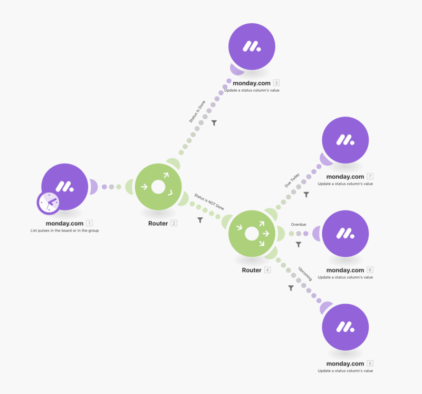
Monday.com status column automation diagram
Visual representation of the status update automation workflow

For unfinished tasks, a second router evaluates due dates against the current date to categorize them as "Due Today", "Overdue", or "Upcoming". Each category updates the status column accordingly, providing clear visual indicators for your team.

Setting this scenario to run daily ensures your board always reflects current task statuses. For optimal performance, schedule it during off-hours to avoid impacting team productivity during peak work times.

2. Send Monday.com Updates to Slack

Extend the previous automation by adding Slack notifications for urgent tasks. This creates a safety net ensuring team members don't miss critical deadlines while working across different platforms.

After categorizing tasks in Monday.com, the scenario uses Slack's API to send targeted messages. You can configure it to notify specific channels or individuals about overdue items or tasks due today, including relevant details from Monday.com.
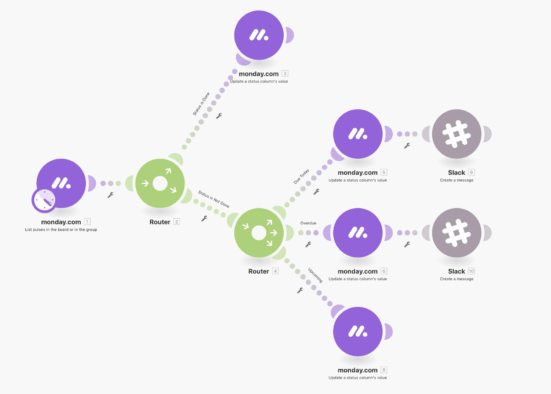
Monday.com to Slack notification workflow
Integration flow from Monday.com status updates to Slack notifications

The Slack messages can include direct links back to the Monday.com items, making it easy for team members to take immediate action. You can customize the message format, include @mentions for responsible parties, and even set up recurring reminders until tasks are completed.

For teams using multiple communication tools, this automation bridges the gap between project management and team messaging, ensuring critical updates don't get lost in either platform.

Frequently Asked Questions

Common questions about Monday.com and Make integration

Connecting Monday.com with Make allows you to automate repetitive tasks, sync data between apps, and create custom workflows. This saves time and reduces manual errors while ensuring your team stays updated with real-time information.

The integration enables complex automations that would otherwise require custom development, such as automatically creating follow-up tasks when items are completed or syncing customer data between Monday.com and your CRM.

  • Eliminates manual data entry between systems
  • Reduces human error in status updates
  • Provides real-time visibility across platforms

To authenticate, you'll need your Monday.com API key which can be found in your account settings under Admin > Integrations > API. In Make, add a new Monday.com connection and paste your API key when prompted.

The connection process typically takes less than a minute. Make verifies the API key immediately, and once authenticated, you can start building scenarios that interact with your Monday.com account.

  • API keys are account-specific
  • Keys can be regenerated if compromised
  • Admin permissions required to access API settings

Make can interact with boards, items (pulses), columns, updates, and users in your Monday.com account. You can retrieve, create, update, and delete this data through Make's modules, enabling powerful automation possibilities.

For example, you can create new items when certain conditions are met in another app, update multiple items in bulk based on spreadsheet data, or archive completed items after a set period automatically.

  • Full CRUD operations on boards and items
  • Access to custom column values
  • User and team management capabilities

Yes, you can set up webhooks in Monday.com that trigger Make scenarios when specific events occur, like when an item is created or updated. Alternatively, Make can poll Monday.com at regular intervals to check for changes.

Webhooks provide near-instant triggering but require some initial setup in both Monday.com and Make. Polling is simpler to implement but introduces a slight delay between the event and the automation running.

  • Webhooks for real-time triggering
  • Scheduled polling for simpler setups
  • Filter triggers to specific boards or items

Make provides error handling tools like routers and error handlers. You can set up alternative paths for your data when errors occur, send notifications about failures, and implement retry mechanisms for temporary issues.

Common error handling strategies include logging errors to a spreadsheet, notifying admins via email or Slack when critical failures occur, and automatically retrying failed operations after a delay.

  • Built-in error handling modules
  • Custom error notification options
  • Automatic retry configurations

Common use cases include syncing due dates across boards, sending Slack notifications for overdue tasks, creating follow-up items automatically, updating CRM records from Monday.com changes, and generating reports from board data.

Teams also use this integration to automate client onboarding workflows, sync project timelines with calendar apps, and maintain data consistency between Monday.com and other business systems like ERP or accounting software.

  • Cross-platform notification systems
  • Automated reporting and analytics
  • Data synchronization between apps

Yes, our team at GrowwStacks specializes in building custom automation solutions. We can create tailored workflows that connect Monday.com with other apps in your stack to meet your specific business requirements.

Whether you need complex multi-app integrations, custom error handling, or specialized reporting, our automation experts can design and implement solutions that save your team hours of manual work each week.

  • Custom scenario development
  • Integration with proprietary systems
  • Ongoing support and optimization

Need Custom Automation Help?

This guide is a starting point. Our team builds fully tailored automation systems for your specific workflow needs.