Make.com ChatGPT Telegram AI Automation

How to Create a ChatGPT-powered Telegram Bot That Replies

Step-by-step guide to building an AI-powered Telegram bot that automatically responds to messages using ChatGPT and Make.com automation.

Telegram bot interface showing ChatGPT responses

Building a Telegram bot that automatically responds to messages with ChatGPT's intelligence solves numerous communication challenges. From answering FAQs to providing instant support, this integration combines Telegram's messaging platform with ChatGPT's conversational AI.

While Telegram doesn't natively offer AI-powered replies, Make.com provides the perfect automation platform to connect these services. The result is a responsive bot that handles inquiries 24/7 with human-like understanding.

Step 1: Create a new scenario and install a Telegram Bot

The foundation of our automation begins in Make.com's scenario builder. After logging into your account, initiate a new scenario which will serve as the workflow orchestrator between Telegram and ChatGPT.

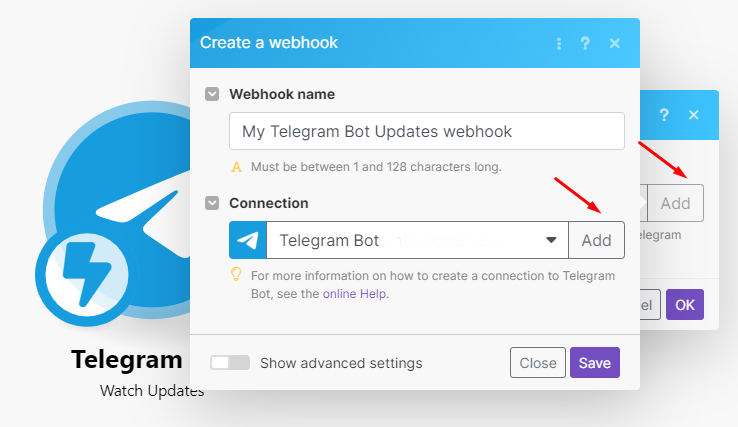
The Telegram Bot app's "Watch Updates" module acts as our trigger point. This webhook-based module instantly detects incoming messages, whether from direct chats or channel posts. Configuration involves connecting your Telegram account through Make's interface.
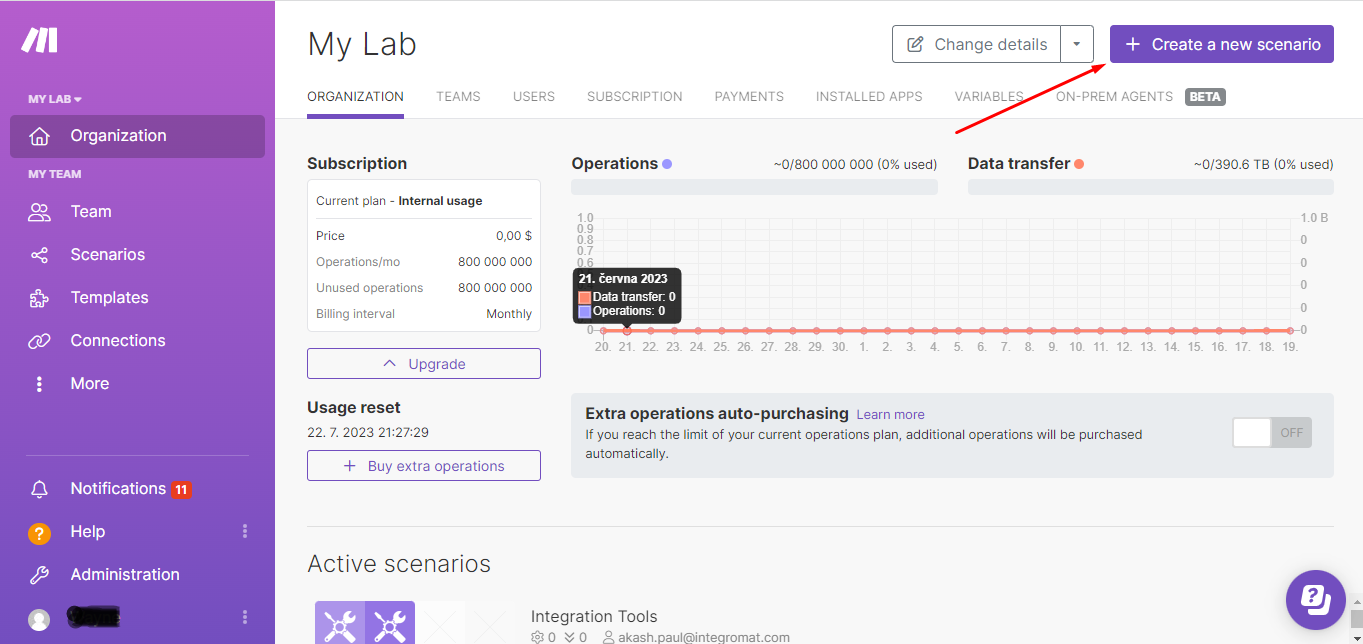
Make.com scenario builder interface
Setting up the Telegram Bot module in Make.com

Webhook Configuration

Make simplifies webhook creation with a one-click setup. The platform automatically handles the technical complexities of establishing a persistent connection between Telegram's API and your automation workflow.

This webhook remains active as long as your scenario runs, requiring no additional maintenance. Its efficiency lies in triggering the workflow only when new messages arrive, optimizing resource usage.

Step 2: Add the OpenAI module

The intelligence layer comes from OpenAI's ChatGPT integration. The "Create a Completion" module allows us to harness ChatGPT's language capabilities while customizing its behavior for our specific use case.

Authentication requires your OpenAI API key, which you can generate in your account settings. The module offers configuration options that determine response quality, including model selection and temperature settings.

Pro tip: Use GPT-4 for more nuanced responses or GPT-3.5 for faster, more cost-effective replies depending on your needs.

Crafting the Perfect Prompt

The prompt engineering determines your bot's effectiveness. Our recommended structure handles several key functions:

  • Language detection and matching
  • Topic filtering to avoid off-subject responses
  • Context-aware reply generation
OpenAI module configuration in Make
Configuring the OpenAI module with the response prompt

Step 3: Add the final Telegram module

Completing the circle involves sending ChatGPT's generated response back to Telegram. The "Send a Text Message or Reply" module handles this final step, requiring proper mapping of data between modules.

Key mapping points include connecting the correct chat ID (whether from direct messages or channels) and feeding the AI-generated response into the message content field. These connections ensure replies reach the right conversation with appropriate context.

Pro tip: For group chats, ensure you've granted the bot necessary permissions and consider adding @ mentions to clarify who the bot is responding to.

Activation and Testing

Before activating your scenario, thoroughly test all connections. Make.com provides a testing mode that lets you verify each step without sending actual messages. Once live, monitor initial interactions to refine responses as needed.
Final Telegram send module configuration
Setting up the Telegram send module to deliver responses

Frequently Asked Questions

Common questions about AI-powered Telegram bots

You'll need three key components: A Make.com account with at least Core Plan access, valid OpenAI API tokens, and an active Telegram account. The Make account handles the automation workflow, OpenAI provides the AI capabilities, and Telegram serves as the messaging platform.

For optimal performance, ensure your OpenAI account has sufficient credits or a paid plan if expecting high message volumes. The Telegram account must have permissions to create and manage bots through BotFather.

Absolutely. The OpenAI prompt template provided in the tutorial serves as a foundation that you can expand significantly. Common customizations include adding brand voice guidelines, specific response formats, or domain-specific knowledge.

For advanced customization, you can implement conditional response paths based on message content, integrate with knowledge bases, or add personality traits to make responses more engaging.

The tutorial includes a multilingual prompt that automatically detects and responds in the sender's language. This leverages ChatGPT's extensive language capabilities, supporting dozens of languages with varying proficiency levels.

For businesses needing specific language handling, you can enhance the prompt to include language detection confirmation or add fallback languages when the AI isn't confident in its translation.

Costs primarily come from two sources: OpenAI API usage billed per token processed, and your Make.com subscription. The webhook-based design means the bot only triggers when messages arrive, keeping costs proportional to usage.

For a typical support bot handling 500 messages daily, costs might range between $10-$50/month depending on response length and complexity. Monitoring usage through both platforms' dashboards helps manage expenses.

Yes, the tutorial includes topic filtering in the prompt template. This makes the bot politely decline off-topic questions while thoroughly addressing approved subjects. The filtering happens at the AI level, allowing for nuanced understanding beyond simple keyword matching.

For stricter controls, you can add pre-processing steps in Make.com to analyze messages before they reach ChatGPT, potentially saving on API costs for clearly off-topic queries.

Make.com maintains stable webhook connections with automatic reconnection capabilities. The platform monitors connection status and can notify you of any disruptions. In our testing, webhooks typically maintain connection for weeks without issues.

For mission-critical implementations, consider adding error handling in your scenario to retry failed operations and log issues for review. The system includes built-in mechanisms to handle temporary outages gracefully.

Our team specializes in building tailored Telegram bot solutions that go beyond this tutorial's scope. We can implement features like user authentication, database integration for personalized responses, and multi-step conversation flows.

Custom solutions might include connecting your CRM or helpdesk system, implementing sentiment analysis, or creating approval workflows for sensitive responses. We design bots that align with your specific operational requirements.

Need Custom Automation Help?

This guide is a starting point. Our team builds fully tailored automation systems for your specific workflow needs.