
As the landscape of workflow automation continues to expand, businesses are increasingly encountering new challenges and opportunities. One significant area that demands attention is the systematic documentation of integrations and automated processes. For many organizations, this will become a critical task in the near future.
Anyone who has delved into automation tools like Make.com understands that building a single automation often leads to the creation of many more. This rapid expansion can quickly lead to a core problem: managing and tracking these numerous integrations.
How do you keep integrations organized and documented?
While enhancing efficiency and automating repetitive tasks is highly beneficial, a growing number of integrations can make it difficult to keep track of what each one does. It becomes easy to lose sight of the purpose and functionality of individual workflows within a complex system.
Therefore, it is essential to establish and maintain a robust documentation system as your automation portfolio expands. This practice is particularly vital for companies that automate extensively, as well as for agencies and tech consulting firms that develop integrations for multiple clients.
To gain practical insights and real-world examples, we consulted XRay.Tech, a certified Make partner, about their methods for managing documentation for both their clients and internal operations. Their approach offers valuable lessons for anyone looking to streamline their automation documentation.
So, what's the best way to document integrations?
XRay.Tech, an automation consulting firm based in East Haven, Connecticut, manages hundreds of automated workflows for their clients and for their own internal processes. Their experience provides a clear blueprint for effective documentation.
They have developed a comprehensive documentation method that simplifies the tracking of every app integration, while also considering workflow performance. The cornerstone of their system is Notion, a versatile workspace tool that has gained significant popularity.
A Stepping Stone to Automation at Scale
XRay.Tech, an automation consulting company located in East Haven, Connecticut, is responsible for managing hundreds of automated workflows for their diverse clientele, in addition to overseeing their own internal operations. Their extensive experience has led them to develop a highly effective documentation strategy.
To maintain clarity and control over their vast automation ecosystem, XRay.Tech devised a documentation method that simplifies the process of tracking each developed app integration, while also providing insights into workflow performance. The central component of their innovative approach is Notion, a rapidly growing and highly adaptable workspace application.
For businesses or consultants who are actively building integrations, adopting a similar documentation system is highly recommended. Effective documentation is not merely an administrative task; it is a strategic imperative that supports scalability and long-term maintainability of your automation efforts.
Dude, Where's My Integration?
In the rapidly evolving world of low-code and no-code automation, comprehensive documentation holds the same critical importance as it does in traditional software development. Without proper records, even the most brilliant automations can become black boxes, difficult to understand, maintain, or troubleshoot.
Fundamentally, the primary objective of documenting your integrations mirrors that of documenting code: to ensure that your colleagues can easily comprehend your work and contribute to it without unnecessary friction. This shared understanding is vital for team collaboration and the longevity of your automated processes.
XRay.Tech has chosen Notion as their preferred tool for achieving this documentation clarity. While numerous other applications could serve a similar purpose, Notion's extensive and flexible features make it particularly well-suited for managing a vast collection of information related to automated workflows.
Notion's strength lies in its ability to allow users to add custom attributes to any document, which significantly aids in sorting and organizing information. These attributes can be tailored to specific needs, enabling users to:
- Clearly identify who is responsible for contributing to each document.
- Associate documentation with specific clients, projects, or tasks.
- Attach relevant links and files to provide additional context and resources.
While the examples provided in this guide specifically leverage Notion's capabilities, the underlying principles of this documentation method can be applied to any capable note-taking application or word processor. The key is the systematic approach to information capture and organization.
Documenting Integrations: First Steps
XRay.Tech's documentation process begins with creating a concise yet thorough summary for each automated workflow. This summary outlines the workflow's purpose and how it operates, providing an immediate understanding for anyone reviewing it.
A valuable tip for maintaining consistency and clarity at this initial stage is to envision that the documentation will be read by someone completely unfamiliar with the integrations. By adopting this perspective, you ensure that sufficient detail is included for the reader to grasp the workflow's objective and the individual tasks that comprise it.
Typically, XRay.Tech dedicates a Notion page to each distinct process. A single process might encompass several individual workflows that collectively contribute to its overall function and successful completion. For more complex processes, Notion's page nesting capabilities allow for the creation of subpages for each specific workflow, maintaining a clear hierarchical structure.
To ensure uniformity across all records, XRay.Tech utilizes a standardized documentation template. This template pre-fills each new Notion page with a series of prompts, guiding the documenter to include all necessary information. This structured approach guarantees that no critical details are overlooked and that all documentation follows a consistent format.
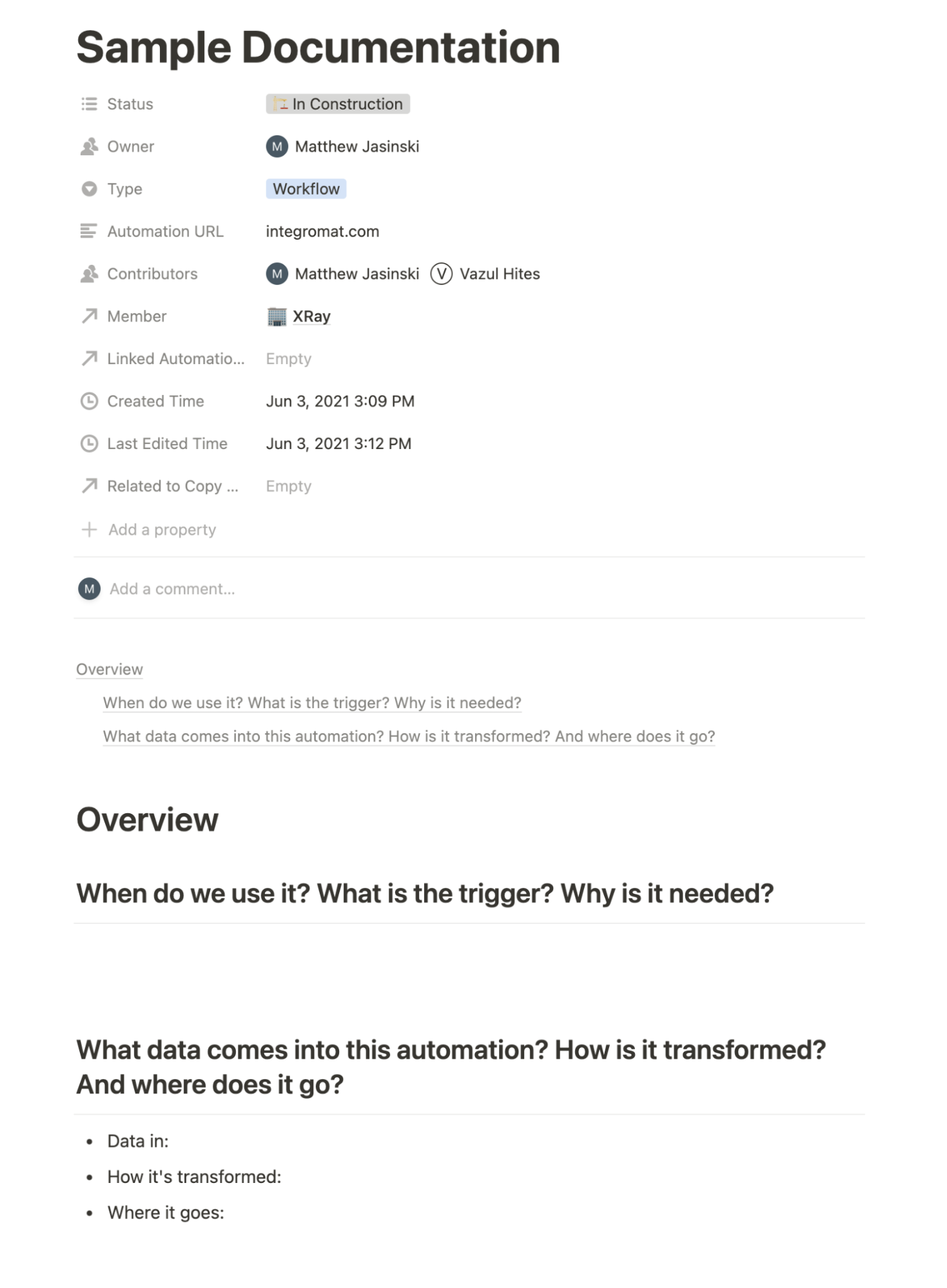
As illustrated in the template, specific questions are included to clarify when and why a particular automation is used. These prompts are instrumental in defining the automation's core use case and its strategic value within the business.
Furthermore, the template incorporates questions about the data involved in the workflow. These data-centric prompts help to delineate the technical configuration of the automation and identify all the applications that are integrated into the process. This ensures a comprehensive overview of the workflow's technical architecture.
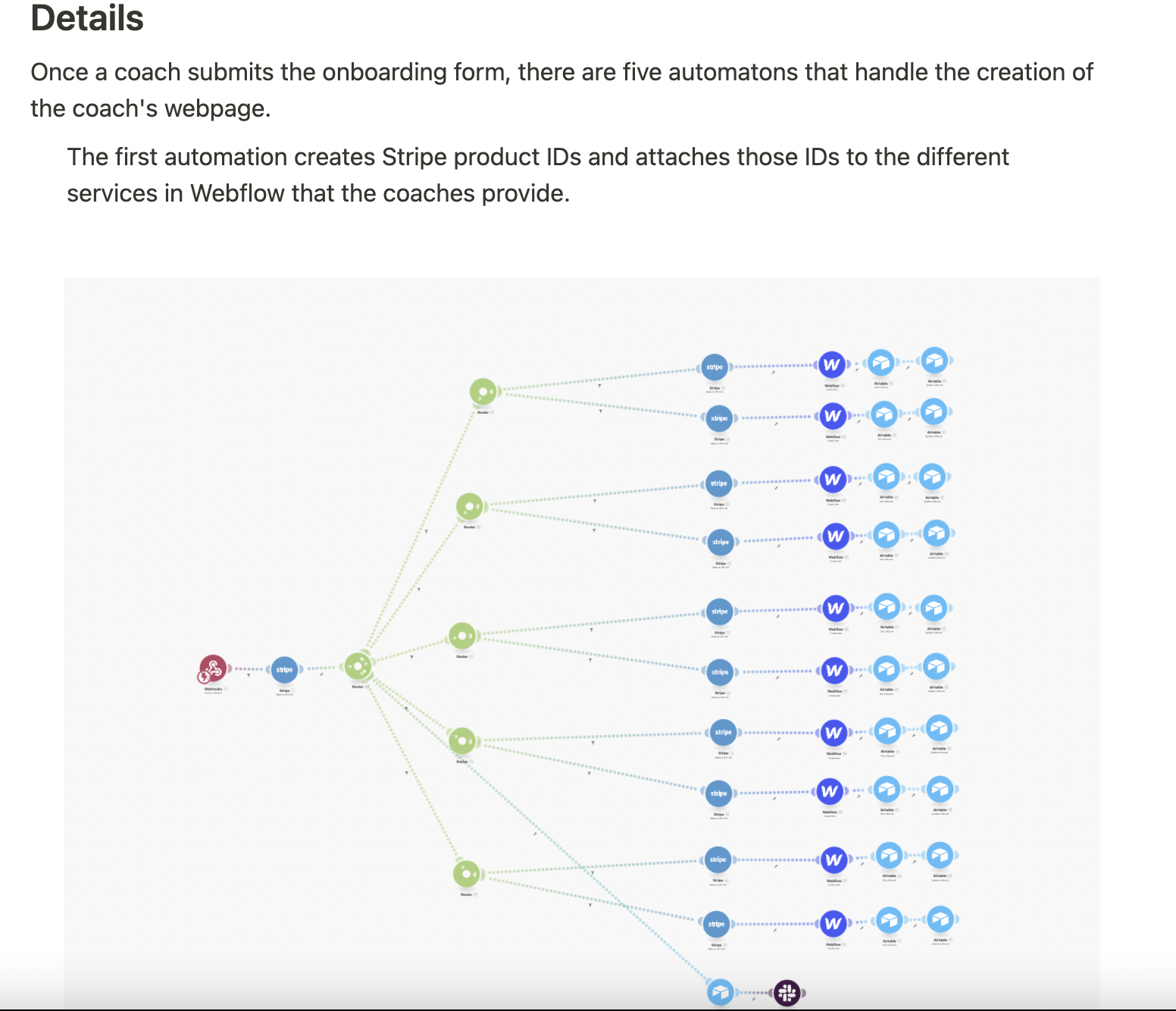
In addition to textual descriptions, screenshots of the actual workflows are embedded directly into the documentation. This visual component provides a quick and intuitive way to understand the integration without the need to create new graphics from scratch, saving time and ensuring accuracy.
Next: Adding Attributes to Organize the Documentation
One of Notion's most powerful features, and a primary reason for its suitability as an internal documentation tool, is its ability to incorporate a wide array of custom attributes into each page. These attributes transform static documents into dynamic, filterable records.
For instance, you can establish attributes to track the status of each workflow (e.g., "Active," "In Development," "Archived"), define its type (e.g., "Marketing Automation," "Client Onboarding"), include a direct link to the corresponding scenario in Make.com, list all contributing team members, and even link the page to a specific client profile or designate it as an internal automation. This level of detail provides immediate context and streamlines management.
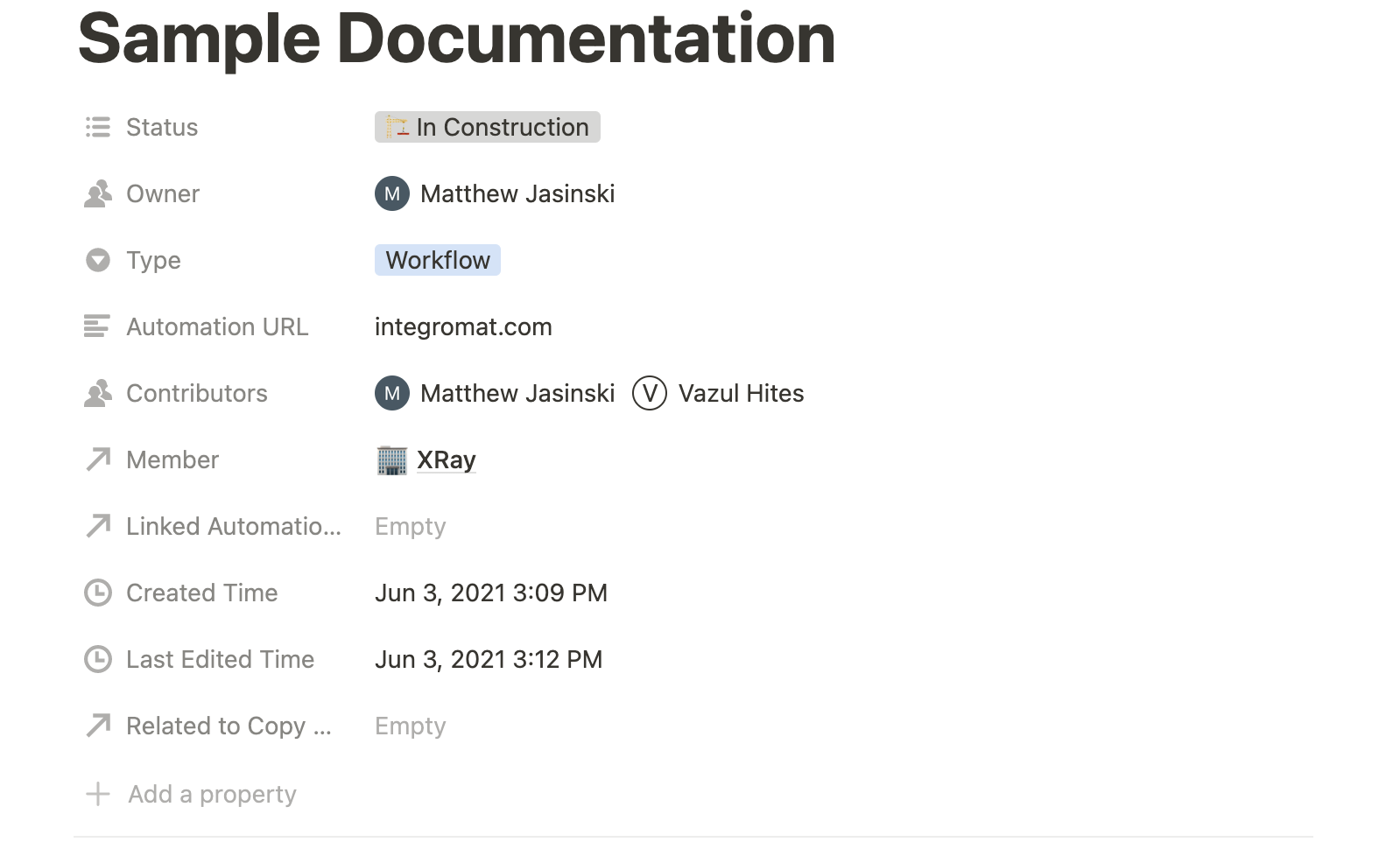
Once these attributes are in place, you can leverage Notion's powerful database views to sort, filter, and group your documentation based on any of these criteria. This functionality allows for highly flexible and insightful analysis of your automation portfolio.
For example, you can quickly generate a view that displays all active marketing automations, or all workflows currently under development for a specific client. This capability provides a comprehensive and accurate overview of workflow status, purpose, and type, all from a single dashboard. This dynamic organization is invaluable for strategic planning and operational oversight.
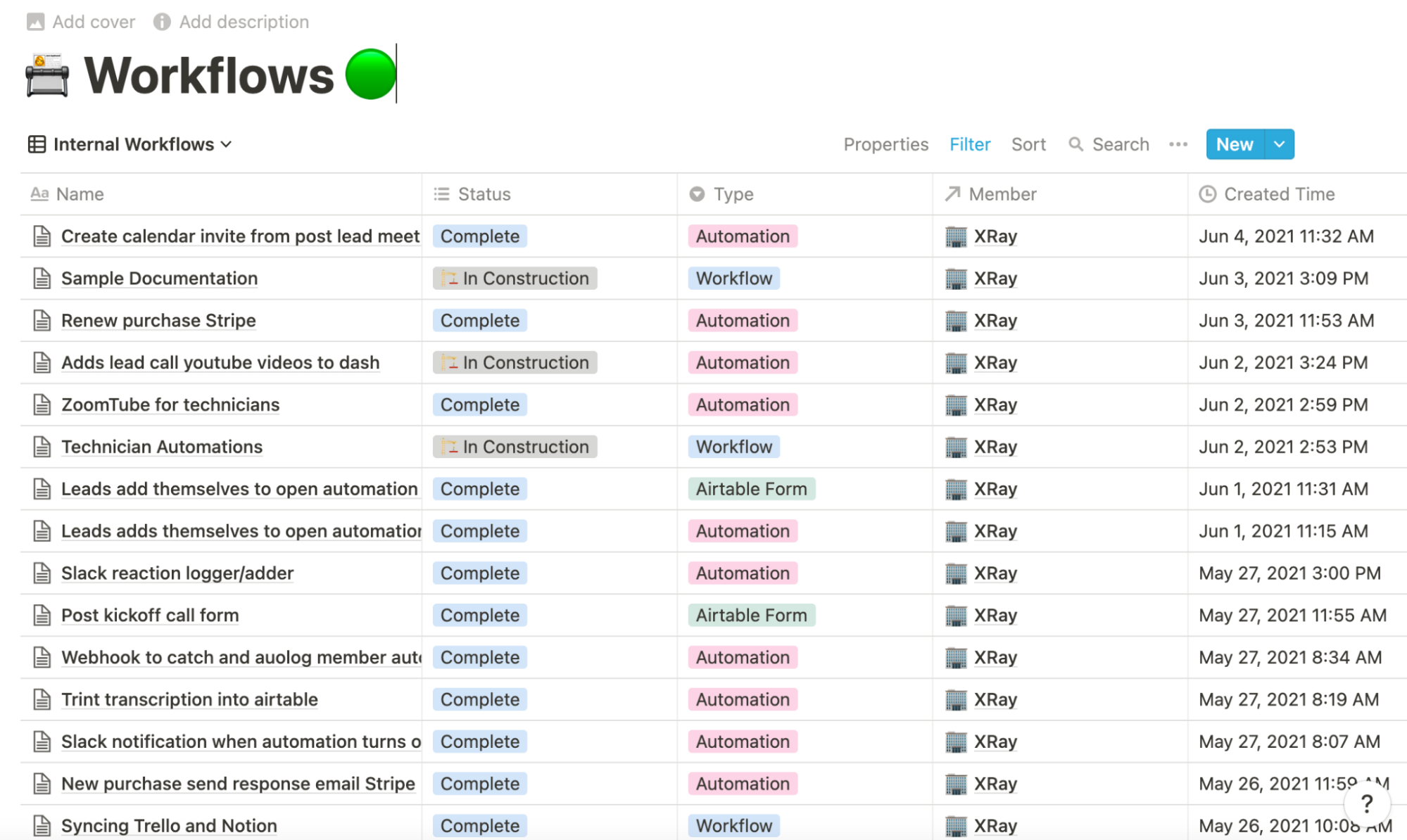
For XRay.Tech, these adaptable attributes and views are instrumental in helping their employees quickly locate specific integrations and access all relevant information. This significantly reduces search time and ensures that team members always have the most up-to-date details at their fingertips.
It's important to highlight that all these attributes are fully customizable. They can be modified and tailored in minutes to perfectly align with your organization's unique needs and evolving requirements, making Notion an incredibly flexible tool for managing complex automation documentation.