Make.com Lead Generation Marketing Giveaways Google Sheets

How to Gather Leads Through a Prize Giveaway Using Barcodes, Google Sheets and Webhooks

Automate your prize giveaways to effortlessly capture valuable lead data, engage customers with interactive experiences, and build lasting relationships, all powered by Make.com.

Get This Workflow → Make.com · · Free Template
Illustration of two people discussing barcodes, representing lead generation through prize giveaways.

What This Workflow Does

This powerful automation streamlines the entire process of running an interactive prize giveaway, allowing businesses to capture valuable lead information with minimal manual effort. It connects Google Forms and Google Sheets with barcode generation and email delivery, creating a seamless experience for both participants and administrators. By automating the lead capture and prize notification process, you can focus on engaging with your new prospects rather than getting bogged down in administrative tasks.

The core function of this workflow is to transform a simple form submission into an engaging, real-time prize reveal. When a potential customer enters their details into a Google Form, the system automatically processes their entry, generates a unique barcode (QR code) that determines if they've won, and emails it to them. Upon scanning the barcode, the participant instantly discovers their prize status, and their entry in Google Sheets is updated accordingly. This not only makes the giveaway exciting but also ensures accurate data collection and immediate follow-up potential.
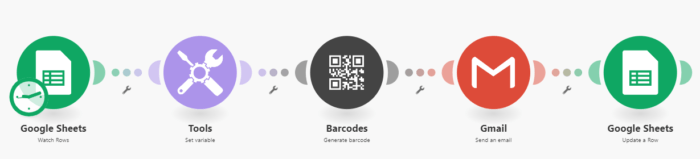
Make.com scenario flow for lead capture and barcode generation
Scenario 1: Lead Capture and Barcode Generation
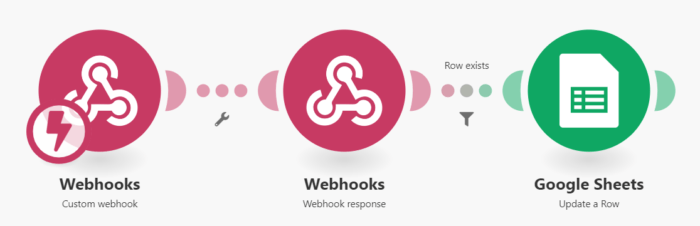
Make.com scenario flow for barcode scan processing
Scenario 2: Barcode Scan Processing

How It Works

Step 1: Participant Submits Google Form

A potential lead fills out a Google Form with their personal details, which is automatically recorded in a designated Google Sheet. This is the initial touchpoint for capturing customer information.
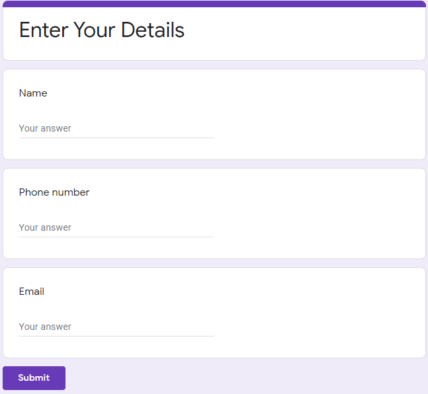
Screenshot of a Google Form for prize giveaway entry
Example Google Form for collecting lead information.

Step 2: Lead Data is Transferred to Google Sheets

Upon submission, the Google Form automatically populates a new row in a connected Google Sheet. This sheet acts as your central database for all giveaway participants.
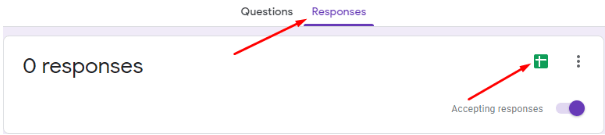
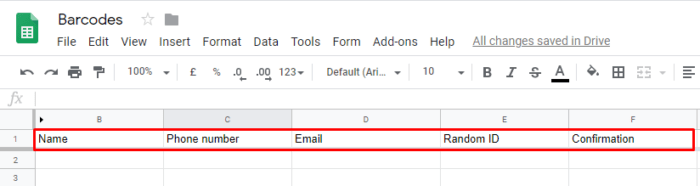
Screenshot showing how to create a Google Sheet from Google Forms responses
Connecting Google Form responses to a Google Sheet.
Screenshot of a Google Sheet with participant data and random ID column
Google Sheet with participant data.

Step 3: Random Number Generation and Barcode Creation

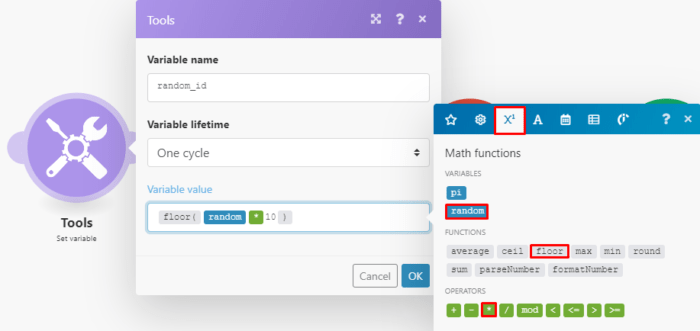
A Make.com scenario is triggered by the new row in Google Sheets. It generates a random number (0-10) to determine the prize outcome (even for win, odd for lose). This random number, along with the participant's row number, is then embedded into a unique QR code (barcode) using a webhook URL.
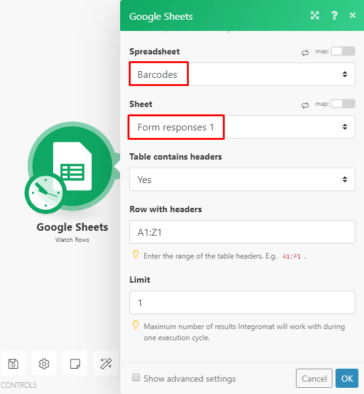
Make.com Google Sheets Watch Rows module configuration
Configuring the Google Sheets 'Watch Rows' module.
Make.com Tools Set Variable module for random number generation
Generating a random number for prize determination.

Step 4: Barcode Email Delivery

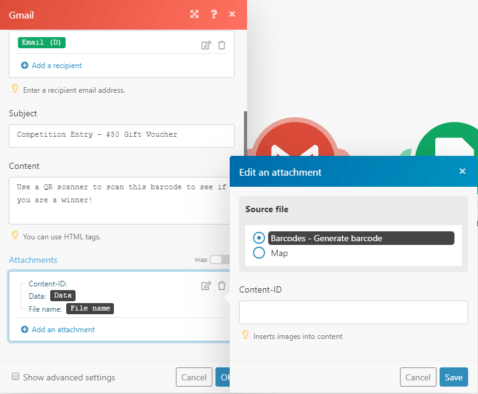
The generated QR code is automatically sent to the participant's email address. This email contains instructions on how to scan the barcode to reveal their prize status, creating an interactive and engaging step in the lead nurturing process.
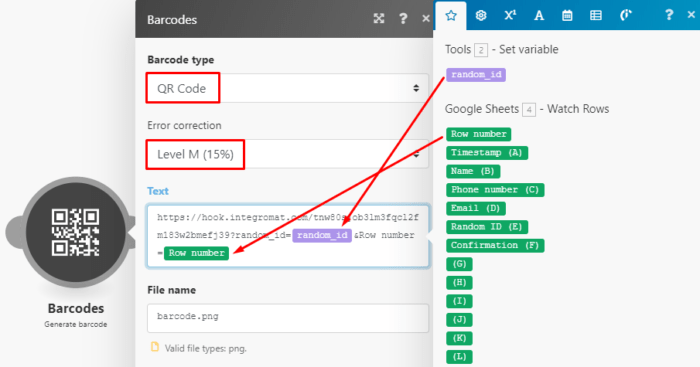
Make.com Barcodes Generate a barcode module configuration
Configuring the Barcodes module with the webhook URL.
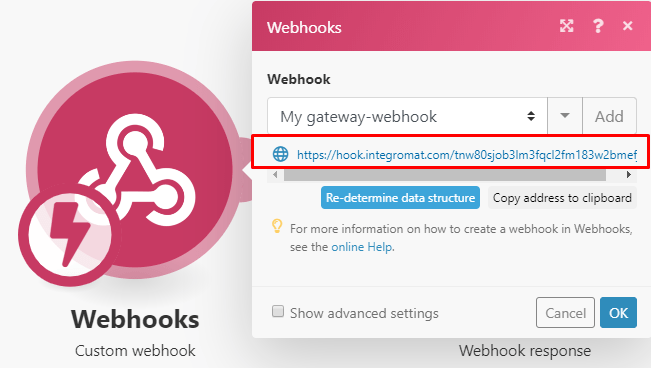
Make.com Webhooks Custom webhook module URL
The custom webhook URL used for barcode generation.
Make.com Gmail Send an email module configuration
Sending the QR code via Gmail.

Step 5: Barcode Scan and Instant Result

When the participant scans their unique QR code, a second Make.com scenario is instantly triggered via the embedded webhook. This scenario processes the random number from the QR code, determines if it's a win or lose, and displays a custom HTML message directly on the participant's device.

Step 6: Google Sheet Update with Outcome

Finally, the Google Sheet is updated with the outcome of the prize reveal (e.g., "Win" or "No win"). This provides a comprehensive record of all participants and their results, enabling easy tracking and future marketing efforts.

Who This Is For

This workflow is ideal for businesses and marketers looking to boost lead generation and customer engagement through interactive promotions. It's particularly useful for:

  • Retailers: Running in-store or online promotions to capture customer data and offer instant discounts or prizes.
  • Event Organizers: Collecting attendee information at conferences, trade shows, or promotional events with an engaging activity.
  • Marketing Agencies: Offering a unique and trackable lead magnet for clients across various industries.
  • Small to Medium Businesses: Any business seeking an affordable and effective way to grow their email list or customer database while providing an exciting customer experience.
  • Educational Institutions: Engaging prospective students at open days or recruitment events.

If you want to make lead capture fun, efficient, and measurable, this automation is for you.

What You'll Need

  1. A Make.com account (free tier available).
  2. A Google account for Google Forms and Google Sheets.
  3. A Gmail account for sending emails.
  4. A QR scanner app on participants' mobile devices (most modern smartphones have this built-in).
  5. Basic understanding of Make.com functions, filters, and webhooks (though this guide will walk you through it).

Quick Setup Guide

Setting up this powerful lead generation system is straightforward. Follow these steps to get your prize giveaway automation running:

  1. Prepare Your Google Form and Sheet: Create a new Google Form to collect participant details (e.g., Name, Email). Link this form to a new Google Sheet to automatically store submissions. Ensure your Google Sheet has columns for "Timestamp", "Name", "Email", "Random ID", and "Confirmation".
  2. Create Scenario 1 (Lead Capture & Barcode Generation):
    • Add a "Google Sheets - Watch Rows" module, selecting your giveaway Google Sheet.
    • Add a "Tools - Set Variable" module to generate a random number between 0-10. Use the formula floor(random(0, 10)). This will determine if the participant wins.
    • Add a "Barcodes - Generate a barcode" module. Select "QR Code" as the type.
    • In the Barcodes module, construct the webhook URL for Scenario 2 (which you'll create next). Embed the generated random ID and the Google Sheet row number into this URL.
    • Add a "Gmail - Send an email" module. Map the participant's email address from the Google Sheet. Attach the generated QR code from the Barcodes module.
    • Add a "Google Sheets - Update a row" module. Map the row number from the "Watch Rows" module and update the "Random ID" column with the generated random number.
  3. Create Scenario 2 (Barcode Scan Processing):
    • Add a "Webhooks - Custom webhook" module. Copy its URL; you'll use this in Scenario 1.
    • Add a "Webhooks - Webhook response" module. Set the status to 200. In the body, use an IF function with the Mod operator to check if the random ID from the webhook URL is even (win) or odd (lose). Display a custom HTML message accordingly.
    • Add a "Google Sheets - Update a row" module. Create a filter before this module to ensure the row number exists. Map the row number from the Custom Webhook.
    • In the "Update a row" module, update the "Confirmation" column in your Google Sheet with "Win" or "No win" based on the same IF/Mod logic used in the Webhook response.
  4. Test and Activate: Run a few test entries through your Google Form and scan the emailed QR codes to ensure both scenarios are working correctly and updating the Google Sheet as expected. Once confirmed, activate both scenarios.

Key Benefits

  • Automated Lead Capture: Automatically collect participant data from Google Forms directly into Google Sheets, eliminating manual data entry and reducing errors.
  • Enhanced Customer Engagement: Provide an interactive and exciting experience with instant prize reveals via unique QR codes, increasing participation and brand interaction.
  • Efficient Prize Management: Randomly determine winners and update records in real-time, simplifying the logistics of running a giveaway.
  • Streamlined Communication: Automatically send personalized emails with unique barcodes, ensuring participants receive their entry and instructions promptly.
  • Actionable Data Insights: Maintain a clean, updated Google Sheet with all participant data and prize outcomes, ready for analysis and targeted follow-up marketing campaigns.

Frequently Asked Questions

Common questions about prize giveaway automation and lead generation

Lead generation is crucial for business growth as it identifies potential customers interested in your products or services. By capturing contact information, businesses can nurture these leads, build relationships, and guide them through the sales funnel. Effective lead generation ensures a continuous pipeline of prospects, reducing reliance on cold outreach and improving marketing ROI.

Without a consistent flow of new leads, businesses risk stagnation. A robust lead generation strategy, especially one enhanced by automation, allows companies to efficiently identify and engage with individuals who are already showing interest, leading to higher conversion rates and more sustainable growth over time.

Automation streamlines the entire process of running a prize giveaway, from collecting entries to notifying winners and updating records. It eliminates manual data entry, reduces errors, and ensures a consistent participant experience. For lead capture, automation instantly processes new submissions, generates unique identifiers like barcodes, and initiates follow-up communications, saving significant time and resources.

This efficiency allows marketing teams to run more campaigns with less overhead, freeing up personnel to focus on strategic planning and creative execution. Automated giveaways also provide a faster, more engaging experience for participants, which can increase participation rates and positive brand perception.

  • Reduces manual workload and human error.
  • Ensures consistent and timely participant communication.
  • Scales easily for large volumes of entries.

Barcodes and QR codes offer a seamless way to bridge the physical and digital worlds in marketing. They provide quick access to information, promotions, or entry forms with a simple scan, enhancing user engagement. For businesses, they enable efficient tracking of campaign participation, offer redemption, and provide valuable data on customer behavior, all while creating an interactive experience.

These codes are particularly effective for in-person events or print media, allowing immediate digital interaction. They simplify the user journey, removing friction points like typing long URLs, and can be easily integrated into automated workflows to personalize experiences and track campaign performance in real-time.

Google Sheets serves as an excellent, accessible database for lead management when integrated with automation platforms like Make.com. New leads captured through forms can automatically populate a sheet, which then triggers subsequent actions like sending emails or generating unique codes. This centralizes lead data, makes it easily shareable, and allows for dynamic updates based on workflow progression, ensuring all team members have access to the latest information.

The real power lies in its flexibility. Google Sheets can be used to store, organize, and even perform basic analysis on lead data. When combined with automation, it becomes a dynamic hub where lead information is not just stored, but actively used to drive marketing and sales processes, from initial contact to conversion.

Webhooks act as real-time notifications between applications, enabling instant data transfer and triggering actions in response to specific events. In this workflow, a webhook is crucial for immediately processing a barcode scan, allowing for an instant determination of a prize outcome. This eliminates delays and creates a highly responsive, interactive experience for the participant, making the giveaway feel dynamic and engaging.

Unlike traditional API polling, where systems constantly check for updates, webhooks push information as soon as an event occurs. This makes them incredibly efficient for time-sensitive processes like instant win games or immediate lead follow-ups, ensuring that your automation reacts precisely when needed without unnecessary resource consumption.

  • Enable instant communication between apps.
  • Reduce latency in automated processes.
  • Are highly efficient compared to polling methods.

Yes, the logic for determining winners in an automated prize giveaway is highly customizable. Instead of a simple even/odd number check, you could implement more complex algorithms, integrate with external random number generators, or even set specific win probabilities. This flexibility allows businesses to tailor the giveaway to their marketing goals and budget, ensuring fairness while controlling the distribution of prizes.

For example, you might want to ensure a certain percentage of participants win, or distribute different tiers of prizes. Automation platforms provide the tools to build these custom rules, allowing for sophisticated campaign design that goes beyond basic chance. This level of control helps optimize both participant satisfaction and campaign ROI.

Absolutely! While this template provides a great starting point, GrowwStacks specializes in building custom automation solutions tailored to your unique business needs. Whether you require more complex giveaway mechanics, integration with specific CRM systems, advanced analytics, or personalized participant journeys, our experts can design and implement a bespoke workflow that maximizes your lead generation and engagement efforts. Contact us for a free consultation to discuss your vision.

We understand that every business has unique challenges and goals. Our team works closely with you to understand your existing processes and identify opportunities for automation, ensuring the solution we build is perfectly aligned with your strategic objectives and delivers measurable results. Let us help you unlock the full potential of automation.

Need a Custom Lead Generation Automation?

This free template is a starting point. Our team builds fully tailored automation systems for your specific business needs.