
What This Workflow Does
This innovative workflow empowers you to start your day with critical business insights, delivered directly by your Alexa device. Instead of manually checking dashboards or reports, you can have your Google Analytics data read aloud as part of your morning flash briefing. This automation connects Google Analytics, processes the data, and makes it accessible to Alexa, providing a seamless and hands-free way to stay informed about your website's performance.
Beyond just Google Analytics, the underlying method is highly versatile. It can be adapted to broadcast information from various sources like Reddit, RSS feeds, or any API, transforming how you consume daily updates. Imagine getting a summary of new leads, social media mentions, or inventory levels spoken to you while you prepare your coffee. This solution is about integrating essential business data into your daily routine, making information consumption effortless and efficient.
How It Works
Step 1: Fetch Data from Google Analytics
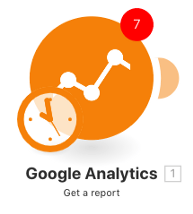
The process begins in Make.com, where a scheduled scenario is set up to connect to your Google Analytics account. This module is configured to retrieve specific metrics, such as daily website sessions, from the previous day. You have the flexibility to choose any metric that is most relevant to your business needs, ensuring you get the most impactful data in your briefing.
Step 2: Structure Data into JSON Format
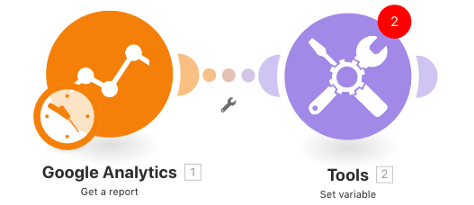
Once the data is fetched, the workflow uses a "Tools - Set variable" module to transform this raw data into a structured JSON (JavaScript Object Notation) format. This is a critical step because Alexa's Flash Briefing skill requires data to be presented in a specific JSON structure. The JSON includes a unique identifier, the update date, a title for the briefing, and the main text that Alexa will read, dynamically embedding your Google Analytics metrics.
Step 3: Upload JSON to Dropbox
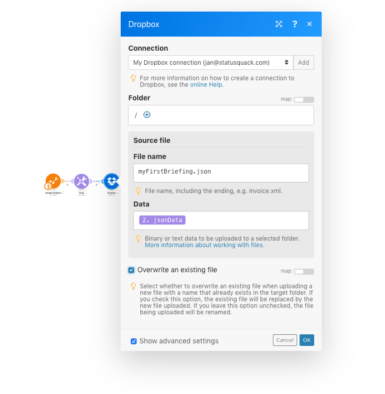
The formatted JSON file is then uploaded to a designated folder in your Dropbox account using the "Dropbox - Upload a file" module. This step is crucial for making the data accessible to Alexa. The workflow is configured to overwrite the existing file daily, ensuring your flash briefing always contains the most up-to-date information. After the file is uploaded, a public direct-download link is created for this JSON file.
Step 4: Configure Alexa Flash Briefing Skill
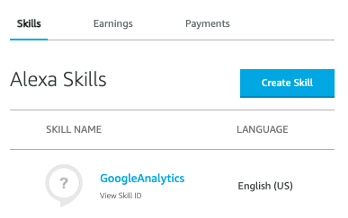
In the Alexa Developer Console, you create a new Flash Briefing skill. This skill is configured to use the public direct-download link from Dropbox as its data source. You'll specify a preamble (what Alexa says before the data), a name for the briefing, and set the content type to "text" with a daily update frequency. This tells Alexa where to find your daily website performance summary.
Step 5: Test and Enjoy Your Daily Briefing
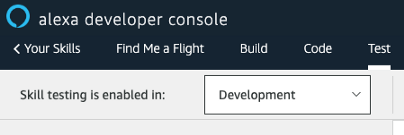
Finally, you enable the newly created skill for testing within the Alexa Developer Console. Once enabled, you can open your Alexa app or speak to your Alexa device, saying "Alexa, play news" or "Alexa, what's my flash briefing?" to hear your customized Google Analytics report. This completes the loop, providing you with an effortless, audible summary of your website's performance every morning.
Who This Is For
This workflow is ideal for business owners, digital marketers, website administrators, and anyone who needs to stay consistently updated on their website's performance without the overhead of manual checks. If you manage a website, e-commerce store, or blog and want to quickly grasp key metrics like daily traffic, engagement, or conversions, this automation is for you.
It's particularly beneficial for those who value efficiency and want to integrate data consumption into their morning routine seamlessly. Entrepreneurs seeking a quick pulse on their online presence, marketing managers who need to monitor campaign effectiveness, or even content creators tracking audience engagement can all leverage this tool to gain insights effortlessly.
What You'll Need
- A Google Analytics account with access to the desired website property.
- A Make.com account (a free tier is sufficient for basic usage).
- A Dropbox account (or another cloud storage service that allows public direct-download links).
- An Amazon Developer Console account to create and manage Alexa skills.
- An Alexa-enabled device or the Alexa App on your smartphone for listening to the briefing.
Quick Setup Guide
Setting up this workflow is straightforward. Follow these steps to get your daily Google Analytics briefing from Alexa:
- Create a Make.com Scenario: Log into your Make.com account and create a new scenario. Add a "Google Analytics - Get a report" module and connect it to your Google Analytics account. Select the specific metric (e.g., sessions, page views) you want Alexa to report for the previous day.
- Format Data for Alexa: Add a "Tools - Set variable" module. In the variable value field, paste the provided JSON template and replace "HERE-YOUR-VARIABLE" with the output from your Google Analytics module (e.g., the 'sessions' variable).
- Upload to Dropbox: Add a "Dropbox - Upload a file" module. Connect your Dropbox account, specify a folder, and set the file name (e.g.,
myAnalyticsBriefing.json). Crucially, enable the "Overwrite an existing file" option in advanced settings. - Make File Public: Go to your Dropbox account, find the uploaded JSON file, and create a shareable link. Change the
dl=0parameter in the URL todl=1to ensure it's a direct download link. Test this link in your browser to confirm it downloads the file directly. - Configure Alexa Skill: Log into the Alexa Developer Console. Create a new skill, choosing "Flash Briefing" as the model. Add a new feed, provide a preamble (e.g., "From Google Analytics"), a name (e.g., "My Daily Analytics"), set content type to "text" and frequency to "Daily". Paste your direct Dropbox JSON link into the "Feed" field.
- Enable Testing: In the Alexa Developer Console, navigate to the "Test" tab and change the skill status dropdown to "Development" to enable the skill for your account.
- Enjoy Your Briefing: Open your Alexa App or speak to your Alexa device, saying "Alexa, play news" or "Alexa, what's my flash briefing?" to hear your personalized Google Analytics update!
Key Benefits
- Instant Daily Insights: Get a verbal summary of your website's performance without lifting a finger, saving precious morning time.
- Enhanced Data Accessibility: Transform complex analytics into an easy-to-digest audio format, making data more approachable for busy professionals.
- Proactive Decision Making: Quickly identify significant changes or trends in your website data, enabling faster, more informed business decisions.
- Customizable Reporting: Tailor the specific metrics and phrasing of your daily briefing to align perfectly with your most important business goals.
- Reduced Manual Effort: Eliminate the need for repetitive manual checks of Google Analytics, freeing up time for more strategic tasks.