
In today's evolving work landscape, the concept of the digital nomad has firmly established its place. Professionals now have the flexibility to pursue full-time careers while embracing their desired lifestyles, often from any location in the world. This could mean working from a beach in Thailand for an American startup, freelance writing for a European blog while backpacking through South America, or simply working from home to be closer to family.
This modern approach to work-life balance offers significant benefits and attractions for employees seeking new opportunities. It empowers individuals to design their professional lives around their personal aspirations, fostering a sense of autonomy and fulfillment that traditional office settings often cannot provide. The allure of geographical freedom and flexible hours is a powerful motivator in the contemporary job market.
New Scenarios, New Problems, New Solutions
While remote work offers immense advantages for employees, it can also introduce complexities for organizations. Managing teams spread across different cities, countries, and time zones, each with varying workloads and communication preferences, can lead to disjointed operations. Companies are increasingly challenged to find innovative ways to maintain team cohesion and ensure seamless collaboration.
To overcome these hurdles, businesses must cultivate a culture that supports remote work while establishing robust procedures for managing individual tasks and fostering strong connections between diverse teams. This is where automation platforms like Make.com become indispensable. Make.com's integration capabilities are designed to re-embed remote teams and streamline processes, ensuring that work progresses smoothly regardless of location, workload, or the specific software tools being used.
Streamline Cross-Departmental Communications to Solve Customer Issues
To illustrate the transformative role of Make.com, let's consider a common business challenge: systematizing cross-departmental communications for customer support issues. Imagine a scenario where a customer encounters a problem with your company's software and contacts your customer support team via Zendesk. During the discussion, it becomes clear that the issue is more complex than initially thought, requiring the expertise of a development team member.
Traditionally, this handoff could be fraught with delays, especially if the developer is unavailable, in a different time zone, or uses a separate project management system. However, with Make.com, this process can occur seamlessly. By integrating various software services, customer support and development teams can communicate and react swiftly to customer concerns, ensuring that no issue falls through the cracks due to communication breakdowns.
The beauty of such an integration lies in its ability to automate the transfer of critical information. When a customer support agent identifies a technical issue, the system can automatically create a corresponding task or ticket in the development team's preferred platform, like Jira. This eliminates manual data entry, reduces the potential for errors, and ensures that developers receive all the necessary context without delay, allowing them to focus on problem-solving rather than administrative tasks.
Jira Software & Zendesk Integration
Jira Software is a widely used development tool that empowers teams to plan, track, report, and release software efficiently. Its robust features make it a cornerstone for many engineering and product teams. Now, with full support on Make.com, Jira users can effortlessly connect their accounts to a multitude of other services, including customer support platforms like Zendesk, to streamline issue resolution.
Zendesk, on the other hand, is a leading customer service software designed to help businesses manage customer inquiries, often referred to as "tickets." It provides a centralized system for support agents to interact with customers, track issues, and maintain a history of interactions. The integration between Jira Software and Zendesk is particularly powerful for ensuring that customer-reported problems are quickly and effectively addressed by the technical teams.
Consider a situation where a customer issue is reported through Zendesk, leading to the creation of a support ticket. If the customer support team determines they cannot resolve the issue and a developer's intervention is required, the integration becomes invaluable. Whether the developer is in a different city, a different time zone, or simply at another desk, an automated integration ensures the ticket remains on track, preventing potential delays and negative customer experiences.
The core of this solution is to provide a quick and efficient mechanism for informing the developer about the urgent issue. As illustrated in the example below, the integration automatically creates an issue in Jira Software for the relevant developer. This means the developer receives the problem directly within their primary work environment, Jira, which is the software they need to use to solve the issue.
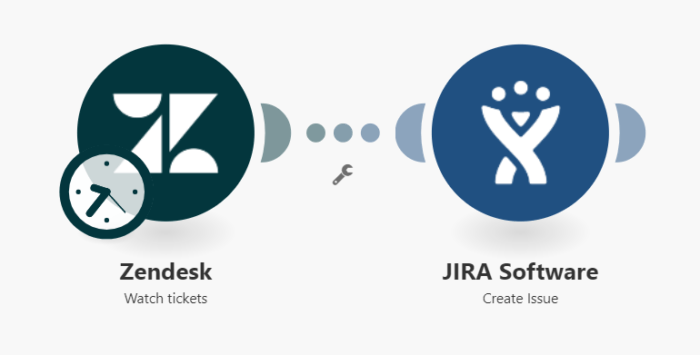
This automated solution eliminates the need for manual communication between support and development teams, such as emails or chat messages, and the subsequent manual transfer of data into Jira. Developers no longer have to wait for someone to connect with them on a separate platform, only to then manually input the details into their project management system. This saves valuable time and reduces the likelihood of information being lost or misinterpreted.
The result is an effortlessly and efficiently resolved issue, leading to happier customers and consistent project progress. For employers, this means the ability to offer the flexibility of a remote work environment without compromising on the quality or speed of work. It empowers employees to maintain their desired work-life balance, whether they're exploring new places or simply enjoying more time with family, all while contributing effectively to the company's success. With Make.com, such seamless operations are not just possible, but easily achievable.