
Make.com SaaS Churn Reduction Automation

How to Track SaaS Subscriptions to Reduce Churn

Learn how to create an automated churn management solution that identifies cancelled subscriptions to deploy winback programs and reduce customer churn.

Illustration showing subscription cancellation analysis dashboard

Understanding SaaS Churn

Customer churn represents the percentage of subscribers who cancel their recurring services during a given time period. For subscription-based businesses, monitoring churn is as critical as tracking new customer acquisition. High churn rates can undermine growth and indicate deeper issues with product-market fit or customer satisfaction.

Churn analysis becomes particularly valuable when you can identify specific cancellation patterns. The automation we'll build helps surface these insights by systematically tracking payment failures and voluntary cancellations across your customer base.

Pro tip: Segment your churn analysis by customer cohorts (signup date, plan type, acquisition channel) to identify high-risk groups and tailor retention strategies accordingly.

Automation Scenario Overview

This workflow connects three key systems: your payment database (PostgreSQL), a centralized tracking spreadsheet (Google Sheets), and your team's task management tool (ClickUp). The automation runs monthly to identify cancellations from the previous billing cycle.

The complete solution performs three core functions: extracts payment status data from your database, filters for cancellations and failed payments, then creates actionable tasks for your customer success team to follow up with affected subscribers.
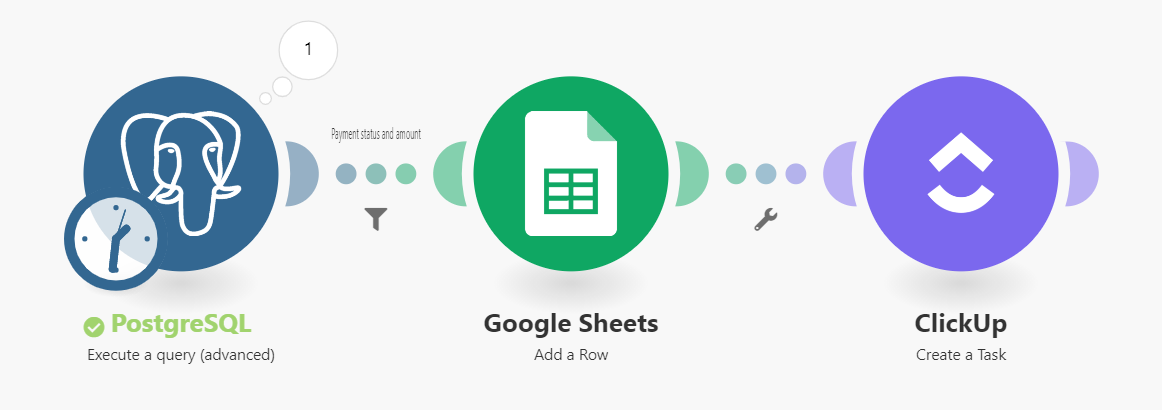
Diagram showing the churn analysis workflow between PostgreSQL, Google Sheets and ClickUp
The automated workflow connects payment data with team task management

Step 1: Create the Make Scenario

Begin by creating a new scenario in Make (formerly Integromat). This serves as the container for your entire automation workflow. Name it descriptively, like "Monthly Churn Detection" to clearly identify its purpose.

Make's visual interface allows you to drag and connect modules that represent different apps and actions. The first module you'll add connects to your PostgreSQL database containing payment records.

Step 2: Add PostgreSQL Module

The PostgreSQL module executes a query against your payment database. Configure it with your database credentials and set up a dynamic query that retrieves transactions from the previous calendar month.

The SQL query should filter for payment records with statuses like "Cancelled" or "Failed." Use Make's date functions to automatically adjust the date range each month, ensuring you always analyze the most recent billing cycle without manual adjustments.
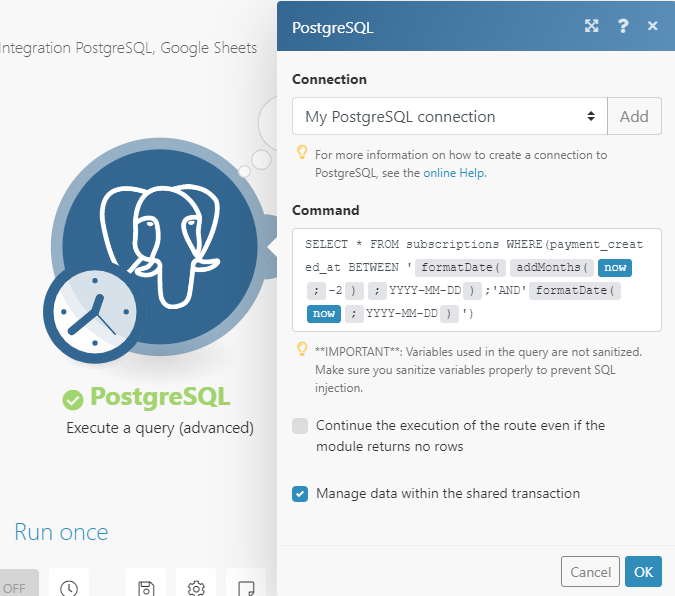
Screenshot showing PostgreSQL module configuration in Make
Configuring the PostgreSQL module to query payment data

Step 3: Connect Google Sheets

Add a Google Sheets module to your scenario to log all identified cancellations in a centralized spreadsheet. This creates an audit trail and allows for historical analysis of churn patterns.

Map the fields from your PostgreSQL query to corresponding columns in your Google Sheet. Essential fields to include are customer email, subscription tier, cancellation date, and payment amount. This structured data becomes valuable for analyzing churn drivers over time.

Step 4: Implement ClickUp Tasks

The final component creates actionable tasks in ClickUp for your customer success team. Configure the module to generate specific tasks based on the cancellation reason - for example, "Payment Failed" tasks might go to your billing team while "Voluntary Cancellation" tasks route to account managers.

Include relevant customer details in each task description to provide context for follow-up. Consider adding priority levels based on customer lifetime value or other business rules to help your team prioritize their outreach efforts.
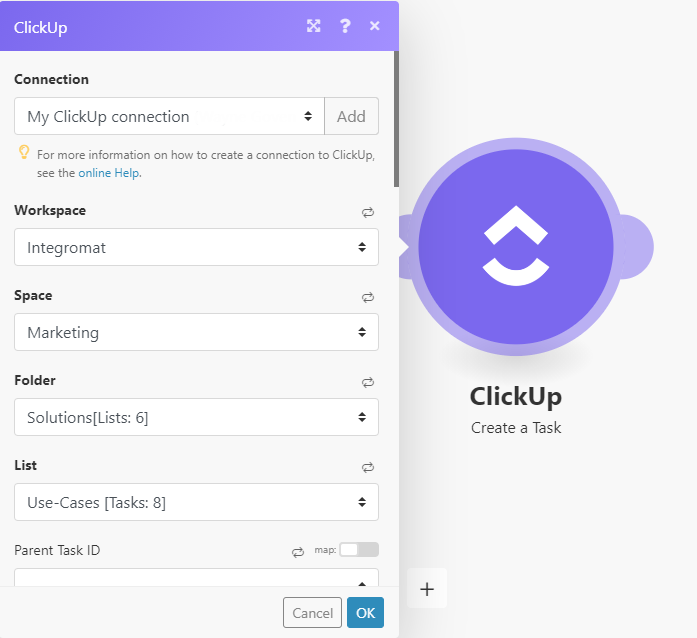
Screenshot showing ClickUp task creation settings in Make
Setting up automated task creation in ClickUp

Testing and Scheduling

Before activating your scenario, run several test executions with different date ranges to verify it correctly identifies cancellations and creates the appropriate tasks. Check that data flows accurately between all connected systems.

Once validated, schedule the scenario to run automatically on the first day of each month. This ensures your team always has fresh cancellation data to work with at the start of each billing cycle, maximizing their chances of successful winback efforts.

Frequently Asked Questions

Common questions about SaaS subscription tracking and churn reduction

Customer churn refers to the percentage of subscribers who cancel their recurring services during a given time period. It's a critical metric for SaaS businesses because high churn directly impacts revenue and indicates potential issues with product-market fit, customer satisfaction, or competitive positioning.

Monitoring churn helps identify at-risk customers before they cancel, allowing for proactive retention efforts. It also provides insights into which features or services may be underperforming, guiding product development priorities.

Most SaaS businesses analyze churn monthly, as this aligns with typical billing cycles. However, high-growth companies or those with significant churn issues may benefit from weekly monitoring to identify and address problems faster.

The automation in this guide is configured for monthly analysis, but you can adjust the schedule in Make to run more frequently if needed. Just be mindful of not overwhelming your team with too many alerts.

Key payment data points include transaction status (success/failed), cancellation dates, payment method changes, subscription tier changes, and any failed payment recovery attempts. Tracking customer lifetime value alongside churn helps prioritize retention efforts.

For deeper insights, consider adding product usage metrics to your analysis. Customers who reduce usage before canceling often show predictable patterns that can trigger early intervention.

Yes, no-code platforms like Make allow you to build automated workflows that connect payment processors, CRMs, and analytics tools without writing code. The solution in this guide requires no programming knowledge.

These visual automation tools provide pre-built connectors for most business applications and include templates for common workflows like churn analysis, making implementation faster and more accessible.

Voluntary churn occurs when customers actively cancel, while involuntary churn happens due to failed payments. The automation in this guide helps identify both types, allowing for different recovery strategies for each situation.

Involuntary churn often has higher recovery rates since the cancellation wasn't intentional. Implementing payment retry logic and credit card updater services can significantly reduce this churn type.

Implement multi-step verification in your automation: check for multiple failed payments, customer support tickets about cancellation, and usage pattern declines before flagging an account as churned.

You can add filters in Make to only create tasks for cancellations meeting specific criteria, like customers who were active for at least 3 months or those on premium plans worth retaining.

Yes, our team at GrowwStacks specializes in building tailored churn management systems that integrate with your specific tech stack. We can create advanced workflows with predictive analytics, personalized winback campaigns, and real-time alerts.

Our solutions go beyond basic cancellation tracking to include customer health scoring, automated retention offers, and integration with your CRM and marketing tools for coordinated recovery efforts.

Need Custom Automation Help?

This guide is a starting point. Our team builds fully tailored automation systems for your specific workflow needs.