
This guide will walk you through setting up a Make.com scenario that retrieves a list of your Twitter followers, compares it against a stored list, and then saves any new followers to a Data Store. This ensures you always have an up-to-date record of your audience growth.
The process involves several key Make.com modules, including the Data Store for persistent data and the Array Aggregator for efficient data comparison. The difficulty level for this tutorial is intermediate, and it should take approximately 15 minutes to implement. Before you begin, ensure you have a Twitter account connected to Make.com and a Data Store set up to store your follower information.
Configuring the Scenario
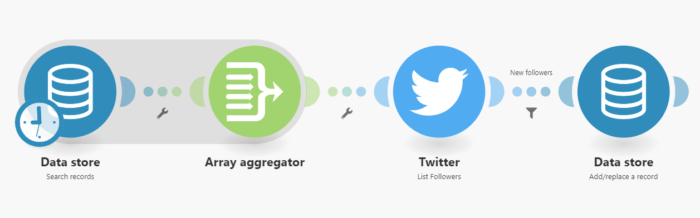
The automation scenario is built using four core Make.com modules, each playing a crucial role in fetching, comparing, and storing your Twitter follower data. These modules work in sequence to ensure that only new followers are added to your Data Store.
The modules involved are: Data Store > Search records, Array Aggregator, Twitter > List followers, and Data Store > Add/replace a record. Below is an overview of how these modules are connected in the scenario.
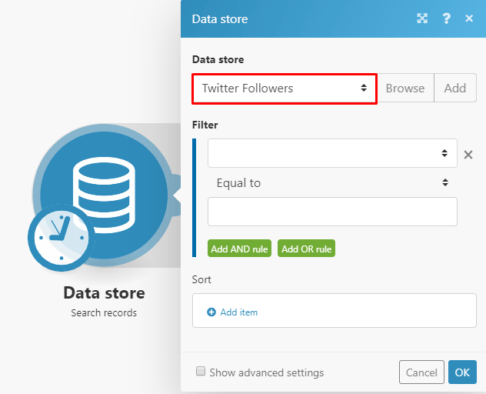
The first module in the scenario is the Data Store > Search records. Its configuration is straightforward: simply select an existing Data Store where your current follower list is kept, or create a new one if you haven't already. It's important to leave the filter field empty in this module, as its purpose is to retrieve all existing records from the Data Store for comparison.
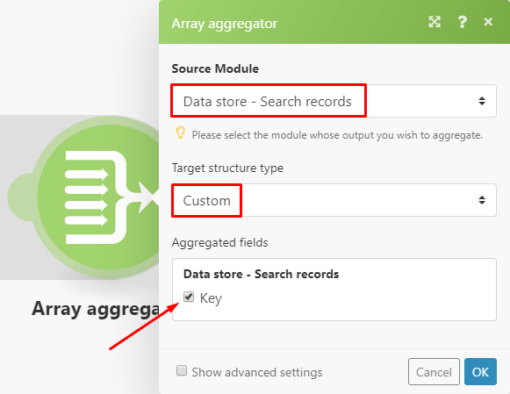
Next, you'll configure the Array Aggregator module. This module is crucial for consolidating the individual records from your Data Store into a single array. The Source module should automatically be set to Data Store > Search records, and the Target structure type should be Custom. These settings can typically be left as their defaults. Under the aggregated fields, make sure to tick the Key option. This tells the Array Aggregator to collect all the keys (which represent the Twitter screen names in your Data Store) into one array.
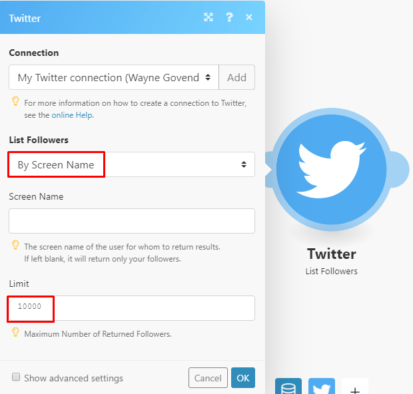
Following the Array Aggregator, add the Twitter > List followers module. This module is responsible for fetching the most up-to-date list of your followers directly from Twitter. In its configuration, select By Screen Name under the List Followers option. You will also need to enter a numerical value under Limit. This limit specifies the maximum number of followers Make.com will retrieve during a single execution cycle. Choose a number that suits your needs, keeping in mind the potential volume of your followers.
A critical component of this scenario is the filter placed on the route between the Twitter > List followers module and the final Data Store > Add/replace a record module. This filter's purpose is to ensure that only genuinely new followers are passed through to be saved. It achieves this by checking if the Keys (screen names) retrieved from the Data Store do not contain the Screen names outputted by the Twitter module. If a screen name from Twitter is not found in your existing Data Store, it means it's a new follower, and the bundle will proceed.
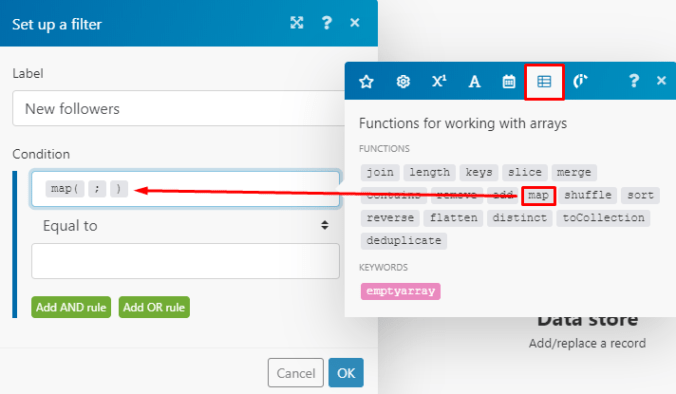
To set up this filter, click on the route connecting the two modules. Within the filter configuration, you'll utilize the map() function, which is found under the Functions for working with arrays tab. This function is essential for extracting specific items or values from an array of collections, allowing for precise comparisons.
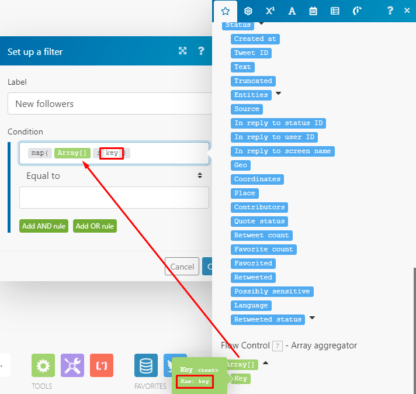
Within the filter, you'll map the Array[] element outputted by the Array Aggregator. Inside the brackets, type the word key after the semicolon. It's crucial to use the raw name of the element, which in this case is 'key', as outputted by the Array Aggregator. You can verify the raw name by hovering over the element in the mapping panel.
Pro tip: Always double-check the raw name of elements when using functions like map(). Hovering over the element in the mapping panel reveals its precise internal name, preventing common configuration errors.
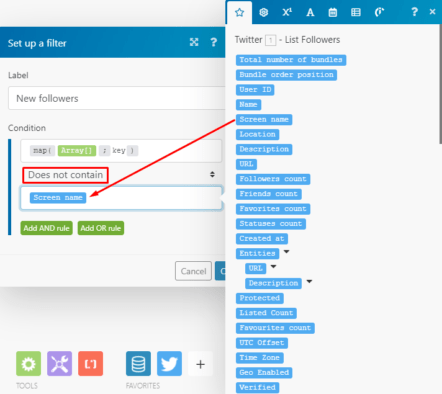
After mapping the key, select the Does not contain text operator. Then, map the Screen name element outputted by the Twitter module. This completes the filter setup. If a bundle successfully passes this filter (meaning the Twitter screen name is not already in your Data Store), it will proceed to the next module.
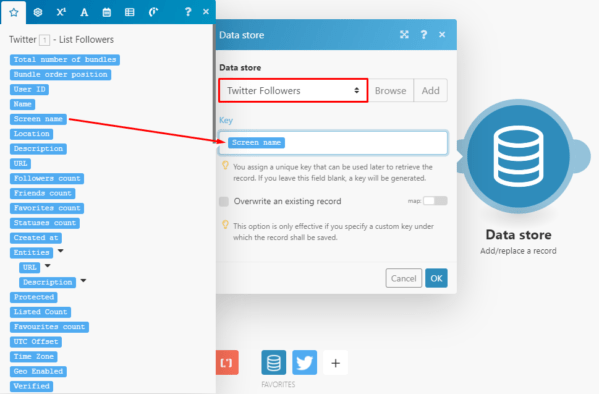
The final step in the scenario configuration is setting up the Data Store > Add/replace a record module. This module will add the new followers to your Data Store. Simply select the same Data Store you used in the first module. Then, map the Screen name element, which is outputted by the Twitter module, to the Key field in this Data Store module. This action will create a new record for each new follower, using their screen name as the unique identifier.
With all modules configured, your scenario is now ready to run. Let's examine two different execution scenarios to see how the filter and data storage work in practice.
Scenario Execution 1
In the first execution example, you'll observe how the system handles new followers. The bundles retrieved from the Data Store are aggregated, and the filter correctly identifies that the screen names from the Twitter module are not present in the existing Data Store keys. As a result, these new followers successfully pass the filter and are added as new records to your Data Store.
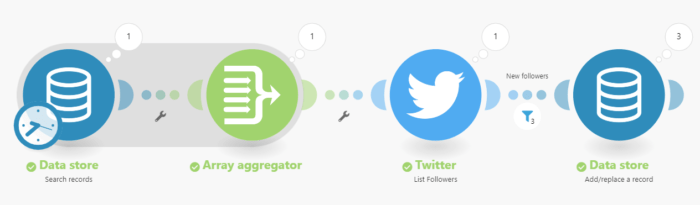
This demonstrates the effectiveness of the "does not contain" filter in isolating unique new entries. Each new follower's screen name becomes a new key in your Data Store, maintaining an accurate and growing list of your audience.
Scenario Execution 2
In the second execution, the scenario processes a list of Twitter followers where all screen names are already present in the Data Store. In this case, the filter's condition—that the Data Store keys "do not contain" the Twitter screen names—is not met. Consequently, none of these bundles proceed to the final Data Store module, as they are not new followers.
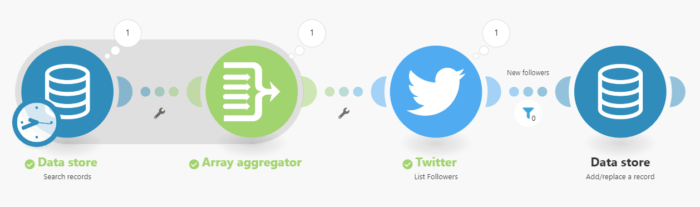
This highlights the efficiency of the filter in preventing duplicate entries and ensuring that your Data Store remains clean and only contains records for unique, new followers. The scenario effectively distinguishes between existing and new connections, optimizing data management.
You have now successfully learned how to use Make.com's Array Aggregator and Data Store to automatically track and update your list of Twitter followers. This powerful combination allows for precise data management and ensures you're always aware of your audience growth without manual intervention. Happy Automating!