
Are you finding that your customer messaging is fragmented across various platforms? Does your company's communication feel impersonal, lacking that unique touch that sets you apart? Intercom offers a comprehensive solution, enabling you to connect with your customers in a more personal and meaningful way at every stage of their journey.
Intercom is an all-in-one messaging platform that unifies sales, marketing, and support functions. Its core mission is to integrate these traditionally separate departments to help you effectively capture and convert leads, smoothly onboard and engage customers, provide robust support, and foster customer retention, all while offering self-service options. Essentially, Intercom aims to bring a personal touch back to business interactions.
While Intercom empowers you to personalize customer engagement, Make.com steps in to handle the underlying data flow. Make connects the various applications that feed information into Intercom, ensuring a seamless and automated process. This means you can eliminate the manual, time-consuming task of copying and pasting data between your different apps to achieve the desired results.
By leveraging Make, you can transform your scattered data into a cohesive, automated system that supports Intercom's personalized approach. This integration acts as the "glue" that binds your digital ecosystem, allowing information to flow freely and efficiently. The result is a more streamlined operation, improved data accuracy, and a better overall customer experience. Let's explore how you can get started with these powerful automations.
Automate Your Intercom Tasks with Make
Integrating Intercom with Make.com is a straightforward process that can significantly reduce manual effort and boost efficiency. The initial setup involves a few simple steps to establish a secure connection between your Intercom account and the Make platform, paving the way for powerful automations.
To begin, you'll need to create your first scenario in Make that involves Intercom. When you select an Intercom module within your scenario, the module settings panel will prompt you to "Add a connection." This is where you'll initiate the link between the two platforms.
Upon clicking "Add," a pop-up window will appear, asking you to name your connection. While "My Intercom Connection" is a common choice, you can use any name that helps you identify it easily. After naming it, click "Continue." Make will then securely redirect you to the Intercom website. On the Intercom site, you'll be asked to grant Make access to your account. Simply click the "Connect" button to authorize this access. Once authorized, you will be automatically redirected back to your Make scenario, and your Intercom connection will be successfully established. From this point, you can proceed to build and refine your automation scenario, leveraging the newly created connection.
Pro tip: Always use a descriptive name for your connections in Make. This becomes especially helpful as you build more complex workflows with multiple connections, making it easier to manage and troubleshoot your automations.
Intercom Scenarios
Once your Intercom account is successfully connected to Make, a world of automation possibilities opens up. You can now design scenarios that eliminate repetitive tasks, ensure data consistency, and enhance your customer engagement strategies. Here are some practical examples of how Make can help you automate key Intercom workflows.
These scenarios are just a starting point. Make's flexibility allows for countless combinations and customizations, enabling you to tailor automations precisely to your business needs. By automating these processes, you free up valuable time and resources, allowing your team to focus on more strategic initiatives and provide a higher quality of service.
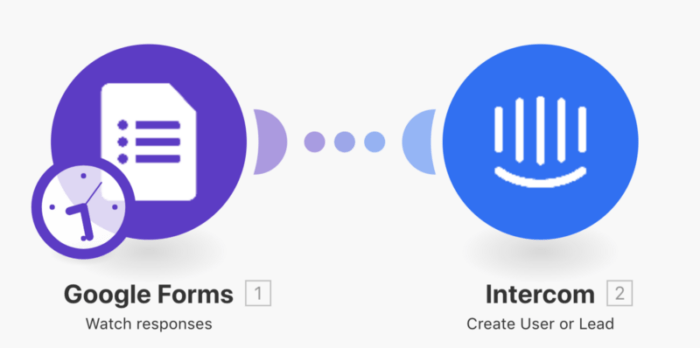
1. Create Intercom Users from New Google Forms Entries
Many businesses rely on Google Forms for various purposes, including new user sign-ups, lead generation, or gathering customer feedback. Manually transferring this information into Intercom can be a time-consuming and error-prone task. Make offers a seamless solution to automate this process, ensuring that every new entry in your Google Form instantly translates into a new user in Intercom.
With this automation, every time a new response is submitted through your designated Google Form, Make will automatically trigger the creation of a new user profile within your Intercom account. This eliminates the need for manual data entry, reduces delays in engaging with new contacts, and ensures that your Intercom database is always up-to-date with the latest information from your forms. It's an efficient way to streamline your onboarding and initial outreach efforts.
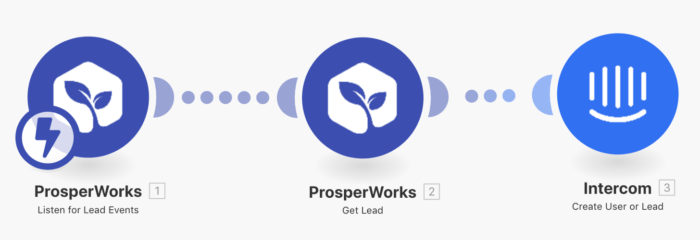
2. Add New Copper Leads to Intercom as Users
For sales teams utilizing Copper CRM, efficiently moving leads into your customer communication platform is crucial for timely engagement. Manually transferring new leads from Copper to Intercom can introduce delays and potential data inconsistencies, hindering your sales pipeline's momentum. Make provides an automation to bridge this gap, ensuring your leads are always where they need to be.
By setting up a Make scenario, every time a new lead is created in Copper, a corresponding new user will be automatically generated in Intercom. This ensures that your sales and marketing teams have immediate access to the latest lead information in both systems, facilitating prompt follow-ups and personalized communication. This integration not only saves time but also helps maintain a consistent and accurate view of your leads across your CRM and messaging platforms.
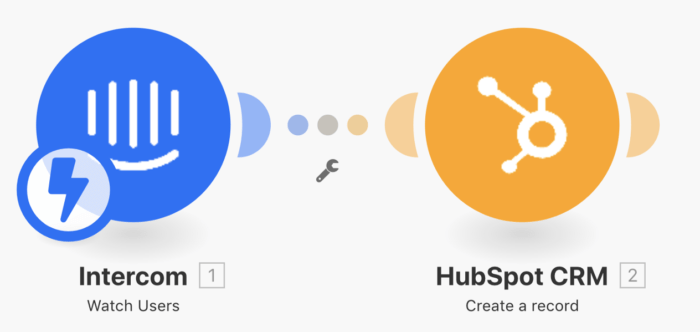
3. Add New Intercom Users to HubSpot as Users
Maintaining a unified customer database across all your business tools is essential for effective customer relationship management. If you're using Intercom for customer messaging and HubSpot CRM for managing your contacts, ensuring that new Intercom users are reflected in HubSpot can be a manual burden. Make offers a solution to automate this synchronization, keeping your CRM up-to-date effortlessly.
This Make scenario works in reverse, allowing you to automatically transfer new users created in Intercom directly into your HubSpot CRM as new contacts. This ensures that your CRM always has the most current list of your Intercom users, enabling consistent communication, targeted marketing campaigns, and accurate reporting across both platforms. This automation is vital for businesses looking to maintain a single source of truth for their customer data and avoid discrepancies between systems.
These are just a few examples of the many ways you can leverage Make to automate your Intercom workflows. For a more extensive list of scenario ideas and available actions, we encourage you to visit the dedicated Intercom integration page on Make's website. There, you'll find a comprehensive overview of how Intercom can connect with various other applications, acting as the "glue" for your entire digital ecosystem.
However, don't limit your imagination to just these examples. Make is capable of far more than simple data transfers. We highly recommend exploring the full capabilities of the platform by visiting our Product page. You'll discover how Make can automate complex, multi-step workflows across thousands of applications, transforming the way your business operates.
If this guide has inspired you to explore the power of automation, or if you're ready to experience the benefits firsthand, visit www.make.com today and try it for free! Don't let inefficiencies hold your business back. Embrace automation to save time, reduce errors, and empower your team to focus on what truly matters. If you found this article helpful, please consider sharing it with others who might benefit from these insights.