
Make.com Formstack WebMerge Data Automation

Automate Data Collection and Storage with Make

Learn how to streamline your data workflows with secure collection, automated processing, and dynamic document generation.

Diagram showing automated data collection workflow

Data Collection Basics: Formstack

Formstack provides a versatile platform for creating smart, customizable forms that work both online and offline. Its mobile app enables data collection anywhere, syncing automatically when connectivity returns while maintaining data integrity throughout the process.

The platform takes security seriously with enterprise-grade protections including encryption, access controls, and compliance certifications. For payment collection, Formstack integrates with major processors while handling sensitive financial data securely.
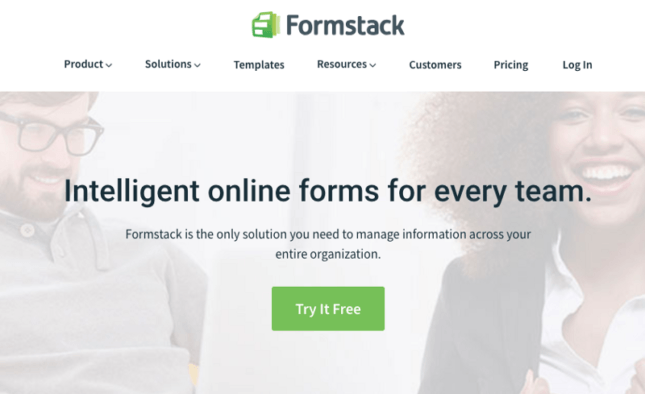
Formstack interface showing form creation options
Formstack's form builder interface with various field options

Pro tip: Use Formstack's conditional logic to show/hide fields based on previous answers, creating smarter forms that adapt to each respondent.

Automating Data Processing with Make

Make (formerly Integromat) connects Formstack with hundreds of other apps to automate your entire data workflow. When someone submits a form, Make can instantly route that data to CRMs, databases, or other systems while applying transformations along the way.

The platform's visual builder lets you create complex workflows without coding. Functions like filters, routers, and aggregators help organize incoming data, while data stores provide secure archival of all submissions for compliance and reference.
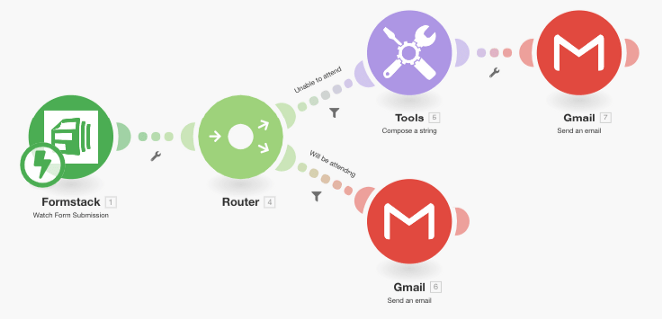
Make scenario routing form data to multiple destinations
Example Make scenario processing Formstack submissions

Key Make Features for Form Data

Make's parser module automatically extracts structured data from form submissions, while the aggregator can combine multiple related submissions. The router directs data flows based on content, sending different responses to sales versus support teams.

Error handling ensures failed steps automatically retry or notify administrators. Webhooks trigger instant processing of new submissions rather than waiting for scheduled checks.

Dynamic Documents with WebMerge

WebMerge transforms form data into professional documents automatically. Configure templates in Word, PDF, or other formats with merge fields that pull from form submissions. Each new submission generates a completed document delivered via email, cloud storage, or direct download.

Common use cases include contracts, proposals, certificates, and tickets. The system handles complex formatting including tables, images, and conditional content that shows only when certain form fields contain data.
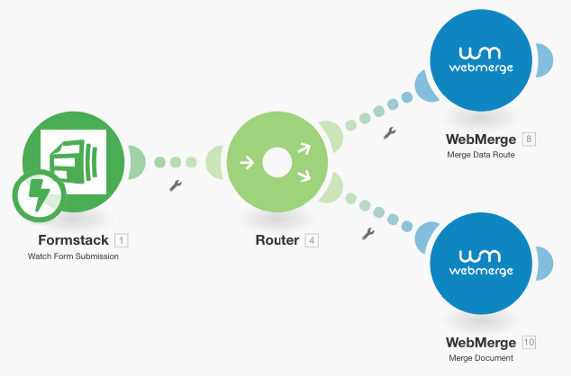
WebMerge document generation interface
WebMerge template editor showing merge field placement

Pro tip: Combine WebMerge with Make to add generated documents as attachments in follow-up emails or save them to cloud storage with organized naming conventions.

Frequently Asked Questions

Common questions about automating data collection

Formstack is an excellent choice for secure online form data collection with features like offline form filling, payment processing, and robust security measures. It integrates seamlessly with Make for automated workflows.

The platform offers SOC 2 Type II compliance, field-level encryption, and granular access controls. For highly sensitive data, Formstack provides HIPAA-compliant forms with additional safeguards.

Using Make's Formstack integration, you can automatically route form submissions to other cloud services while manipulating the data with built-in functions before it reaches destination apps.

Common destinations include CRM systems like Salesforce, databases like Airtable, communication tools like Slack, and storage platforms like Google Drive. Make handles authentication and data formatting for each connection.

Make's data stores provide secure storage for your form data copies, preventing accidental modification or deletion while allowing you to reference historical submissions in your automations.

They function like read-only databases within your scenarios, ideal for maintaining audit trails, comparing current submissions against past entries, or archiving data before processing.

Yes, WebMerge integrates with Make to dynamically create PDFs, Word docs, or other file types based on form data, perfect for contracts, proposals, or tickets.

The system supports conditional content, tables, images, and electronic signatures. Output files can be emailed to recipients, saved to cloud storage, or made available via download links.

Formstack's mobile app allows offline data collection that syncs when connectivity returns, with Make ensuring no data is lost during the transfer process.

This is particularly valuable for field workers, event staff, or any situation where internet access may be unreliable. The app caches submissions locally until it can securely transmit them.

Automated systems reduce human error risks and can implement encryption, access controls, and audit trails more consistently than manual processes.

Properly configured automation eliminates insecure practices like emailing spreadsheets or using shared drives for sensitive data. Every data movement is logged and access can be tightly restricted.

Yes, GrowwStacks specializes in building tailored automation systems for secure data collection and processing workflows specific to your business requirements.

Our team handles everything from initial consultation to implementation and ongoing support. We design solutions that integrate with your existing tools while meeting your security and compliance standards.

  • Custom form design and workflow mapping
  • Secure data routing and transformation
  • Document generation and distribution

Need Custom Automation Help?

This guide is a starting point. Our team builds fully tailored automation systems for your specific workflow needs.