AI Agents Need More Than Access – They Need Precision
AI models like Claude and Cursor are rapidly becoming essential operating environments for developers, product managers, and technical leaders. As the Model Context Protocol (MCP) gains wider adoption, there's a clear expectation that AI should not just process information, but actively perform tasks. This includes creating tickets, updating CRM records, triggering complex workflows, and modifying databases on your behalf.
However, granting AI direct, unrestricted access to your internal systems isn't true orchestration; it's delegation without proper control. This can lead to significant risks and inefficiencies in a production environment.
Traditional MCP connections often expose entire API surfaces, forcing the LLM to deduce multi-step workflows and consequently increasing token usage. Imagine giving an LLM raw access to a platform like Confluence. While seemingly productive, this could result in an agent inadvertently deleting crucial company pages. Even without such catastrophic errors, presenting a vast array of tools to an LLM's context window compels it to expend valuable tokens simply on reading specifications and determining which tool to invoke. This inflates costs, slows down execution, and elevates the risk of the LLM selecting an incorrect action. Such governance blind spots, unpredictable execution, and excessive spending are unacceptable in enterprise production settings.
For enterprise-grade AI, purpose-built tools, deterministic execution, strict scoping, comprehensive observability, and managed governance are paramount. These are precisely the capabilities that Make MCP Toolboxes are designed to deliver.
Introducing MCP Toolboxes: Managed AI Access at Scale
Make MCP Toolboxes are specialized MCP servers that you establish at the team level within the Make.com platform. Instead of exposing your entire technology stack to an AI client, you can carefully select a specific subset of your Make scenarios and publish them as callable tools. This allows for precise control over what your AI agents can access and execute.
This approach provides several key advantages:
- Tool management in Make: You can centralize the addition, configuration, labeling, and deletion of tools through a single interface. Each tool can be assigned clear descriptions and designated as either read-only or read-and-write, ensuring appropriate access levels.
- Token-based authorization: Generate multiple unique keys for each toolbox. Every key restricts access exclusively to the tools within that specific toolbox, eliminating the risks associated with shared credentials or broad, all-or-nothing exposure.
- Unique URL per toolbox: Each toolbox receives its own distinct endpoint URL. This enables you to power different AI agents or clients with entirely customized and isolated toolsets, enhancing flexibility and security.
- Monitoring and visibility: The system tracks all tool usage, providing a transparent view of which tools have been invoked, with what parameters, and all subsequent actions taken. This ensures comprehensive observability and accountability.
The Governance Layer Leaders Need
Without the structured environment of MCP Toolboxes, teams often resort to insecure workarounds to connect their AI agents. This can involve using shared internal tokens, creating dummy accounts, or granting overly broad API access. The result is a fragmented and ungoverned access landscape that is difficult to audit, prone to errors, and inherently risky to maintain in a production environment.
Make MCP Toolboxes fundamentally transform this dynamic by providing a robust governance layer:
- You precisely define which specific tools are made available to each individual AI agent.
- You can limit parameters and scope actions at the scenario level, ensuring AI only operates within predefined boundaries.
- Every invocation of a tool is audited through centralized monitoring, providing a clear and traceable record of all AI actions.
- Unique URLs and scoped tokens eliminate cross-client data exposure, significantly enhancing data security and privacy.
For organizations with stringent security and compliance requirements, this system converts AI from a potential liability into a fully governed operational asset. Every action taken by an AI agent is scoped, meticulously logged, and completely traceable, offering peace of mind and robust control.
Practical Use Cases
Deterministic Orchestration with Claude
Instead of requiring an AI like Claude to reason through complex CRM logic step by step—such as searching, validating, creating, and associating records—you can expose a single, high-level tool like "Onboard Customer." Behind this single tool, Make executes the entire predefined sequence: validating customer data, creating contact records, associating them with companies, setting up deals, and triggering necessary notifications. Claude then receives a clean, concise confirmation response, streamlining the interaction.
This approach offers significant and tangible benefits:
- Lower token consumption – The LLM doesn't need to ingest inputs and outputs from every intermediate step of the workflow, drastically reducing token usage and associated costs.
- Fewer hallucination risks – The core business logic is precisely defined and executed within Make, rather than being inferred probabilistically by the LLM, minimizing the chance of incorrect or fabricated actions.
- Guaranteed execution – Make runs deterministic scenarios, ensuring consistent and predictable outcomes every time, unlike the probabilistic guesses an LLM might make.
- A cleaner audit trail – Every scenario run is logged and fully visible within Make, providing a transparent and easily auditable record of all automated actions.
Ultimately, Make handles the complexity of orchestration, allowing Claude to remain focused on its core strength: reasoning and understanding user intent.
Chain Complex Processes into a Single Tool
Consider a scenario where you want an LLM to perform a multi-step task: research a topic on LinkedIn, compile the relevant data, format it into a brief, and then generate a new Google Doc. With a raw MCP connection, the AI would have to reason through and execute each individual step, with each step presenting an opportunity for it to lose context or make an erroneous decision.
Using an MCP Toolbox, you can chain all these actions into a single, cohesive background process. You expose just one tool to the LLM. Behind the scenes, Make deterministically manages the entire multi-step workflow—from gathering the data to creating the document—and then returns the final Google Doc URL directly to your chat interface. This simplifies the AI's interaction and ensures reliable execution of complex tasks.
More Ways Teams Are Using MCP Toolboxes
Bypass native connector limits. Native integrations in LLM clients like Claude often restrict you to a single account per application. This means you might connect your work Slack, but be unable to simultaneously access your personal or community Slack accounts. With an MCP Toolbox, you can build a centralized tool that effectively bridges multiple accounts. This allows you to query data across five different Slack communities or search both personal and work inboxes in a single prompt, with the toolbox intelligently routing the action to the correct account.
Turn your LLM into a live testing sandbox. The traditional process of testing and optimizing automation scenarios typically involves tedious cycles of manually triggering webhooks and meticulously checking execution logs. With an MCP Toolbox, advanced builders can transform an LLM like Claude into a dynamic, live sandbox for their Make scenarios. By exposing a scenario as a tool, you can rapidly A/B test by passing different variables—such as swapping AI models, testing various text inputs, or adjusting parameters—directly through the chat interface. This enables you to run a scenario dozens or even hundreds of times without ever needing to leave the conversation, dramatically accelerating the testing and iteration process.
How to Create Your First MCP Toolbox
Creating your first Make MCP Toolbox is a straightforward process that allows you to quickly empower your AI agents with controlled access to your automations. Follow these steps to get started:
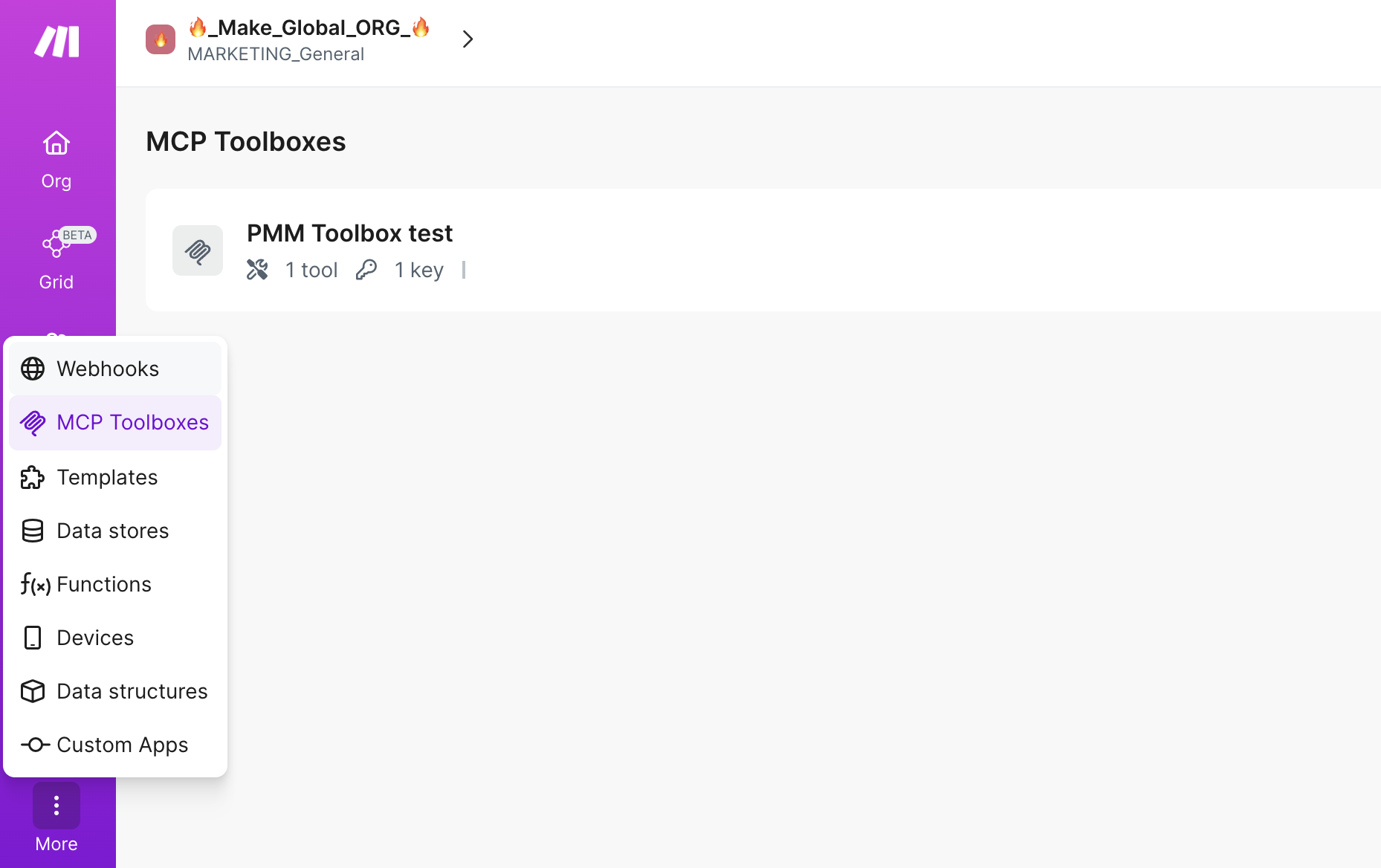
- In Make, navigate to the MCP Toolboxes section in the left sidebar, then click on Create toolbox at the top of the page.
- Provide a descriptive name for your new toolbox. Next, select the specific Make scenarios you wish to expose as callable tools. Remember, only active scenarios configured with on-demand scheduling will appear in this list.
- Click Create. A Create key dialog will appear. It is crucial to copy this key and store it securely, as it provides authorized access to your toolbox.
- After securely storing your key, click Close. Then, copy the unique URL provided under MCP Server URL. This URL is the endpoint your AI client will use to communicate with your toolbox.
- Finally, use the copied URL and your securely stored key to connect your MCP-compatible AI client, such as Claude, Cursor, or ChatGPT. Refer to your AI client's documentation for specific connection instructions.
For more comprehensive setup instructions, including detailed guides on connecting to specific clients like Claude Desktop, consult the official Make MCP Toolboxes documentation and the Make Developer Hub.
Raw MCP vs. Make MCP Toolboxes
The Model Context Protocol (MCP) fundamentally defines how AI clients communicate with external systems. While this protocol is invaluable for enabling AI to interact with the real world, it doesn't inherently address the operational complexities and governance challenges that arise when deploying AI in a business context.
When an AI client is connected directly to a raw MCP server, the AI is tasked with interpreting the entire MCP surface, inferring which tools to call, determining the correct sequence, and hoping its probabilistic reasoning gets the workflow right. This introduces significant unpredictability. With Make MCP Toolboxes, however, you explicitly define these workflows and business logic. The AI's role is simplified to merely triggering these predefined, deterministic processes.
Here’s how this distinction plays out across various contexts:
Compared to direct app MCP servers: With a direct connection, the AI attempts to guess workflows based on available API descriptions. In contrast, Make allows you to precisely define these workflows. Your Make scenarios encapsulate robust business logic, comprehensive error handling, and intricate multi-step sequences that no LLM should be left to invent on the fly.
Compared to agent-first platforms: Agent-first tools primarily focus on the reasoning layer of AI. Make, on the other hand, prioritizes tool reliability and robust governance. This ensures that the actions your AI agents take are consistently predictable, fully auditable, and always correct, providing a solid operational foundation.
Compared to code-only frameworks: Custom code offers immense flexibility but becomes challenging to audit and maintain at scale. Make’s visual Scenario Builder provides built-in logging, sophisticated error handling mechanisms, and clear operational controls that can easily keep pace with increasing complexity, offering a more manageable and transparent solution.
Why Teams Trust Make for AI Orchestration
Make.com doesn't aim to compete with leading AI models like Claude, Cursor, or ChatGPT; instead, it empowers them by providing a robust orchestration layer. This synergy translates into significant organizational benefits:
- Deterministic execution: Make scenarios run consistently and predictably every time. There's no guesswork, no variation in steps, and no risk of hallucinated actions, ensuring reliable automation.
- Scoped access control: Each MCP Toolbox contains only the specific tools you choose to expose. This allows for tailored access, meaning different AI agents can be granted entirely different toolsets and secured with unique keys.
- Reduced hallucination risk: Critical business logic resides within Make scenarios, not within the LLM's prompt context. The AI simply triggers the predefined logic, and Make executes it, significantly lowering the risk of AI generating incorrect or irrelevant information.
- Observability and logging: Every call to a tool is meticulously tracked, and every scenario run is fully visible within the Make platform. This provides complete transparency, allowing you to know exactly what your AI agents are doing at all times.
- Secure credential handling: Your AI clients never directly access underlying API credentials. Make securely manages all connections to your applications and services, safeguarding sensitive information.
- Controlled combination of reasoning and execution: This architecture ensures that the LLM focuses on its strength—reasoning and understanding intent—while Make handles the precise and reliable execution of actions. Each layer performs optimally in its designated role.
Define the Logic. Let the AI Trigger It.
If your current approach involves connecting AI models like Claude or Cursor directly to raw MCP servers, you are essentially entrusting an LLM to invent your critical business logic on the fly. While this might be acceptable for initial prototyping and experimentation, it is fundamentally unsustainable and risky for production-grade environments.
Make MCP Toolboxes offer a superior and more secure pathway. By defining precisely what your AI agents can do within Make’s intuitive visual Scenario Builder, you gain unparalleled control. You can then scope their access using dedicated toolboxes, allowing Make to handle the deterministic execution of these actions. This powerful combination delivers reliability, robust governance, and comprehensive observability, all without sacrificing the flexibility needed to adapt to evolving business needs.
Get Started
Ready to enhance your AI automation with Make MCP Toolboxes? Here are your next steps:
- Create your first MCP Toolbox at the team level to begin defining your AI agent's capabilities.
- Explore the comprehensive technical documentation on the Make Developer Hub for in-depth information and advanced configurations.