Effective marketing communication hinges on personalization. Matt Felser, Head of Business Engineering at Meta, highlights how businesses can leverage AI to not only capture high-quality leads from platforms like Facebook and Instagram but also to maximize the potential of these opportunities.
Achieving genuine personalization in marketing messages, whether on Meta or other channels, is crucial for impact. Traditionally, delivering this at speed and scale has been a significant challenge. However, the advent of AI has transformed this landscape, offering a level of responsiveness that manual efforts simply cannot match. This technological advancement allows for the creation of not just faster emails, but fundamentally better and more engaging communications.
During a recent webinar, Matt Felser from Meta, alongside Sara Kahankova, AI Transformation Lead at Make, and Daniel Zrust, App Solutions Architect at Make, demonstrated how the combined power of Make, Meta, and AI can process raw lead data to generate personalized responses in real-time. This integrated approach drives immediate action and significantly enhances marketing effectiveness.
The Problem
For brands actively running lead generation campaigns on social media platforms like Instagram and Facebook, Meta has already implemented sophisticated features to streamline lead capture. Tools such as Meta instant forms simplify the process of gathering potential customer information, while Meta's proprietary AI models ensure these forms reach the most relevant audiences.
However, the critical question arises: what happens immediately after a user submits one of these forms? The period following lead submission is crucial for conversion, and without efficient follow-up, valuable opportunities can be lost.
In the absence of AI and automation, businesses typically face two less-than-ideal options: either manually sifting through leads and sending individual follow-up emails, or relying on a basic, generic autoresponder. Neither of these methods is optimal, especially considering the cost associated with acquiring each lead and the constant pressure to achieve a high return on ad spend (ROAS). Manual processes are slow and prone to human error, while generic responses often fail to engage prospects effectively.
As Daniel Zrust emphasized during the webinar, "It might be too late when you follow up with a personalized message manually. With AI, you can compile a message in one minute, not one hour." This highlights the significant advantage AI offers in terms of speed and efficiency, ensuring that personalized communication reaches leads when their interest is highest, thereby increasing the likelihood of conversion.
The Tools
To implement this advanced marketing personalization strategy, several key applications work in conjunction with Meta Lead Ads and the Make automation platform. These tools are selected for their specific capabilities in data processing, content generation, and communication, forming a robust ecosystem for automated, personalized outreach.
- OpenAI: Specifically, the GPT-4o model serves as a powerful research and data entry assistant, capable of transforming raw data into usable insights and formats.
- Anthropic Claude: The Haiku model from Anthropic Claude acts as a digital copywriter, generating personalized and contextually relevant email content.
- Gmail: This is utilized for sending and receiving emails, facilitating direct communication with customers.
- Airtable: Employed as a flexible CRM system, Airtable stores and manages all lead details, preferences, and interaction history.
- Meta’s Conversions API: This advanced component is crucial for feeding performance data back to Meta, allowing for continuous optimization of future campaigns based on real-world results.
It's important to note that the applications listed above are not rigid requirements. Make's platform is highly flexible, allowing for extensive customization and interchangeability of tools. For example, users could easily substitute Gmail with Mailchimp for email management, or integrate HubSpot instead of Airtable for CRM functionalities. The vast library of apps available within Make ensures that businesses can connect with the tools they already use and prefer, adapting the scenario to their existing tech stack.
The Setup
To achieve the goal of sending highly personalized follow-up emails within moments of a Meta lead being generated, a sophisticated Make scenario is constructed. This scenario involves the seamless integration and coordination of multiple connected modules, each performing a specific function in the automation chain.
The following outlines the sequential steps involved in building this powerful automation. For a more in-depth visual demonstration and additional details, interested users are encouraged to refer to the full webinar recording, which provides a comprehensive walkthrough of each stage.
1. Watch for New Leads with Meta Lead Ads
The entire automation workflow is initiated by configuring the Facebook Lead Ads module within Make. This module is set up to act as a trigger, constantly monitoring for and activating the scenario whenever a new lead is successfully captured through Meta's advertising platforms.
While specific lead form fields may vary depending on the business, the webinar's real estate agency example showcased typical data points such as city, postcode, budget, and a free-text description box. This free-text field, often prompting for details like "Please describe your dream house," can yield highly variable and unstructured responses. It is precisely in handling such diverse and qualitative data that AI modules prove exceptionally valuable, transforming raw input into actionable insights for personalization.
2. Retrieve Lead Details
Following the initial trigger, the next crucial step in the scenario involves a "Get lead details" module. This module is responsible for systematically extracting all available information pertaining to the newly acquired lead directly from Meta. The data retrieved encompasses not only the specific answers provided by the lead in the form but also the questions themselves.
Collecting both the answers and the questions is highly beneficial. The answers provide direct insights into the lead's preferences and needs, while the questions offer context that can be invaluable for accurate CRM entry and for crafting highly relevant and personalized follow-up messages. This comprehensive data retrieval ensures that subsequent AI processing has a rich foundation of information to work with.
3. Send a Lead Event Back to Meta
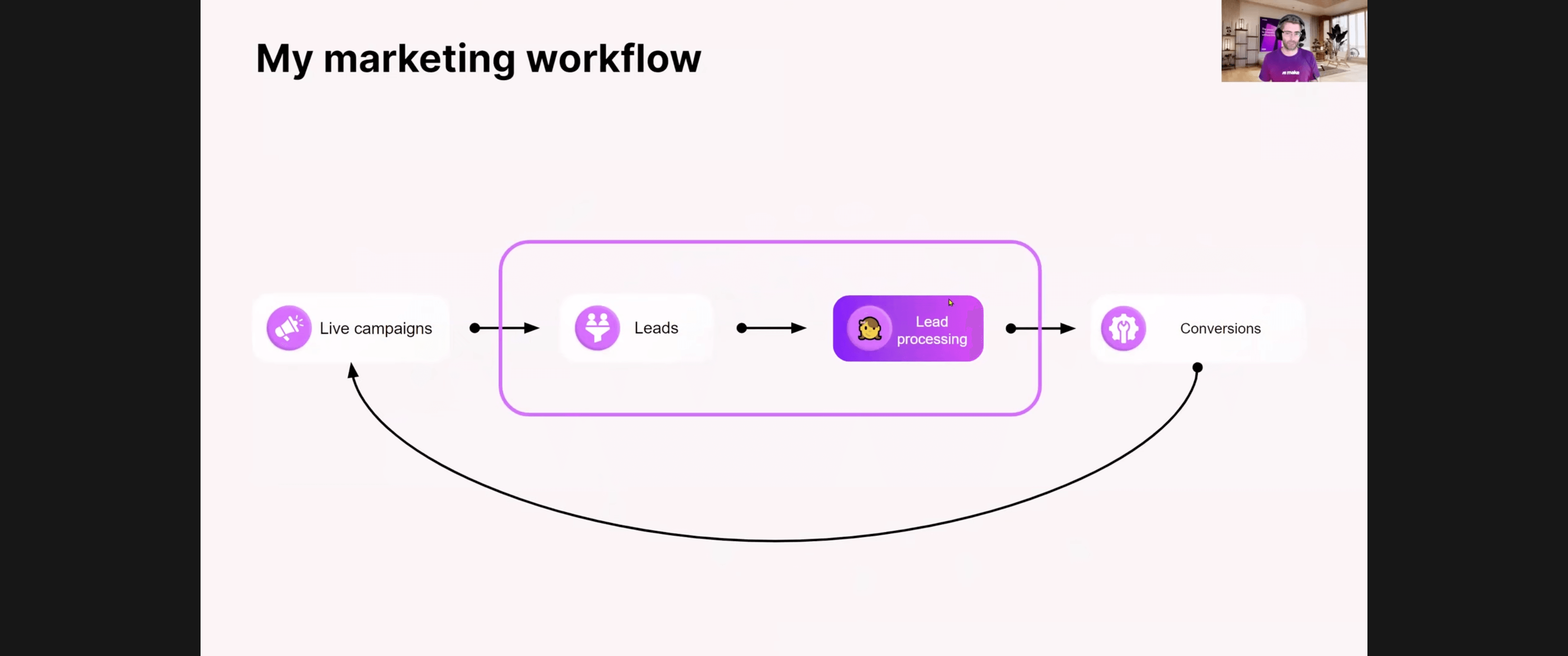
An important optimization step involves utilizing the Meta Conversions API to send an event back to Meta. This action confirms that the lead has been successfully received and initiates a crucial feedback loop. This feedback is vital for the ongoing optimization of advertising campaigns, as it helps Meta's algorithms gain a clearer understanding of what constitutes a 'successful' lead.
By providing this direct feedback, Meta can refine its targeting mechanisms, ensuring that future ad deliveries are more accurately directed towards individuals likely to convert. This is particularly impactful if the campaign's performance goal is specifically set to 'conversion leads,' as it directly informs and improves the AI models driving ad distribution.
Matt Felser from Meta underscored this point, stating, "Signals enable targeting, optimization, and measurement. The more you share, the more we can learn and improve your outcomes." This highlights the symbiotic relationship between providing data and receiving enhanced campaign performance.
4. Store the Lead in a CRM
The next logical step in the automation is to securely store all the collected lead information within a Customer Relationship Management (CRM) system. In this particular scenario, Airtable is used as the CRM, though any other compatible CRM could be integrated. The automation creates a new record in Airtable, meticulously mapping all the lead's details.
This includes essential fields such as the lead's name, contact information, stated preferences, and budget. By systematically mapping this data, the CRM becomes a centralized repository for lead management, enabling subsequent teams to easily access and utilize this information for personalized follow-ups, tracking progress, and maintaining a comprehensive customer history.
5. Convert Technical Data into User-Friendly Details
To enhance the natural flow and human-like quality of subsequent communications, an OpenAI module is integrated into the workflow. Its primary function is to transform less readable or technical data fields, such as a numerical ZIP code or postcode, into more user-friendly and conversational details, like a specific neighborhood name. For instance, a postcode like "SW6 1AA" can be converted into "Fulham."
For anyone familiar with the complexities of British postcodes, understanding that a simple string of characters can represent a distinct neighborhood is not always straightforward. Tasking an AI with this conversion is a far more efficient and less tedious use of resources than manual lookup. Although the output may seem minor, referring to neighborhoods by name represents a significant leap forward in humanizing communications with potential clients, making the interaction feel more personal and less automated.
6. Generate a Personalized Message with AI
Following the data transformation, a personalized follow-up email is generated using the Anthropic module. While the webinar specifically featured the Haiku model, users have the flexibility to integrate their preferred Large Language Models (LLMs). Experimentation with different prompts is encouraged to achieve desired results, as effective prompting is consistently key to generating high-quality AI output.
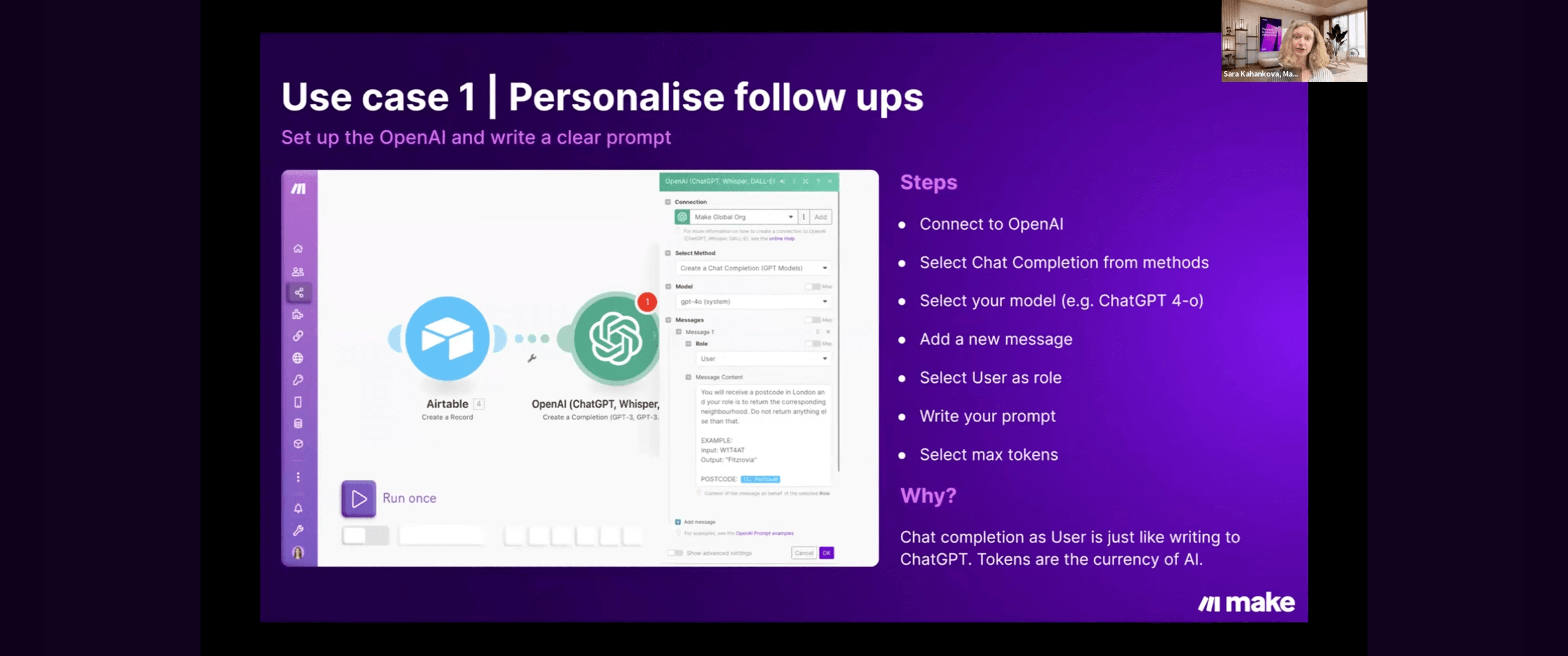
The AI prompt designed for this scenario should be comprehensive and include several key elements to guide the generation process effectively:
- Context: Clearly define the AI's role, such as "You are a real estate agent."
- The Goal: Specify the desired outcome, for example, "Write a short, polite follow-up recommending one property."
- The Lead’s Data: Incorporate all relevant information about the lead, including their budget, location, and preferences.
- An Example Message: Provide a sample message to establish the desired tone and style for the AI's output.
During the webinar, Sara Kahankova emphasized the critical importance of crafting clear and unambiguous prompts. She advised, "Be specific. Tell it what you want to do and what you don’t want it to do. To avoid AI ‘hallucinations’, you can even say: ‘Do not make things up.’" This guidance helps ensure the AI produces accurate, relevant, and high-quality content that aligns with marketing objectives.
Pro tip: When crafting AI prompts for marketing, always specify the desired tone (e.g., friendly, professional, urgent) and include negative constraints like "Do not use jargon" or "Do not exceed 150 words." This helps guide the AI more effectively and prevents unwanted outputs.
7. Send the Email
Once the personalized message has been generated by the AI, it is then seamlessly passed to the Gmail module. This module is configured to address the email directly to the lead, dynamically inserting their submitted first name for a personal touch. Both the subject line and the body of the message are populated with the AI's carefully crafted output.
The lead's email address is also fetched from the initial data provided, ensuring that the communication is sent to the correct recipient. This automated sending process ensures that personalized follow-ups are delivered promptly, capitalizing on the lead's immediate interest and significantly reducing the time between inquiry and response.
8. Update CRM Status
The final step in this automated workflow is to update the corresponding record in Airtable, or whichever CRM is in use. This update reflects that the personalized follow-up email has been successfully sent to the lead. Maintaining an accurate and up-to-date CRM is essential for several reasons.
It ensures that all team members have visibility into the lead's interaction history, preventing duplicate efforts and providing context for future engagements. Furthermore, it keeps the CRM synchronized, allowing for subsequent automated actions, such as setting reminders for manual follow-ups, assigning leads to sales representatives, or applying specific pipeline tags based on the interaction. This ensures a cohesive and efficient lead management process.
9. Optional Advanced Step: Use an AI Assistant to Match Leads with Real Products or Services
During the webinar, an advanced technique was introduced to further enhance personalization: leveraging OpenAI’s Assistants feature. This capability allows for a deeper level of customization by matching lead preferences with actual product or service offerings. In the real estate example, a comprehensive list of available properties was uploaded to the Assistant. Subsequently, a "message an assistant" module in Make queries this data.
Instead of generating a generic follow-up, the AI Assistant intelligently analyzes the lead’s stated preferences—such as budget, desired location, or specific features—and identifies the most relevant property from the uploaded list. This specific recommendation is then seamlessly integrated into the personalized response. This approach moves beyond simple personalization to offer tangible value directly within the initial communication.
While the demonstration focused on property listings, this powerful methodology is highly adaptable. The same principle can be applied to various business contexts, including recommending specific products from an e-commerce catalog, suggesting tailored services based on client needs, or even proposing relevant events to attendees. This ensures that every follow-up is not just personal, but also highly relevant and actionable.
How AI Helps
The synergy between Make, AI, and Meta fundamentally transforms marketing personalization. This powerful combination enables businesses to respond to leads within seconds, delivering messages that are not only timely but also deeply personalized. The resulting communications are crafted in natural language, making them indistinguishable from human-written content.
Crucially, these messages are dynamically generated based on the lead's actual responses and preferences, ensuring high relevance. Furthermore, the AI adapts the tone and incorporates specific details that make each interaction feel genuinely human. This level of sophisticated, scalable personalization would be utterly unattainable through manual processes alone, highlighting AI's indispensable role in modern marketing.
Do More with Make and AI
The capabilities demonstrated in this guide represent just a fraction of what's possible when combining the power of Make with artificial intelligence. By integrating AI into your automation workflows, you can unlock new levels of efficiency, personalization, and strategic insight across various business functions.
To delve deeper into the world of AI automation with Make and begin transforming your own processes, explore additional resources and sign up for a free account today. Starting your automation journey is just a few clicks away, enabling you to build intelligent workflows that drive real business value.