The COVID-19 pandemic significantly accelerated the demand for online food ordering systems. As lockdowns and quarantines became widespread, restaurants were left with limited options beyond delivery and pickup services. In this challenging environment, efficient food ordering systems quickly became central to their survival and continued operation.
However, relying on third-party online ordering platforms often presents two major challenges for restaurants. Firstly, the sheer number of available options can make it difficult to choose the right system that aligns with specific business needs. Secondly, these platforms frequently charge substantial fees, which can severely impact already tight profit margins in the restaurant industry.
If these issues resonate with your experience, it might be the ideal time to explore a no-code solution for building your own food ordering system. This approach leverages readily available tools to create a comprehensive system without requiring any programming knowledge. Whether you're a restaurant owner looking to streamline operations or assisting a friend in the industry, a no-code solution offers a swift and effective path to establishing an online presence.
This guide outlines a clear, step-by-step process to help small businesses quickly establish and manage their online food ordering capabilities. While you can follow these steps precisely, the beauty of a no-code approach lies in its flexibility, allowing you to customize and adapt the specifics to best suit your unique business model and customer base.
1. Sort out the specifics
Before diving into the technical aspects of building your system, it's crucial to clearly define the unique characteristics and requirements of your food ordering process. Not all food ordering systems are identical, and understanding your specific needs will guide your choices throughout the development.
Consider how orders are typically processed in your establishment. For instance, do you only accept immediate orders, or do you need to accommodate scheduled orders for later in the day or week? The answers to these questions will influence the design and functionality of your system. Additionally, think about the information you typically gather from customers, which generally includes their name, contact details, delivery address, and payment information.
Beyond these standard details, evaluate if your business requires any additional information, such as referral codes for marketing purposes or specific delivery instructions for complex locations. By meticulously sorting out these specifics upfront, you will gain a much clearer vision of how your no-code food ordering system should function and appear, ensuring it meets both your operational needs and customer expectations.
- Name / Contact
- Address for delivery
- Payment details
Do you need any other info, such as referral codes, or specific delivery instructions? Once the specifics have been sorted, you will have a clearer vision of how your system will be.
2. Set up a food ordering form
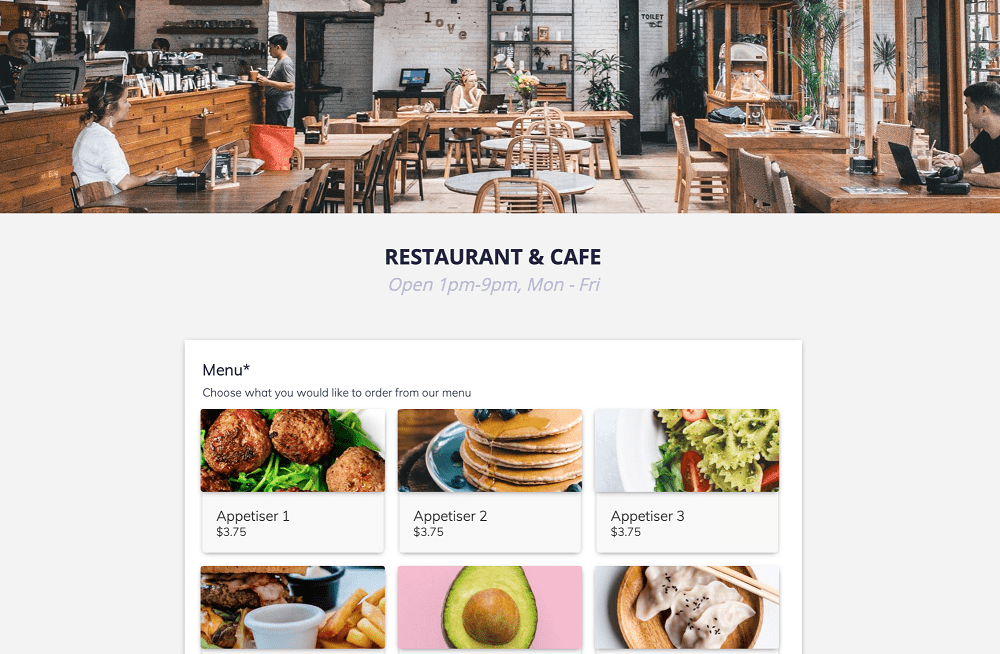
The foundational step in creating your no-code food ordering system is to establish the customer-facing interface: the ordering form. This form will serve as the primary point of interaction where customers can browse your menu, make selections, and submit their orders. When choosing a form builder, prioritize one that offers robust integration capabilities with various other applications, as this will be essential for automating subsequent steps in your workflow.
Paperform is an excellent example of a versatile form builder that allows you to design and customize professional-looking forms in just a few minutes. Utilizing a pre-built restaurant order form template, you can quickly set up an intuitive and visually appealing online ordering page. These forms can be seamlessly embedded directly into your existing website, or you can use the form itself as a standalone landing page by sharing its unique link across your social media channels and other marketing efforts.
A well-designed form with good user experience (UX) and intuitive design significantly contributes to customer satisfaction. Ensure the form's aesthetic is consistent with your brand identity, providing a cohesive and professional experience. Key data points that your form should capture include the specific products ordered, the preferred delivery method, payment details, and comprehensive customer contact information. While this form is the initial touchpoint, remember that a truly effective system relies on powerful integrations to connect this front-end with your back-end operations.
For instance, upon a customer submitting an order, the details can be automatically captured and routed to various applications. This could involve logging the order in Google Sheets for record-keeping, adding it to Microsoft To-Do for staff task management, sending an SMS notification via ClickSend, or even creating an event in Google Calendar. Ideally, the system should integrate directly with your existing point-of-sale (POS) system, allowing incoming orders to be displayed to your staff in real-time, ensuring prompt fulfillment. Regardless of your specific preferences, using an integration tool like Make is crucial for managing and orchestrating all these connections efficiently, as more integrations will be explored throughout this guide.
- Products ordered
- Delivery method
- Payment details
- Customer contact information
3. Manage payments
Once you have successfully established a system for customers to place orders and for your restaurant staff to receive them, the next critical step is to implement a secure and efficient payment system. This ensures that transactions are processed smoothly and that your business can effectively manage its finances.
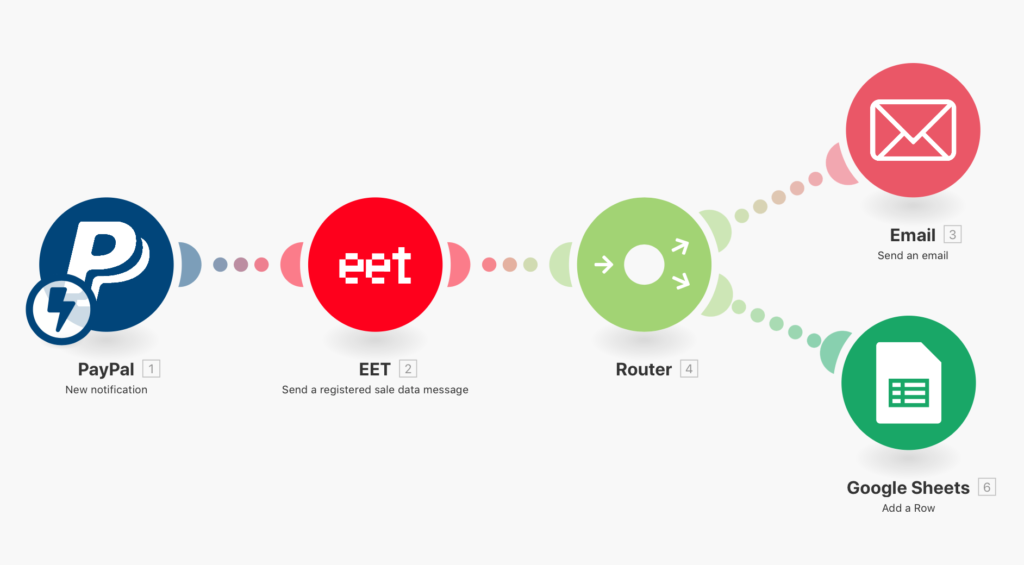
Widely used payment platforms such as PayPal, Square, and Stripe are excellent choices for integrating into your no-code food ordering system. These platforms allow customers to securely store their credit card information and complete transactions quickly and easily. Your chosen form builder should offer straightforward options to link form submissions directly to these external payment vendors. This integration not only facilitates seamless payments but also provides you with valuable sales data, often accessible through informative dashboards or downloadable as CSV files for further analysis.
The true power of an automation platform like Make becomes evident in managing post-payment processes. After a payment is successfully completed, you can configure automated workflows to store this transaction data for future analysis or to instantly send an invoice to the customer's email address. Make allows you to connect the payment notification from platforms like PayPal to other applications, using the input from each field to populate and dispatch a pre-designed invoice template. This level of automation significantly reduces manual administrative work and enhances the overall customer experience.
If your payment system is already established and you're looking to expand its capabilities, consider exploring additional ways to automate payment assignments and related tasks. This could involve categorizing transactions, reconciling payments with orders, or integrating with accounting software to further streamline your financial operations.
Pro tip: When selecting a payment gateway, consider factors like transaction fees, supported currencies, and ease of integration with your chosen form builder and automation platform to ensure it aligns perfectly with your business model.
4. Take it further
Once you have successfully implemented the core components of your no-code food ordering system—the ordering form and payment processing—your restaurant is officially ready to accept online orders. Customers can now conveniently browse your menu, place their selections, and complete payments directly through your online page or via shared form links on messaging apps. However, the journey doesn't end there; optimizing and expanding the functionality of your system can yield significant long-term benefits.
Investing time and effort into enhancing your online ordering system can greatly improve efficiency, customer satisfaction, and overall business performance. The beauty of a no-code approach is the flexibility to add sophisticated features without needing complex development. These enhancements can range from improving communication with customers to streamlining internal processes and gaining deeper insights into your sales data.
Here are several suggestions for how you can further improve and automate your online ordering system:
- Introduce cancellations: Implement a system where customers can easily request order changes or cancellations, perhaps via text message. You can then automate the process of updating the order status in a Google Sheet, ensuring that staff are immediately aware of any modifications without manual intervention. This approach focuses on updating existing records rather than creating new ones.
- Keep leads and track analytics: Integrate your order form with marketing software like HubSpot CRM. This allows you to automatically capture customer information as leads, track their ordering history, and analyze purchasing patterns. Such data is invaluable for targeted marketing campaigns and understanding customer behavior.
- Send newsletters: Leverage email marketing tools such as MailChimp or Active Campaign. By integrating these with your ordering system, you can automatically add new customers to your mailing list and send out engaging newsletters, special offers, or updates to those who have recently purchased from you, fostering repeat business.
- Send push notifications: Enhance customer communication by sending push notifications. These can alert customers when their order is ready for pickup or out for delivery, directly to their iOS or Android devices. This real-time communication improves transparency and customer experience.
- Store transaction data securely: Ensure all your transaction data is managed and stored in one secure location. Integrating with database services like MySQL allows for centralized data management, making it easier to access, analyze, and report on your sales and customer information while maintaining data integrity and security.
Key takeaways
Building a food ordering system doesn't have to be a complex or daunting task. With the power of no-code tools and strategic integrations, it's entirely possible to create a comprehensive, end-to-end system that manages the entire ordering process without writing a single line of code. This approach empowers restaurants to take control of their online presence and operations efficiently.
By leveraging web applications and integration platforms, you can design an attractive and functional order form that not only captures all necessary customer and order data but also seamlessly connects this information to your existing software ecosystem. This connectivity is key to automating tasks, reducing manual errors, and improving overall operational flow.
As you embark on creating or enhancing your no-code food ordering system, keep these three fundamental principles in mind:
- Have a clear vision of your system: Before you start building, take the time to conceptualize exactly what your system should look like, what functionalities it needs to perform, and how it will operate from both the customer's and the restaurant's perspective. A well-defined vision will serve as your roadmap.
- Consider both the customer and restaurant processes and perspectives: A successful system caters to both sides. Think about the customer's journey from browsing to checkout, and simultaneously consider your staff's workflow from order reception to fulfillment. Using tools like a timeline maker can help you plan and prioritize the setup process effectively.
- Choose the right tools: The selection of your no-code tools is paramount. Opt for a form creator that offers extensive customization and, crucially, supports integrations with popular services. Similarly, choose SaaS tools that are designed to facilitate further integrations, ensuring your system remains flexible and scalable as your business grows.
By adhering to these guidelines, your online ordering system will transform into a powerful asset, significantly boosting your sales and operational efficiency. Furthermore, building your own system allows you to bypass the often exorbitant fees charged by third-party delivery apps, directly impacting your bottom line.
In the dynamic world of food service, embracing innovation is key. Just as with food, now is an excellent time to try something new and leverage no-code solutions to revolutionize your restaurant's operations. Happy automating!