
Introduction to Customer Segmentation
Effective customer segmentation is a cornerstone of successful email marketing and customer relationship management. While email marketing platforms excel at mass communications, their true power is unlocked when messages are tailored to specific audience segments. This targeted approach ensures that your communications are relevant, timely, and impactful, fostering stronger customer relationships.
Building successful relationships with your customers throughout their entire lifecycle depends heavily on delivering the right message at the right time. Imagine sending a thank-you note before an order is even processed, or failing to acknowledge a long-term, loyal supporter. These missteps can be avoided with precise segmentation. By leveraging tools like ActiveCampaign and Make.com, businesses can achieve a level of communication precision that was once complex and time-consuming.
WooCommerce, ActiveCampaign and Make: Get the Most Out of Your Tools
The ability to segment your customers and clients from one platform and seamlessly store them in ActiveCampaign for further engagement is now more accessible than ever. This capability significantly streamlines your communication strategies, making it easier to nurture leads, convert prospects, and retain loyal customers. Make.com provides the bridge to connect these platforms, enabling powerful automation that keeps your customer data synchronized and actionable.
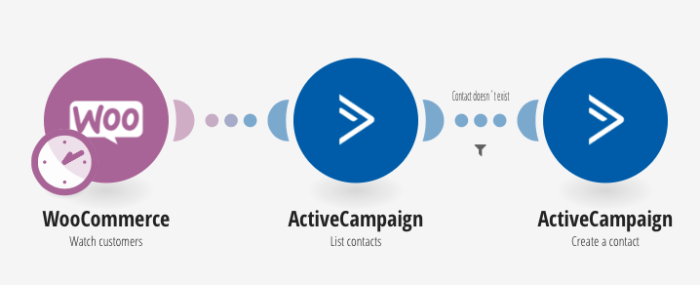
Consider a common scenario involving WooCommerce and ActiveCampaign. With Make.com, you can implement a "Watch customers for WooCommerce" trigger. This means that every time a new order is processed through your WooCommerce store, an automated workflow is initiated. This workflow will then check your ActiveCampaign contact list to determine if the customer is new or already exists in your database.
If the customer is not found in ActiveCampaign, they are automatically added as a new contact. Conversely, if the customer already exists, their existing contact record in ActiveCampaign is simply updated with the latest purchase information. This ensures that your ActiveCampaign data is always current, reflecting the most recent customer interactions and allowing for immediate, relevant follow-up actions.
Automating New Customer Onboarding
The initial interaction with a new customer is critical. Automating the process of adding new WooCommerce customers to ActiveCampaign ensures that no new lead falls through the cracks. This immediate synchronization means you can trigger welcome sequences, provide essential onboarding information, or offer first-time buyer incentives without any manual intervention.
This automation not only saves valuable time but also enhances the customer experience by providing instant and relevant communication. By setting up a Make.com scenario to "Add new WooCommerce customers to ActiveCampaign as contacts," you establish a robust system that continuously updates your marketing database. This foundational step is crucial for building personalized customer journeys from day one.
Pro tip: Beyond just adding contacts, consider enriching the ActiveCampaign profile with WooCommerce order details like product purchased, order value, and date. This data can be invaluable for highly specific segmentation and future marketing campaigns.
Managing Customer Lifecycle with Dynamic Segmentation
Customers evolve, and your segmentation should too. A customer who made their first purchase yesterday is different from one who made their first purchase 30 days ago. Dynamic segmentation allows you to reflect these changes in your marketing efforts, ensuring that your messaging remains appropriate and engaging throughout the customer lifecycle.
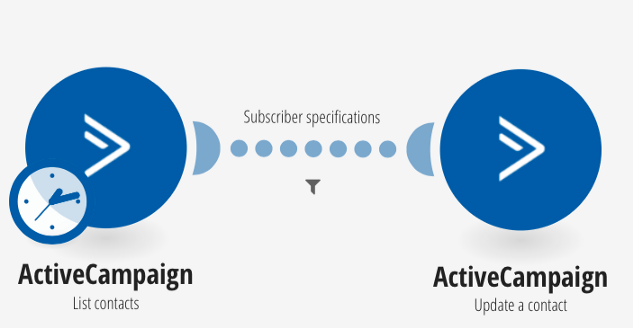
Make.com enables you to create follow-up processes that automatically move contacts between different segments in ActiveCampaign. For instance, you can design a scenario that identifies contacts who have been on your "new contacts" list for a specific duration, such as 30 days. This scenario can then automatically transition them to an "existing contacts" list.
This type of scheduled automation, perhaps running once a day, ensures that your customer lists are always current. It prevents your "new contacts" list from becoming stale and allows you to target "existing contacts" with different types of campaigns, such as loyalty programs, product updates, or cross-selling opportunities. This continuous refinement of your audience segments is key to long-term customer engagement and retention.
Ultimately, the combination of WooCommerce, ActiveCampaign, and Make.com provides a powerful toolkit for sophisticated customer management. By automating segmentation and contact list management, you can ensure that your communications are always timely and relevant, fostering stronger customer relationships and driving business growth. Explore the full range of ActiveCampaign modules available on Make.com to unlock even more possibilities for your e-commerce operations.