
Audio producers and sound engineers often face demanding schedules, requiring extensive knowledge of various tools and software. Time is a critical factor in their work, making efficiency paramount. This guide explores how SoundCloud automation can significantly streamline these processes, making work easier and more productive for everyone involved in audio creation and distribution.
Make.com offers powerful integration capabilities with SoundCloud through dedicated modules. These modules enable you to automate key workflows related to audio production, distribution, and promotion. Specifically, Make provides functionalities to:
- Watch tracks
- Upload a track
- Delete a track
By combining these SoundCloud modules with other application modules within Make, you can construct sophisticated automation scenarios. The complexity of these scenarios can vary, but even basic automations can yield substantial time savings and workflow improvements. Let's start by exploring some fundamental automation possibilities.
Automating File Uploads to SoundCloud
Whether you're a prolific producer handling numerous files or someone who manages a few tracks weekly, the manual process of uploading audio to SoundCloud can be time-consuming. Fortunately, automation offers effective solutions to expedite this crucial step, allowing you to focus more on your creative work.
Automating file uploads ensures that your new content reaches your audience faster and with less effort. By setting up intelligent workflows, you can eliminate the repetitive drag-and-drop tasks, making your release schedule more consistent and manageable.
1. Upload Files from Google Drive to SoundCloud
Google Drive might not be the first choice for audio file storage for everyone, but it offers compelling advantages, including generous storage space and cloud-based accessibility. Despite these benefits, manually transferring audio files from Google Drive to SoundCloud can still be a tedious process. To simplify this, Make.com provides a template that automates the entire workflow.
This automation template performs a straightforward but highly impactful task: whenever a new audio file is uploaded to a designated folder in Google Drive, it is automatically uploaded to your SoundCloud account. This eliminates the need for manual uploads, offering significant time savings for producers who frequently release new material.

The core function of this template is to remove the manual step of uploading files. For musicians and content creators who frequently publish new tracks, this automation can dramatically reduce the time spent on administrative tasks, allowing them to concentrate on creating music and engaging with their audience. It ensures that your content is live on SoundCloud as soon as it's ready in your cloud storage.
2. Upload Files from Dropbox to SoundCloud
Similar to Google Drive, you can also automate the upload of audio files from Dropbox to SoundCloud. This particular automation template is slightly more intricate, often involving the use of webhooks. While the term "webhook" might sound intimidating, it's essentially a method for apps to communicate with each other in real-time, and Make.com simplifies its implementation.
The fundamental outcome of this Dropbox automation is identical to the Google Drive version: any audio file uploaded to Dropbox will be automatically transferred and published on SoundCloud. This ensures a consistent and hands-free publishing process, regardless of your preferred cloud storage solution.
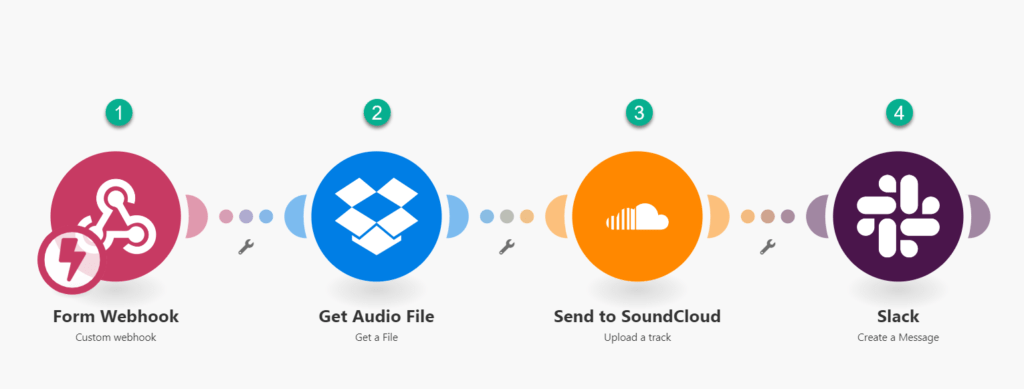
An additional feature often included in this type of template is a Slack module. This module allows you to automatically send a notification to a specific Slack channel or individual whenever a file is successfully uploaded to SoundCloud. This is particularly useful for teams, ensuring everyone is informed about new releases. If the Slack notification isn't necessary for your workflow, you can easily remove that module and still benefit from the automated file upload functionality.
Pro tip: When setting up cloud storage integrations, ensure your file naming conventions are consistent. This can simplify organization on SoundCloud and make it easier to manage your tracks post-upload, especially if you're dealing with a large volume of content.
Automating Notifications for New SoundCloud Tracks
SoundCloud automation isn't just for audio engineers; it also offers significant advantages for promoters, distributors, talent scouts, and even general listeners. Efficient notification management is often overlooked but can be a game-changer in the fast-paced world of audio production and distribution.
In collaborative audio projects, such as podcasts, radio shows, or music production, many individuals need to stay informed about various events. These events could range from a new song being uploaded, an alternative arrangement becoming available, or even a specific audio segment needing attention due to an issue. Manually managing these notifications across large teams can quickly become overwhelming and inefficient.
Consider the example of Oscar-winning composer and producer Gustavo Santaolalla, known for his unique production style. Bands working with him often recalled being asked for dozens, sometimes hundreds, of songs. From a notification management perspective, handling such a vast number of tracks for review and production would be a logistical nightmare without automation. This highlights the critical need for automated notification systems in high-volume audio environments.
Let's explore how Make.com templates can enhance the notification process for SoundCloud tracks, ensuring that relevant parties are always in the loop without manual effort.
1. Create Evernote Notes for New SoundCloud Tracks
This integration is often referred to as the "SoundCloud scout integration" because it perfectly caters to the needs of A&R scouts who must stay updated on emerging tracks from artists of interest. It's also highly beneficial for producers who work asynchronously and need to save tracks for later review when they can't listen immediately.
The template automatically creates a new note in Evernote every time a user you are monitoring uploads a new track to SoundCloud. This ensures that you never miss a new release from artists you're tracking, providing a seamless way to keep an organized record of their work.
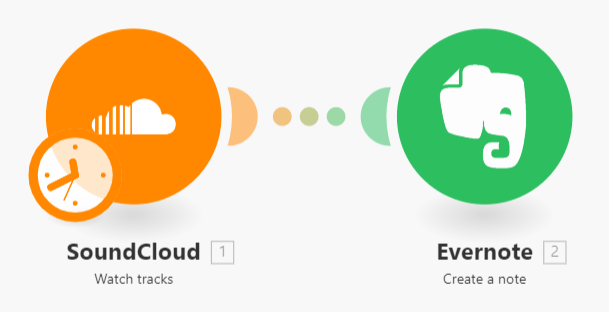
By automating this process, you can be among the first to know about an artist's latest track. This template simplifies the task of following someone's work and maintaining a comprehensive record, making it incredibly convenient for talent discovery and project management. It transforms passive listening into an active, organized tracking system.
2. Post Slack Messages for SoundCloud Tracks
For teams collaborating on audio projects, integrating SoundCloud with Slack can significantly improve communication and workflow efficiency. As long as all relevant team members are part of the same Slack channel, this automation ensures everyone stays informed about new audio content.
This straightforward template automatically posts a message to a designated Slack channel whenever a new SoundCloud track is uploaded. This real-time notification system is invaluable for keeping team members updated on new releases, ensuring that everyone is aware of fresh content as soon as it becomes available.
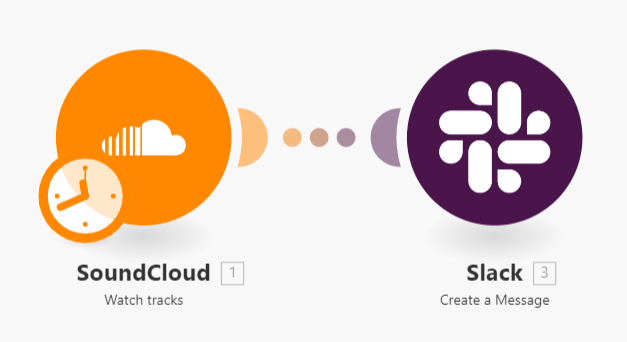
The immediate notification via Slack helps streamline review processes, promotional efforts, and general awareness within the team. It reduces the need for manual check-ins or separate announcements, fostering a more responsive and collaborative environment for audio content management. This simple automation can prevent communication gaps and ensure that all team members are on the same page regarding new SoundCloud releases.
Pro tip: When setting up Slack notifications, consider creating specific channels for different types of SoundCloud updates (e.g., "New Releases," "Artist Watchlist"). This helps keep information organized and ensures that team members only receive notifications relevant to their roles.