
The Shopify App Store is a vibrant and ever-growing ecosystem, offering thousands of applications designed to extend and enhance the functionality of e-commerce stores. With nearly 7,000 apps available, merchants have a vast array of tools at their disposal to meet specific business needs, from marketing to inventory management.
The proliferation of Shopify apps is driven by several factors. Firstly, the platform boasts over 1.7 million merchants, each with unique requirements that demand tailored solutions. Secondly, the robust Shopify API provides a solid foundation for developers to create and launch innovative applications, capitalizing on the high demand within the e-commerce community.
However, as the number of available apps increases, so does the potential cost for store owners. The average Shopify merchant reportedly uses around six apps from the App Store, a number that is likely to climb. While these tools are crucial for boosting productivity, automating repetitive tasks, and reducing operational expenses, many users believe that leveraging them inevitably leads to higher monthly outlays.
This doesn't have to be the case. This guide explores more affordable alternatives to common Shopify apps by utilizing Make templates. These templates leverage the official Shopify API, allowing you to implement powerful automations at a fraction of the cost of dedicated apps. You'll need a Make account to get started, which you can register for free.
QR Code Generator
QR codes, a seemingly modern convenience, have been simplifying our lives since 1994. For Shopify store owners, they offer a wealth of benefits that can significantly enhance operations and customer interactions.
Implementing QR codes on printed labels attached to your products can streamline inventory checks and updates. Instead of manually searching for product names, a quick scan with a $10 barcode scanner or a smartphone provides instant access to product information. This efficiency is invaluable for managing stock accurately and quickly.
For businesses operating both online and physical stores, QR codes prove incredibly useful during the checkout process or when fulfilling orders. They can also be used to create loyalty or membership cards, allowing for easy customer identification during in-person visits, fostering a more personalized shopping experience.
Generating these QR codes can be automated with a simple Make template. This automation is triggered whenever a new product is added to your Shopify store, creating a QR code automatically without any further manual intervention after initial setup. This eliminates the need for a separate paid app, which typically costs around $9 per month on the Shopify App Store.
Data Exports
Your Shopify store's data is an invaluable asset, essential not just for backup but also for generating reports, launching targeted marketing campaigns, and making informed business decisions. Shopify natively allows you to export some data in CSV format, but this method often falls short of comprehensive needs.
Relying solely on CSV files for data export can be inconvenient. Many merchants prefer a more direct export to a spreadsheet or a dedicated database for better organization and analysis. Furthermore, Shopify's default export options may not cover all the data you need, such as detailed collection information.
Make offers powerful solutions to overcome these limitations. With Make templates, you can automate the export of various data types, including orders, products, customer information, and even abandoned carts. These exports can be configured as one-time transfers or scheduled to regularly add new items to your chosen database, providing real-time insights and ensuring your data is always up-to-date.
By using Make, you can avoid the recurring costs associated with specialized Shopify apps designed solely for data export, which often start at $20 per month. Make empowers you to manage your data on your own terms, giving you greater control and flexibility without additional app expenses.
Blog Imports
While primarily an e-commerce platform, Shopify also includes blogging capabilities, recognizing the importance of organic, SEO-driven traffic. A well-maintained blog can significantly boost your website's visibility in search engine results, attracting potential customers through valuable content.
A seamless transition from a blog article to a product page is crucial for converting readers into customers. This transition is much smoother when both your blog and store share a consistent look and feel, which can be challenging if your content resides on different domains. Historically, this often meant tedious manual copying and pasting, an impractical and time-consuming process.
Make provides elegant solutions for migrating blog content, particularly for those transitioning from platforms like WordPress to Shopify. We offer two specific templates: one that simply imports your WordPress blog posts into Shopify, and another that also ensures featured images are correctly attached, maintaining the visual integrity of your content.
These templates eliminate the need for costly third-party blog import apps, which typically charge around $9.99 per month on the Shopify App Store. By automating this migration, Make helps you consolidate your content, improve your site's SEO, and enhance the overall user experience without incurring extra expenses.
Confirmation Email Attachments
After a customer makes a purchase, many businesses are required to send specific documents, such as terms and conditions, warranties, return policies, or instructions. This is particularly common in European countries where certain legal texts must be provided post-purchase.
- Terms and conditions
- Warranties
- Rights of withdrawal
- Return/refund policies
- Instructions
- Other company policies
- Other legal texts
A significant limitation of Shopify's native email system is its inability to attach files directly to confirmation emails. This often necessitates sending a separate email containing the required documents, which can lead to a fragmented customer experience and additional manual effort.
With Make, you can easily automate the process of sending these crucial documents. You don't need to hire a developer or subscribe to an expensive app. Make templates allow you to configure an automation that sends a follow-up email with the necessary attachments immediately after a purchase, ensuring compliance and a professional customer communication flow.
This automation streamlines your post-purchase process, saving time and ensuring that all legal and informational requirements are met without additional costs. Similar solutions on the Shopify App Store can cost upwards of $10 per month, making Make a cost-effective alternative.
Custom Contact Forms
"Contact Us" pages are frequently among the most visited sections of any website. Neglecting this crucial touchpoint can lead to customers perceiving your business as unreliable or unapproachable. These pages typically feature a form allowing customers to communicate their inquiries or concerns.
Shopify's built-in contact form is quite basic, offering limited customization options. You cannot easily add or remove fields to gather specific information, and email notifications are restricted to a single address associated with the Shopify account. This lack of flexibility can be problematic for businesses with diverse customer service needs.
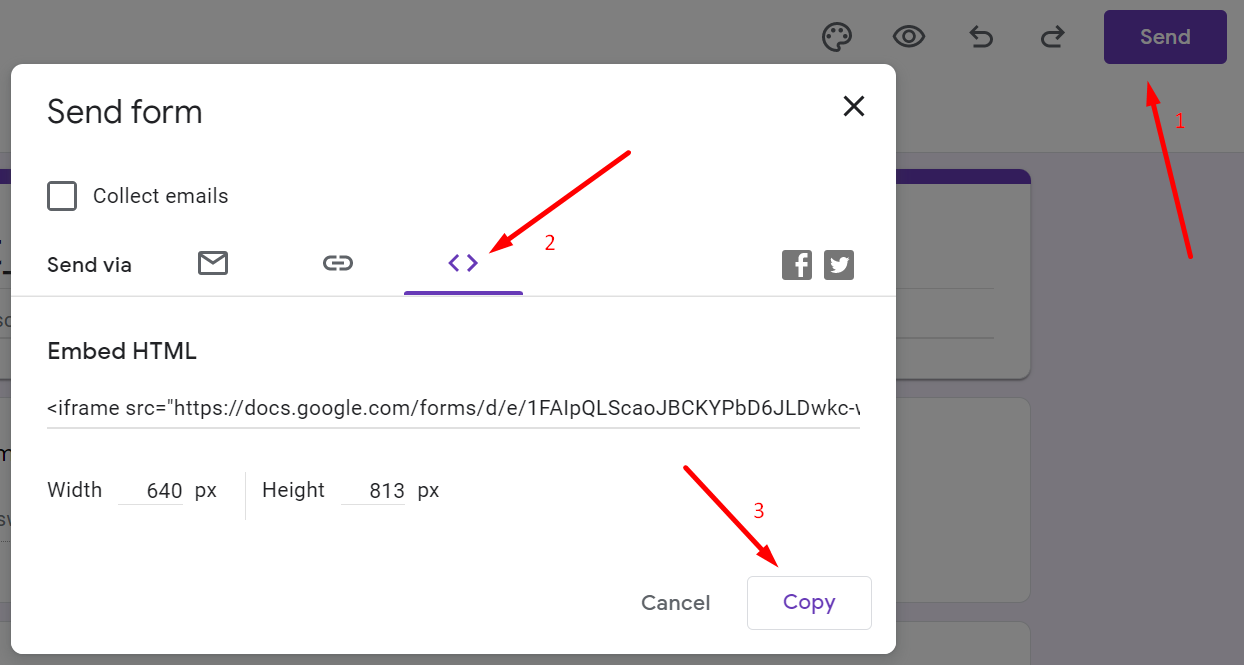
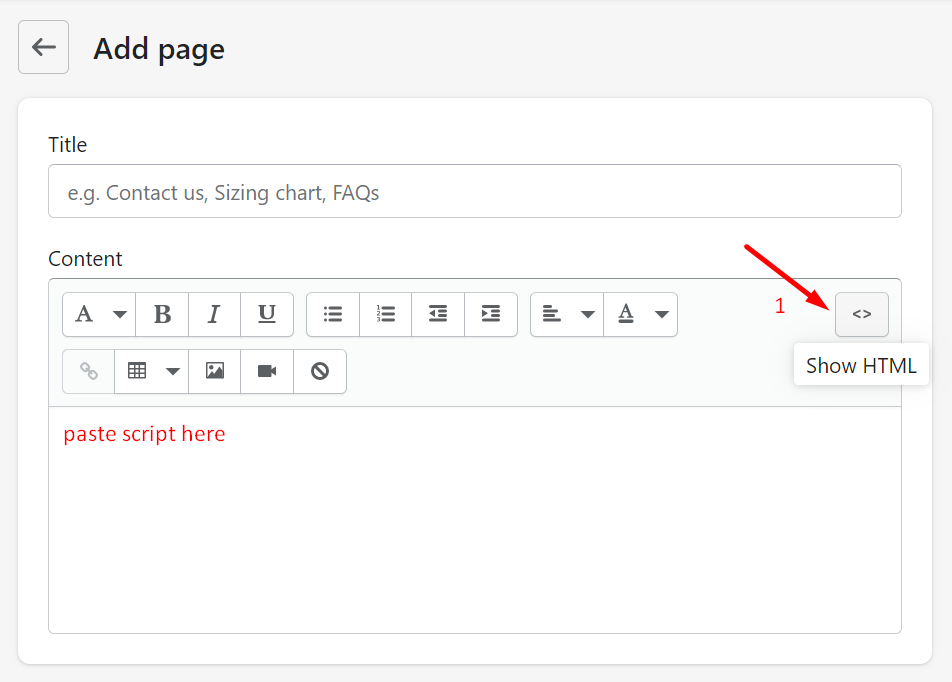
For instance, you might require more dynamic fields, wish to notify different team members based on the nature of the inquiry, or even route queries to specific departments. To achieve this, you can create a custom form using a tool like Google Forms (which is free and user-friendly) and embed it directly onto your Shopify page. Simply locate the "Embed" button in your form builder and paste the generated script into your Shopify page's HTML editor.
Adjust the form's width and height as needed to ensure it integrates seamlessly with your page's design. Once the custom form is live, you can configure Make to automatically notify you or relevant team members about each new submission. This ensures timely responses to customer queries, which is vital for customer satisfaction and retention. Without efficient communication, customers are likely to seek out competitors who offer better support.
This custom form solution, powered by Make, can replace expensive Shopify apps that typically start at $19 per month, offering a more flexible and cost-effective way to manage customer communications.
Auto-Tagging
While collections are excellent for organizing products for customers, tags serve a similar, highly valuable purpose within your Shopify admin panel. Tags provide concise yet important pieces of information about orders, products, or customers, making data quickly accessible without needing to open each individual record.
Tags are incredibly versatile. They can be used to create powerful filters, allowing you to quickly retrieve records with similar attributes or perform bulk changes efficiently. Beyond simple organization, Shopify tags can be integrated into broader workflows to process orders, build automated sequences, and segment your products or customer base for targeted actions.
Manually adding tags can be a time-consuming and tedious task. Make offers templates that automate this process, ensuring consistency and saving valuable time. These templates can be configured to add tags to every new order or only to orders that meet specific criteria. This automation frees you from repetitive manual work, allowing you to focus on more strategic aspects of your business.
Pro tip: While the provided templates focus on order tagging, the same principles can be applied to auto-tag products, customers, or other Shopify components. Explore Make's extensive module library to customize tagging rules for any aspect of your store.
For instance, you can set up an automation to proactively investigate shipping delays. By automatically tagging all delivered orders, you can easily filter for orders that lack this tag after a certain period, indicating a potential issue. This allows you to reach out to carriers and customers before problems escalate, significantly improving customer satisfaction.
Automated tagging solutions typically cost around $10 per month on the Shopify App Store. By leveraging Make templates, you can implement these powerful organizational tools without incurring additional app expenses, making your Shopify operations more efficient and cost-effective.