Introduction to Plivo and Make.com Integration
In today's fast-paced business environment, effective communication is paramount. Voice calls and SMS messages remain critical channels for reaching customers, and automating these interactions can significantly enhance efficiency and customer satisfaction. This guide delves into how you can leverage Make.com to automate applications built on Plivo, a robust cloud API platform for voice and SMS services.
Plivo empowers businesses to create custom voice and SMS applications, enabling seamless communication with customers across more than 200 countries. It provides all the necessary tools to manage phone calls, acquire local numbers, and send SMS messages from a single, unified platform. By integrating Plivo with Make.com, you can connect these powerful communication features with a vast ecosystem of other applications and services, transforming manual processes into automated workflows.
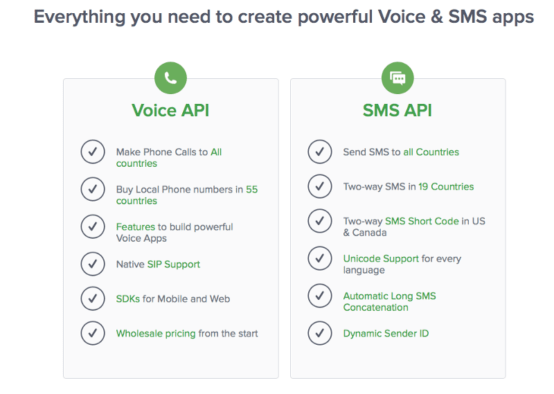
This integration allows you to automate a wide array of communication tasks, from sending personalized SMS reminders to forwarding incoming calls based on specific criteria. The goal is to streamline your operations, reduce manual effort, and ensure that your customer communications are timely and effective. Let's explore the specific modules and automation possibilities that Plivo offers within the Make.com ecosystem.
Plivo Modules Available on Make.com
Make.com provides a rich set of modules for Plivo, enabling extensive integration possibilities. These modules are categorized into Triggers and Actions, allowing you to initiate workflows based on Plivo events or perform actions within Plivo from other applications.
Triggers
Triggers are events in Plivo that can start a Make.com scenario. These are crucial for building reactive automations that respond to customer interactions in real-time.
- SMS received: Initiates a scenario when an SMS message is received through your Plivo number.
- SMS received (instant): Similar to 'SMS received' but triggers immediately upon message arrival, ideal for real-time interactions.
- New recording added: Starts a scenario when a new call recording is generated and stored in Plivo.
- Call received: Triggers a scenario when an incoming call is detected on your Plivo number.
- Call received (instant): Provides immediate notification of an incoming call, allowing for instant processing.
Actions
Actions are operations that Make.com can perform within Plivo. These allow your scenarios to send messages, make calls, or manage ongoing call interactions.
- Send SMS: Sends an SMS message to a specified recipient.
- Make a call and speak text: Initiates an outbound call and converts provided text into speech for the recipient.
- Make a call and play audio: Initiates an outbound call and plays a specified audio file to the recipient.
- Respond to an incoming call: Allows your scenario to control and respond to an ongoing incoming call, such as playing a message or forwarding the call.
These modules form the building blocks for creating sophisticated communication automations, connecting Plivo's core functionalities with the broader capabilities of Make.com.
Automating Tasks with Plivo and Make.com
With the diverse range of Plivo modules available on Make.com, you can automate a multitude of communication tasks, significantly enhancing your operational efficiency and customer engagement. These automations can transform how your business interacts with its audience, making communication more dynamic and responsive.
Consider these practical applications:
- Send SMS reminders & alerts to your customers: Automatically send appointment reminders, delivery notifications, or promotional alerts based on events in your CRM or calendar.
- Forward an incoming call to your personal phone number: Set up intelligent call routing that forwards calls to specific team members or personal devices based on caller ID, time of day, or other criteria.
- SMS notifications on your phone: Receive instant SMS notifications on your mobile device for critical business events, such as new lead submissions, urgent support tickets, or system errors.
- Run a live SMS poll: Engage your audience with interactive SMS polls, collecting feedback or running contests, and processing responses in real-time.
These examples represent just a fraction of the possibilities. To begin, you'll need both a Plivo account and a Make.com account. Once connected, you can start building scenarios that revolutionize the speed and effectiveness of your customer communications.
Pro tip: Always test your Plivo scenarios thoroughly with real phone numbers before deploying them to a live audience. This helps ensure message delivery, call quality, and correct data flow, preventing potential communication breakdowns.
To illustrate the power of this integration, let's walk through a practical example: automating an SMS poll and sending real-time responses to participants.
Step 1: Run a Live SMS Poll
Running a live SMS poll is an excellent way to interact with your customers, gather immediate feedback, or conduct engaging contests. This method allows you to gain valuable insights directly from your customer base in a dynamic and accessible format.
Plivo provides the core functionality for sending and receiving SMS messages, but when combined with Make.com, you can easily track responses and automate subsequent actions. Make.com's real-time processing capabilities ensure that every response is captured and acted upon without delay, making your polls highly interactive and efficient.
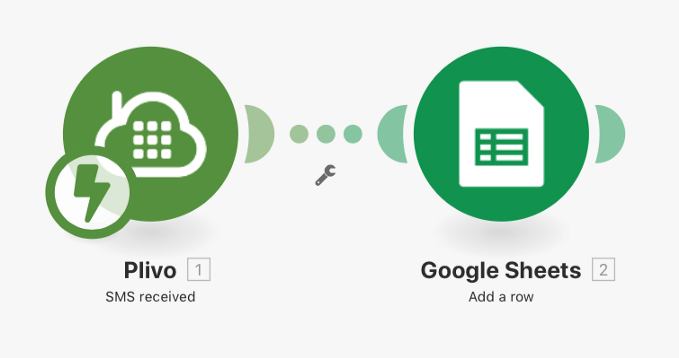
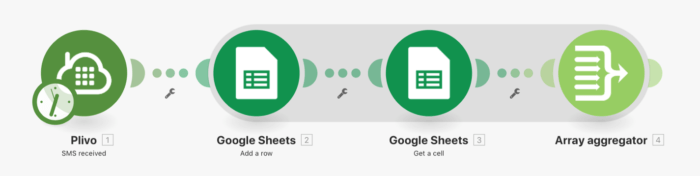
For the initial setup of a live SMS poll, Plivo offers a detailed guide that demonstrates how to integrate with Google Sheets. In this foundational step, you configure a scenario where incoming SMS responses are automatically recorded into a Google Sheet spreadsheet. This creates a centralized, organized record of all poll participation.
Once this initial setup is complete, you have a robust system for collecting poll data. The next crucial step is to enhance this scenario by adding an automated response mechanism, ensuring that every participant receives a timely acknowledgment for their input.
Step 2: Send SMS to Customers
After successfully setting up your live SMS poll to record responses, the next logical step is to automate a thank-you message or a relevant follow-up SMS to your customers. This not only acknowledges their participation but also enhances the overall customer experience.
Building upon the existing Plivo and Google Sheets scenario, you can easily extend its functionality within Make.com. Start by revisiting the Google Sheet used for the poll. Create a new column, perhaps titled "Response," and populate the first row with your desired message, such as "Thank you for your response!". This message will be dynamically sent back to participants.

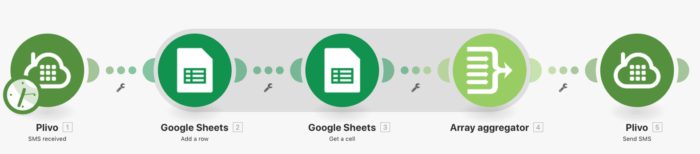
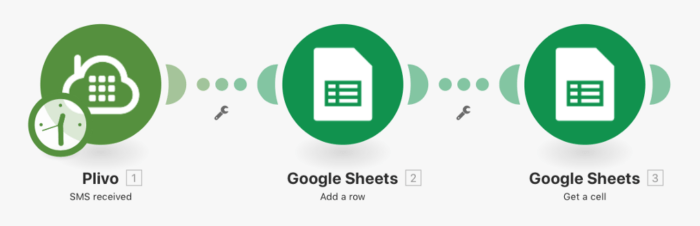
Now, return to your Make.com scenario. You'll need to add a new module that retrieves this response message and associates it with the phone number of the customer who just participated in the poll. Integrate a "Get a cell" module from Google Sheets to fetch the content of your newly created "Response" cell.
To ensure the correct message is sent to the right person, you'll then need to aggregate the "Add a row" module (which records the incoming poll response) with the "Get a cell" module. This aggregation step is crucial for accurately mapping the customer's phone number to the automated response message.
Finally, introduce a "Send SMS" module from Plivo into your scenario. Map the aggregated data, which now contains both the recipient's phone number and the personalized response message, to this Plivo module. This final connection ensures that the thank-you SMS is sent instantly after a customer responds to your poll.
With this enhanced scenario, you've created a fully automated, real-time feedback loop. Your business can now run live SMS polls, instantly record responses, and send immediate acknowledgments, significantly improving customer interaction and operational efficiency. Make.com empowers you to expand the scope of your communication possibilities, ensuring you stay connected with your customers at every touchpoint.