Make.com Google Forms Ninox Database Automation No-Code

Automate Google Forms to Ninox Data Transfer

Eliminate manual data entry by automatically creating Ninox records from every new Google Forms submission

Get This Workflow → Make.com · Google Forms · Free Template
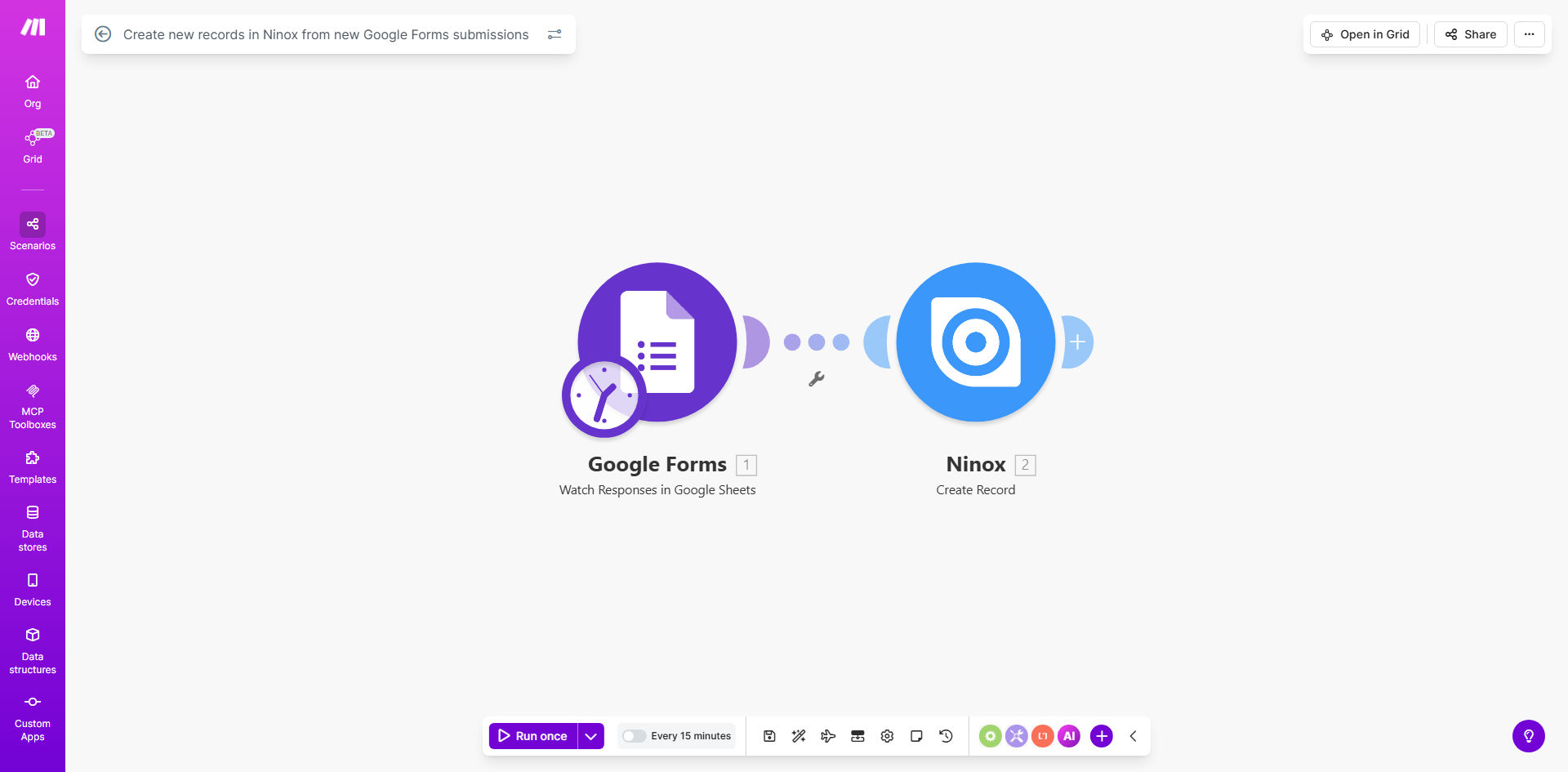
Make.com workflow diagram showing Google Forms to Ninox integration

What This Workflow Does

This automation solves the tedious and error-prone process of manually transferring data from Google Forms submissions to your Ninox database. Every time someone submits your Google Form, the workflow automatically creates a corresponding record in your specified Ninox database table with all the form responses mapped to the appropriate fields.

The system runs on a schedule you control (hourly, daily, etc.), checking for new submissions and processing them in batches. This ensures your Ninox database stays current without any manual intervention, while avoiding API rate limits that could occur with instant processing after each submission.

How It Works

1. Trigger on New Form Submissions

The workflow connects to your Google Forms account and checks for new responses at your chosen interval. Each new submission is queued for processing.

2. Extract and Format Response Data

The system parses each form response, extracting all answers and converting them into a standardized format that matches your Ninox database structure.

3. Create Ninox Database Records

Using Ninox's API, the workflow creates new records in your specified database table, mapping each form field to the corresponding database column based on your configuration.

4. Handle Errors and Notifications

If any records fail to create (due to missing data or API issues), the system logs the error and can notify you via email while continuing to process other submissions.

Who This Is For

This automation is ideal for businesses and teams that:

  • Collect customer feedback, applications, or registrations via Google Forms
  • Use Ninox as their primary database for customer or operational data
  • Need to eliminate manual data entry between forms and databases
  • Require real-time access to form submissions in their business systems
  • Want to reduce errors from manual copy-paste of form responses

What You'll Need

  1. A Google Forms form with submissions you want to track
  2. A Ninox database with a table to receive the form data
  3. A Make.com account (free plan available)
  4. Admin access to connect both Google Forms and Ninox APIs
  5. Basic understanding of your Ninox database structure

Quick Setup Guide

  1. Click "Get This Workflow" to copy the template to your Make.com account
  2. Connect your Google Forms account in the first module
  3. Connect your Ninox account and select the target database/table
  4. Map each form question to the corresponding Ninox database field
  5. Set your preferred schedule for checking new submissions
  6. Test with a sample form submission and verify the Ninox record
  7. Activate the workflow to begin automatic processing

Pro tip: Create a test form and database table to practice field mapping before connecting your production forms. This helps avoid data structure mismatches.

Key Benefits

Eliminate 100% of manual data entry between Google Forms and Ninox, saving 2-5 hours per week typically spent copying and pasting form responses.

Reduce data errors by 90%+ by removing human transcription mistakes that occur when manually transferring form responses to your database.

Keep your database current automatically with submissions flowing into Ninox on your preferred schedule (hourly, daily, etc.) without manual exports.

Scale form collection effortlessly - handle 10 or 10,000 submissions with the same reliability, without adding administrative overhead.

Maintain data integrity with consistent field mapping that ensures each response lands in the correct database column every time.

Frequently Asked Questions

Common questions about Google Forms and Ninox automation

Automating Google Forms to Ninox eliminates manual data entry errors, saves hours of administrative work, and ensures your database is always current with the latest submissions. This is particularly valuable for businesses collecting customer feedback, event registrations, or application forms where timely data access is crucial.

For example, a real estate agency using Google Forms for property inquiries can instantly have all leads appear in their Ninox CRM, allowing immediate follow-up while the inquiry is fresh, rather than waiting for manual data entry during business hours.

The workflow runs on a schedule you configure in Make.com, from every few minutes to daily. Most businesses set it to run hourly for near real-time updates while avoiding API rate limits. The template includes instructions for adjusting the schedule to match your data collection needs.

For time-sensitive applications like job applications or emergency service requests, you might configure more frequent checks. For less urgent data like weekly employee surveys, daily syncs may be sufficient.

This workflow works with any Google Forms that collect structured data like contact information, surveys, applications, or order forms. It's ideal for forms with multiple choice, dropdown, or short text responses that map clearly to Ninox database fields. Complex forms with file uploads may require additional configuration.

The best candidates are forms where each question corresponds to a specific database field. For instance, a customer feedback form with fields for name, email, rating, and comments maps perfectly to a Ninox customer feedback table with matching columns.

Yes, the workflow includes field mapping configuration where you match each Google Forms question to the corresponding Ninox database field. This ensures data lands in the right columns regardless of your form structure or database schema changes over time.

For example, if your form asks for "Full Name" but your Ninox database separates this into "First Name" and "Last Name" columns, you can configure the workflow to split the form response appropriately during the transfer process.

The template includes error handling that pauses execution and notifies you via email if data transfer fails. Common issues like API limits or missing fields won't stop the entire workflow - problematic records are logged for review while others continue processing normally.

For instance, if a form submission is missing a required Ninox field, that specific record will be flagged in the error log with details about what's missing, allowing you to follow up with the respondent while all other valid submissions continue flowing into your database.

While Ninox offers basic forms, Google Forms provides superior design flexibility, conditional logic, and collaboration features. This automation gives you the best of both - Google's powerful form builder with direct integration into your Ninox database without manual exports or copy-pasting.

Google Forms excels at complex form structures, team collaboration on form design, and advanced features like file uploads or payment integration - all while maintaining the data integrity and business logic of your Ninox database through this automated connection.

Absolutely! Our team at GrowwStacks specializes in building tailored automation solutions. We can create custom workflows that handle complex form structures, add data validation, integrate with other apps, or implement advanced business logic specific to your Ninox database requirements.

For example, we've built solutions that automatically categorize form submissions based on content, trigger follow-up emails from Ninox, or even update inventory levels when order forms are submitted. The possibilities are endless when you combine Google Forms with Ninox through custom automation.

  • Custom field mapping for complex forms
  • Multi-step data validation before Ninox import
  • Integration with other business apps in your stack

Need a Custom Google Forms Automation?

This free template is a starting point. Our team builds fully tailored automation systems for your specific business needs.