Make.com WooCommerce Softr User Onboarding Automation

Automate Softr User Creation from WooCommerce Customers

Seamlessly connect your eCommerce store to your membership portal with automatic user provisioning and email invitations

Get This Workflow → Make.com · Softr · Free Template
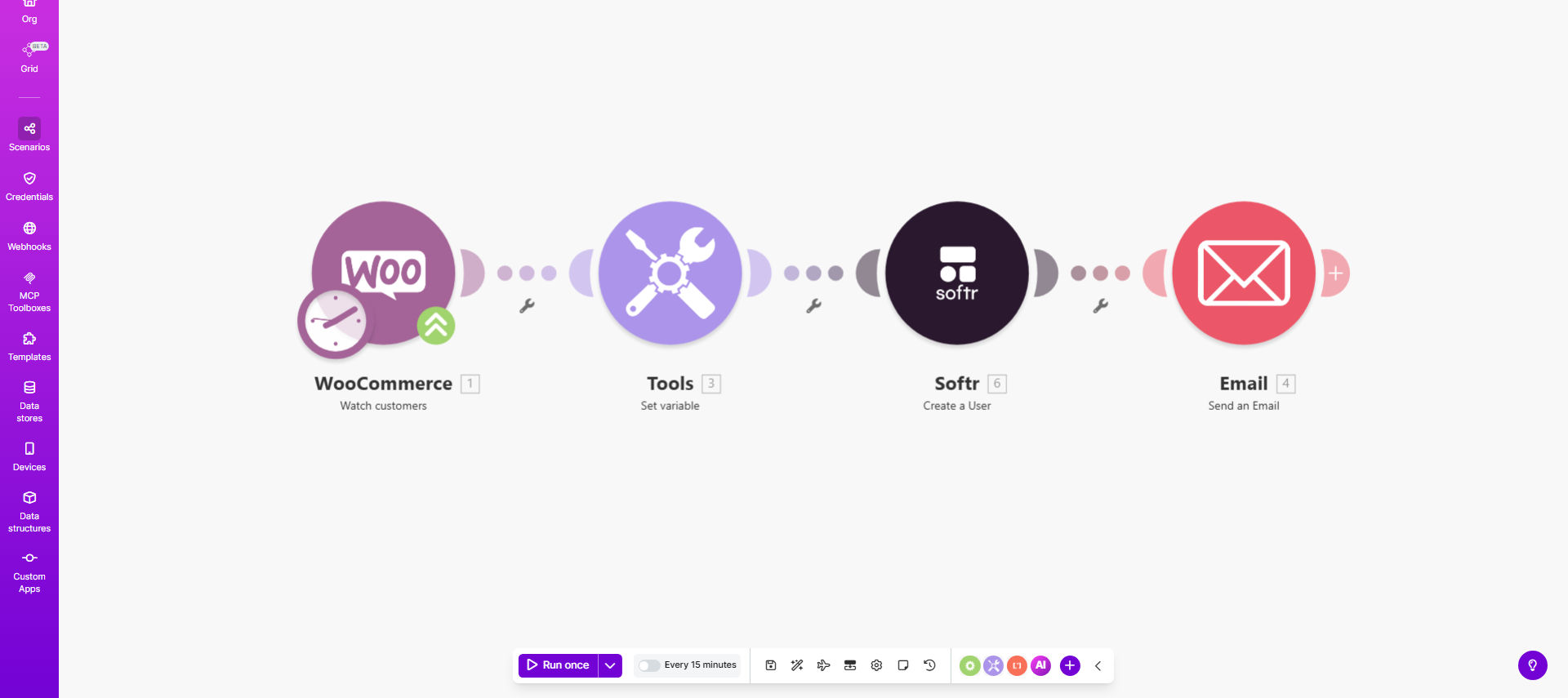
Automation workflow diagram showing WooCommerce to Softr integration

What This Workflow Does

This automation solves the tedious manual process of creating Softr user accounts for new WooCommerce customers. When someone makes a purchase on your WooCommerce store, the workflow automatically creates their Softr account and sends a personalized invitation email - all without any manual intervention.

Businesses using Softr for member portals, client dashboards, or gated content often struggle with onboarding new users efficiently. This workflow eliminates the back-and-forth of manual account creation while ensuring customers get immediate access to your Softr resources after purchase.

How It Works

1. New customer detection

The workflow monitors your WooCommerce store for new customer registrations or purchases. It triggers whenever a new customer profile is created in your WooCommerce database.

2. Data mapping

Customer information (name, email, and any custom fields) is extracted from WooCommerce and formatted for Softr's API requirements. You can customize which fields transfer between systems.

3. Softr user creation

The workflow makes an API call to Softr to create the new user account with the mapped customer data. You can specify user roles, permissions, and any default settings.

4. Email invitation

Once the Softr account is created, the system sends a professionally formatted email invitation with login instructions. The template is fully customizable with your branding.

Pro tip: Add a delay before sending the invitation email if customers need time to receive their WooCommerce order confirmation first.

Who This Is For

This automation is ideal for:

  • Businesses selling digital products or services through WooCommerce that grant access via Softr
  • Membership sites using WooCommerce for signups and Softr for member content
  • Course creators who deliver materials through Softr after WooCommerce purchases
  • SAAS companies offering WooCommerce as a purchase option for Softr-based tools
  • Agencies managing multiple client portals that need automated onboarding

What You'll Need

  1. A WooCommerce store with customer registration enabled
  2. A Softr account with API access enabled
  3. Make.com account (formerly Integromat)
  4. Admin access to both platforms for initial setup
  5. An email service provider connected to Make (like Gmail or SendGrid)

Quick Setup Guide

  1. Install the template in your Make.com account
  2. Connect your WooCommerce store via the API
  3. Configure your Softr API credentials
  4. Map WooCommerce customer fields to Softr user fields
  5. Customize the email invitation template
  6. Test with a new WooCommerce test customer
  7. Activate the workflow in live mode

Key Benefits

Saves 5-10 hours per month by eliminating manual account creation and invitation sending for every new customer.

Reduces onboarding delays from days to minutes, improving customer satisfaction and reducing support requests.

Ensures 100% accuracy in user provisioning by removing human error from manual data entry.

Creates professional first impressions with automated but personalized email invitations.

Scales effortlessly as your customer base grows without additional administrative overhead.

Frequently Asked Questions

Common questions about WooCommerce-Softr automation and integration

Automating Softr user creation saves hours of manual work while ensuring no customers slip through the cracks. It creates a seamless onboarding experience by instantly granting access to your Softr portal with personalized invitations.

For businesses processing dozens or hundreds of new customers monthly, this automation eliminates the bottleneck of manual account provisioning. Customers appreciate the immediate access after purchase rather than waiting for manual setup.

The workflow transfers customer name, email, and any custom fields you configure. You can map WooCommerce customer data to corresponding Softr user fields for complete profiles.

Common mappings include first/last name, purchase history tags for access control, billing address fields, and custom metadata. The template includes the basic fields but can be extended to transfer any available customer data.

Yes, the email template is fully customizable. You can brand it with your logo, adjust messaging, and include personalized links or instructions for accessing your Softr portal.

Best practice is to mirror your WooCommerce order confirmation style for consistency. Include clear next steps, support contact information, and any important details about accessing purchased products or services.

Customers receive immediate access to your Softr portal after purchase without waiting for manual setup. The automated invitation makes onboarding feel professional and seamless.

This instant gratification reduces buyer's remorse and increases engagement with your content. Studies show customers who access purchased products immediately are more likely to become repeat buyers.

The workflow can be configured to either skip existing users or update their information. This prevents duplicate accounts while keeping customer data current.

For membership sites, updating existing users ensures access permissions reflect new purchases. The template includes logic to handle both scenarios based on your business requirements.

Absolutely. Common additions include sending welcome sequences, adding users to mailing lists, or triggering internal notifications when VIP customers sign up.

The modular nature of Make.com workflows lets you extend this template indefinitely. Popular enhancements include:

  • Adding users to Slack or Discord channels
  • Creating Google Drive folders for each customer
  • Sending SMS notifications alongside emails

Yes! GrowwStacks specializes in custom integrations between WooCommerce and Softr. We can build tailored automations that match your specific business workflows and requirements.

Our team will analyze your current processes, identify optimization opportunities, and implement a complete automation solution. We handle everything from initial consultation through deployment and ongoing maintenance.

  • Custom field mappings between systems
  • Conditional logic based on purchase types
  • Multi-step onboarding sequences

Need a Custom WooCommerce-Softr Automation?

This free template is a starting point. Our team builds fully tailored automation systems for your specific business needs.