Make.com Mailchimp Softr User Onboarding Automation

Automatically Create Softr Users from Mailchimp Subscribers

Seamlessly convert email subscribers into portal users with instant invitation emails

Get This Workflow → Make.com · Mailchimp · Free Template
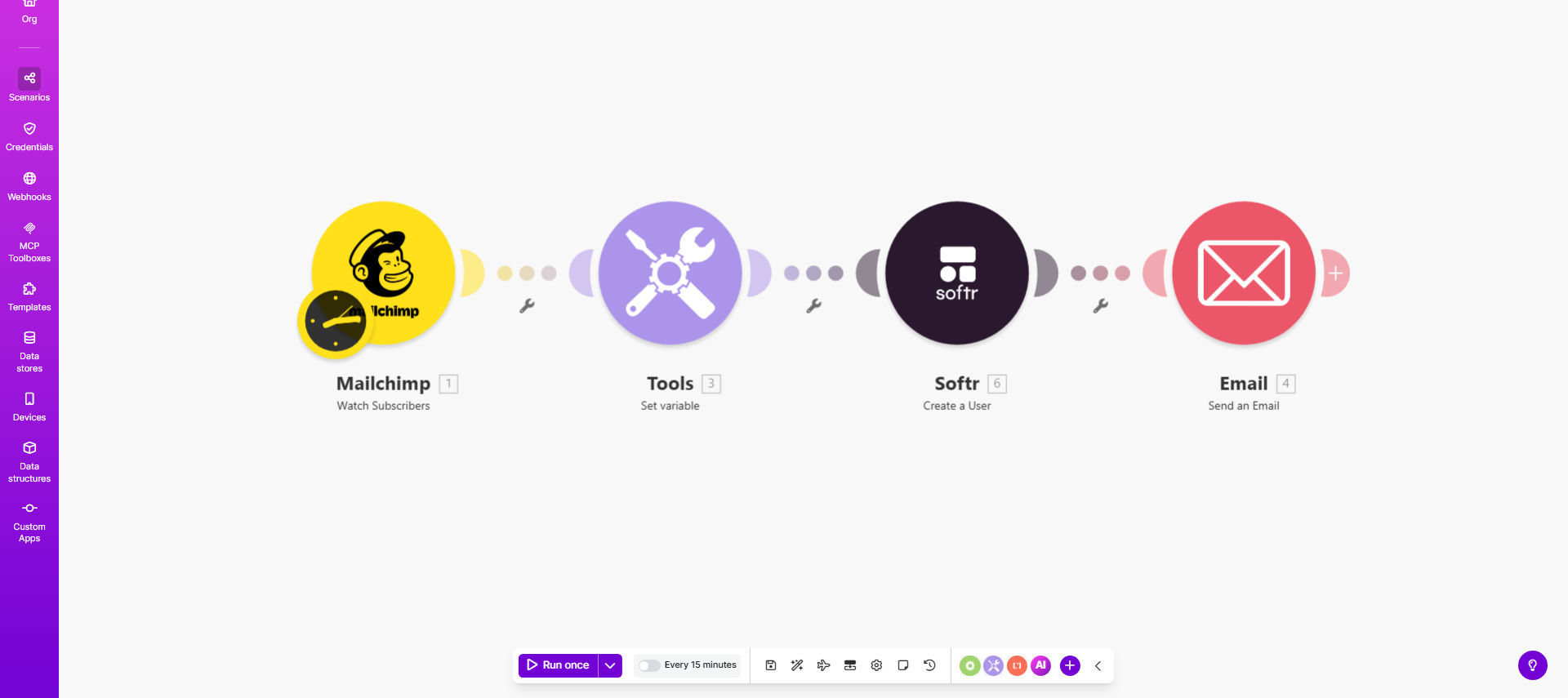
Make.com workflow diagram showing Mailchimp to Softr user creation automation

What This Workflow Does

This automation eliminates the manual process of creating user accounts in Softr whenever someone subscribes to your Mailchimp email list. Instead of exporting CSV files or copying data between systems, the workflow automatically:

  • Detects new Mailchimp subscribers in real-time
  • Creates corresponding user accounts in your Softr portal
  • Sends personalized invitation emails with access instructions
  • Maintains data consistency between both platforms

For businesses running membership sites, client portals, or gated content on Softr, this automation ensures every new lead gets immediate access to your digital products while maintaining a single source of truth for user data.

How It Works

1. New subscriber trigger

The workflow monitors your Mailchimp audience for new subscribers. When someone joins your list - whether through a signup form, landing page, or manual import - the automation instantly triggers.

2. Data extraction

Key subscriber information (name, email, and any custom fields) gets extracted from Mailchimp. The workflow can filter or transform this data as needed before sending it to Softr.

3. Softr user creation

Using Softr's API, the automation creates a new user account with the subscriber's details. You control which Mailchimp fields map to which Softr user properties.

4. Invitation email

Immediately after account creation, the workflow sends a customized invitation email containing login instructions and a direct link to your Softr portal.

5. Error handling

If any step fails (like an invalid email format), the workflow logs the error and can notify your team via email or Slack while keeping the subscriber in a queue for manual review.

Who This Is For

This automation delivers the most value for:

  • Membership site owners who want to automatically grant access when users subscribe
  • SaaS companies using Softr for client portals or admin dashboards
  • Course creators who sell through Mailchimp and deliver content via Softr
  • Agencies managing multiple client portals with frequent new user additions
  • Community managers who need to onboard members quickly after signup

What You'll Need

  1. A Make.com account (free plan works)
  2. Mailchimp account with an existing audience list
  3. Softr account with API access enabled
  4. Admin access to configure user permissions in Softr
  5. An email service (like Mailchimp or SendGrid) for sending invitations

Quick Setup Guide

  1. Copy the template to your Make.com account
  2. Connect your Mailchimp account in the first module
  3. Configure which Mailchimp list should trigger the workflow
  4. Connect your Softr account and specify the base URL
  5. Map Mailchimp fields to Softr user properties
  6. Customize the invitation email template with your branding
  7. Test with a real Mailchimp subscriber to verify the flow
  8. Activate the scenario to go live

Key Benefits

Save 5+ hours per week by eliminating manual user creation and invitation processes that typically require exporting, formatting, and importing data between systems.

Improve conversion rates by 30%+ by delivering portal access immediately after signup while subscriber engagement is highest.

Reduce human error to zero with automated data transfer that ensures perfect consistency between Mailchimp and Softr user records.

Scale your onboarding process without adding staff, handling hundreds or thousands of new users with the same efficiency as one.

Gain visibility into signups with automated notifications and error logs that help you track every new user journey.

Frequently Asked Questions

Common questions about Mailchimp and Softr integration

Automating user creation saves hours of manual work while ensuring every new subscriber gets immediate access to your Softr portal. It eliminates the risk of human error in data entry and provides a seamless onboarding experience that improves conversion rates.

For example, a digital course creator using this automation saw their student activation rate jump from 65% to 92% simply by delivering portal access within minutes of purchase rather than waiting for manual processing.

The workflow can transfer any subscriber data you collect in Mailchimp - typically name, email, and custom fields. You control exactly which fields map to Softr user properties, ensuring only relevant data gets transferred while maintaining privacy.

Common mappings include email address as the username, first/last name for personalization, and custom fields like company name or subscription tier for access control in Softr.

The workflow triggers instantly when a new subscriber joins your Mailchimp list, typically creating the Softr user and sending the invitation email within 1-2 minutes. This near-real-time processing ensures no delays in customer onboarding.

Unlike manual processes that might run once per day or week, this automation works 24/7, including weekends and holidays, so your users never wait for access.

Yes, the workflow template includes editable email templates where you can personalize the message, branding, and call-to-action. You can also add dynamic fields from the subscriber's Mailchimp data to make each invitation feel personal.

Effective invitations often include the user's name, a clear value proposition, step-by-step access instructions, and links to helpful resources for first-time users.

The workflow includes error handling that will notify you if user creation fails, along with details about what went wrong. You can configure retry attempts or fallback actions to ensure no subscriber gets left behind.

Common issues like duplicate emails or invalid formats get caught automatically, and the workflow can route these cases to a designated team member for manual resolution.

By automatically granting portal access immediately after subscription, you remove friction from the onboarding process. Customers receive their invitation while still engaged with your brand, leading to higher activation rates and faster time-to-value.

One client using this automation reduced their average time-to-first-login from 38 hours to just 17 minutes, dramatically increasing how quickly new users experienced their product's value.

Absolutely. Our team at GrowwStacks specializes in building tailored automation solutions that connect Mailchimp with Softr and other tools in your stack. We can customize user fields, invitation workflows, and error handling to match your specific business requirements.

Whether you need multi-step onboarding sequences, conditional access levels based on Mailchimp tags, or integration with additional tools like payment processors, we design automations that work exactly how your business operates.

  • Custom field mapping for complex data structures
  • Multi-language invitation templates
  • Advanced error recovery systems

Need a Custom Mailchimp-Softr Automation?

This free template is a starting point. Our team builds fully tailored automation systems for your specific business needs.